Crossfire Dashboard
- Indicatori
- Versione: 1.0
- Attivazioni: 5

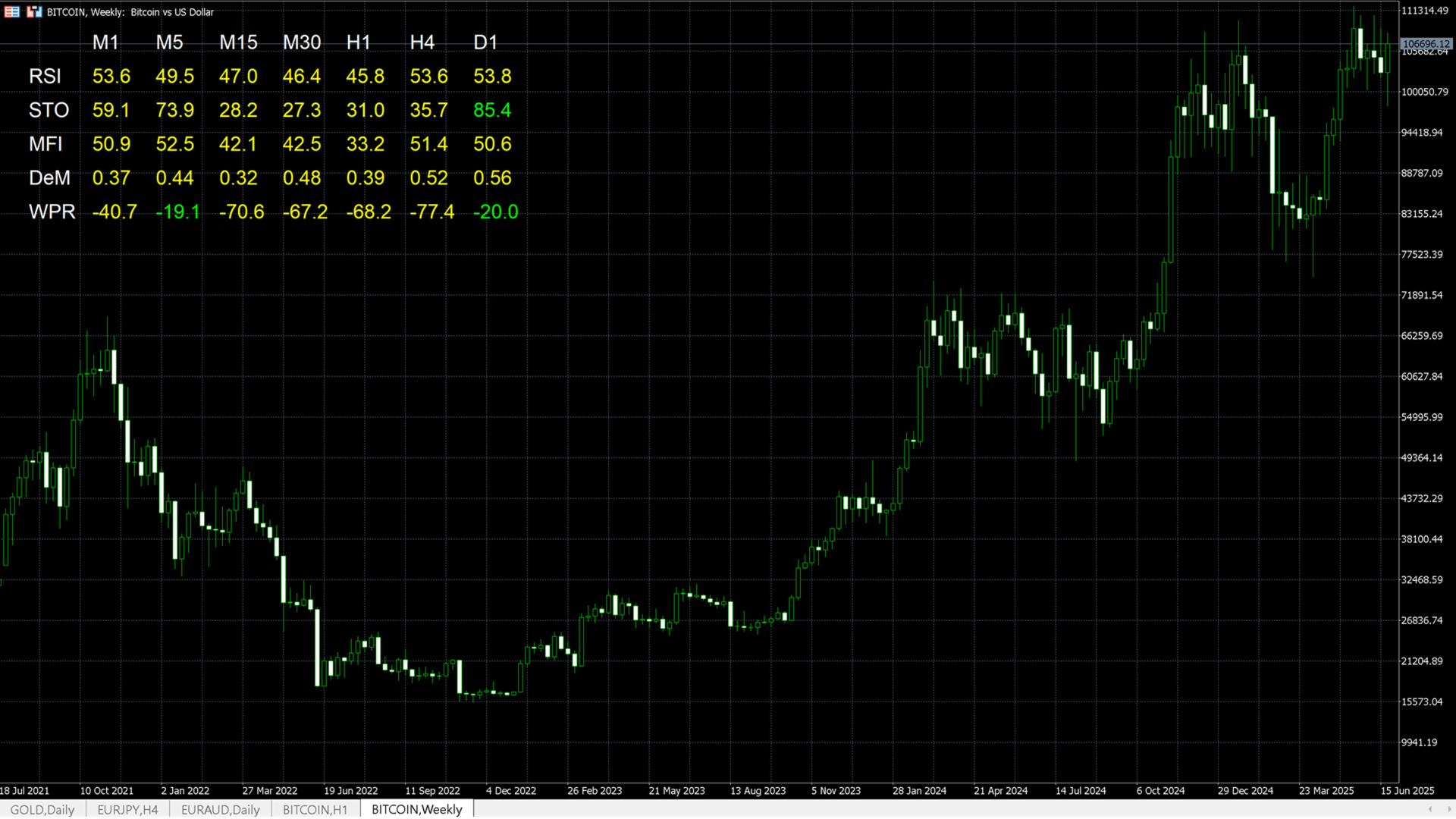
Crossfire Dashboard is an assisting visual tool that displays real-time values of selected financial instrument's key technical indicators across multiple timeframes in a single, organized table. It enables traders to quickly assess trend strength, overbought/oversold conditions, and alignment across timeframes — without switching charts or manually loading multiple indicators.
This dashboard is ideal for traders who rely on momentum, trend-following, or reversal strategies and want a clean birds-eye view of market sentiment across five bounded idnicators — Relative Strength Index (RSI), Stochastic (STO), Money Flow Index (MFI), DeMarker (DeM), and William's %R (WPR).
The indicator displays the above-mentioned five indicators' values across multiple time-frames (M1, M5, M15, M30, H1, H4, and D1).
✅ Key Features
-
Live multi-timeframe updates for five core indicators: RSI, Stochastic, MFI, DeMarker, and WPR.
-
Scans and updates values for 7 major timeframes: M1, M5, M15, M30, H1, H4, D1.
-
Color-coded readings to highlight Overbought, Oversold, and Neutral zones.
-
Clean, customizable design that does not clutter your chart.
-
No repainting, no lag – works entirely based on current market data.
🎯 Use Cases
-
Confirm signals from your main strategy by checking multi-timeframe consensus.
-
Identify momentum exhaustion zones across multiple periods.
-
Combine with price action for pinpointing entry/exit points.
🛠️ How to Use
-
Load the indicator on any chart, any timeframe.
-
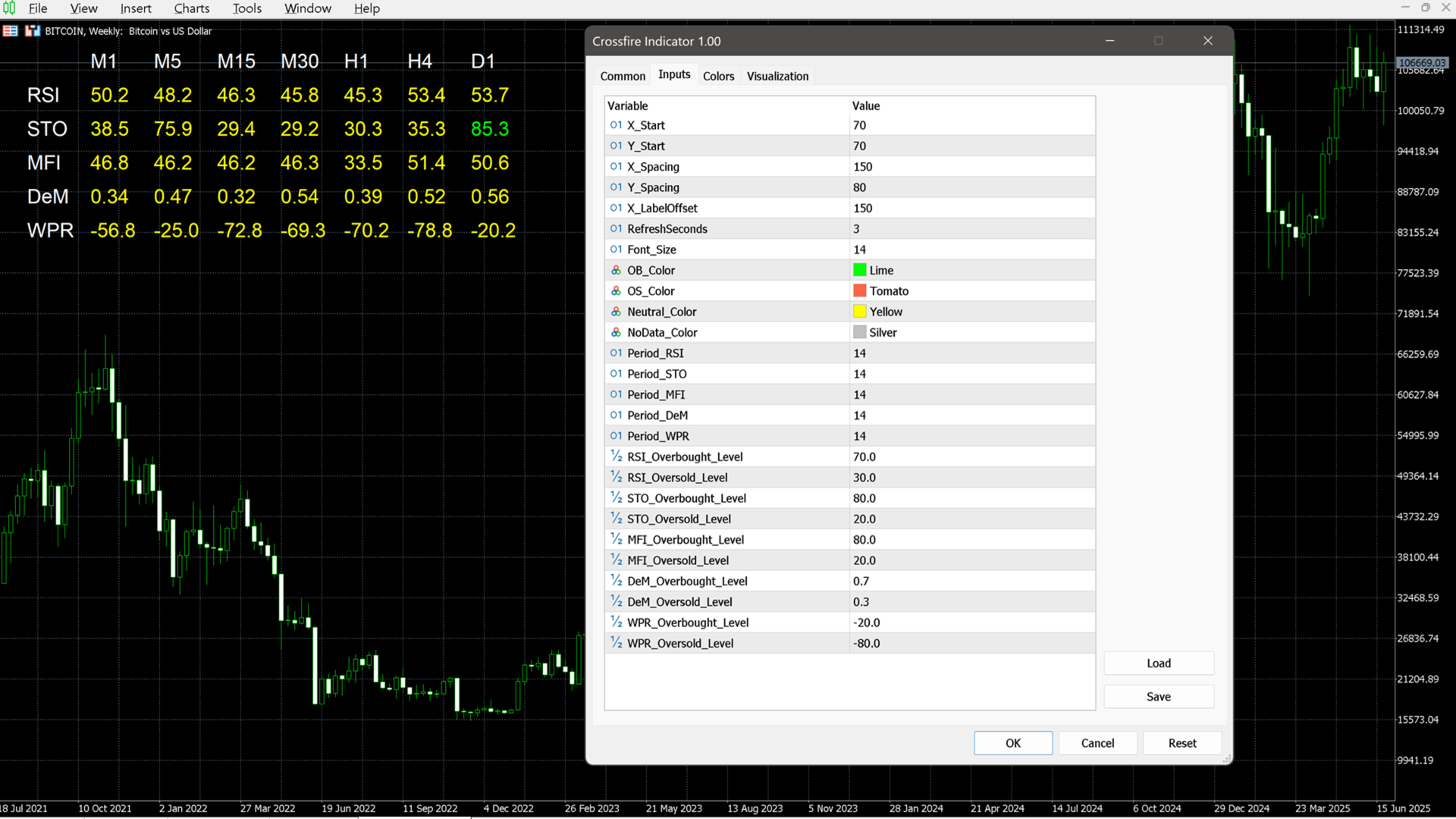
Adjust input parameters as desired (see explanation of inputs below).
-
Let the dashboard refresh automatically to reflect current multi-timeframe conditions.
-
Look for alignment of overbought/oversold zones across indicators and timeframes to spot strong confluence signals related to the attached financial instrument.
⚙️ Inputs & Customization
Below is a detailed explanation of each input parameter you can configure:
📐 Dashboard Layout
-
X_Start – Horizontal starting pixel for the dashboard placement.
-
Y_Start – Vertical starting pixel for the dashboard placement.
-
X_Spacing – Horizontal space between columns (i.e., timeframes).
-
Y_Spacing – Vertical space between indicator rows.
-
X_LabelOffset – Distance between the indicator names and the data grid.
-
Font_Size – Font size of the dashboard text.
⏱ Performance Settings
-
RefreshSeconds – Controls how often the dashboard updates (in seconds). Recommended: 5–10 seconds for real-time monitoring.
🎨 Color Settings
-
OB_Color – Color for Overbought values (default: Lime).
-
OS_Color – Color for Oversold values (default: Tomato).
-
Neutral_Color – Color for values within neutral range (default: Yellow).
-
NoData_Color – Color for timeframes when there is insufficient data (default: Silver).
📊 Indicator Periods
-
Period_RSI – Period setting for the Relative Strength Index.
-
Period_STO – %K period for Stochastic Oscillator (uses 3,3 as fixed D and Slowing).
-
Period_MFI – Period for Money Flow Index.
-
Period_DeM – Period for DeMarker.
-
Period_WPR – Period for Williams %R.
🔺 OB/OS Threshold Levels
-
RSI_Overbought_Level / RSI_Oversold_Level – Thresholds for overbought/oversold RSI.
-
STO_Overbought_Level / STO_Oversold_Level – Thresholds for Stochastic %K line.
-
MFI_Overbought_Level / MFI_Oversold_Level – Thresholds for MFI extremes.
-
DeM_Overbought_Level / DeM_Oversold_Level – Upper and lower bounds for DeMarker.
-
WPR_Overbought_Level / WPR_Oversold_Level – Levels (e.g., -20/-80) for Williams %R.