 MetaTrader 5
 Sistemi Esperti
 Indicatori
 Script
 Librerie
 Archiviazione
Guarda come scaricare robot di trading gratuitamente
Ci trovi su Telegram!
Unisciti alla nostra fan page
Ti è piaciuto lo script? Provalo nel Terminale MetaTrader 5

Account Recorder - balance, equity and day drawdown to CSV every minute (service) - service for MetaTrader 5
Daniel Reynolds

MQL4 and MQL5 developer building Expert Advisors, indicators, trade panels and utilities for MetaTrader 4 and 5.
What I build:
- Visualizzazioni:
- 72
- Valutazioni:
- Pubblicato:
-
 Ti stai perdendo delle opportunità di trading:
- App di trading gratuite
- Oltre 8.000 segnali per il copy trading
- Notizie economiche per esplorare i mercati finanziari
Registrazione AccediAccetti la politica del sito e le condizioni d’uso
Se non hai un account, registrati -
 Hai bisogno di un robot o indicatore basato su questo codice? Ordinalo su Freelance
Vai a Freelance


Account Recorder is a service: it runs in the terminal's background without a chart, and keeps writing even when you change charts or templates. At a fixed interval (every minute by default) it adds one row to a CSV file:
Server time, local time, balance, equity, floating result, credit, margin, free margin, margin level, open positions, pending orders, first balance of the day, the highest equity recorded today, and the drawdown from that peak (money and %).
That gives you an equity curve that includes open trades, and a record of your daily drawdown, which is useful for prop firm rules.
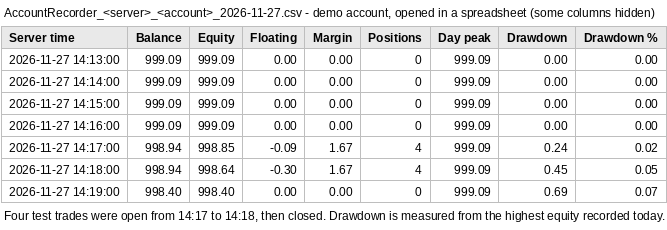
Rows recorded on a demo account, one per minute.
How it works
- Rows land on whole multiples of the interval (for example on each minute). If the PC clock goes back (end of summer time), the schedule follows it.
- One file per account and server day by default (AccountRecorder_<server>_<account>_<date>.csv), or one file for everything. The server is part of the name, so two accounts with the same number at different brokers never share a file.
- The day's first balance and highest equity are kept in terminal global variables, so a restart of the service or terminal on the same day continues the same figures. The peak is the highest equity the service has recorded, so it can miss a spike between two rows.
- While the terminal is not connected, no rows are written (you can change this).
- If the file is locked (for example, open in a spreadsheet), rows are kept in memory and written when it is free; the Experts tab says so once.
- It only reads account information. It never opens, changes or closes trades.
How to start it: in the Navigator, right-click Services > Account Recorder > Add Service, set the inputs and press OK. To stop it, right-click the running copy and choose Stop or Remove.
Inputs
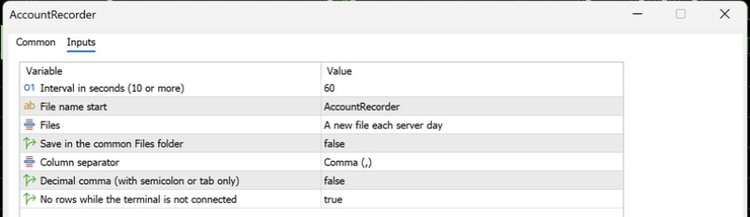
The service's inputs
- Interval in seconds (10 or more).
- File name start.
- Files: a new file each server day, or one file.
- Save in the common Files folder.
- Column separator: comma, semicolon or tab.
- Decimal comma (with semicolon or tab only).
- No rows while the terminal is not connected: true by default.
 GotobiDays - include file to find Gotobi days (Japanese payment dates)
Include file with small functions to find the Gotobi days: the 5th, 10th, 15th, 20th, 25th and the last day of each month, moved back to the previous business day when they fall on a weekend or a holiday you list. Information only, no trading functions.
 GSLP Active Research EA for Gold
Free MT5 research EA with three closed-bar entry models, ATR stops, fixed-R targets and a tester cost ledger. Version 2.31 uses the chart symbol and timeframe. Historical research: XAUUSD M5. Educational source; published tests were loss-making.
 Export Closed Trades to CSV with a summary per magic number
Saves the closed trades of your MT5 account history to a CSV file, one row per trade, plus a second file with totals for each magic number.
History Depth Check - how far back your EA can read on each timeframe
Shows, for each timeframe and symbol, how many bars an EA, indicator or script can read on a live chart and from what date, and flags the timeframes where "Max bars in chart" cuts off older history that the terminal already has.