 MetaTrader 5
 Sistemi Esperti
 Indicatori
 Script
 Librerie
 Archiviazione
Guarda come scaricare robot di trading gratuitamente
Ci trovi su Telegram!
Unisciti alla nostra fan page
Ti è piaciuto lo script? Provalo nel Terminale MetaTrader 5

Tick Depth Probe - how far back your broker keeps real ticks - script per MetaTrader 5
Dennis Muchiri Miano

I build MetaTrader 5 tools for my own trading and publish them on the MQL5 Market under DeeFX. I trade with the tools I build: a tool ships only after it has done its job on my own charts, so it can do the same job on yours.
What I build
- Risk and drawdown guards for prop-firm rules
- Visualizzazioni:
- 89
- Pubblicato:
-
 Ti stai perdendo delle opportunità di trading:
- App di trading gratuite
- Oltre 8.000 segnali per il copy trading
- Notizie economiche per esplorare i mercati finanziari
Registrazione AccediAccetti la politica del sito e le condizioni d’uso
Se non hai un account, registrati -
 Hai bisogno di un robot o indicatore basato su questo codice? Ordinalo su Freelance
Vai a Freelance
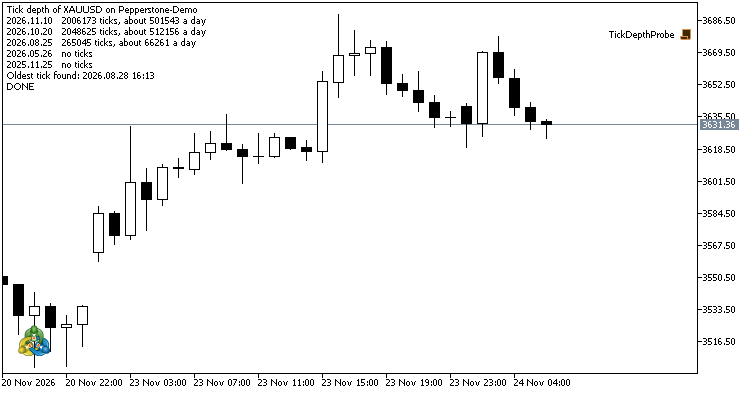
A backtest on "Every tick based on real ticks" is only as real as the ticks your broker still keeps. This script asks the broker's server for real ticks in a few short sample windows, from two weeks ago back to about four years ago, and tells you the oldest tick it found.
It places no orders and changes no settings. Run it on the symbol you want to test: tick history is kept per symbol.
How it works
- The windows start two weeks ago, then about 1, 3, 6, 12, 18, 24, 30, 36, 42 and 48 months ago. Only a few days are asked for in each, so the script does not need the whole history.
- The first request for a window makes the terminal download it, so an early answer can be "no ticks" although the broker has them. The script asks each window again until ticks arrive or the time limit is up.
- The newest window is a control. If even that one is empty, the script says that the result means nothing instead of naming a date.
- It stops after a set number of empty windows in a row. If ticks turn up behind an empty window, or a request failed, it says so.
How to read the result
One line per window shows the start date, the number of ticks and the average per day of the window. In the above picture the last window with ticks is only partly filled, which is why its average is far lower: the history begins inside it. The line "Oldest tick found" is the one to set your test start by: start on or after that date. The picture shows a run on gold on one broker's demo, where the ticks began about three months back.
Inputs
- InpSymbol: symbol to check. Blank means the chart's symbol.
- InpDays: length of each sample window in days, from 1 to 7 (default 4).
- InpWaitSec: the longest wait for each window in seconds (default 60). Raise it on a slow connection or a symbol with many ticks.
- InpStopEmpty: stop after this many empty windows in a row (default 2, 0 checks all).
- InpOnChart: show the result on the chart as well (default true).
The result also goes to the Experts log and to a text file in MQL5\Files, TickDepthProbe_ plus the symbol name.
Good to know
- On gold, with half a million ticks a day, a first run took about five minutes and a repeat about two.
- The windows are samples. A tick in a window does not prove that every minute between two windows is there, and the true start can lie between an empty window and the next one.
- An empty answer can also be a slow download. Run it a second time with a longer wait before you rely on it.
Questions and ideas: post in the comments.
 Swing Level Breaks Graded by Volume
Draws support and resistance from confirmed swing points and keeps each level live, with its price on the chart, until a close breaks it. Every break is graded on the spot: an arrow when volume surges, a diamond when the candle shows a rejection wick, a hollow circle when price slipped through without either.
 Account Settings Sync - Bidirectional EA Settings Across Charts
Small MQL5 library that shares an EA's own runtime settings between charts of the same account, with edits from either chart, a file lock and per-field merge.
Import Ticks CSV - a tick file into a custom symbol for real-tick tests
A script that reads a tick CSV into a custom symbol and builds its M1 bars, so the Strategy Tester can run "Every tick based on real ticks" over a period the broker's server does not keep. It finds the columns by name and moves UTC times to server time.
 Risk Lot Line: lot size from a draggable stop loss
Drag a stop-loss line and read the lot size for your risk. The loss per lot comes from OrderCalcProfit, so the size is right on metals, indices and cross pairs. Shows the real risk after rounding, the margin and an R-multiple take profit. Places no orders.