 MetaTrader 5
 Sistemi Esperti
 Indicatori
 Script
 Librerie
 Archiviazione
Guarda come scaricare robot di trading gratuitamente
Ci trovi su Facebook!
Unisciti alla nostra fan page
Unisciti alla nostra fan page
Ti è piaciuto lo script? Provalo nel Terminale MetaTrader 5

Order Block Marker with Mitigation Tracking - indicatore per MetaTrader 5

- Visualizzazioni:
- 88
- Pubblicato:
-
 Ti stai perdendo delle opportunità di trading:
- App di trading gratuite
- Oltre 8.000 segnali per il copy trading
- Notizie economiche per esplorare i mercati finanziari
Registrazione AccediAccetti la politica del sito e le condizioni d’uso
Se non hai un account, registrati -
 Hai bisogno di un robot o indicatore basato su questo codice? Ordinalo su Freelance
Vai a Freelance

Order Block Marker with Mitigation Tracking
The idea behind it
An order block is a popular price-action concept: the last candle against the direction of a strong move. The idea is that this candle shows where larger participants were active before the impulse, and that price often returns to the zone before continuing.
- Bullish order block - the last bearish (down) candle before a strong move up.
- Bearish order block - the last bullish (up) candle before a strong move down.
The indicator needs a clear rule to call a move "strong", so it uses objective conditions (all measured on closed bars):
- Candle k has the opposite color of the move.
- The next candle is a displacement candle in the other direction and closes beyond the High (or Low) of candle k.
- Within InpImpulseBars bars after candle k, price moves away from it by at least InpImpulseMult times the average candle range (calculated over InpAvgPeriod bars).
- Before the impulse is confirmed, price has not already returned into the zone or closed through it.
After a block is confirmed, its state is tracked on every new price:
- Fresh - price has not returned to the zone yet.
- Mitigated - price returned into the zone (a touch, or the middle of the zone, depending on InpMitigation). The zone stays on the chart with a different style, because many traders watch the first retest.
- Broken - a bar closes beyond the far side of the zone. The block is no longer valid and is removed.
The indicator keeps a list of active zones. At the start it scans a limited number of bars; after that, each new closed bar is processed once and each tick only updates the states of the listed zones. The full history is never rescanned.
How to interpret it
- White dashed box (default) - a fresh bullish order block, labeled "Bull OB". Price returning from above is often watched as a possible demand zone.
- Gray dashed box (default) - a fresh bearish order block, labeled "Bear OB". Price returning from below is often watched as a possible supply zone.
- Dim dotted box - a mitigated block: price has already come back to it. The label becomes "(mitigated)". Such blocks are usually considered weaker than fresh ones.
- Disappearing box - a block that was broken by a close beyond it, or a mitigated block when InpShowMitigated is false.
- Tooltip - hover over a box to see its direction and state.
- Boxes start at the block candle and extend to the right, so you can see how long a zone has remained untouched.
External variables (inputs)
| Input | Default | Purpose |
|---|---|---|
| Detection | ||
| InpImpulseBars | 3 | Number of bars after the block in which the impulse must appear (2 to 10) |
| InpImpulseMult | 2.0 | Minimum impulse size in average candle ranges (0.5 to 10) |
| InpAvgPeriod | 14 | Period of the average candle (High-Low) range (2 to 100) |
| InpZoneMode | OB_ZONE_RANGE | Zone height: OB_ZONE_RANGE (High-Low) or OB_ZONE_BODY (Open-Close) |
| InpLookbackBars | 500 | Number of bars scanned when the indicator starts (30 to 5000) |
| InpMaxZones | 20 | Maximum number of zones kept; the oldest is dropped first (1 to 200) |
| Mitigation | ||
| InpMitigation | OB_MIT_TOUCH | When a block is mitigated: OB_MIT_TOUCH (price enters the zone) or OB_MIT_HALF (price reaches the middle of the zone) |
| InpShowMitigated | true | Keep mitigated blocks on the chart; if false they are deleted at mitigation |
| InpMitigatedColor | clrDimGray | Color of mitigated blocks |
| Appearance | ||
| InpBullColor | clrWhite | Color of bullish order blocks |
| InpBearColor | clrGray | Color of bearish order blocks |
| InpZoneStyle | STYLE_DASH | Border style of fresh blocks |
| InpZoneWidth | 1 | Border width (1 to 5) |
| InpFillZones | false | Fill fresh blocks with color |
| InpExtendBars | 20 | Number of bars the zones extend to the right of the last bar (0 to 200) |
| InpShowLabels | true | Show a text label at the left edge of each block |
| InpLabelSize | 8 | Label font size (6 to 20) |
| Alerts | ||
| InpAlertNew | false | Show an alert when a new order block is confirmed |
Recommended use
- Works on any symbol and timeframe; M5 to H4 charts of liquid symbols are the most common choice. A block is confirmed only InpImpulseBars bars after its candle, so it appears with a short delay and never changes afterwards.
- Raise InpImpulseMult for fewer, stronger blocks and lower it for more blocks. Use OB_ZONE_BODY for tighter zones.
- A fresh block is a candidate for attention, not a trade signal. Combine it with trend, market structure or higher-timeframe levels.
- Mitigation is detected with wicks (High and Low), so it is irreversible once price has touched the zone, even on the current bar. A block is broken only by a closed bar, so the forming bar never removes a block.
- On the first start only the last InpLookbackBars bars are scanned. Blocks that were broken within that history are not shown.
- When more than InpMaxZones blocks are active, the oldest ones are removed to keep the chart readable.
- All objects use the prefix OrdBlk_ and are removed when the indicator is deleted from the chart. Do not attach two copies to the same chart because they would share object names.
- It is a chart indicator only and does not trade, so it works the same on netting and hedging accounts.
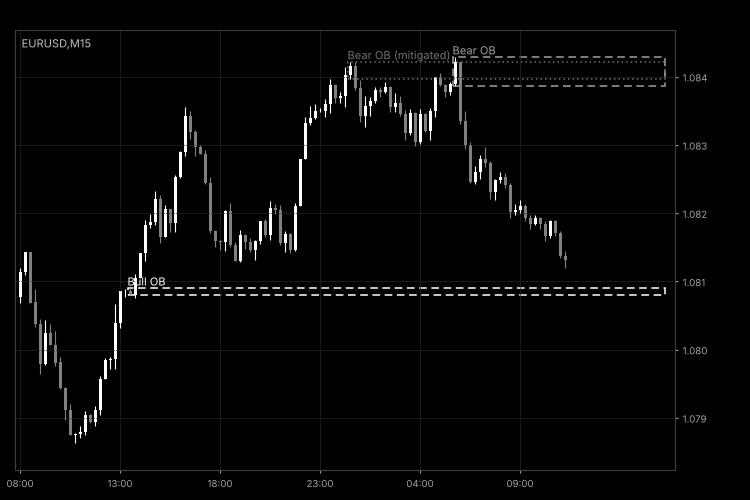
Fig. 1. OrderBlockMarker on an M15 chart with default settings: two fresh blocks and one mitigated block (black and white image per Code Base guidelines).
Fair Value Gap (FVG) Detector with Auto-Removal When Filled
Fair Value Gap (FVG) Detector with Auto-Removal When Filled
Index Gap Marker – daily opening gaps and fill status
Shows the daily opening gaps for stock indices and indicates whether each one has been filled.
Fair Value Gap (FVG) Detector with Auto-Removal When Filled
Detects bullish and bearish Fair Value Gaps (three-candle price imbalances), draws them as boxes extending to the right and automatically removes each box once the price fills the gap.
Break of Structure (BOS) and Change of Character (CHoCH) Labels
Detects swing highs and lows and labels every break of market structure: BOS (Break of Structure) when the trend continues and CHoCH (Change of Character) when the trend reverses.