 MetaTrader 5
 Sistemi Esperti
 Indicatori
 Script
 Librerie
 Archiviazione
Guarda come scaricare robot di trading gratuitamente
Ci trovi su Facebook!
Unisciti alla nostra fan page
Unisciti alla nostra fan page
Ti è piaciuto lo script? Provalo nel Terminale MetaTrader 5

Spread and Cost Monitor Panel - indicatore per MetaTrader 5
Kenichiro Sakamoto

Sono Kenichiro Sakamoto, lo sviluppatore di FXEA365, uno studio che crea Expert Advisor trasparenti e basati su regole per MetaTrader 5.
- Visualizzazioni:
- 85
- Valutazioni:
- Pubblicato:
-
 Ti stai perdendo delle opportunità di trading:
- App di trading gratuite
- Oltre 8.000 segnali per il copy trading
- Notizie economiche per esplorare i mercati finanziari
Registrazione AccediAccetti la politica del sito e le condizioni d’uso
Se non hai un account, registrati -
 Hai bisogno di un robot o indicatore basato su questo codice? Ordinalo su Freelance
Vai a Freelance

The indicator shows a small panel with the trading cost of the current symbol. It displays the current spread in pips and points, the average spread since the indicator was attached, and the spread cost of a 1-lot trade converted to the account currency. The values are refreshed on every tick and by a two-second timer.
The cost is calculated from the spread, the tick size and the tick value of the symbol, so it also works for metals, indices and crypto symbols. The average is collected from incoming ticks and starts again whenever the indicator is re-attached or its inputs are changed.
The status line reads Normal while the spread is at or below InpWarnSpread points and switches to Wide in the warning colour when the spread goes above that level. This is useful for checking broker conditions before running a scalping Expert Advisor, or for watching how the spread behaves around news releases and the daily rollover.
Input parameters
- InpWarnSpread - spread level in points above which the status line shows Wide (default 30).
- InpCorner - chart corner the panel is attached to.
- InpX, InpY - distance from that corner in pixels (scaled with the screen DPI).
- InpFontSize - font size of the panel text.
- InpTextColor, InpValueColor - colours of the labels and the values.
- InpOkColor, InpWarnColor - colours of the status line in the normal and wide states.
- InpBgColor - panel background colour.
The panel scales with the screen DPI and can be placed in any corner of the chart. The indicator only displays information. It does not place or manage trades.
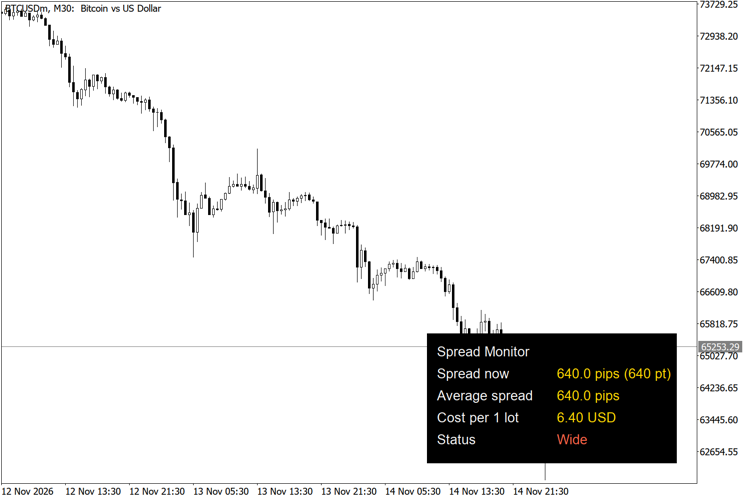
Spread monitor panel on BTCUSD M30
Trading Session Range Boxes
Draws the Tokyo, London and New York trading sessions as coloured boxes that span the high and low of each session.
Currency Strength Ranking Panel
A panel that ranks the eight major currencies (USD, EUR, GBP, JPY, AUD, NZD, CAD, CHF) by their average rate of change against each other.
Thanos AI Level Strength
Unbroken swing highs and lows, shaded by strength: how old each level is and how many times price was turned away from it.
 Prop Firm Equity Guard - daily loss and max drawdown protection
Account-wide protection for prop firm and funded accounts: enforces a daily loss limit and a maximum overall loss (FTMO-style), closes all positions and blocks new trades when a limit is hit, with an optional profit target.