 MetaTrader 5
 Sistemi Esperti
 Indicatori
 Script
 Librerie
 Archiviazione
Guarda come scaricare robot di trading gratuitamente
Ci trovi su Telegram!
Unisciti alla nostra fan page
Unisciti alla nostra fan page
Ti è piaciuto lo script? Provalo nel Terminale MetaTrader 5

Spread and Slippage Tracker - sistema esperto per MetaTrader 5

- Visualizzazioni:
- 51
- Pubblicato:
-
 Ti stai perdendo delle opportunità di trading:
- App di trading gratuite
- Oltre 8.000 segnali per il copy trading
- Notizie economiche per esplorare i mercati finanziari
Registrazione AccediAccetti la politica del sito e le condizioni d’uso
Se non hai un account, registrati -
 Hai bisogno di un robot o indicatore basato su questo codice? Ordinalo su Freelance
Vai a Freelance

Spread & Slippage Tracker
The idea behind it
Two different complaints get lumped together as "broker trouble": a wide spread at the moment you traded, and a fill that landed somewhere other than the price you actually requested. They're not the same thing, and conflating them makes it hard to tell which one is actually costing you. This tool keeps them separate and measures both from real data instead of a hunch.
Spread tracking is the easy half — it samples SYMBOL_SPREAD every tick and keeps a running minimum, maximum, and average, reset once per day so a quiet Tuesday doesn't get buried under last Friday's NFP spike. Slippage is the harder half: it only exists as data the moment a real deal executes, via OnTradeTransaction . That's also the reason this ships as an Expert Advisor rather than an indicator — indicators never receive trade events, so there's no other way to see the gap between the price an order requested and the price it actually filled at. It places no trades of its own; it only watches the ones that happen.
How to interpret it
- The panel's top line is the spread block: current spread in points, plus the day's min/avg/max so far.
- The panel's second line is the slippage block: how many deals have been tracked since the EA was attached, the average slippage across them, and the single worst (most adverse) slippage seen.
- Slippage is signed so that a positive number always means "cost you something" — filled higher than requested on a buy, or lower than requested on a sell — regardless of trade direction.
- With file logging on, every tracked deal gets one row in a CSV: timestamp, symbol, deal ticket, side, requested price, filled price, and slippage in points — the raw material for your own spreadsheet if you want to slice it by time of day, symbol, or broker.
- With the alert threshold set above zero, a single deal slipping past that many points fires a one-time Experts-log entry and terminal alert right when it happens, instead of only showing up later in the averages.
External variables (inputs)
| Input | Default | Purpose |
|---|---|---|
| InpResetStatsDaily | true | Reset the min/avg/max spread stats at the start of each new trading day so old sessions don't skew today's reading. |
| InpTrackAllSymbols | false | Track slippage on every symbol traded on the account, not just the chart's own symbol. |
| InpSlippageAlertPoints | 0 | A single deal's adverse slippage, in points, that triggers an immediate alert. 0 disables the alert. |
| InpLogToFile | true | Append every tracked deal's details to a CSV log under MQL5\Files\SpreadSlippageTracker\. |
| InpCorner | CORNER_LEFT_UPPER | Chart corner the readout panel is anchored to. |
| InpCornerX | 20 | Panel X offset, in pixels, from the chosen corner. |
| InpCornerY | 20 | Panel Y offset, in pixels, from the chosen corner. |
Recommended use
- Attach to any chart on the account you want to monitor — with InpTrackAllSymbols on, one instance covers every symbol you trade, not just the chart it's sitting on.
- Spread stats are naturally per-symbol-of-the-chart; if you trade several symbols and want separate spread stats for each, run one instance per symbol's chart.
- Places no orders and holds no position itself, so it carries none of its own margin or stop-out risk — it only ever reads trade history that already happened.
- Slippage figures only reflect deals that occur while this EA is attached and running; it doesn't back-read trade history from before it was started.
- Works identically on any account type, though the slippage you'll actually see varies a lot by execution model — a market-execution account can show real, nonzero slippage in both directions, while some instant-execution setups will show consistently near-zero slippage simply because of how fills are matched. That difference is itself useful information, not a sign the tool is broken.
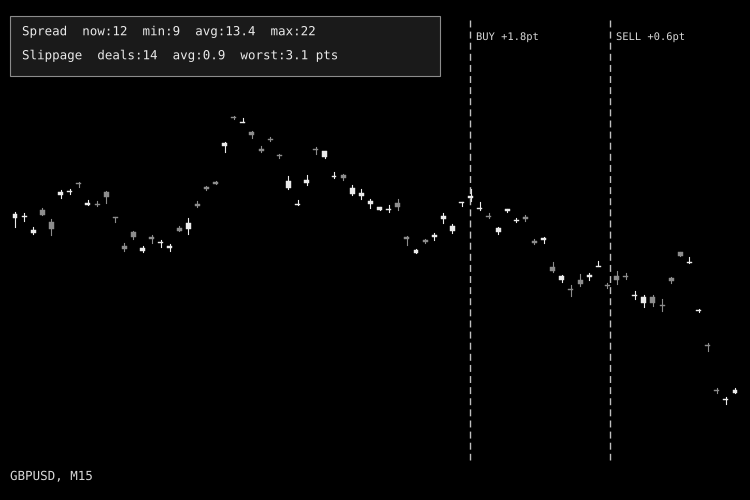
Fig. 1. Spread & Slippage Tracker panel on a GBPUSD chart (shown in black & white per Code Base image guidelines).
 Smart Liquidity Hunter — Confirmed Swing Sweeps for MT5
Closed-bar sweeps of confirmed swing levels, with wick, volatility and freshness filters, liquidity lines, a dashboard and optional alerts.
MZ Smart Trail Manager - Break-even, Stepped Trailing Stop and Profit Lock
Trade manager for MT5: break-even, stepped trailing stop and progressive profit lock. Works with manual trades or any EA. Distances in ATR, so it fits any symbol. Bilingual panel (EN/AR).
Equity/Drawdown Monitor Panel
A live account-level readout — equity, balance, tracked peak, and current drawdown % from that peak — the one risk number most charts never show you.
Golden Cross Trend Filter (50/200 SMA on daily closes)
Classic 50/200-day Golden Cross trend filter: long while the fast SMA of daily closes is above the slow SMA, flat (or optionally short) otherwise. One decision per completed D1 bar, sizing by % of balance or fixed lot.