 MetaTrader 5
 Sistemi Esperti
 Indicatori
 Script
 Librerie
 Archiviazione
Guarda come scaricare robot di trading gratuitamente
Ci trovi su Facebook!
Unisciti alla nostra fan page
Unisciti alla nostra fan page
Ti è piaciuto lo script? Provalo nel Terminale MetaTrader 5

Prop Risk Guard MT4 - daily loss and drawdown protection - sistema esperto per MetaTrader 4

- Visualizzazioni:
- 81
- Valutazioni:
- Pubblicato:
-
 Ti stai perdendo delle opportunità di trading:
- App di trading gratuite
- Oltre 8.000 segnali per il copy trading
- Notizie economiche per esplorare i mercati finanziari
Registrazione AccediAccetti la politica del sito e le condizioni d’uso
Se non hai un account, registrati -
 Hai bisogno di un robot o indicatore basato su questo codice? Ordinalo su Freelance
Vai a Freelance
Stop one bad day from ending your prop-firm challenge or your account. Prop Risk Guard watches your MT4 account and acts the moment a limit is hit: it closes every open order, deletes pending orders and keeps the account flat until the lock resets. It works with any EA and with manual trading.
What it protects
Daily loss limit: in % or money, measured from the day's starting balance, equity, or the higher of the two (pick what your prop firm uses). You set the hour the day starts (server time). Closed and floating P/L both count.
Max drawdown: static (from your starting balance) or trailing (from the account's peak equity). Profit target lock (optional): once the target is reached, it closes everything and locks, so the profit can't be given back.
Early warning: an alert when a set share of a limit is used (80% by default). Safety buffer: acts a few % before the real limit, because fast markets can move between two checks.
When a limit is hit
All open orders are closed and all pending orders deleted. The account is then locked: any new trade is closed within a fraction of a second (the guard checks 4 times per second), whether it comes from an EA, the phone or the desktop. The daily lock resets when the new day starts; the max-drawdown and target locks stay on until you enter a new starting balance for a new challenge. Locks and the day's reference are saved, so they survive a terminal or VPS restart.
Panel
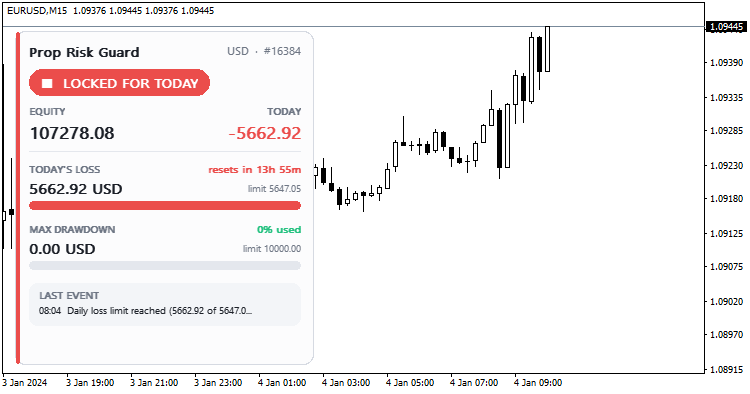
A card panel shows the status (PROTECTED, WARNING, LOCKED FOR TODAY, LOCKED), equity, today's P/L, how much of each limit is used with a colour bar, the time until the daily reset and the last event. Click it to collapse it. It picks a dark or light look from the chart colours.
Usage
Attach it to ONE chart (any symbol); it watches the whole account, or only one symbol or magic number if you choose. Set your prop firm's rules and make sure AutoTrading is on, so the guard is allowed to close trades. In the Strategy Tester, Demo mode opens deliberately risky random trades, so you can watch it warn, close everything and lock.
Please note: the guard reacts to price changes, so in a very fast market or a gap the final loss can be a little bigger than the limit; use the safety buffer to leave room. It never opens trades on a real account. Keep the terminal running (a VPS is ideal). An MT5 version is also available in CodeBase.
Repaint Checker MT4 - find out whether an indicator repaints
Tests any MT4 indicator for repainting: records what every buffer showed when each bar closed, reads the same bars again later and reports values that changed, signals that appeared late and signals that vanished, with dates.
 Previous Day and Week High Low Levels MT4
Previous day high and low, previous week high and low and today's open as horizontal lines with small price labels, on any timeframe.
Three Colors
Example: Moving Average indicator filling by different colors
MACD Sample
Classical MACD Sample.