 MetaTrader 5
 Sistemi Esperti
 Indicatori
 Script
 Librerie
 Archiviazione
Unisciti alla nostra fan page

Broker GMT offset and daylight-time rule from price history - libreria per MetaTrader 5

- Visualizzazioni:
- 123
- Pubblicato:
-
 Ti stai perdendo delle opportunità di trading:
- App di trading gratuite
- Oltre 8.000 segnali per il copy trading
- Notizie economiche per esplorare i mercati finanziari
Registrazione AccediAccetti la politica del sito e le condizioni d’uso
Se non hai un account, registrati -
 Hai bisogno di un robot o indicatore basato su questo codice? Ordinalo su Freelance
Vai a Freelance
Hai bisogno di un robot o indicatore basato su questo codice? Ordinalo su Freelance
Vai a Freelance
An Expert Advisor that trades at New York hours needs the offset between the broker's server clock and UTC. Some brokers use UTC all year; many use GMT+2 in winter and GMT+3 in summer, following either the US or the European calendar. On a GMT+2/+3 broker that follows the European calendar, a fixed 7-hour difference to New York is right most of the year, but one hour off for two or three weeks every spring and one week every autumn, when the US and Europe have changed their clocks on different dates.
On a live chart the offset is TimeTradeServer() - TimeGMT(), but that depends on the computer's clock and time zone. In the Strategy Tester it is always zero, because TimeGMT() repeats the simulated server time.
BrokerClock.mqh reads the offset from the price history instead. For CME index futures, and for most FX symbols and index CFDs that follow them, the week closes at 17:00 New York. The last H1 bar before each weekend therefore ends at a known UTC instant, and comparing the two gives the broker's offset for that week. The library tests every base offset with three rules (fixed, plus one hour during US summer time, plus one hour during European summer time) against up to 60 weekends. The rule that explains most of the last 8 weekends wins, and all the weekends found break ties.
| Function | What it returns |
|---|---|
| HistoryClockOffset(srv) | The broker's GMT offset now, from the H1 history of the chart symbol; g_histRule names the rule. OFFSET_UNKNOWN until enough history exists. |
| LiveClockOffset() | The terminal's own offset, for a live cross-check (a wrong computer clock shows up as a difference). |
| NewYorkOffset(utc), EUSummer(utc), LondonOffset(utc), SydneyOffset(utc) | The daylight-time rules, computed from the calendar, with no external data. |
| ServerToNY(srv, offset), NYClockToServer(srv, h, m, offset), InNYWindow(srv, offset, ...) | Conversions between server time and New York time for trading windows and order expiration. |
A minimal use in an Expert Advisor, refreshed once an hour because the history check copies many bars:
#include <BrokerClock.mqh>

int      g_offset   = OFFSET_UNKNOWN;
datetime g_offsetAt = 0;

int BrokerOffset()
{
   datetime srv = TimeCurrent();
   if(g_offsetAt > 0 && srv - g_offsetAt < (g_offset == OFFSET_UNKNOWN ? 60 : 3600))
      return g_offset;
   int hist = HistoryClockOffset(srv);
   int live = MQLInfoInteger(MQL_TESTER) ? OFFSET_UNKNOWN : LiveClockOffset();
   g_offset   = (hist != OFFSET_UNKNOWN) ? hist : live;
   g_offsetAt = srv;
   return g_offset;
}

void OnTick()
{
   int off = BrokerOffset();
   if(off == OFFSET_UNKNOWN || !InNYWindow(TimeCurrent(), off, 9, 30, 15, 30))
      return;                                    // no clock yet, or outside 09:30-15:30 New York
   // ... entry logic
}
ClockTest.mq5 checks the library in the Strategy Tester. It writes the New York, London and Sydney offsets for every hour of 2024-2027 to clock_tz.csv in the common Files folder, converts 09:30 New York to server time and back for every day on three fixed offsets (GMT+0, +2 and +3), and prints the detected clock once a week. Input: InpWriteCsv (write the table). No trading.
ClockSymbols.mq5 builds test symbols. It copies the M1 bars of a symbol from a broker that runs on UTC and writes three custom symbols with the same prices on a UTC clock, a US-rule GMT+2/+3 clock and an EU-rule GMT+2/+3 clock, so the detection can be tested on all three clocks. Inputs: InpSource (source symbol, empty for the chart symbol), InpFrom and InpTo (the period, which should include a clock change), InpPrefix (name prefix of the new symbols). Close the terminal normally afterwards, or the new symbols may not be saved.
Verification. The daylight-time functions matched the IANA time zone database on all 35,064 hours of 2024 to 2027. The round trip from New York to server time and back gave 0 errors in 4,383 cases. In the Strategy Tester, the detection named the right clock on custom symbols with three server clocks and switched in the exact week of each clock change:
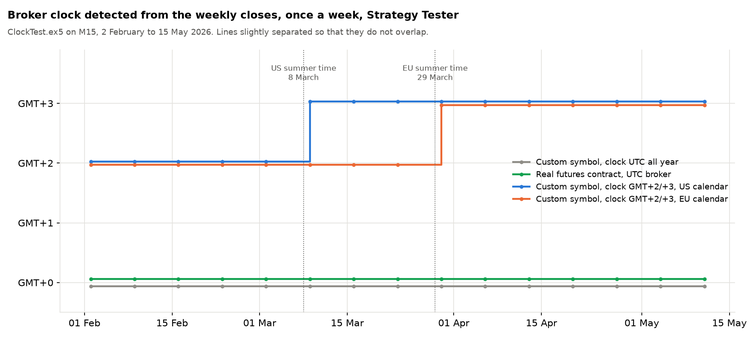
Clock detected each week in the Strategy Tester on three server clocks, February to May 2026
Limits. The method needs weekends that straddle a clock change to tell the rules apart, so a symbol with only a few weeks of history may be one hour off until more history exists; for such backtests, set the offset by hand. A weekend after an early close gives one wrong week, which the majority vote absorbs. Symbols that close at another hour (stock CFDs, some cash indices) or trade through the weekend (crypto) cannot be used; run the detection on the broker's index or major FX chart instead (it reads _Symbol), or add a symbol parameter to the CopyRates call.
The files do not trade. They are free to use and change.
 Partial Close Multi TP Manager
Partial close expert advisor for MetaTrader 5: closes a percent of the position at TP1, TP2, TP3, TP4 and TP5, moves the stop loss to breakeven and trails it. Works on manual trades and on positions of any EA, on any symbol, Gold (XAUUSD) included. Open source code.
 Swap Markup Scanner
Shows the broker's hidden financing markup and the carry for every symbol, as annual % of notional.
 ADX Auto Range
Range boxes that are drawn when market trend strength weakens
Supertrend Scalper with Breakeven Win Rate Panel
A Supertrend scalping EA with 14 switchable filters and a self-measuring panel that shows the actual win rate next to the win rate needed to break even after real spread, so you can see whether a setting has an edge or only a high percentage.