 MetaTrader 5
 Sistemi Esperti
 Indicatori
 Script
 Librerie
 Archiviazione
Unisciti alla nostra fan page

VpsToolkit - safe order send and restart-safe state for VPS EAs - libreria per MetaTrader 5

I help traders answer two questions before real money is at risk:
1) Is this strategy real, or just fitted to the past?
2) Will the account survive when something goes wrong?
Protection against overfitting
- Visualizzazioni:
- 88
- Valutazioni:
- Pubblicato:
-
 Ti stai perdendo delle opportunità di trading:
- App di trading gratuite
- Oltre 8.000 segnali per il copy trading
- Notizie economiche per esplorare i mercati finanziari
Registrazione AccediAccetti la politica del sito e le condizioni d’uso
Se non hai un account, registrati -
 Hai bisogno di un robot o indicatore basato su questo codice? Ordinalo su Freelance
Vai a Freelance
Hai bisogno di un robot o indicatore basato su questo codice? Ordinalo su Freelance
Vai a Freelance

VpsToolkit is a small include file ( VpsToolkit.mqh ) for EAs that run 24/7 on an MQL5 VPS or on your own PC. It has no trading logic. You include it and call only the parts you need. VpsToolkit_Demo.mq5 shows how to plug it into an EA.
It covers the problems that usually show up only after an EA goes live: the same EA running on the VPS and on the PC at once, a duplicate order after a timeout, counters reset by a restart, trades closed while the EA was off, and logs you cannot read because the files stay on the VPS.
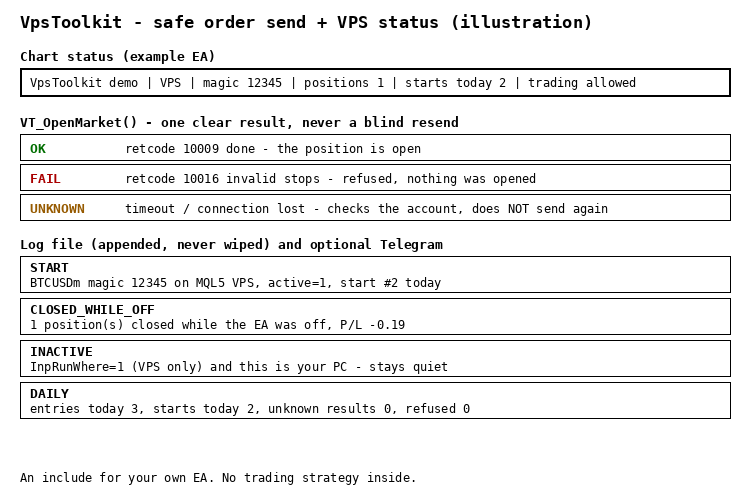
What is inside
- Where to run: VT_ActiveHere() with a run-where switch (anywhere / only on MQL5 VPS / only on this PC), so a copy that should not work stays quiet. VT_CanTrade(why) tells you why trading is blocked (no connection, Algo Trading off, account not allowed).
- Safe order send: VT_OpenMarket() returns OK, FAIL or UNKNOWN. Only "done" counts as OK. On a timeout or lost connection it looks at the account for a few seconds instead of sending again, so a bad connection does not create a second position.
- Restart-safe state: VT_Init() and VT_Ready() wait until the account is loaded (right after a VPS start the login can still be 0). Global variable names include the login, symbol and magic number. VT_TradesToday() reads the deal history instead of a counter in memory.
- Closed while off: VT_ClosedWhileOff() reports positions of your magic number that were closed while the EA was not running (SL/TP, manual close, stop out), with total P/L.
- Restart counter: VT_RestartsToday() and VT_ShouldAnnounce() , so a "started" message is not sent on every VPS restart.
- Append-only log: VT_Log() writes a UTF-8 CSV that is never wiped on restart, plus daily counters ( VT_CountInc() / VT_CountGet() ).
- Telegram (optional): VT_TgSend() , a daily summary at your local hour ( VT_DailyDue() , works at weekends), and VT_CsvNewRows() to send new log rows, because files on an MQL5 VPS cannot be downloaded.
Quick start
- Put VpsToolkit.mqh next to your EA and add #include "VpsToolkit.mqh" .
- In OnInit : VT_Init(_Symbol, magic, runWhere, "MyEA_log.csv") and start a timer.
- In OnTimer : return while !VT_Ready() , then call VT_Heartbeat() . In OnDeinit : VT_Deinit() .
- Open trades with VT_OpenMarket() . On UNKNOWN do not send again on the same signal; decide again on the next bar.
- For Telegram add https://api.telegram.org to Tools > Options > Expert Advisors > Allow WebRequest. Messages are sent from the timer only, never in the Strategy Tester.
The demo EA
On a live or demo chart VpsToolkit_Demo never trades. It shows the status on the chart, counts restarts, reports positions closed while it was off and writes a daily summary. In the Strategy Tester only (InpTesterDemo) it opens one example trade a day through VT_OpenMarket() . InpRunSelfTest runs the built-in self-test.
What was tested
- Compiled with 0 errors and 0 warnings. Self-test: 38 checks passed, in the tester and on a live chart.
- Strategy Tester, EURUSD H1, January to March 2025: 62 example trades through VT_OpenMarket() , a daily summary every day including weekends.
- Live demo account (hedging, BTCUSD): a normal order returned OK (10009), an order with the SL on the wrong side returned FAIL (10016). A position closed while the EA was off was reported after the restart (1 position, P/L -0.19). With run-where = "only on VPS" the copy on the PC stayed inactive. Restarts were counted 1, 2, 3 and the log kept every line.
- Not yet confirmed: Telegram delivery, a run on an MQL5 VPS, and the UNKNOWN path on a real connection loss (covered by the self-test only). Please report anything that does not work as described.
Free to use. Feedback in the comments is welcome.
Garch: GARCH, GJR-GARCH and EGARCH volatility models with forecasts
Fits GARCH(1,1), GJR-GARCH and EGARCH with normal, Student t or GED shocks by maximum likelihood, with robust standard errors and variance forecasts.
 Session Time Highlighter
Highlights the Asia, London and New York sessions and the London/New York overlap using real local time and daylight saving rules, so the session boxes are correct on any broker.
CME equity index futures holiday calendar
Holidays and early halts of the CME equity index futures (S&P 500, Nasdaq-100, Dow, Russell 2000, E-mini and Micro), computed from the US holiday rules for any year, with a script that checks the calendar against your broker's own M1 history.
RegimeHMM: market regimes with a hidden Markov model
Gaussian hidden Markov model fitted by Baum-Welch: regime probabilities without look-ahead, most likely path, expected durations and regime forecasts.