 MetaTrader 5
 Sistemi Esperti
 Indicatori
 Script
 Librerie
 Archiviazione
Unisciti alla nostra fan page

Basket Break-Even Lines - buy, sell and net break-even with target price - indicatore per MetaTrader 5

I build and fix trading tools for MetaTrader 4 and MetaTrader 5:
• Expert Advisors (EAs) built from your strategy rules
• Custom indicators, alerts and on-chart panels
- Visualizzazioni:
- 64
- Valutazioni:
- Pubblicato:
-
 Ti stai perdendo delle opportunità di trading:
- App di trading gratuite
- Oltre 8.000 segnali per il copy trading
- Notizie economiche per esplorare i mercati finanziari
Registrazione AccediAccetti la politica del sito e le condizioni d’uso
Se non hai un account, registrati -
 Hai bisogno di un robot o indicatore basato su questo codice? Ordinalo su Freelance
Vai a Freelance
Hai bisogno di un robot o indicatore basato su questo codice? Ordinalo su Freelance
Vai a Freelance
With a grid, an averaging basket or a hedge you often have several positions open on one symbol at different prices. The terminal shows the profit of each position, but not the price at which the whole basket is back at zero. This indicator draws that price and keeps it up to date on every tick:
- Buy BE: the price where all buy positions together are at zero.
- Sell BE: the price where all sell positions together are at zero.
- Net BE: the price where buys and sells together are at zero. It is drawn when both sides are open.
- Target: the price where the whole basket makes the profit you enter, in the account currency.
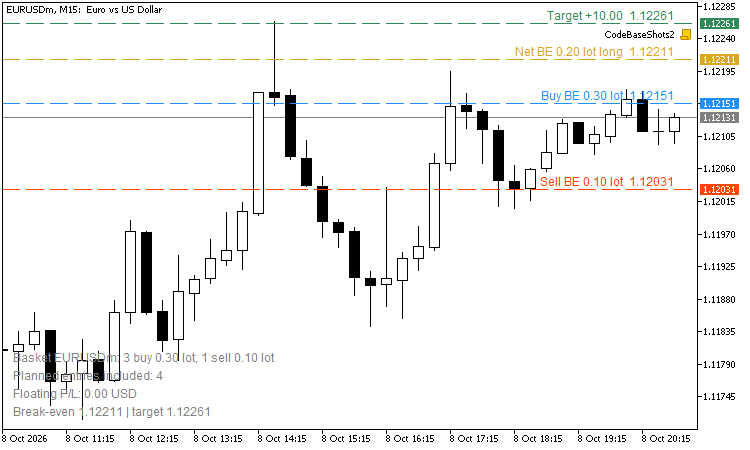
An info block in the lower left corner shows the number of buys and sells with their volume, the floating result of the open positions and the basket levels.
How it is calculated
The result of a basket is result(P) = k × ((buy lots − sell lots) × P − (Σ buy lots × open price − Σ sell lots × open price)) + swap, where k is the money for a move of 1.0 with 1 lot (tick value / tick size). Setting the result to zero, or to the target, gives each level. Swap can be included. Without swap the break-even levels are exact; the swap part and the target use the current tick value, so on symbols whose profit currency is not the account currency they are close approximations. The spread and commission are not included: buys close at Bid and sells at Ask, so the buy level is a Bid price and the sell level an Ask price.
When buys and sells have the same volume the basket is fully hedged: its result does not change with price and there is no net level. The info block says so instead of drawing a meaningless line.
Planned positions
Before you add to a basket, type the planned entries in the input, for example B 0.10 1.0850; B 0.10 1.0820; S 0.05 1.0900. They are added to the open positions for the calculation only; nothing is traded. The screenshot shows four planned entries on EURUSD M15 with a 10 USD target, on an account without open positions.
Inputs
| Input | Default | Meaning |
| Only this magic number | -1 | -1 = all positions on the chart symbol |
| Include swap | true | |
| Target profit line | 0 | in account currency, 0 = off |
| Planned positions | empty | B or S, lots, price; entries separated by ; |
| Buy / Sell / Net break-even line | true | show or hide each line |
| Colours, line style and width | chosen to be readable on dark and white charts | |
| Info block, colour and font size | true | lower left corner |
The indicator only reads positions. It never opens, changes or closes a trade.
 Telegram Trade Notifier - opens, closes, pending orders and daily summary
Sends every opened and closed position, pending orders and a daily account summary to your Telegram chat. It never trades on your account.
Equity Guard - daily loss, max drawdown and profit target lock
Closes all trades and keeps the account flat when the daily loss limit, the maximum drawdown or a daily profit target is reached. Prop-firm style rules, an on-chart panel, and a state that survives terminal restarts.
Accelerator Oscillator (AC)
The Acceleration/Deceleration Indicator (AC) measures acceleration and deceleration of the current driving force.
MACD Signals
Indicator edition for new platform.