 MetaTrader 5
 Sistemi Esperti
 Indicatori
 Script
 Librerie
 Archiviazione
Unisciti alla nostra fan page

Server Time Offset: the three clocks in MQL5 and how timestamps shift on export - script per MetaTrader 5

- Visualizzazioni:
- 699
- Valutazioni:
- Pubblicato:
- Aggiornato:
-
 Ti stai perdendo delle opportunità di trading:
- App di trading gratuite
- Oltre 8.000 segnali per il copy trading
- Notizie economiche per esplorare i mercati finanziari
Registrazione AccediAccetti la politica del sito e le condizioni d’uso
Se non hai un account, registrati -
 Hai bisogno di un robot o indicatore basato su questo codice? Ordinalo su Freelance
Vai a Freelance
Hai bisogno di un robot o indicatore basato su questo codice? Ordinalo su Freelance
Vai a Freelance
A datetime in MQL5 is an integer: seconds since 1970. Server time - TimeCurrent(), bar times, deal times - is the broker's wall clock stored as if it were UTC. Export it to a CSV, read it in Python or a spreadsheet with a function that assumes "seconds since 1970 UTC", and every timestamp shifts by the server's UTC offset. On a UTC-3 broker that is three hours: the daily bar dated 00:00 reads as 21:00 of the previous day, and "yesterday's session" silently becomes "today's, half formed". That is exactly what happened to a morning report of mine before this script existed - and the parser never complained.
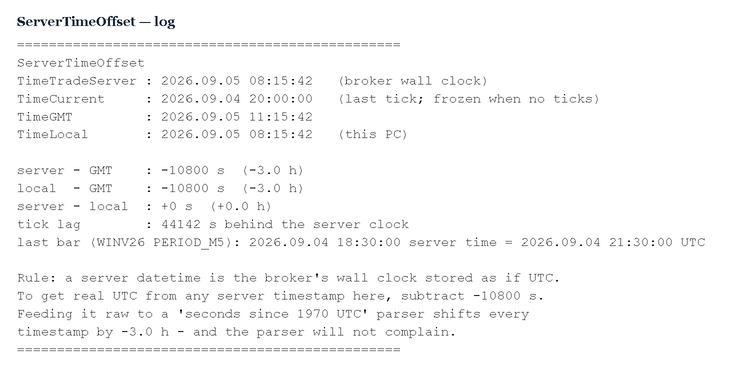
The script prints the three clocks an MQL5 program can see and the offsets between them:
- TimeTradeServer() - the broker's wall clock, available even without ticks;
- TimeCurrent() - the stamp of the last tick, which freezes when no ticks arrive;
- TimeGMT() - real UTC, from the local PC clock;
- TimeLocal() - this PC's clock.
It then reports server minus GMT, local minus GMT, server minus local, the tick lag (how far TimeCurrent sits behind the server clock), and this chart's last bar time in server time and in real UTC. Run it with the market closed and the tick lag alone tells the story: on a Saturday it showed 44,142 seconds - the last tick was Friday evening.
Input: InpShowLastBar (true) - also print the current chart's last bar time in both server time and UTC. There are no other parameters; the script reads clocks and prints.
The rule the script ends with: a server datetime is the broker's wall clock stored as if it were UTC. Export server timestamps as wall-clock text (yyyy-mm-dd hh:mm:ss), or export the epoch together with the offset printed here - and never let the consumer apply its own timezone to them. Feeding a raw server epoch to a "seconds since 1970 UTC" parser shifts every timestamp by the offset, and nothing warns you.
This is a diagnostic, not a strategy. It predicts nothing and trades nothing: it measures the clocks in your terminal so that the numbers that leave it mean what you think they mean.
 Risk-Based Lot Size Calculator
A simple MQL5 script that calculates the correct lot size for a trade based on your account risk percentage and stop loss distance in pips, so every trade risks a consistent, controlled amount of your balance.
Correlation-Aware Lot Size Calculator
Sizes your next trade based on the correlated risk you already have open across other positions — not just the trade in isolation.
 Exposure Cap: one position limit per symbol across all your EAs
Four EAs on the same symbol, each one honest on its own: each checks "do I have a position?" with its own magic number, sees none, and enters. On a demo account this reached 22 contracts on a symbol meant to carry 1, and a watchdog had to close 16 positions in one morning. The cap belongs at the door, not after the fact. ExposureCap::Allowed(symbol, lots, cap) sums the volume of every open position on the symbol - all magic numbers, manual trades included - and refuses the order BEFORE it is sent when it would breach the cap. One log line with the three numbers (held, requested, cap) says why. Deliberately simple: gross exposure, no netting of longs against shorts, no per-EA quota. It is a check, not a lock: two EAs deciding on the same tick can both pass; in practice EAs on different charts decide on different ticks. The demo script prints held / cap / room for the current symbol and shows the refusal line. Nothing is traded.
Decision Watchdog: refuse yesterday's decision, fail closed, log once
A daily process writes "today's decision" (which strategy runs, or FLAT) to a file the EAs read at the open. One day the writer did not run. The EAs read yesterday's file, compared its date with TimeCurrent() - the server clock, which had stepped back to the previous day overnight - saw a match, and traded all morning on a 24-hour-old decision. No error anywhere. Two rules, both in this class: 1) staleness is judged against TimeLocal(), which always moves forward; TimeCurrent() is the last tick's stamp - it freezes without ticks and can step back on reconnect. 2) When in doubt the answer is FLAT: missing file, bad date, wrong day, empty line - every failure path returns "do nothing", and each is logged ONCE per state change, not on every tick and not never. File format: line 1 = ISO date, line 2 = decision string. The demo writes a fresh, a stale, a malformed, an empty and a missing file, and shows that only the first is allowed to trade.