 MetaTrader 5
 Sistemi Esperti
 Indicatori
 Script
 Librerie
 Archiviazione
Unisciti alla nostra fan page

Session Range Desk MT5 - sistema esperto per MetaTrader 5

- Visualizzazioni:
- 27
- Valutazioni:
- Pubblicato:
-
 Ti stai perdendo delle opportunità di trading:
- App di trading gratuite
- Oltre 8.000 segnali per il copy trading
- Notizie economiche per esplorare i mercati finanziari
Registrazione AccediAccetti la politica del sito e le condizioni d’uso
Se non hai un account, registrati -
 Hai bisogno di un robot o indicatore basato su questo codice? Ordinalo su Freelance
Vai a Freelance
Hai bisogno di un robot o indicatore basato su questo codice? Ordinalo su Freelance
Vai a Freelance

Session Range Desk MT5 — versione 4.01
Session Range Desk è un Expert Advisor didattico e open source per il breakout del range di sessione, destinato ai conti di hedging su MetaTrader 5. Combina un filtro di range, il dimensionamento delle posizioni in base alla distanza dallo stop e un pannello grafico. Le copie su simboli diversi possono visualizzare una vista condivisa tramite le variabili globali del terminale. Non utilizza schemi di griglia, martingala o media.
Sequenza di trading
Al primo tick idoneo, in corrispondenza o successivo all’ora di avvio del server configurata, l’EA rileva il massimo più alto e il minimo più basso delle barre completate nelle LookbackCandles precedenti sul timeframe del grafico. Si tratta di un intervallo relativo alle barre precedenti, non di una sessione di apertura accumulata in modo continuo. Se la sua ampiezza è al di fuori della banda ATR configurata, il segnale di quel giorno viene saltato. In caso contrario, il prezzo che tocca il limite o la chiusura di una barra completata oltre tale limite può attivare un ordine di mercato. Il bordo opposto dell’intervallo viene utilizzato come stop. L’obiettivo previsto è un ingresso riuscito per simbolo per giorno di server durante il funzionamento ininterrotto.
La gestione opzionale include un obiettivo R-multiplo, il break-even e la chiusura parziale. R si riferisce alla distanza iniziale tra l’entrata e lo stop. All’ora di chiusura configurata, l’EA tenta di chiudere la posizione corrispondente su un tick in arrivo. L’esecuzione rimane soggetta al broker e ai prezzi disponibili.
Parametri di input
- StartHour / StartMinute: ora del server a partire dalla quale viene stabilito l’intervallo della barra completata. EndHour / EndMinute: ora del tentativo di chiusura forzata nello stesso giorno. Utilizzare un’ora di inizio precedente a quella di fine; le sessioni notturne non sono implementate.
- LookbackCandles: numero di barre del grafico completate in precedenza. BreakoutMode: touch o chiusura della barra completata.
- ATR_TF / ATR_Period: timeframe e periodo dell’ATR. Min_ATR_Mult / Max_ATR_Mult: intervallo di ampiezza del range accettato rispetto all’ultimo valore ATR completato.
- RiskPercent: rischio della distanza dello stop di ingresso target espresso in percentuale del saldo. MaxDailyRiskPct: soglia di impegno del desk condiviso utilizzata prima dell’ingresso; non si tratta di uno stop sul capitale del conto né di un limite di perdita giornaliero garantito.
- SkipOnMinLot / MinLotTolerance: indica se saltare un’entrata quando il volume minimo del broker supererebbe il rischio target oltre il superamento percentuale consentito.
- UseTP / TP_R: abilita e imposta l’obiettivo fisso R-multiplo.
- UseBreakEven / BE_Trigger_R / BE_Target_R: abilita il break-even, il relativo trigger e il nuovo stop rispetto all’entrata in R. Uno stop all’entrata non copre le commissioni né garantisce un’esecuzione a perdita zero.
- UsePartialTP / PTP_Trigger_R / PTP_Percent: abilita la chiusura parziale, il relativo trigger in R e la percentuale. La chiusura parziale viene saltata quando il volume non può essere suddiviso entro i limiti del broker. Imposta un trigger di chiusura parziale al di sotto dell’obiettivo fisso se questa dovesse avvenire prima di tale obiettivo.
- MagicNumber / DeskName: identificatori corrispondenti per le copie partecipanti nello stesso terminale. Utilizzare una copia per simbolo, impostazioni del desk identiche e un numero magico dedicato. Il coordinamento non si estende tra i terminali.
- ShowPanel / PanelCorner / PanelX / PanelY: visibilità del pannello, angolo e offset. ShowChartLevels controlla in modo indipendente l’intervallo e i tracciati delle operazioni. Entrambi i tracciati sono disabilitati durante l’ottimizzazione e i test non visivi.
Installazione e controlli iniziali
Inserire SessionRangeDesk.mq5 nella cartella MQL5/Experts e compilarlo in MetaEditor. Sono necessari solo i file di inclusione standard Trade, PositionInfo, SymbolInfo e Canvas forniti con MetaTrader 5. Iniziare con lo Strategy Tester e su un conto demo di hedging. Lo screenshot fornito illustra il pannello in un test con simbolo personalizzato USDJPY M15; non si tratta di un’impostazione predefinita raccomandata per la produzione né di una prova di redditività. Non vengono distribuiti file di impostazioni ottimizzati.
Limitazioni importanti
Questa versione è un esempio di programmazione, non un sistema certificato di protezione del conto. Il desk bus non è una riserva di rischio atomica tra grafici: segnali simultanei, heartbeat obsoleti, arrotondamento dei volumi e costi di esecuzione possono far sì che l’esposizione effettiva differisca dalla soglia. Non applica regole relative al capitale a livello di conto né regole di società di trading proprietarie di terze parti. L’ottimizzazione su singolo simbolo non convalida il coordinamento tra più grafici.
La chiusura di fine giornata è un tentativo basato sui tick. La versione 4.01 contrassegna l’azione di fine giornata come completata anche se il broker rifiuta tale chiusura, pertanto non deve essere considerata come un meccanismo garantito di azzeramento delle posizioni. Il ripristino al riavvio non stabilisce un blocco persistente dell’inserimento, una volta al giorno, per tutte le situazioni. Verificare queste modalità di errore prima di considerare l’uso non presidiato. Il comportamento di compensazione delle chiusure parziali non è supportato da questa versione.
I test di regressione locali hanno confrontato i registri delle operazioni con la grafica abilitata e disabilitata, e il log di compilazione autonomo memorizzato riporta zero errori e zero avvisi. Questi controlli non costituiscono una convalida delle prestazioni in tempo reale o con tick effettivi. Le precedenti ipotesi sintetiche sui costi sono state corrette durante la ricerca; nella presente pubblicazione non vengono avanzate affermazioni relative a profitti storici, drawdown o velocità. Gli spread, le commissioni, gli swap, lo slippage, i livelli di volume e le restrizioni sugli stop specifici del broker richiedono verifiche separate.
Strumenti di intelligenza artificiale hanno assistito nella revisione del codice, nella revisione della ricerca e nella preparazione della presente descrizione. Il codice sorgente e le limitazioni sono forniti a scopo di ispezione e test; non viene garantito alcun rendimento, sicurezza o accettazione da parte della piattaforma. 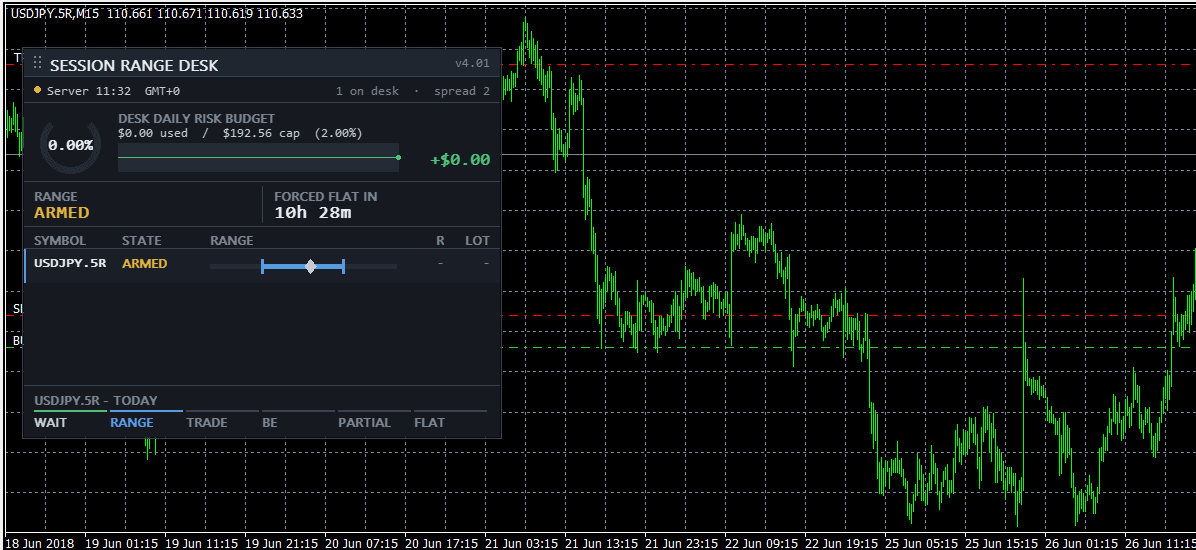
Tradotto dall’inglese da MetaQuotes Ltd.
Codice originale https://www.mql5.com/en/code/76927
Position Peak Logger - how far your trades actually travelled, in R
Registra l'escursione massima positiva e negativa di ogni posizione in multipli di R e scrive una riga CSV per ogni operazione chiusa.
Tick Integrity Auditor
Audits the tick history that 'Every tick based on real ticks' backtests replay. Five checks per symbol over the last N days: impossible and crossed quotes, timestamps that run backwards or repeat, one-tick price reversals sized in multiples of the symbol's own median spread, silences inside the broker's declared quote sessions, and minutes where the ticks and the M1 bars disagree. Every finding goes to CSV with its millisecond timestamp, and the tool prints its own arithmetic so the report can be recounted. Read only: no trade function, no DLL, no network.
87.8 Percent from 2021 to YTD at 8.5 Percent MaxDD. The Nikkei EA That Only Buys When Volume Is Quiet
A free, fully open JPN225 (Nikkei 225) EA for M15. Buys when price leans up, momentum isn't stretched and volume is quiet. Backtest 2022 to 2026: profit factor 1.68, +18.5% a year, passed 15 stress tests. Flat by 17:00.
 Extrapolator
Extrapolator fits a sum of sinusoidal harmonics to the recent price history and extends the fitted curve to the right of the last bar as a forecast.The forecast is a mathematical extrapolation of past cyclical behaviour, not a guarantee of future price movement. The last part of the line is redrawn while the current model bar is forming, and the fitted curve changes with each refit.