Unisciti alla nostra fan page
Quantora Drawdown Monitor MT5 - Professional Account Risk and Equity Drawdown Monitor - indicatore per MetaTrader 5
- Visualizzazioni:
- 48
- Pubblicato:
-
Hai bisogno di un robot o indicatore basato su questo codice? Ordinalo su Freelance Vai a Freelance
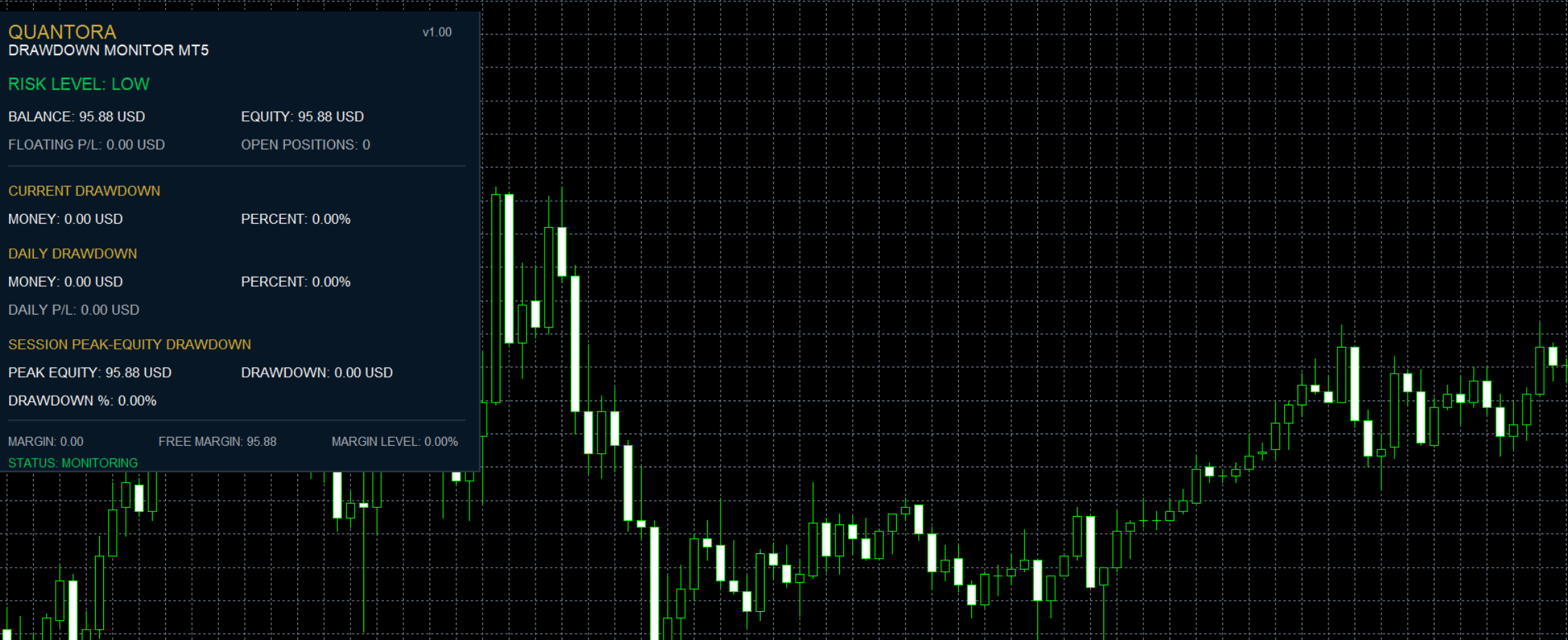
Quantora Drawdown Monitor MT5 is a professional account risk monitoring utility designed for MetaTrader 5.
The indicator continuously monitors the relationship between account balance and equity to provide traders with a clear overview of their current drawdown and account risk.
It combines Current Drawdown, Equity Drawdown, Daily Drawdown, Peak Equity, Maximum Drawdown, Floating P/L and Daily Performance into a single real-time dashboard.
Configurable risk thresholds automatically classify current account conditions as LOW, MODERATE, HIGH or CRITICAL.
Main Features
- Real-time Balance monitoring
- Real-time Equity monitoring
- Floating Profit/Loss
- Current Drawdown in account currency
- Current Drawdown %
- Peak Equity tracking
- Equity Drawdown %
- Maximum Drawdown %
- Maximum Drawdown amount
- Daily Starting Balance
- Daily Closed P/L
- Daily Total P/L
- Daily Drawdown amount
- Daily Drawdown %
- Open Positions counter
- Optional Magic Number filter
- Configurable risk thresholds
- LOW risk status
- MODERATE risk status
- HIGH risk status
- CRITICAL risk status
- Visual Drawdown Bar
- Automatic real-time updates
- Professional Quantora dashboard
- Low CPU usage
- Works on all chart timeframes
- Free and open-source MQ5 code
Current Drawdown
The indicator calculates the difference between the current account Balance and Equity.
For example:
Balance: $10,000.00
Equity: $9,875.00
Current Drawdown: $125.00
Current Drawdown: 1.25% When equity is equal to or above balance, current balance-based drawdown is displayed as zero.
Peak Equity Tracking
Quantora Drawdown Monitor tracks the highest account equity observed while the indicator is running.
This value is displayed as:
PEAK EQUITY
Current equity is then compared with the recorded peak to calculate Equity Drawdown.
For example:
Peak Equity: $10,150.00
Current Equity: $9,875.00
Equity Drawdown: 2.71% This provides another perspective on account decline beyond the basic Balance vs Equity calculation.
Maximum Drawdown
The indicator continuously records the highest observed Equity Drawdown percentage after initialization.
The dashboard displays this value as:
MAX DD
This allows traders to see the largest equity decline detected during the current monitoring period.
Daily Performance
The indicator also provides a daily account summary based on the current broker day.
The dashboard includes:
Daily Starting Balance
Daily Closed P/L
Daily Total P/L
Daily Drawdown
Daily Drawdown %
Daily starting balance is reconstructed using the current account balance and the qualifying closed results from the current broker day.
Daily Total P/L also considers the applicable current floating result.
Risk Status
Quantora Drawdown Monitor automatically evaluates account drawdown and assigns one of four risk levels:
LOW
MODERATE
HIGH
CRITICAL
Default thresholds are:
LOW ≤ 2%
MODERATE 2% – 5%
HIGH 5% – 10%
CRITICAL > 10% All three threshold levels can be adjusted from the indicator inputs.
This allows traders to configure the dashboard according to their own risk-management framework.
Visual Drawdown Bar
The dashboard includes a visual risk bar that changes according to the current drawdown condition.
The bar provides a quick visual representation of account risk without requiring the trader to constantly interpret numerical values.
The risk status and progress bar automatically update while the indicator is running.
Open Position Monitoring
The indicator displays the number of currently open positions.
When the optional Magic Number filter is disabled, the dashboard monitors the account's open positions without restricting them to a particular EA Magic Number.
Magic Number Filter
An optional Magic Number Filter is included.
When enabled, applicable position monitoring and daily deal calculations can be restricted according to the specified Magic Number.
This is useful when several Expert Advisors operate on the same MetaTrader 5 account and the trader wants to focus on a particular strategy.
Automatic Updates
Quantora Drawdown Monitor uses a timer-based update system.
The default refresh interval is designed to provide current account information while maintaining low CPU usage.
The update interval can be adjusted from the indicator settings.
Installation
Place:
Quantora_Drawdown_Monitor_MT5.mq5
inside:
MQL5 → Indicators
Compile the source code using MetaEditor.
Then attach Quantora Drawdown Monitor MT5 to any MetaTrader 5 chart.
The dashboard will begin monitoring the account automatically.
Important Note
Peak Equity and Maximum Drawdown are tracked from the moment the indicator is initialized.
They do not represent the historical all-time maximum drawdown of the trading account.
Removing the indicator, restarting it or reinitializing it can reset these runtime tracking values.
Daily Starting Balance is reconstructed using the available current-day trading history.
Broker history, commissions, swaps, fees, deposits, withdrawals and other balance operations may affect account statistics.
This indicator is designed as an informational risk-management utility. It does not open, modify or close trading positions and does not provide financial advice.
Product Information
Version: 1.00
Platform: MetaTrader 5
Program Type: Indicator
Category: Trading Utilities / Risk Management
License: Free / Open Source
Developed by QUANTORA
Professional MetaTrader 5 Trading Tools, Indicators and Expert Advisors.
More Professional Quantora Trading Products
Explore Quantora's professional MetaTrader 5 Expert Advisors, premium indicators and trading tools on the official MQL5 Market:
Quantora Trading Journal Panel MT5 - Professional Daily Trading Performance Analyzer
Professional open-source Trading Journal Panel for MetaTrader 5. Analyzes closed trades and displays win rate, profit factor, net profit, average results and account performance in a real-time dashboard.
Quantora Trading Clock MT5 - Professional Global Market Time Dashboard
Professional open-source Trading Clock for MetaTrader 5. Displays broker server time, local time, UTC and Sydney, Tokyo, London and New York market times with live session status and overlap information.
Quantora Daily Profit Loss Monitor MT5 - Professional Daily Trading Performance Monitor
Professional open-source Daily Profit and Loss Monitor for MetaTrader 5. Tracks daily closed profit, losses, floating P/L, win rate, daily return and configurable profit targets and loss limits.
MACD Signals
Indicator edition for new platform.
