 MetaTrader 5
 Sistemi Esperti
 Indicatori
 Script
 Librerie
 Archiviazione
Unisciti alla nostra fan page

KCI Volatility Distance - indicatore per MetaTrader 5

- Visualizzazioni:
- 49
- Valutazioni:
- Pubblicato:
- Aggiornato:
-
 Ti stai perdendo delle opportunità di trading:
- App di trading gratuite
- Oltre 8.000 segnali per il copy trading
- Notizie economiche per esplorare i mercati finanziari
Registrazione AccediAccetti la politica del sito e le condizioni d’uso
Se non hai un account, registrati -
 Hai bisogno di un robot o indicatore basato su questo codice? Ordinalo su Freelance
Vai a Freelance
Hai bisogno di un robot o indicatore basato su questo codice? Ordinalo su Freelance
Vai a Freelance
Presentazione:
Il KCI Volatility Distance è un algoritmo avanzato e adattivo, meticolosamente progettato per mappare con estrema precisione lo slancio del mercato e la direzione del trend. Utilizzando un calcolo proprietario basato su matrici, questo strumento filtra dinamicamente il rumore di mercato e fornisce una prospettiva strettamente quantitativa sulla forza direzionale. Realizzato con un nucleo di programmazione orientata agli oggetti (OOP) altamente ottimizzato, è progettato sia per garantire chiarezza visiva nel trading sia per integrarsi perfettamente nei moduli di apprendimento degli Expert Advisor o delle macchine
, garantendo prestazioni della CPU estremamente leggere su più asset.
Funzioni e spiegazioni
- Motore di slancio a matrice: calcola le dinamiche interne dei prezzi all’interno di una struttura a matrice multidimensionale. Funzione: identifica la vera forza sottostante della direzione attuale del mercato prima che si verifichi un breakout significativo, fornendo un vantaggio nel rilevamento precoce del trend.
- Filtro dinamico del rumore: un meccanismo adattivo che si ricalibra in base alle condizioni di mercato in tempo reale. Funzione: sopprime automaticamente i falsi segnali e i picchi di prezzo irregolari durante i periodi di consolidamento o di basso volume, proteggendo gli algoritmi automatizzati dall’esecuzione di operazioni premature.
- Output della forza direzionale: traduce complessi valori matematici delle matrici in un flusso numerico chiaro e autonomo. Funzione: funge da indicatore definitivo per trigger di ingresso precisi, convalida dei pattern di continuazione o determinazione dinamica delle dimensioni dei lotti nei sistemi automatizzati.
Requisiti
- Indicatore tecnico / Nucleo di trading algoritmico / Strumento di analisi quantitativa.
- Esecuzione altamente ottimizzata, estremamente leggera per un basso consumo di CPU in ambienti VPS (< 50 KB).
- Script open-source (file .mq5) con un’architettura di classi OOP incorporata.
Figura 1

Figura 3

Semplici impostazioni dei parametri
Fig. 2
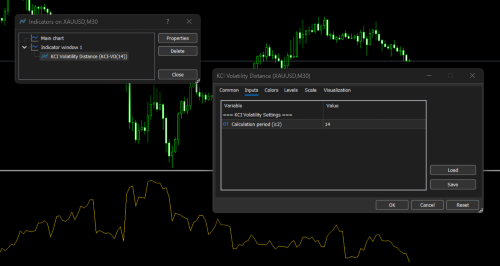
Guida all'integrazione di KCI Volatility Distance nell'Expert Advisor (EA)
Esistono due metodi principali per integrare questo algoritmo in un EA. Il primo metodo (OOP incorporato) è altamente raccomandato per ottenere la massima efficienza della CPU e per la raccolta di set di dati per l’apprendimento automatico. Il secondo metodo (iCustom Invocation) è adatto per test rapidi su prototipi.
Metodo 1: Utilizzo diretto tramite classe OOP incorporata (ultra-leggera)
- Questo metodo integra il motore direttamente nell’EA senza richiamare indicatori esterni. Il codice viene posizionato a livello globale, inizializzato in OnInit ed eseguito in OnTick.
Frammento di codice
// --- 1. Inserire la classe OOP all'inizio del file EA oppure includerla tramite #include ---
class CKCIDirectionalMatrix
  {
   // (Inserire qui l'implementazione completa della classe CKCIDirectionalMatrix)
   // ...
  };

// --- 2. Dichiarazione dell'istanza dell'oggetto globale ---
CKCIDirectionalMatrix MatrixEngine;

// Parametri di input EA
input int MatrixPeriod = 14;
input double EntryThreshold = 0.0050; // Soglia di forza del momentum

// --- 3. Inizializzare il motore in OnInit() ---
int OnInit()
  {
   if(!MatrixEngine.Init(MatrixPeriod))
      return(INIT_PARAMETERS_INCORRECT);

   return(INIT_SUCCEEDED);
  }

// --- 4. Eseguire la logica di base in OnTick() ---
void OnTick()
  {
   // Preparare gli array per memorizzare i dati relativi ai prezzi di mercato più recenti
   double high[], low[], close[];

   if(CopyHigh(_Symbol, _Period, 0, MatrixPeriod + 2, high) < 0)
      return;

   if(CopyLow(_Symbol, _Period, 0, MatrixPeriod + 2, low) < 0)
      return;

   if(CopyClose(_Symbol, _Period, 0, MatrixPeriod + 2, close) < 0)
      return;

   // Gli array devono essere configurati come serie temporali (indice 0 = barra più recente)
   ArraySetAsSeries(high, true);
   ArraySetAsSeries(low, true);
   ArraySetAsSeries(close, true);

   // Calcola la matrice di output relativa alla barra chiusa più recente (indice 1)
   double current_matrix_strength = MatrixEngine.Calculate(1, high, low, close);

   // --- A. Modulo di apprendimento automatico / estrazione delle caratteristiche ---
   // Inserisci il valore di 'current_matrix_strength' nella tua rete neurale
   // oppure un vettore di caratteristiche dell'IA come variabile di input.

   // --- B. Modulo delle decisioni di trading (filtraggio dei segnali) ---
   if(current_matrix_strength > EntryThreshold)
     {
      // Verifica del momentum superata.
      // L'andamento del mercato è ritenuto sufficientemente forte.

      // -> Eseguire qui gli ordini di ACQUISTO o VENDITA in base a
      //    alla strategia direzionale del tuo EA.

      // -> In alternativa, utilizzare questo valore per impostare dinamicamente
      //    regolare la spaziatura della Smart Grid o altri parametri adattivi.
     }
  }
Metodo 2: Richiamo tramite iCustom()
Se si pubblica separatamente il file .mq5 dell’indicatore KCI Volatility Distance e si desidera che l’EA lo legga tramite il buffer standard degli indicatori.
Frammento di codice
// --- 1. Dichiarare l'handle dell'indicatore nell'ambito globale ---
int MatrixHandle;

// Parametri di input EA
input int MatrixPeriod = 14;

// --- 2. Creare l'handle dell'indicatore in OnInit() ---
int OnInit()
  {
   // Assicurarsi che il nome del file dell'indicatore corrisponda esattamente
   // il file che si trova nella cartella "Indicatori".
   MatrixHandle = iCustom(_Symbol, _Period, "KCI Volatility Distance", MatrixPeriod);

   if(MatrixHandle == INVALID_HANDLE)
     {
      Print("Failed to load the KCI Volatility Distance indicator.");
      return(INIT_FAILED);
     }

   return(INIT_SUCCEEDED);
  }

// --- 3. Lettura dei dati del buffer dell'indicatore in OnTick() ---
void OnTick()
  {
   double MatrixBuffer[];
   ArraySetAsSeries(MatrixBuffer, true);

   // Recupera i due valori più recenti dal buffer 0 (linea KCI-VD)
   if(CopyBuffer(MatrixHandle, 0, 0, 2, MatrixBuffer) <= 0)
     {
      Print("Failed to copy matrix buffer data.");
      return;
     }

   // Valore della matrice relativo alla candela chiusa più recente
   double current_matrix_strength = MatrixBuffer[1];

   // Valore della matrice relativo alla candela in fase di formazione (in tempo reale)
   double previous_matrix_strength = MatrixBuffer[0];

   // --- Logica delle decisioni di trading ---
   if(current_matrix_strength > previous_matrix_strength)
     {
      // Il Momentum si sta espandendo.
      // -> Utilizzare questo come ulteriore conferma per
      //    aumentare la distanza del Take Profit.
      //
      // -> In alternativa, utilizzarlo per attivare un sistema adattivo
      //    Regolazione del trailing stop.
     }
  }
Data l’architettura altamente adattiva e a basso impatto sulla CPU di KCI Volatility Distance, il suo potenziale va oltre gli indicatori visivi tradizionali. La flessibilità del suo codice basato sulla Programmazione Orientata agli Oggetti (OOP) gli consente di fungere da motore per una varietà di scenari algoritmici avanzati.
See how KCI Volatility Distance can be used in this indicator's Arrow Placement : KCI Arrow and on expert advisor EA KCI N-Matrix Engine
Ecco alcune implementazioni strategiche di KCI Volatility Distance per vari scopi di sviluppo di EA e indicatori complessi:
1. Sistema di difesa anti-stop-hunting (SL e TP dinamici)
I movimenti improvvisi dei prezzi sono spesso una trappola di liquidità (liquidity grab o stop-hunt) piuttosto che un trend reale. La KCI Volatility Distance è in grado di rilevare queste anomalie.
- Logica: se si verifica un brusco picco di prezzo, ma i valori della Matrice mostrano un basso livello di efficienza (direzione), l’EA lo rileverà come un potenziale stop-hunting.
- Implementazione: Anziché eseguire un Cut Loss o impostare uno SL statico, l’EA amplierà automaticamente la protezione SL (SL dinamico) fino a quando la volatilità non si attenuerà, per poi cercare un punto di recupero più ottimale.
Frammento di codice
// Esempio: Rilevamento delle anomalie di volatilità (filtro anti-stop-hunt)
double matrix_value = MatrixEngine.Calculate(1, high, low, close);

// L'ATR funge da indice di riferimento per la volatilità di base
double atr_baseline = iATR(_Symbol, _Period, 14);

// Rilevare un'espansione anomala del mercato rispetto all'intervallo di volatilità previsto
if(matrix_value > (atr_baseline * 2.5))
  {
   Print("Warning: Volatility anomaly detected. Quantum SL Defense activated.");

   // Misure di protezione:
   // - Impedire l'apertura di nuove posizioni.
   // - Ampliare dinamicamente lo Stop Loss delle posizioni esistenti
   //   per ridurre la probabilità che si verifichino eventi di "stop-hunt".
   ModifySLToSafeZone(matrix_value);
  }
2. Griglia intelligente adattiva e algoritmo di media
Uno dei punti deboli del sistema Grid standard è la rigidità della spaziatura (passi), particolarmente pericolosa in presenza di un forte trend unidirezionale.
- Logica: converte la spaziatura della griglia da valori statici (punti) a coefficienti dinamici moltiplicati per il risultato dell’output “KCI Volatility Distance”.
- Implementazione: quando il mercato è laterale (la matrice si espande), anche la distanza tra le linee della griglia si allarga. Ciò impedisce all’EA di aprire troppe posizioni in un’unica area di consolidamento, rendendolo molto sicuro nel resistere ai drawdown su asset con movimenti ampi come XAUUSD, BTC o l’US30.
Frammento di codice
// Esempio: calcolo adattivo della distanza nella griglia
input double GridMultiplier = 1.5;

// Recupera l'ultima misurazione della matrice direzionale
double current_matrix = MatrixEngine.Calculate(0, high, low, close);

// Calcolare la spaziatura adattiva della griglia utilizzando il valore della matrice
// come rappresentazione dinamica delle attuali condizioni di mercato
double dynamic_grid_step = current_matrix * GridMultiplier;

// Aprire una nuova posizione sulla griglia solo dopo che il mercato ha registrato un movimento
// oltre la soglia di spaziatura calcolata dinamicamente
if(MathAbs(CurrentPrice - LastOrderPrice) >= dynamic_grid_step)
  {
   // Esegui l'ordine successivo di tipo "Grid" / "Averaging"
   ExecuteGridOrder();
  }
3. Normalizzazione delle caratteristiche per l’apprendimento automatico (ML)
Moduli: I modelli di rete neurale richiedono dati di input normalizzati per riconoscere accuratamente i modelli, senza essere distorti dalle differenze nelle cifre dei prezzi tra i broker o le classi di asset (ad esempio, la netta differenza tra i prezzi del petrolio WTI e le coppie forex minori).
- Logica: all’interno della formula della Distanza di Volatilità KCI, è presente un calcolo del Rapporto di Efficienza (ER) che produce naturalmente un rapporto di scala compreso tra 0 e 1.
- Implementazione: È possibile modificare leggermente la classe OOP per restituire valori ER puri. Questo array di valori Matrix viene estratto in un array come set di dati di addestramento molto pulito e privo di rumore per il Pattern Learner.
--------- Altre opzioni ---------
Esempio di file di intestazionemodulare (KCIVD.mqh)
Salvare il codice sottostante come KCIVD.mqh nella cartella MQL5\Include\. Questo file costituirà il motore principale richiamato da indicatori, expert advisor e moduli ML.
Frammento di codice
//+------------------------------------------------------------------+
//|                                                        KCIVD.mqh |
//|                                   Copyright 2026, KCI Developer |
//|                         https://www.mql5.com/it/users/ritzfalih |
//+------------------------------------------------------------------+
#property copyright "Copyright 2026, KCI Developer"
#property link      "https://www.mql5.com/it/users/ritzfalih"
#property version   "1.0"

class CKCIVolatilityDistance
  {
private:
   int               m_kinetic_period;
   double            m_point;

public:
                     CKCIVolatilityDistance(void);
                    ~CKCIVolatilityDistance(void);

   bool              Init(const int period);
   double            Calculate(const int index,
                               const double &high[],
                               const double &low[],
                               const double &close[]);
  };

//+------------------------------------------------------------------+
//| Costruttore                                                      |
//+------------------------------------------------------------------+
CKCIVolatilityDistance::CKCIVolatilityDistance(void)
  {
   m_kinetic_period = 14;
   m_point          = _Point;
  }

//+------------------------------------------------------------------+
//| Distruttore                                                       |
//+------------------------------------------------------------------+
CKCIVolatilityDistance::~CKCIVolatilityDistance(void)
  {
  }

//+------------------------------------------------------------------+
//| Inizializzazione                                                   |
//+------------------------------------------------------------------+
bool CKCIVolatilityDistance::Init(const int period)
  {
   if(period < 2)
     {
      Print("[KCI VD Error] Period must be at least 2");
      return(false);
     }
   m_kinetic_period = period;
   m_point          = _Point;
   if(m_point <= 0) m_point = 0.00001; // Soluzione di riserva per motivi di sicurezza
   return(true);
     }

//+------------------------------------------------------------------+
//| Motore di calcolo principale (ottimizzato per CPU e velocità)              |
//| Nota: gli array devono essere impostati come serie (ArraySetAsSeries = true)      |
//+------------------------------------------------------------------+
double CKCIVolatilityDistance::Calculate(const int index,
                                         const double &high[],
                                         const double &low[],
                                         const double &close[])
  {
   double sum_TR    = 0.0;
   double sum_sq_TR = 0.0;
   double path_length = 0.0;

   // --- 1. Finestra di loop ottimizzata senza funzioni annidate ---
   for(int j = 0; j < m_kinetic_period; j++)
     {
      int curr_idx = index + j;

      // Ottimizzazione della velocità di calcolo del True Range (evitando MathMax a più livelli)
      double hl = high[curr_idx] - low[curr_idx];
      double hc = MathAbs(high[curr_idx] - close[curr_idx + 1]);
      double lc = MathAbs(low[curr_idx] - close[curr_idx + 1]);

      double tr = hl;
      if(hc > tr) tr = hc;
      if(lc > tr) tr = lc;

      sum_TR    += tr;
      sum_sq_TR += (tr * tr);

      // Lunghezza del percorso del movimento del prezzo di chiusura (rapporto di efficienza)
      if(j < m_kinetic_period - 1)
        {
         path_length += MathAbs(close[curr_idx] - close[curr_idx + 1]);
        }
     }

   // --- 2. Calcolo del rapporto di efficienza ---
   double net_distance = MathAbs(close[index] - close[index + m_kinetic_period - 1]);

   if(path_length < net_distance) path_length = net_distance; // Limiti logici
   if(path_length == 0.0)         path_length = m_point;      // Prevenire la divisione per zero

   double efficiency_ratio = net_distance / path_length;

   // --- 3. Calcolo della deviazione standard del KCI ---
   double mean_TR  = sum_TR / m_kinetic_period;
   double variance = (sum_sq_TR / m_kinetic_period) - (mean_TR * mean_TR);
   if(variance < 0.0) variance = 0.0; // Correzione della precisione in virgola mobile

   double std_TR = MathSqrt(variance);

   // --- 4. Risultato finale del KCI VD ---
   return(std_TR * (2.0 - efficiency_ratio));
  }
File dell’indicatore visivo (KCI_Volatility_Distance.mq5) --- Altre opzioni ---
Salvare questo codice nella cartella MQL5\Indicators\. Questo indicatore è ora molto pulito perché richiama la struttura OOP dal file .mqh sopra indicato.
Frammento di codice
//+------------------------------------------------------------------+
//|                                      KCI Volatility Distance.mq5 |
//|                                   Copyright 2026, KCI Developer |
//|                         https://www.mql5.com/it/users/ritzfalih |
//+------------------------------------------------------------------+
#property copyright   "Copyright 2026, KCI Developer"
#property link        "https://www.mql5.com/it/users/ritzfalih"
#property description "KCI Volatility Distance - Indicator Module"
#property indicator_separate_window

#property indicator_buffers 1
#property indicator_plots   1
#property indicator_label1  "KCI-VD"
#property indicator_type1   DRAW_LINE
#property indicator_color1  clrGold
#property indicator_style1  STYLE_SOLID
#property indicator_width1  1

// Includi Mesin Utama KCIVD
#include <KCIVD.mqh>

// --- Input ---
input group "=== KCI Volatility Settings ==="
input int KineticPeriod = 14;   // Periodo di calcolo (≥2)

// --- Buffer ---
double KVR_Buffer[];

// Istanza dell'oggetto globale
CKCIVolatilityDistance kci_engine;

//+------------------------------------------------------------------+
//| Funzione di inizializzazione dell'indicatore personalizzato                         |
//+------------------------------------------------------------------+
int OnInit()
  {
   if(!kci_engine.Init(KineticPeriod))
      return(INIT_PARAMETERS_INCORRECT);

   SetIndexBuffer(0, KVR_Buffer, INDICATOR_DATA);
   PlotIndexSetDouble(0, PLOT_EMPTY_VALUE, 0.0);
   ArraySetAsSeries(KVR_Buffer, true);

   IndicatorSetInteger(INDICATOR_DIGITS, _Digits);
   IndicatorSetString(INDICATOR_SHORTNAME, "KCI-VD(" + IntegerToString(KineticPeriod) + ")");

   return(INIT_SUCCEEDED);
  }

//+------------------------------------------------------------------+
//| Funzione di iterazione dell'indicatore personalizzato                              |
//+------------------------------------------------------------------+
int OnCalculate(const int rates_total,
                const int prev_calculated,
                const datetime &time[],
                const double &open[],
                const double &high[],
                const double &low[],
                const double &close[],
                const long &tick_volume[],
                const long &volume[],
                const int &spread[])
  {
   if(rates_total < KineticPeriod + 2) return(0);

   // Imposta l'array predefinito come serie
   ArraySetAsSeries(high, true);
   ArraySetAsSeries(low, true);
   ArraySetAsSeries(close, true);

   if(prev_calculated == 0)
     {
      ArrayInitialize(KVR_Buffer, 0.0);
     }

   int limit = (prev_calculated == 0) ? (rates_total - KineticPeriod - 2) : (rates_total - prev_calculated + 1);

   // Esegui il motore di calcolo tramite un oggetto OOP
   for(int i = limit; i >= 0 && !IsStopped(); i--)
     {
      KVR_Buffer[i] = kci_engine.Calculate(i, high, low, close);
     }

   return(rates_total);
  }
Guida all’integrazione interfunzionale (Come utilizzarlo in EA/ML)
Grazie alla struttura della classe CKCIVolatilityDistance, è possibile utilizzarla direttamente in qualsiasi Expert Advisor per ottenere le massime prestazioni. Ecco un esempio della sua implementazione logica:
Integrazione nel modulo di Machine Learning (Estrazione delle caratteristiche / Convalida del segnale)
Se si dispone di una rete neurale o di un modulo di apprendimento dei modelli che richiede la normalizzazione della volatilità come caratteristica di input, è possibile estrarre il valore KCI VD in modo puro:
Frammento di codice
#include <KCIVD.mqh>

CKCIVolatilityDistance KCI_ML;

int OnInit()
  {
   // Inizializza il motore KCI Volatility Distance
   // con il periodo di calcolo desiderato.
   KCI_ML.Init(14);

   return(INIT_SUCCEEDED);
  }

void GetMLFeatures()
  {
   double high[], low[], close[];

   // Copiare una quantità sufficiente di dati storici sui prezzi
   // (ad esempio, le ultime 50 barre) in array locali.
   CopyHigh(_Symbol, _Period, 0, 50, high);
   CopyLow(_Symbol, _Period, 0, 50, low);
   CopyClose(_Symbol, _Period, 0, 50, close);

   ArraySetAsSeries(high, true);
   ArraySetAsSeries(low, true);
   ArraySetAsSeries(close, true);

   // Calcola il valore della "KCI Volatility Distance" per
   // la candela corrente (indice 0) o l'ultima candela chiusa (indice 1).
   double kci_current_volatility = KCI_ML.Calculate(0, high, low, close);

   // Inserire "kci_current_volatility" nella rete neurale
   // vettore di caratteristiche per la validazione o la previsione del segnale.
  }
4. Scanner multisimbolo (indicatore per dashboard)
Poiché KCIDirectionalMatrix non si basa su iCustom e libera rapidamente la memoria locale, è perfetto come motore di ricerca di segnali su un dashboard multisimbolo.
- Logica: installare un unico indicatore della dashboard su un grafico, ma eseguire il ciclo di calcolo della matrice su 20-30 simboli diversi contemporaneamente.
- Implementazione: l’indicatore analizzerà l’intero Market Watch (valute principali, coppie incrociate, metalli, indici) per identificare gli asset i cui valori della matrice si stanno contraendo (in preparazione di un breakout) o che stanno registrando un forte slancio di tendenza. Ciò eviterà che il VPS Windows Server subisca rallentamenti o sovraccarichi la CPU.
Frammento di codice
// Esempio: motore di scansione del mercato multi-asset
string symbols[] = {"EURUSD", "GBPUSD", "XAUUSD", "BTCUSD", "US30"};

for(int s = 0; s < ArraySize(symbols); s++)
  {
   // Carica i dati storici di mercato necessari
   // per lo strumento di trading corrente.
   // ...

   // Valutare l'intensità direzionale
   // della candela completata più di recente.
   double strength = MatrixEngine.Calculate(1, h, l, c);

   // Generare un segnale di trading solo quando il
   // l'intensità direzionale supera la soglia configurata.
   if(strength > Threshold)
     {
      // Aggiorna la dashboard con i dati rilevati
      // Opportunità di ACQUISTO/VENDITA per lo strumento in questione.
      DrawDashboardSignal(symbols[s], strength);
     }
  }
Questo è il codice KCI Volatility Distance; in ogni caso, questo codice può essere utilizzato per vari scopi. È possibile svilupparlo ulteriormente con indicatori MT5 standard e indicatori MT5 personalizzati per ottenere una precisione ancora maggiore e un’analisi più accurata.
Tradotto dall’inglese da MetaQuotes Ltd.
Codice originale https://www.mql5.com/en/code/74838
Double Enevlopes (Historical Gauged)
Uno strumento e un sistema per la gestione di un'attività di babysitting :D
Structure Range
Sell Arrow SL Box: Extends UPWARDS from the Sell Arrow. Buy Arrow SL Box: Extends DOWNWARDS from the Buy Arrow.
Previous Week High Low Indicator
Plots the previous trading week's High and Low as horizontal reference levels across the current week, with optional multi-week history for context. No repainting, no discretion — the levels are read directly from the completed Weekly bar.
Scalping Dashboard
This indicator is a professional Scalping Dashboard utility designed specifically for MetaTrader 5 (MT5). It displays real-time vital market status information and scalping strategy conditions (based on Exponential Moving Arrows/EMAs), automatically computing spreads, momentum, and moving averages to output instant BUY/SELL SETUP visual signals.