 MetaTrader 5
 Sistemi Esperti
 Indicatori
 Script
 Librerie
 Archiviazione
Unisciti alla nostra fan page

MW Download History - script per MetaTrader 5

- Visualizzazioni:
- 3712
- Valutazioni:
- Pubblicato:
- Aggiornato:
-
 Ti stai perdendo delle opportunità di trading:
- App di trading gratuite
- Oltre 8.000 segnali per il copy trading
- Notizie economiche per esplorare i mercati finanziari
Registrazione AccediAccetti la politica del sito e le condizioni d’uso
Se non hai un account, registrati -
 Hai bisogno di un robot o indicatore basato su questo codice? Ordinalo su Freelance
Vai a Freelance
Hai bisogno di un robot o indicatore basato su questo codice? Ordinalo su Freelance
Vai a Freelance

This script allows the user to download all the available OHLC info in his Terminal to a file located in the Commons folder. This data can later be used to create custom symbols. If a file already exists there, it will be updated with any new information available since the last tick data recorded in that file.
To use this script, execute the following steps:
- Go to your Common folder (Archive -> Open Data Folder -> Navigate one step back in Explorer -> Enter in folder "Common")
- Create a new folder there with the name "MW Download History"
- You may create it with anoter name, but in this case you must rename the "define" compiler directive inside the script called "MW_DH_DEST_FOLDER" with the alternative name you choose
- Open the script in your MT5 Editor
- Compile it
- Open the MT5 Terminal
- Open the Tool Box (Ctrl+T) and select the tab "Experts"
- Open the Navigator (Ctrl+N)
- Open the Market Watch (Ctrl+M)
- Add there the symbols whose data you want to download
- Open a chart of any of the symbols in Market Watch
- Attach the script (compiled file) from the Navigator to it. A popup with input parameters will appear
- Input 1: Inform which symbol you want to have its data downloaded, in case it's just one. If this parameter is left empty, all the symbols in Market Watch will be considered minus the exceptions (next inputs)
- Input 2: If you want some of the Market Watch symbols not to be downloaded and they have a common string in their names, you may inform that string in this input, and they will be ignored (useful to avoid downloading custom symbols's data)
- Input 3: If you want some of the Market Watch symbols not to be downloaded, you may inform which in this input separating each symbol with ";"
- Input 4: Select which timeframe you want to have downloaded. M1, the default, is advised
-
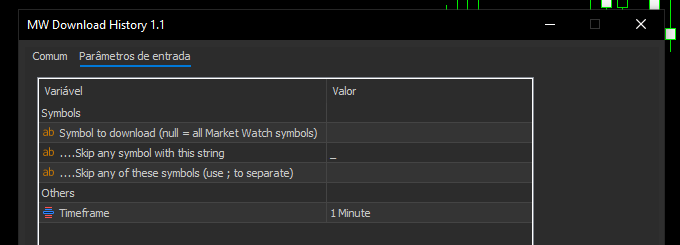
- In case the user wants to download more than one timefrime, a new file for the different timeframe will be created. All files have the symbol and the selected timeframe on its name
- Press OK and monitor the results in the Tool Box. After finished, you may go to the destination folder (step 2) and check for the files created (one for each symbol)
- Repeat steps 5-12 periodically (like at the first Sunday of every new month) to keep the files updated
To learn how to create custom symbols using the created files, you may find tutorials here and in YouTube on how to do that.
Finally,
- Any suggestions on how to improve this script will be welcomed
- I'm sorry for any mistakes; this is my first public script
- I'ld like to thanks a guy/user named "etrader" who provided somewhere the script that served as initial reference for this one, "downloadhistory.mq5"
 Support and Resistance(SNR) Sentinel Indicator
Adaptive Support & Resistance indicator that automatically detects, tracks, and updates the nearest valid S/R levels using configurable confirmation bars. Levels dynamically shift after confirmed breakouts and extend forward in real time.
 Price Action Intraday Trading - Expert for MT5
Price Action Day Trader is a robust, trend-following MQL5 Expert Advisor designed for intraday trading. It focuses on high-probability price action patterns Pin Bars, Engulfing Candles, and Inside Bar Breakouts while filtering trades through a dual Moving Average trend filter.
Candle Close Timer – MT5 Indicator
Indicator Description – Candle Close Timer Name: Candle Close Timer Version: 1.0 Author: BENTRADE TRADING Link: https://www.mql5.com/en/users/dahmi_benali
Multi-timeframe RSI scanner with visual dashboard and alerts
Production-ready multi-timeframe RSI scanner with intelligent alert retry system. Monitors up to 7 timeframes simultaneously, highlights convergence zones when 3+ TFs align, and now auto-retries failed notifications to ensure you never miss critical overbought/oversold setups.