 MetaTrader 5
 Sistemi Esperti
 Indicatori
 Script
 Librerie
 Archiviazione
Guarda come scaricare robot di trading gratuitamente
Ci trovi su Twitter!
Unisciti alla nostra fan page
Unisciti alla nostra fan page
Ti è piaciuto lo script? Provalo nel Terminale MetaTrader 5

Open Position v3a - Updated for MT4 Build 600 - indicatore per MetaTrader 4

- Visualizzazioni:
- 48255
- Valutazioni:
- Pubblicato:
- Aggiornato:
-
 Ti stai perdendo delle opportunità di trading:
- App di trading gratuite
- Oltre 8.000 segnali per il copy trading
- Notizie economiche per esplorare i mercati finanziari
Registrazione AccediAccetti la politica del sito e le condizioni d’uso
Se non hai un account, registrati -
 Hai bisogno di un robot o indicatore basato su questo codice? Ordinalo su Freelance
Vai a Freelance
Open Positions v2 ( updated - see below) 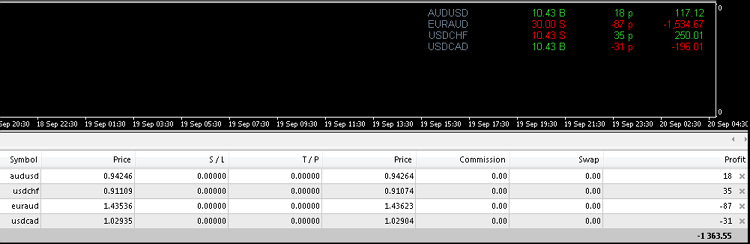
- Open Position V2 has been updated to Open Position v3a for MT4 Build 600.
- Remove all old instances of Open Position v2 from all charts.
- Delete all instances of the old file Open Position v2 from the experts / indicator folder and all instances of Open Position v2 transfered to the MQL4 / Indicators folder.
- Install Open Postion v3a in MQL4 / Indicators folder.
This indicators is a modifications of the MetaQuotes iExposure indicator.
- Locked to the top right corner of the secondary window.
- The indicator should open as a secondary window below the main window.
- The indicator can also be dragged onto any secondary window such as Stocastics or MACD etc,
- If the indicator does not open as a secondary window (unlikely) and is preferred to occupy its own secondary window then install Blank.mq4 and drag the indicator onto Blank.mq4.
- The indicator is only visible when one or more positions are open.
- p = points. MT4 calculates in points not pips. Compare chart p numbers in included demo image against numbers* under Profit Heading in (Account) Terminal. **
- Use Column_Spacer to increase or decrease distance between columns. Too large an increment may result in the indicator moving off the display area. For finer control use decimal increments.
- For bold fonts set Fonts_Bold: true.
* If you find your MT4 Terminal numbers differ from the installed Indicator proceed as follows: Open Terminal(Ctrl+T). Right-click heading Profit. Shift cursor to → Profit menu. Select → as Points.
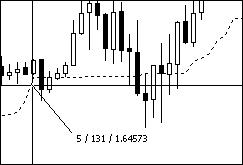
** Put focus on the chart and bring up the cross hairs (Ctrl+F) or click mouse scroll wheel. Hold the left mouse button down and drag a line at about 45 degree angle. Below image: 5 is bar displacement, 131 is price displacement in Points, 1.64573 is price.
Calculate the value of a move: The point value can be quickly calculated. As per above Image, AUDUSD (117.12/(10.43 x 18)) = (117.12/187.74) = 0.62384. In this case £0.62, but for greater accuracy retain 5 decimal placing. So a if 18 points move @ 10.43 lots = 117.12 then 180 points (18 x10 ) move at 10.43 lots = 117.12 x 10 = 1,171.20. Proof using point value: 10.43 x 180 x 0.62384 = 1,171.20.
The image illustrates trades taken to check the below cases against the MT4 Terminal values.:
- A Buy profit
- A buy loss
- A Sell profit
- A Sell loss
Tick Generator: Indicator update can lag the terminal in fast market, on slow PCs or slow connections. A tick-generator keeps all indicators up-dating current. Free – Here. Says for EA but keeps indicators up-dating current as well.
TimeZones Six v2
Display up to six Times Zones. Hide Time Zones not required.
Open position with STOCH and RSI
This indicator shows when to buy and sell in the right time..so you don't miss the train.
Account Information
Adds account information to chart: Profit, Balance, Equity, Free Margin, Margin and Margin Level %. On chart click hide/show account information. Show Profit only option.
Color Fill MA
The indicator draws 2 Moving Averges with different color filling.