Risk Manager Pro MT5

5

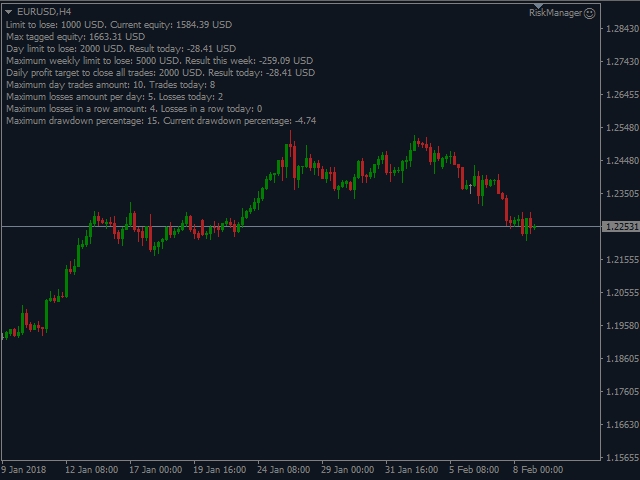
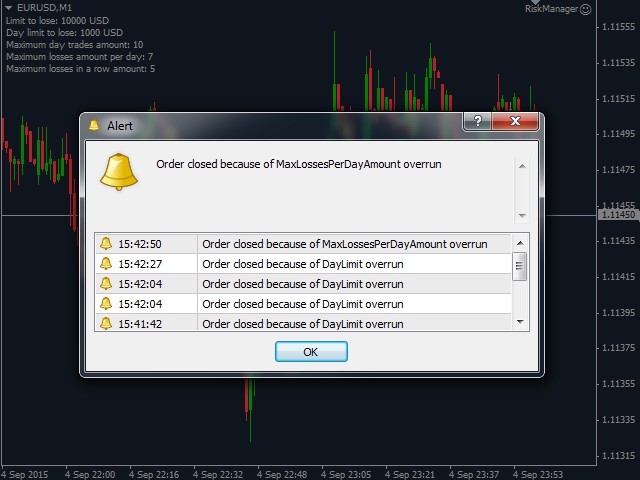
The Expert Advisor is a comprehensive risk manager helping users to control their trading activities. With this tool being a safeguard you can easily configure various risk parameters. When any limit is exceeded, the risk manager can force close opened positions, close other EAs, and even close the terminal to prevent emotional trading that doesn't correspond to your trading strategy.

Risk Manager Settings

Account Protection

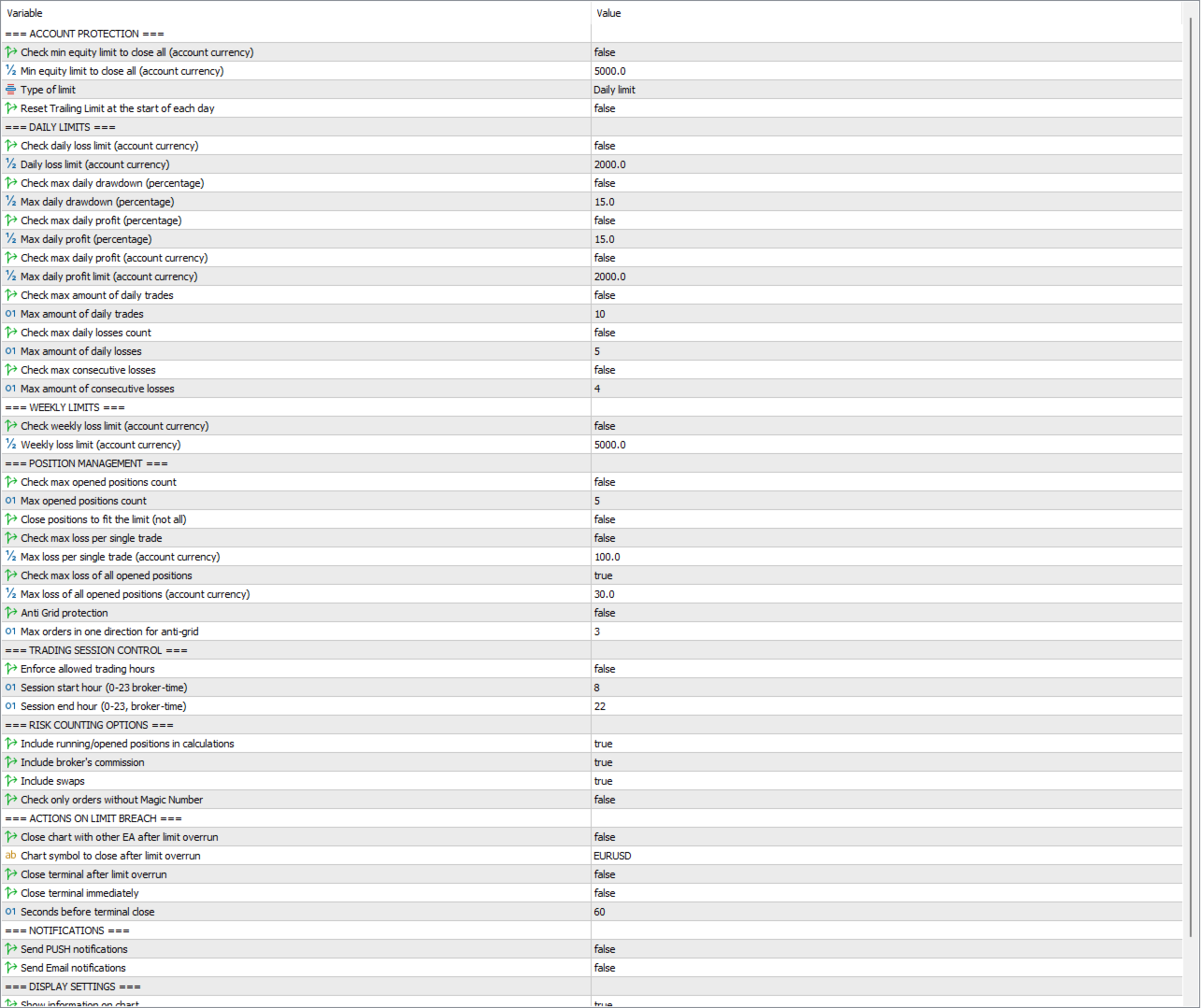
  • Check min equity limit to close all (account currency) - check the minimal equity limit at which the risk manager will close all positions and cancel all orders
  • Min equity limit to close all (account currency) - minimum account equity triggering loss prevention measures
  • Type of limit:
    • Daily limit - limit calculated on a daily basis (e.g. if the daily loss limit is $10 and starting equity was $100, positions close when equity drops to $90). Resets each day.
    • Trailing limit from highest tagged equity - limit calculated from the maximum equity value ever reached (e.g. if loss limit is $100 and equity peaked at $1300, positions close when equity drops below $1200).
  • Reset Trailing Limit at the start of each day - resets max tagged equity to current equity daily

Daily Limits

  • Check daily loss limit (account currency) - enable maximum daily loss monitoring according to the Type of limit setting
  • Daily loss limit (account currency) - maximum daily loss allowed
  • Check max daily drawdown (percentage) - enable maximum daily drawdown percentage monitoring
  • Max daily drawdown (percentage) - maximum daily drawdown percentage allowed
  • Check max daily profit (percentage) - enable profit limit to close positions when threshold is exceeded
  • Max daily profit (percentage) - maximum daily profit percentage before closing positions
  • Check max daily profit (account currency) - enable daily profit limit in currency amount
  • Max daily profit limit (account currency) - maximum daily profit in currency before closing positions
  • Check max amount of daily trades - enable maximum number of trades per day monitoring
  • Max amount of daily trades - maximum number of trades allowed per day
  • Check max daily losses count - enable maximum number of losing trades per day monitoring
  • Max amount of daily losses - maximum number of losing trades allowed per day
  • Check max consecutive losses - enable maximum number of consecutive losing trades monitoring
  • Max amount of consecutive losses - maximum number of consecutive losing trades allowed

Weekly Limits

  • Check weekly loss limit (account currency) - enable maximum weekly loss monitoring according to the Type of limit setting
  • Weekly loss limit (account currency) - maximum weekly loss allowed

Position Management

  • Check max opened positions count - enable maximum number of open positions monitoring
  • Max opened positions count - maximum number of positions allowed to be open simultaneously
  • Close positions to fit the limit (not all) - close only excess positions to fit within the limit instead of closing all
  • Check max loss per single trade - enable individual position loss monitoring
  • Max loss per single trade (account currency) - maximum loss allowed for any single position
  • Check max loss of all opened positions (currency) - enable monitoring of total loss across all open positions in currency amount
  • Max loss of all opened positions (account currency) - maximum total loss allowed across all open positions
  • Check max loss of all opened positions (percentage) - enable monitoring of total loss across all open positions as percentage of equity
  • Max loss of all opened positions (percentage of equity) - maximum total loss allowed across all open positions as percentage of current equity
  • Anti Grid protection - enable protection against adding to losing positions
  • Max orders in one direction for anti-grid - maximum number of trades allowed in the same direction

Trading Session Control

  • Enforce allowed trading hours - enable time-based trading restrictions
  • Session start hour (0-23 broker-time) - first hour when trading becomes allowed
  • Session end hour (0-23, broker-time) - hour when the trading session ends

Risk Counting Options

  • Include running/opened positions in calculations - include open positions in risk calculations (not just closed ones)
  • Include broker's commission - include broker's commission in loss/profit calculations
  • Include swaps - include swap charges in loss/profit calculations
  • Check only orders without Magic Number - monitor only positions opened without magic numbers (typically manual trades)

Actions on Limit Breach

  • Close chart with other EA after limit overrun - close specified chart to stop other EAs from trading
  • Chart symbol to close after limit overrun - symbol name of charts to be closed when limits are exceeded
  • Close terminal after limit overrun - close the entire terminal when any limit is reached
  • Close terminal immediately - immediate terminal closure vs. delayed closure with countdown
  • Seconds before terminal close - countdown time before terminal closes (if not immediate)

Notifications

  • Send PUSH notifications - send mobile push notifications when events are triggered
  • Send Email notifications - send email alerts when events are triggered

Display Settings

  • Show information on chart - display risk manager status and limits on the chart
  • Font size for display - set font size for the information display
  • Font color for display - set color for the information display


    Avis 9
    stevenasmo
    24
    stevenasmo 2026.02.11 16:15 
     

    This is the greatest EA in the game. I would suggest it to any serious day trader. Roman is quick with support and will help you if you have a problem with it. Thanks to the RISK MANAGER I literally NEVER lose more than I want for the day. No more overtrading!!!!! :D

    Jmerchant
    29
    Jmerchant 2025.10.15 10:12 
     

    Really great EA and I think its a must-have for any retail trader, mistakes happen and this gives you the added protection. Very easy to use and install, and got a quick response from support, thank you! My only recommendation would be on the max position action, instead of closing all open trades just block further positions from being opened.

    cat6699
    197
    cat6699 2025.06.18 01:58 
     

    Отличный продукт! Высочайшее качество и скорость работы. Спас мне несколько депозитов вовремя остановив торговлю. Настройки понятные и в то же время очень гибкие. Советник подходит для работы с ПРОП-фирмами, так как в настройках учтены все особенности разнообразных ПРОП-фирм по учету ежедневных, максимальных и даже просадок на позицию. Автор всегда на связи, оперативно отвечает и даже может подкорректировать советник если есть необходимость. Спасибо, Роман!

    Produits recommandés
    Episode Health Monitor Episode Health Monitor is a trading utility for MetaTrader 5 designed to analyze the real-time condition of active trading positions directly on the chart. The tool evaluates the current “trading episode” - a group of open positions - and provides a structured view of risk, stability, and distance to potential failure. Instead of relying only on profit/loss or price movement, it helps identify whether the current position is stable, weakening, or approaching a critical st
    Trade Assistant 38 in 1
    Makarii Gubaydullin
    4.91 (23)
    Outil multifonctionnel : Calculateur de Lot, Ordres Grid, Ratio R/R, Gestionnaire de Trades, Zones d'Offre et de Demande, Price Action et bien plus Version Démo   |   Manuel d'Utilisation L'Assistant de Trading   ne fonctionne pas dans le testeur de stratégies : vous pouvez télécharger la   Version Démo ICI  pour tester l' utilitaire . Contactez-moi   pour toute question  / idée d'amélioration / en cas de bug détecté Si vous avez besoin d'une version MT4, elle est disponible ici Simplifiez, acc
    Product introduction : Trade Manager Tool for MT5 Trade Manager Tool will help trader calculate almost exactly the risk based on your account automatically. Along with that, there are features to support capital preservation with Trailing Stop, BreakEven, Risk Limit such as Daily Limit Profit/Loss,etc.. helps you avoid overtrading.In particular, the panel is simply designed with many interactive buttons inside the panel and outside the chart to help trader interact more easily.These features re
    This tool will perform Trailing stop loss and Break even management for orders. Helps you limit or reduce the time spend watching orders on the screen, especially when you need to go to sleep. Just add this EA to 1 chart, you can manage all pairs. You can filter orders by comment, magic number, symbol and order ticket number. When Breakeven it can add shift/offset pips (to cover the commission...). You can try in strategy tester before purchase. The EA will add Buy and Sell alternately, so you
    Trading panel for manual trading. Has a fairly wide functionality. Allows you to automatically calculate the order size, open both market and pending orders. It has a wide range of options for closing orders, it is possible to partially close orders, close orders after reaching a certain profit or loss, separately close profitable and unprofitable, buy and sell, as well as pending orders. The panel also contains a simple implementation of a grid of pending orders, reverse and lock functions, tr
    EasyTradePad for MT5
    Sergey Batudayev
    5 (5)
    EasyTradePad – Panneau de trading pour MetaTrader 5 EasyTradePad   est un outil de trading manuel et semi-automatisé. Son interface permet une gestion rapide des ordres et des positions, ainsi que des calculs de gestion des risques en un clic. Caractéristiques du panneau : Ouvrir et fermer des transactions avec un risque prédéfini (% ou devise de dépôt) Définissez SL et TP en points, en pourcentages ou en valeurs monétaires Calculer automatiquement le ratio risque/récompense Déplacez le stop lo
    TP SL Bot MT5
    Ruslan Brezovskiy
    5 (1)
    TP SL Bot - un utilitaire qui définit automatiquement les Stop Loss et Take Profit pour les nouveaux ordres ouverts de différentes manières selon vos indications. Il dispose également d'une fonction de calcul du volume nécessaire pour ouvrir un trade afin d'atteindre le montant souhaité avec la taille de Stop Loss/Take Profit spécifiée.   Il existe plusieurs façons de calculer la taille et de définir les paramètres : 1. Réglages basés sur le montant spécifié par l'utilisateur en pourcentage du s
    Recluse FX
    Michael Prescott Burney
    3 (2)
    Recluse FX is the ultimate trading system for US30 on the H1 chart. With dedicated stop-loss and take-profit for each order, it guarantees optimal performance and risk management. Validated across over 1200 trades since 2021 with a 100% win rate, Recluse FX delivers unmatched stability and consistent gains under all market conditions. Its progressive pricing means that after 50 copies are sold, the system becomes exclusive to its owners. Purchase Recluse FX now and message for free access to th
    Trade Manager DaneTrades
    Levi Dane Benjamin
    4.28 (29)
    Trade Manager pour vous aider à entrer et sortir rapidement des transactions tout en calculant automatiquement votre risque. Y compris des fonctionnalités pour vous aider à éviter le sur-trading, le trading de vengeance et le trading émotionnel. Les transactions peuvent être gérées automatiquement et les mesures de performances du compte peuvent être visualisées dans un graphique. Ces fonctionnalités rendent ce panneau idéal pour tous les traders manuels et contribuent à améliorer la plateforme
    DDKiller Pro
    Njaratahiry Michael Randrianiaina
    Arrête de faire sauter ton compte. Une bonne fois pour toutes. DDKiller Pro est le gardien du risque MT5 qui tourne silencieusement sur ton graphique et coupe le trading dès qu'une limite est atteinte — que tu passes un challenge prop firm ou que tu gères ton propre compte CFD. Le problème que tout trader connaît : Tu fixes tes règles. Tu les enfreins quand même. Un trade de vengeance. Une position surleviéragée. Une session qui efface un mois de gains. DDKiller Pro retire cette décision de tes
    Nebula Trading Manager
    Sina Mohammadamin Shahriari Moghadam
    This expert advisor named   TradeManager   provides a manual trading management panel in MetaTrader 5 that allows precise control over open positions. It is designed for traders who want dynamic management of Stop Loss (SL), Take Profit (TP), Break Even (BE), and Partial Close functionality. Key Features: Dynamic Trade Management : Manually set or drag-and-drop SL, TP, and BE levels. Supports partial closing at different profit levels (1:1, 1:1.5, 1:2). Automated Drawing : Automatically draw
    Symbol Manager for MT5
    Taras Slobodyanik
    5 (3)
    Symbol Manager or Grid Manager, designed to group orders into one position (by Symbol or by Magic Number). This utility will be useful to multi-currency traders (many EAs), who can have multiple orders on several pairs. You will be able to see the total number of lots, the total profit, and set virtual stop loss and virtual take profit. To set a real TP (or SL), you must first set the virtual value, and then enter the command in this cell: "set". If you want to set real TP/SL for all orders at
    SL TP Panel
    Mikhail Ostashov
    SL TP Panel — Visual Trading Panel for MT5 A convenient trading panel that lets you place pending orders by simply dragging lines on the chart. Stop Loss, Take Profit, order type, and lot size — everything is controlled with your mouse in seconds. Who is this for This panel is designed for manual traders who value speed of execution. Instead of opening the order window, filling in fields, and calculating levels — just drag a line to the desired price and click one button. Key Features Visua
    King ElChart Manual Trade Panel
    Mohammed Maher Al-sayed Mohammed Ahmed Saleh
    King Chart – Manual Trading Panel for MetaTrader 5 Overview King Chart is a simple yet powerful manual trading panel built for traders who want speed, precision, and clarity. It enables quick order execution, clear lot control, and real-time account monitoring  all directly on your MT5 chart. Main Features Multi-Lot Trade Execution 3 Buy and 3 Sell buttons for instant execution Each button is tied to a custom lot size field Designed for flexible scaling in or out of trades Position Management D
    This is a common, simple and easy to use but effective tool to manage trading risks for all traders. It also help trader places stop loss and take profit levels at the same time the order is filled. How to set the expert advisor's parameters to support your trading style? Lots size. Fixed lots size - For traders who prefered to trade with fixed lots size, they can input the lots size in 'User lots' menu in the expert advisor's properties. The input value should be from the 'Minimum Volume' to th
    Equity Protector Pro MT5 Equity Protector Pro MT5 is a risk control utility for MetaTrader 5 designed to monitor account exposure and enforce predefined risk limits directly on the chart. In a standard MT5 setup, traders can see balance, equity, and floating profit. However, when multiple positions are open — especially on fast-moving instruments like XAUUSD - it becomes difficult to understand how close the account is to a risk threshold, or whether the current structure is still safe. This to
    The Position Control is an intuitive yet powerful trading tool that facilitates risk management from entry to exit.  It includes automatic lot sizing, fixed stop loss and take profit features, or determines them using the ATR indicator. After opening a position, you can set automatic break-even points, trailing stops, and choose from three types of partial closures. Moreover, if you open a 0.01 lot position from your phone, the expert will automatically close it and open a risk-managed position
    Visual Risk Tool
    Md Wakiluzzaman Raz
    VisualRiskTool VisualRiskTool is a professional trade execution panel and risk management utility designed for MetaTrader. It streamlines the process of opening and managing positions by automating complex lot size calculations and providing a visual interface for setting stop-loss and take-profit levels directly on the chart. Core Functionality: Precision Risk Management The primary goal of VisualRiskTool is to eliminate manual calculation errors. By defining a fixed risk percentage (e.g., 0.5%
    Account Monitor Pro — Your Ultimate Trade Statistics Hub Account Monitor Pro is a professional information dashboard designed for traders who combine Expert Advisors (EAs) and manual trading. The indicator separates statistics in real-time based on your Magic Number, allowing you to clearly see who is driving the profit: the algorithm or yourself. Key Features: Split Monitoring: Instant separation of "Robot" positions (by Magic Number) and "Manual" trades. Multi-language Support: 11 languages in
    FREE
    Trade assistant pro v8
    Ahmed Mohammed Bakr Bakr
    FREE FREE FREE Trade Assistant MT5 – Professional Trading & Risk Management Panel Trade Assistant MT5 is an advanced trading panel designed to help traders execute orders faster, safer, and more professionally . It simplifies manual trading by combining smart order management , precise risk control , and one-click execution , making it ideal for both beginners and advanced traders. This tool does not trade automatically . Instead, it empowers you with full control while applying professional-gra
    FREE
    Trade Performance Journal — Your Visual Trading Summary Tool Trade smarter by understanding your performance. This Expert Advisor (EA) provides an instant visual summary of your trading results directly on the chart. Whether you’re a scalper, swing trader, or long-term investor, this tool helps you stay on top of your performance metrics with ease. Key Features Flexible Time Analysis View your performance by Quarter, Month, or Half-Year. Easily switch between display modes to analyze your res
    FREE
    DYJ Game Device   is an EA , It has a graphical interface operation,It includes manual opening and quick closing buttons or mobile opening buttons. that follows the virtual transaction record of any dyj indicator to actually open and close positions. You can follow orders according to 5 major strategies Trend mode: Accept the profit and loss ratio assigned to each trader by the market at the close of each day. The actual operation is 1 order each time, with a fixed number of lots each time, such
    Auto Trade Close
    Makarii Gubaydullin
    Fermeture Automatique des Trades : à l'heure ou sur déclenchement de Profit/Perte Avec cet utilitaire, vous pouvez automatiser la fermeture des trades selon une condition donnée. Utilitaire Multifonction : 66+ fonctionnalités, incluant cet outil  |   Contactez-moi  pour toute question  |   Version MT4 Pour activer la Fermeture Auto, vous devez paramétrer les éléments suivants (sur le panneau) : 1. Symbole   auquel la fonction sera appliquée : pour un   [Symbol]   spécifique / ou pour   [ALL] sy
    Product Name: Smart Switch Dashboard STOP WASTING SECONDS. SECONDS COST MONEY. Are you losing trades because you're fumbling through the Market Watch? Is your workspace messy and slowing you down? In trading, Speed is everything. If you aren't organized, you are losing money to traders who are. Smart Switch Dashboard is not just a tool—it is your COMMAND CENTER . Designed for serious Scalpers and Day Traders who demand Speed, Precision, and Zero Lag. DOMINATE YOUR WORKFLOW 1. ULTRA-FAST SY
    Headline ShikaaTraders Gold Grid Pro is a high-performance trade management utility designed specifically for XAUUSD (Gold) and high-volatility pairs. It allows traders to execute complex grid-layering strategies with a single click, ensuring you never miss an entry during fast market moves. Why Choose Gold Grid Pro? Manual trading on Gold requires speed. Manually calculating distances and opening multiple positions takes too much time. This utility automates the "Scaling-In" process, allowing y
    SLTPSetter
    Raphael Djangmah Osro Agbo
    SLTPSetter - StopLoss Take Profit Setter HOW DOES IT WORK? Risk and account management is a very critical aspect of trading. Before entering a position, you must be fully aware how much you will be willing to loss both in percentage and value. This is where SLTPSetter gets you covered.  All you need to do is attach the indicator on the chart and PRESS BUY OR SELL automatically, all parameters needed for placing the trades will be provided at the top left corner of the screen. Feel free to adjust
    Objectif: Ouvre automatiquement les graphiques de tous les symboles du Market Watch avec le modèle default.tpl sur le timeframe actuel (TF) , en fermant tous les autres graphiques (sauf l’actif). Idéal pour analyser rapidement plusieurs instruments sans effort manuel! Fonctionnalités: Automatisation: Ouvre des dizaines de graphiques en un clic. Sécurité: Ferme les graphiques inutiles, en conservant l’actif. Flexibilité: Utilise votre modèle default.tpl (configurez-le à l’avance!).
    FREE
    Данный советник - это аналог TakeProfit и StopLoss, только невидимый брокеру и остальным участникам рынка. Удобная вещь для скальпирующих стратегий, использующих одинаковый StopLoss и  TakeProfit - один раз установил размер предполагаемых убытка и прибыли и далее остается только при соответствующем сигнале открыть позицию, а советник закроет ее сам при достижении установленных уровней.
    Smart TP SL Manager MT5 Smart TP SL Manager MT5 is a trade management utility for MetaTrader 5 designed to monitor and manage position protection directly from the chart through a compact panel. The tool focuses on a common problem in manual trading: loss of control over stop loss, take profit, and position risk when multiple trades are active. Instead of relying on manual checking or switching between terminal windows, the panel provides a structured view of protection status and risk conditio
    Atomic GBP FX
    Michael Prescott Burney
    Atomic GBP — Trading sophistiqué sur GBPUSD H1 Atomic GBP est un Expert Advisor (EA) de niveau professionnel, conçu spécifiquement pour le graphique GBPUSD H1. Il repose sur une analyse historique approfondie et une validation auprès de multiples courtiers. Ce système de trading hautement avancé est conçu pour naviguer dans la volatilité unique et le caractère propre à la paire GBPUSD. Atomic GBP est le fruit d'une recherche exhaustive exploitant 5 ans de données historiques de marché. En analys
    Les acheteurs de ce produit ont également acheté
    Trade Assistant MT5
    Evgeniy Kravchenko
    4.43 (211)
    It helps to calculate the risk per trade, the easy installation of a new order, order management with partial closing functions, trailing stop of 7 types and other useful functions. Additional materials and instructions Installation instructions - Application instructions - Trial version of the application for a demo account Line function -   shows on the chart the Opening line, Stop Loss, Take Profit. With this function it is easy to set a new order and see its additional characteristics bef
    Bienvenue sur Trade Manager EA, l’outil ultime de gestion des risques conçu pour rendre le trading plus intuitif, précis et efficace. Ce n’est pas seulement un outil d’exécution d’ordres ; c’est une solution complète pour la planification des trades, la gestion des positions et le contrôle des risques. Que vous soyez débutant, trader expérimenté ou scalpeur ayant besoin d’une exécution rapide, Trade Manager EA s’adapte à vos besoins, offrant une flexibilité sur tous les marchés, des devises et i
    TradePanel MT5
    Alfiya Fazylova
    4.87 (154)
    Trade Panel est un assistant commercial multifonction. L'application contient plus de 50 fonctions de trading pour le trading manuel et permet d'automatiser la plupart des tâches commerciales. Avant l'achat, vous pouvez tester la version de démonstration sur un compte de démonstration. Télécharger la version d'essai de l'application pour un compte de démonstration : https://www.mql5.com/fr/blogs/post/762644 . Instructions complètes ici . Commerce. Permet d'effectuer des opérations commerciales e
    Version Bêta Le Telegram to MT5 Signal Trader est presque prêt pour la sortie officielle en version alpha. Certaines fonctionnalités sont encore en développement et vous pourriez rencontrer de petits bugs. Si vous rencontrez des problèmes, merci de les signaler, vos retours aident à améliorer le logiciel pour tout le monde. Telegram to MT5 Signal Trader est un outil puissant qui copie automatiquement les signaux de trading depuis des chaînes ou groupes Telegram vers votre compte MetaTrader 5 .
    Farmed Hedge Yield Farming | All Markets (Manual - Hybrid - Semi/Automated EA) MULTI-ASSET SUPPORT Trade any asset available on your broker - Forex: Major, Minor, Exotic pairs - Crypto: BTC, ETH, XRP, SOL, BNB - Stocks: Apple, Tesla, Amazon, Google, etc. - Commodities: Gold, Silver, Oil, Gas - Indices: US30, NAS100, SPX500, DAX40 - Any CFD your broker offers VERIFIED TRADING RESULTS - Farmed Hedge Yield Axi Copy:  https://www.mql5.com/en/signals/2356376 - Farmed Hedge Yield Exn Copy:   https:/
    Power Candles Strategy Scanner - Outil de recherche de configurations multi-symboles à optimisation automatique Le Power Candles Strategy Scanner utilise le même moteur d'auto-optimisation que celui qui alimente l'indicateur Power Candles, pour chaque symbole de votre Market Watch, en parallèle. Un panneau vous indique quels symboles sont statistiquement négociables à l'instant, quelle stratégie est la plus performante pour chacun, la paire Stop Loss / Take Profit optimale, et vous alerte dès qu
    Copy Cat More Trade Copier MT5 (Chat Copieur MT5) est un copieur de trades local et un framework complet de gestion des risques et d'exécution conçu pour les défis commerciaux d'aujourd'hui. Des défis de prop firms à la gestion de portefeuille personnel, il s'adapte à chaque situation avec une combinaison d'exécution robuste, de protection du capital, de configuration flexible et de gestion avancée des trades. Le copieur fonctionne à la fois en mode Master (expéditeur) et Slave (récepteur), avec
    Telegram to MT5 Coppy
    Sergey Batudayev
    5 (8)
    Télégramme vers MT5 :   la solution ultime pour copier des signaux Simplifiez votre trading avec Telegram vers MT5, l'outil moderne qui copie les signaux de trading directement des canaux et chats Telegram vers votre plateforme MetaTrader 5, sans DLL. Cette solution puissante garantit une exécution précise des signaux, de nombreuses options de personnalisation, un gain de temps et une efficacité accrue. [ Instructions and DEMO ] Caractéristiques principales Intégration directe de l'API Telegram
    Exp COPYLOT CLIENT for MT5
    Vladislav Andruschenko
    3.91 (33)
    Copieur professionnel de trades pour MetaTrader 5 Un copieur de trades rapide, professionnel et fiable pour MetaTrader . COPYLOT permet de copier des trades Forex entre les terminaux MT4 et MT5 avec prise en charge des comptes Hedge et Netting . La version MT5 de COPYLOT prend en charge : - MT5 Hedge → MT5 Hedge - MT5 Hedge → MT5 Netting - MT5 Netting → MT5 Hedge - MT5 Netting → MT5 Netting - MT4 → MT5 Hedge - MT4 → MT5 Netting Version MT4 Description complète + DEMO + PDF Comment acheter Comme
    AntiOverfit PRO MT5
    Enrique Enguix
    5 (4)
    Avant d’acheter un EA, vérifiez s’il tient vraiment la route ou s’il a simplement eu de la chance en backtest. La plupart des robots se vendent avec un beau backtest. Une courbe qui monte. Un bon profit factor. Très peu de doutes. Et pourtant, beaucoup de ces EA s’effondrent dès que le marché cesse de se comporter comme dans cet historique précis. Pourquoi ? Parce qu’un backtest ne prouve qu’une seule chose : que cette stratégie a fonctionné sur un parcours de prix bien précis. Il ne prouve pas
    Timeless Charts
    Samuel Manoel De Souza
    5 (4)
    Timeless Charts est une solution de graphiques avancée conçue pour les traders professionnels qui ont besoin de graphiques personnalisés / unités de temps personnalisées – y compris les graphiques en secondes / unités de temps en secondes, les graphiques Renko / barres Renko, les graphiques en clusters / footprints et des outils avancés similaires à ceux disponibles sur les plateformes les plus populaires. Contrairement aux graphiques hors ligne traditionnels ou aux simples indicateurs personnal
    Footprint Chart Pro — Professional OrderFlow EA for MetaTrader 5 Version 6.34 | Professional tool for real traders | Institutional-Grade Visualization DEMO USERS - PLEASE SELECT EVERY TICK / REAL TICK WHEN TESTING AND YOU HAVE DOWNLOADED HISTORICAL DATA. IF YOU SEE A WAITING SCREEN AND IT IS NOT DOWNLOADING, IT MEANS YOU HAVE LOW HISTORICAL DATA. TRY 1 MIN AND 5 MIN FIRST ON 1 DAY DATA. ONE DAY DATA SHOULD BE THE NEWEST AND MOST CURRENT DATE. PLEASE WAIT UNTIL THE MARKET HAS ROLLED OVER PERIOD.
    The product will copy all telegram signal to MT5 ( which you are member) , also it can work as remote copier.  Easy to set up, copy order instant, can work with almost signal formats, image signal,  s upport to translate other language to English Work with all type of channel or group, even channel have "Restrict Saving Content", work with  multi channel, multi MT5 Work as remote copier: with signal have ticket number, it will copy exactly via ticket number. Support to backtest signal. How to s
    Anchor Trade Manager
    Kalinskie Gilliam
    5 (2)
    Anchor: The EA Manager Run your full EA portfolio without conflicts, without stacked risk, and without watching every chart yourself. Anchor coordinates up to 64 Expert Advisors on a single account so only one trades at a time. Attach Anchor to any chart. Type your EA names and magic numbers in one line. Anchor handles the rest. Built for portfolios. Built for discipline. Built for prop firms. The Problem Running multiple EAs on the same account creates risk. Two gold EAs can open opposite posit
    Le Local Trade Copier EA est une solution pour les commerçants individuels ou les gestionnaires de compte qui ont besoin d'exécuter des signaux commerciaux à partir de sources externes ou qui ont besoin de gérer plusieurs comptes en même temps, sans avoir besoin d'un compte MAM ou PAMM. Il copie jusqu'à 8 comptes maîtres vers un nombre illimité de comptes esclaves [ Guide d'installation | Guide de mise à jour | Dépannage | FAQ | Tous les produits ] 100% auto-hébergé Facile à installer et à util
    Take a Break MT5
    Eric Emmrich
    4.75 (24)
    News filter, equity guard & session control for all your EAs — one tool, full protection Take a Break has evolved from a basic news filter into a comprehensive account protection solution . It pauses your other Expert Advisors during news events or based on custom filters. When trading resumes, it automatically restores your entire chart setup , including all EA settings. Why traders choose Take a Break One news filter for all your EAs — no more relying on individual built-in filters that may o
    HINN Lazy Trader
    ALGOFLOW OÜ
    5 (2)
    The core idea: using the user interface, you configure the parameters the chart must meet before entering a position (or positions), choose which entry models to use, and set the rules for when trading and planning should end. Lazy Trader  handles the rest: it  takes over all the routine chart watching and execution! full description  :: 3 key videos [1] ->  [2]   ->  [3] What can it do? - Understands Larry Williams market structure - Understands swing market structure by Michael Huddleston

    Ultimate Trailing Stop EA MT5
    BLAKE STEVEN RODGER
    4.13 (8)
    This EA Utility allows you to manage (with advanced filtering) unlimited open orders (manual or EA) with 16 trailing stop methods: fixed, percent, ATR Exit, Chandelier Exit, Moving Average, Candle High Low Exit, Bollinger Bands, Parabolic, Envelope, Fractal, Ichimoku Kijun-Sen, Alligator, Exit After X Minutes or Bars, RSI and Stochastic. The trailing stop can be either real or virtual, and you can exit fully or with a partial close percent on touch or bar close.  Moreover, you can add (override
    Ultimate Extractor
    Clifton Creath
    5 (9)
    Ultimate Extractor - Professional Trading Analytics for MT5 *****this is the local HTML version of Ultimate Extractor. !!!!!it is not compatible with Cloud!!!! For the online version please reach out to me directly****** Ultimate Extractor transforms your MetaTrader 5 trading history into actionable insights with comprehensive analytics, interactive charts, and real-time performance tracking. What It Does Automatically analyzes your MT5 trading history across all Expert Advisors and generates
    The News Filter MT5
    Leolouiski Gan
    4.77 (22)
    Ce produit filtre tous les conseillers experts et les graphiques manuels pendant les heures de publication des actualités, de sorte que vous n'avez pas à vous soucier des pics de prix soudains qui pourraient détruire vos configurations de trading manuelles ou les transactions entrées par d'autres conseillers experts. Ce produit est également livré avec un système de gestion des ordres complet qui peut gérer vos positions ouvertes et vos ordres en attente avant la publication de toute actualité.
    Grid Manual MT5
    Alfiya Fazylova
    4.9 (21)
    Grid Manual est un panneau de trading permettant de travailler avec une grille d'ordres. L'utilitaire est universel, possède des paramètres flexibles et une interface intuitive. Il fonctionne avec une grille d'ordres non seulement dans le sens des pertes, mais aussi dans le sens de l'augmentation des profits. Le commerçant n'a pas besoin de créer et de maintenir une grille d'ordres, l'utilitaire le fera. Il suffit d'ouvrir une ordre et "Grid Manual" créera automatiquement une grille de ordres po
    MT5 to Telegram Signal Provider est un utilitaire facile à utiliser et entièrement personnalisable qui permet l'envoi de signaux spécifiés vers un chat, un canal ou un groupe Telegram, transformant ainsi votre compte en fournisseur de signaux. Contrairement à la plupart des produits concurrents, il n'utilise pas d'importations DLL. [ Démonstration ] [ Manuel ] [ Version MT4 ] [ Version Discord ] [ Canal Telegram ]  New: [ Telegram To MT5 ] Configuration Un guide utilisateur étape par étape est
    Panneau de trading pour MetaTrader 5 — contrôle professionnel du trading en un clic depuis le graphique et le clavier Un panneau de trading avancé conçu pour les traders actifs, afin d’ouvrir, gérer et clôturer des positions bien plus rapidement qu’avec l’interface standard de MetaTrader. Cette solution s’adresse à ceux qui veulent contrôler positions, ordres en attente, profit global et exécution depuis un seul espace de travail professionnel. Il ne s’agit pas d’un simple utilitaire. C’est un
    Auto Trade Copier is designed to copy trades to multiple MT4, MT5 and cTrader accounts/terminals with 100% accuracy. The provider and receiver accounts must be on the same PC/VPS. With this tool, you can copy trades to receiver accounts on the same PC/VPS. All trading actions will be copied from provider to receiver perfectly. This version can be used on MT5 accounts only. For MT4 accounts, you must use Auto Trade Copier (for MT4). Reference: - For MT4 receiver, please download Trade Receiver Fr
    EA Performance Logger Telegram
    Abdulqudus Tomiwa Akande-owoo
    The Performance Logger is a utility for MetaTrader 5 designed to track and report account metrics. It identifies trades based on specific criteria and provides summaries of account activity. Main Functions Automated Reporting : Generates summaries of account performance and sends them to specified communication channels (Telegram or Discord) on a weekly, monthly, or yearly basis. Strategy Analysis : Organizes performance data based on the specific Expert Advisor or strategy used for each trade.
    Trade Manager DashPlus
    Henry Lyubomir Wallace
    5 (13)
    DashPlus est un outil de gestion de trading avancé conçu pour améliorer l'efficacité et la performance de vos transactions sur la plateforme MetaTrader 5. Il offre un ensemble complet de fonctionnalités, incluant le calcul des risques, la gestion des ordres, des systèmes de grilles avancés, des outils basés sur les graphiques et des analyses de performance. Fonctionnalités principales 1. Grille de récupération Implémente un système de grille flexible et de moyenne pour gérer les transactions dan
    TradeMirror est un outil de copie d'ordres localisé, spécialement conçu pour les plateformes MT4/MT5, qui synchronise les opérations de trading en temps réel. Avantages du produit En se basant sur les normes élevées des logiciels financiers en matière de sécurité, de stabilité et de protection de la vie privée, nous avons procédé à des optimisations en profondeur sur trois dimensions principales : Une interface graphique simple et intuitive, permettant une utilisation sans aucune barrière Des mé
    Entry In The Zone and SMC Multi Timeframe   is a real-time 2-in-1 market analysis tool that combines market structure analysis and a No Repaint BUY / SELL signal system into a single indicator, built on Smart Money Concepts (SMC) — a widely adopted framework used by professional traders to understand market structure. This indicator helps you see the market more clearly, make decisions based on structure rather than guesswork, and focus on high-probability zones where price is more likely to rea
    Poc Breakout Signal: The Ultimate Institutional Order Flow & Price Action System Elevate your trading with Poc Breakout, a comprehensive technical analysis tool designed to bridge the gap between retail trading and institutional market understanding. This all-in-one system combines powerful Buy/Sell signals, advanced Volume Profile analysis, real-time Order Flow (Depth of Market), and critical macroeconomic data to give you a clear, unambiguous edge in the markets. Poc Breakout Signal decodes c
    Telegram to mt5 pro
    Janet Abu Khalil
    3.67 (3)
    Telegram to MT5 Pro — Advanced Telegram Signal Copier with Auto-Fix, Multi-TP, Risk Control and Full Trade Management Telegram to MT5 Pro — Copieur de signaux Telegram professionnel Telegram to MT5 Pro est un copieur de trading haute performance qui exécute automatiquement les signaux de Telegram directement dans votre compte MetaTrader 5, avec un contrôle total du risque, de l’exécution et de la gestion des trades. Le système se compose de deux composants : • L’Expert Advisor (EA) exécuté dans
    Plus de l'auteur
    If you're a trader looking to use Binance.com and Binance.us exchanges directly from your MetaTrader 5 terminal, you'll want to check out Binance Library MetaTrader 5. This powerful tool allows you to trade all asset classes on both exchanges, including Spot, USD-M   and COIN-M futures, and includes all the necessary functions for trading activity. Important: you need to have source code to properly implement the library. With Binance Library MetaTrader 5, you can easily add instruments from Bi
    RiskManager
    Roman Zhitnik
    5 (4)
    The Expert Advisor is a risk manager helping users to control their trading. In the settings, it is possible to specify the parameters at which the risk manager force closes the opened trades and closes the terminal as well, if it is needed to prevent opening trades on emotions, which do not correspond to the trading strategy. Risk Manager settings Check limit to close - check the equity limit Limit to close (account currency)   - equity limit that is checked when  Check limit to close is activ
    Binance Copier allows to seamlessly and easily copy trades between MT5 and Binance Futures! The tool's main feature is to replicate trades and all available orders between MetaTrader 5 and Binance that can be applied to both Expert Advisors and manually opened ones. Key Features: Bidirectional Copying - MT5 → Binance (Master Mode): Copy your MT5 trades to Binance - Binance → MT5 (Slave Mode): Mirror Binance positions in MT5 - Real-time synchronization with configurable delays Complete Trade M
    This is a multi timeframe version of the  Supply and Demand indicator . It allows you to analyze a chart using the law of supply and demand on three different timeframes at a time. You will see zones of sales and purchases and determine the most profitable points to open positions. The indicator is based on the principle of market fractality. Supply and demand zones show places where a strong buyer or seller has made the price reverse and change its direction. The indicator has several types of
    FREE
    Trade Panel MetaTrader 5 - feature-rich tool that adds the desired and highly-demanded functions to the terminal to enhance trading experience. Orders execution with one click You can open and close orders easily, using the panel. Buttons to open Market, Limit and Stop orders in both buy and sell directions are located on the Main tab, while there are multiple options to close already existing positions and cancel orders: Close/cancel all Close/cancel buy and sell positions/orders separately Clo
    This indicator allows to analyze a chart using the rule of supple and demand. You will see zones of sales and purchases and determine the most profitable points to open positions. The indicator is based on the principle of market fractality. Chart zones show places where a strong buyer or seller has made the price reverse and change its direction. The indicator has several types of zones calculation. Color and type of zones displaying are set as desired. The zone width can be displayed in pips.
    FREE
    MT5 to Binance
    Roman Zhitnik
    4 (4)
    The MT5 to Binance trading panel is the perfect tool for cryptocurrency traders looking to maximize their purchases on Binance and Binance US exchanges. To get started, simply input your API Key and Secret Key created in the client area of Binance and select the Enable Spot & Margin Trading and Enable Futures checkboxes and start trading Once launched, the trading panel automatically loads all Spot and Futures symbols into the Symbols section. To start trading, select your desired instrument fr
    This is a multi timeframe version of the  Supply and Demand indicator . It allows you to analyze a chart using the law of supply and demand on three different timeframes at a time. You will see zones of sales and purchases and determine the most profitable points to open positions. The indicator is based on the principle of market fractality. Supply and demand zones show places where a strong buyer or seller has made the price reverse and change its direction. The indicator has several types of
    FREE
    Forex Market Hours
    Roman Zhitnik
    5 (5)
    Current indicator shows the trading sessions for the major financial centres: London New York Tokyo Sydney There are available two types of displaying zones: in sub window below the chart and on the chart. When the subwindow is selected, the sessions are shown in the form of bars. If the sessions are shown on the main chart, they are displayed in the form of lines at the open price of the session that may also act as a support and resistance for further price action during the trading day.  The
    FREE
    Multi Timeframe Indicator includes a lot of functions and can be considered as a universal helper for a trader. It's main objective is to display up to 10 indicators at a time using just one small brick per each of them. These indicators involve Awesome Oscillator, CCI, DeMarker, MACD, RSI, RVI, Stochastic, Larry Williams' Percent Range, Bulls Power and Bears Power. An important function of the indicator is an ability to monitor signals from different timeframes. You can choose different combina
    FREE
    The Supply and Demand with Swap zones MTF indicator is a powerful tool for technical analysis that has been modified and enhanced to provide traders with even more valuable information. This tool is based on the rule of supply and demand and allows traders to analyze a chart on three different timeframes at once, providing a more comprehensive view of the market. One of the key features of this indicator is the so-called swap zones, which are areas that have been broken through by the price but
    FREE
    Swaps Indicator
    Roman Zhitnik
    5 (1)
    The Swaps Indicator allows to monitor the swap rates of desired instruments in one place. There are several ways to choose the instruments list for the indicator: Select instruments from Market Watch Select all instruments Select instruments from the manually adjusted list All the setings color settings are adjustable in the indicator: you can set color for headers, for symbol names, for positive and negative swaps. There is also an ability to adjust the distance between the rows, columns and st
    FREE
    The Supertrend indicator available on the MQL5 Market for MetaTrader 4 is an exceptional tool for traders seeking to identify prevailing trends in specific trading instruments. This indicator boasts two built-in indicators, Average True Range and Standard Deviation, allowing traders to choose the most suitable indicator based on their preferred trading strategy. Additionally, users can customize the period of these indicators and select the price (Close, High, Low, Open, Weighted) to which it s
    Are you looking for a powerful tool to analyze currency strength and identify the best trading opportunities? Look no further than the Currency Strength Indicator. Our easy-to-use tool offers a wide range of features that will help you professionally define weak and strong currency pairs, so you can make informed trading decisions with ease. One of the most significant benefits of our indicator is the ability to select up to 10 currencies for monitoring. And the currencies are not limited to fi
    Filtrer:
    stevenasmo
    24
    stevenasmo 2026.02.11 16:15 
     

    This is the greatest EA in the game. I would suggest it to any serious day trader. Roman is quick with support and will help you if you have a problem with it. Thanks to the RISK MANAGER I literally NEVER lose more than I want for the day. No more overtrading!!!!! :D

    Jmerchant
    29
    Jmerchant 2025.10.15 10:12 
     

    Really great EA and I think its a must-have for any retail trader, mistakes happen and this gives you the added protection. Very easy to use and install, and got a quick response from support, thank you! My only recommendation would be on the max position action, instead of closing all open trades just block further positions from being opened.

    cat6699
    197
    cat6699 2025.06.18 01:58 
     

    Отличный продукт! Высочайшее качество и скорость работы. Спас мне несколько депозитов вовремя остановив торговлю. Настройки понятные и в то же время очень гибкие. Советник подходит для работы с ПРОП-фирмами, так как в настройках учтены все особенности разнообразных ПРОП-фирм по учету ежедневных, максимальных и даже просадок на позицию. Автор всегда на связи, оперативно отвечает и даже может подкорректировать советник если есть необходимость. Спасибо, Роман!

    Mattia Favaro
    207
    Mattia Favaro 2025.05.21 15:48 
     

    It does its job well, I highly recommend it.

    AGG.
    119
    AGG. 2025.03.23 01:43 
     

    Easy to use, very useful! LOVE IT

    aw01
    19
    aw01 2024.11.25 10:53 
     

    I m using this tool for few months already and that's a game changer. The closing terminal option is perfect when you are subject to tilt. When the limit is reached on adaily loss limit for example, the terminal is closed , all positions are closed and won't open until next day. You can go for a walk and relax that you wont burn your account that day. interesting feature aloso to avoid opening multiple entries by mistake if you need it too or go on tilt ....

    11009751
    20
    11009751 2024.10.30 22:01 
     

    L'utilisateur n'a laissé aucun commentaire sur la note

    Roman Zhitnik
    14533
    Réponse du développeur Roman Zhitnik 2024.10.30 22:41
    Hello! Please send me a PM with the details
    Eduardo Mello
    26
    Eduardo Mello 2024.10.10 20:48 
     

    Resolveu meu problema de dias de fúria. Deu limite, sistema fecha e pronto!

    Immanuel Natangwe Shoikuti
    148
    Immanuel Natangwe Shoikuti 2022.07.05 21:17 
     

    I love this EA, I have mastered using it and it works so great, My accounts are growing steadly now, Overtrading will never happen. The TRAILING LIMIT on Equity is such a great function and I truly needed it as a day trader.

    Répondre à l'avis