
Take a Break MT5
- Utilitaires
-
Eric Emmrich
 Looking for help with Take a Break? Check out the 24/7 Support Assistant at https://trading.custom-solutions.it/support
 - Version: 26.90
- Mise à jour: 18 septembre 2026
- Activations: 10
Take a Break pauses your Expert Advisors when trading is a bad idea: before news, after a daily loss, outside your trading hours, or when a rule you wrote yourself says so. When the pause is over, your EAs simply continue. Account protection for all your EAs in one tool: news filter, drawdown and equity protection, time filter and custom rules. One EA on one chart protects the whole account, the free indicator gives every chart its own rules on top.
Free demo | What is new in 26.09 | Support Assistant (24/7): trading.custom-solutions.it/support
What it does for you
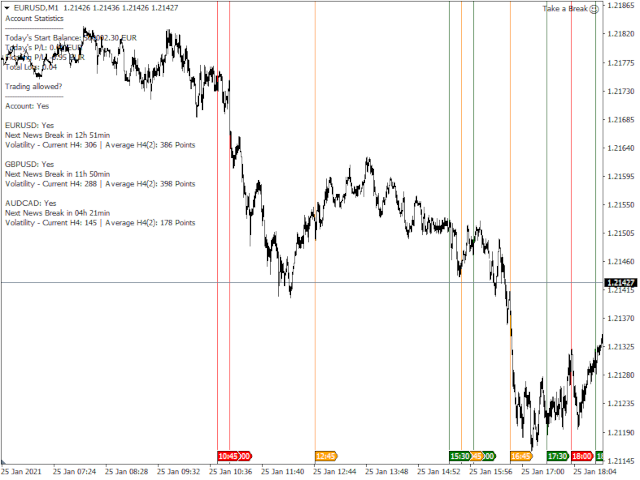
- One news filter for all your EAs. Pause before and after high, medium or low impact news. Take a Break knows which currencies matter for the chart, also for gold, indices and stocks. No setup needed.
- Daily loss and profit limits. When the limit is reached, all trades are closed and every chart pauses until the next day. Built for prop firm and funded accounts (FTMO, The5ers, FundedNext and similar).
- Your own rules (MetaTrader 5). Put any indicator on the chart and write a condition: RSI>70, Close<MA(200), ADX<20, or a buffer from your own indicator. Pause new trades or close one side. If you can code it as an indicator, Take a Break can act on it.
- Trading hours per chart. Hours per weekday, close trades outside those hours, maximum trade duration.
- AI second opinion. Every new trade entry can be assessed on the chart, with a verdict and reasoning. Optional auto-close on poor entries. Some assessments are included, your own Anthropic API key gives unlimited use.
- Works with any EA. No source code, no settings inside the EA. If it runs on a chart, Take a Break can pause it. A kill switch and risk management layer for every EA you run.
How it works
- The EA runs on one M1 chart and protects the whole account: daily limits, equity thresholds, news alerts.
- The free Take a Break Indicator goes on any chart that needs its own rules: news filter, loss limits, trading hours, spread, volatility, custom conditions.
- A paused chart keeps everything but the EA. When trading is allowed again, the EA comes back with all its settings.
Setup in three steps
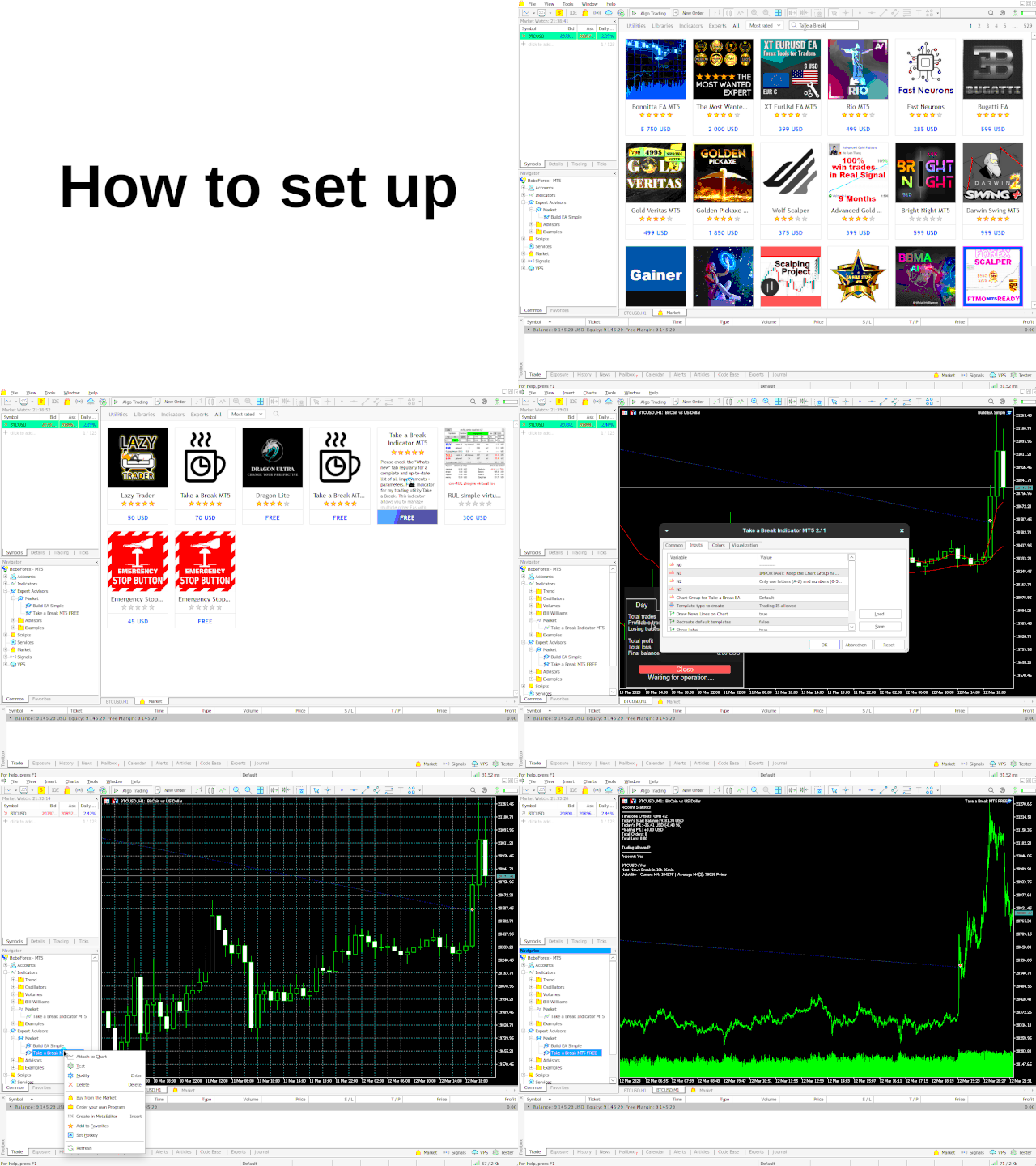
- Press CTRL+O, open the tab Expert Advisors and add this URL to the allowed WebRequest list: https://trading.custom-solutions.it
- Attach the Take a Break EA to any M1 chart. The symbol does not matter.
- Optional: add the free Take a Break Indicator to every chart that should have its own rules.
All features
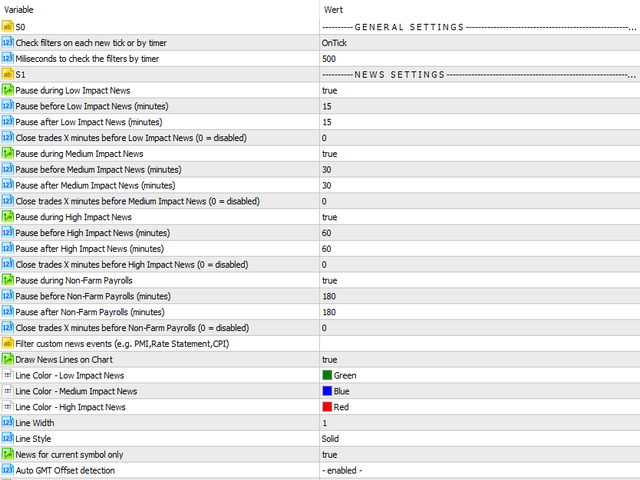
| News filter | Pause before and after special, high, medium and low impact news. Separate timing for NFP. Filter by event name ("CPI,PMI") or currency ("EUR,USD"). "0,day" trades until the release and pauses until midnight. Trade management before news: close all trades or only those with a magic number or comment, optionally only when in profit. |
| News alerts | Push, email and on-screen alerts before news, grouped per pause window, with quiet hours. |
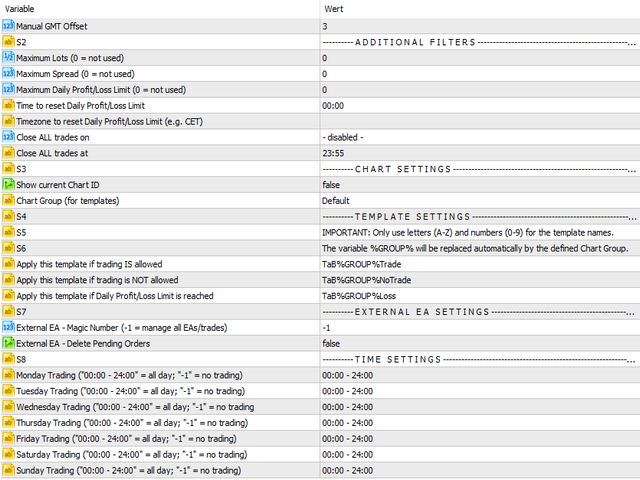
| Account and equity protection | Daily profit and loss limits in equity or balance mode, maximum drawdown per day. Minimum and maximum equity thresholds. Your own reset time and time zone. Closes all trades, pauses every chart, resumes automatically. |
| Drawdown protection per chart | Profit and loss limits in money or percent, per trade or across all trades, like a stop loss and take profit for the whole chart. A soft level that pauses new trades before the close level. Cooldown pause after a limit closed trades. |
| Custom indicator rules | MetaTrader 5 only. Conditions on any chart indicator or price, combined with AND / OR. Actions: pause new trades, close BUY, close SELL. A debug mode lists the indicator names to use. |
| Trading times (time filter) | Hours per weekday, trading sessions, days of month, days of year, months. Close trades outside trading hours. Maximum trade duration. |
| Market filters | Spread filter with maximum spread, candle volatility on any timeframe, daily price change in percent or points. |
| Order limits | Maximum open orders (total, buy or sell), maximum total lots, maximum daily orders, minimum success rate. |
| AI trade assessment | Optional: every new entry gets a verdict with reasoning and improvement hints. Assess buttons on the chart for a verdict before you enter. Optional auto-close on poor entries. |
| Trade scope | Which trades a chart counts: additional symbols, magic numbers, comments, order types. |
Good to know
- Take a Break cannot run in the Strategy Tester. Test it with the free demo, limited to one chart symbol.
- MetaTrader VPS: supported, except the AI trade assessment.
- Custom indicator rules (MT5 only).
- Update the EA and the indicator together, they work as a pair.
- Actively developed since 2018. You get support directly from me, feature requests welcome.
Full settings list and latest changes: see the What's new tab. Questions? Ask the Support Assistant at trading.custom-solutions.it/support or contact me.
















































5/5 stars, great utility, great support.