Data For Quant Researcher
- Utilitaires
-
Manit Chin
 MQL5 Developer | Overfit-proof testing and account protection for EAs
I help traders answer two questions before real money is at risk:
1) Is this strategy real, or just fitted to the past?
2) Will the account survive when something goes wrong?
Protection against overfitting - Version: 1.21
- Activations: 5
Records clean M1 data with real tick counts and spreads for up to 6 symbols from one chart, spike and spread-widening minutes, a daily spread-by-hour table, a daily cross-market table and the facts of every closed trade, into weekly CSV files. Optional daily delivery to your own Telegram bot. It never opens or changes trades.
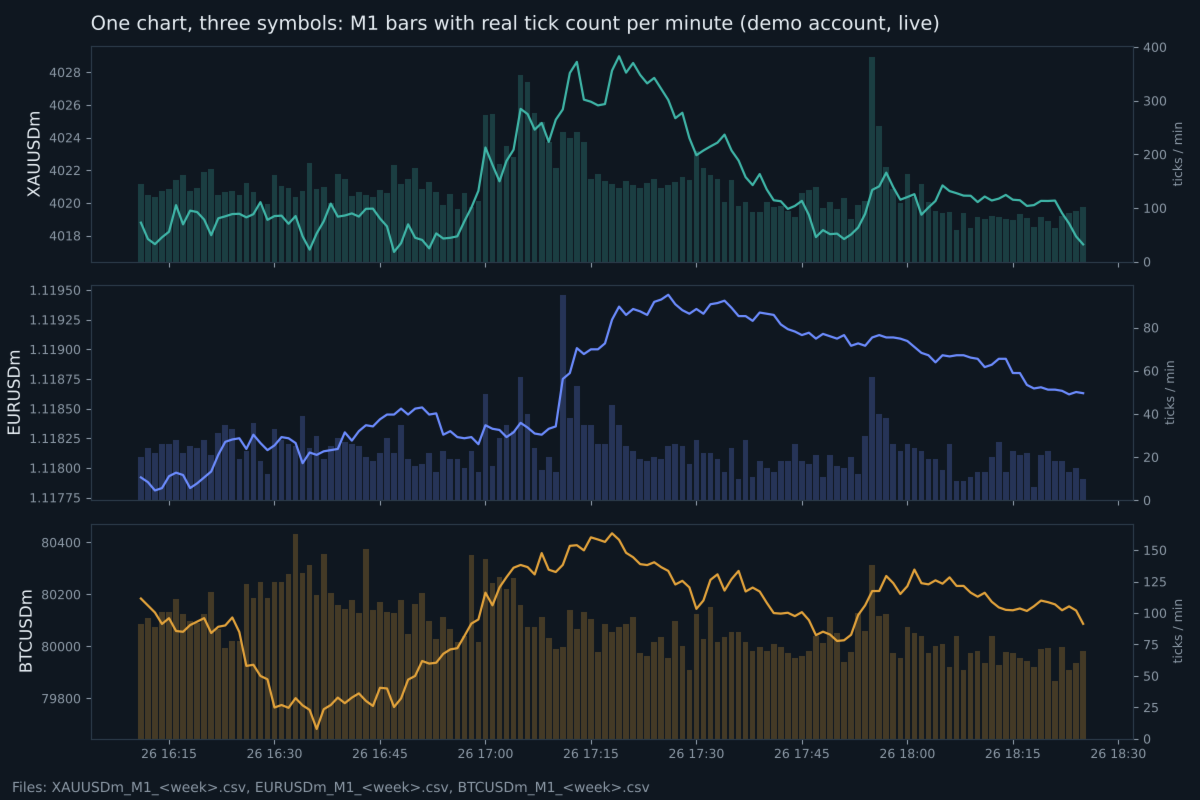
Data For Quant Researcher is a recording tool for people who study their market and their own execution with real data instead of guesses. Attach it to one chart and it records that symbol plus up to five more, around the clock, on an MQL5 VPS or on your own PC.
What it records
Market data (each symbol, every closed minute)
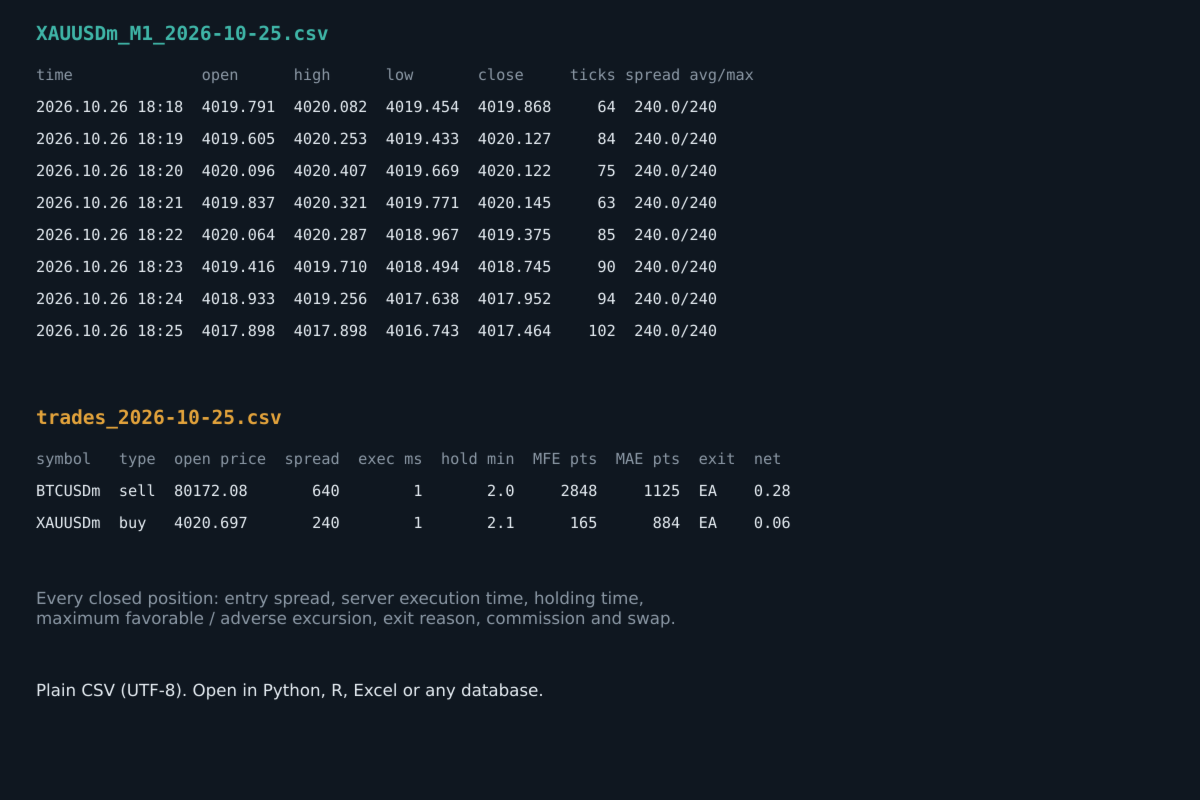
- M1 open, high, low, close and tick volume
- the real number of ticks in that minute
- average, maximum and minimum spread in points
- a flag when ticks were not available, instead of zeros
Events
- price gaps inside the trading session
- market-closed gaps with the price change at the reopen (daily breaks, weekends)
- terminal disconnections and reconnections, starts and stops
Spikes (the symbols you choose)
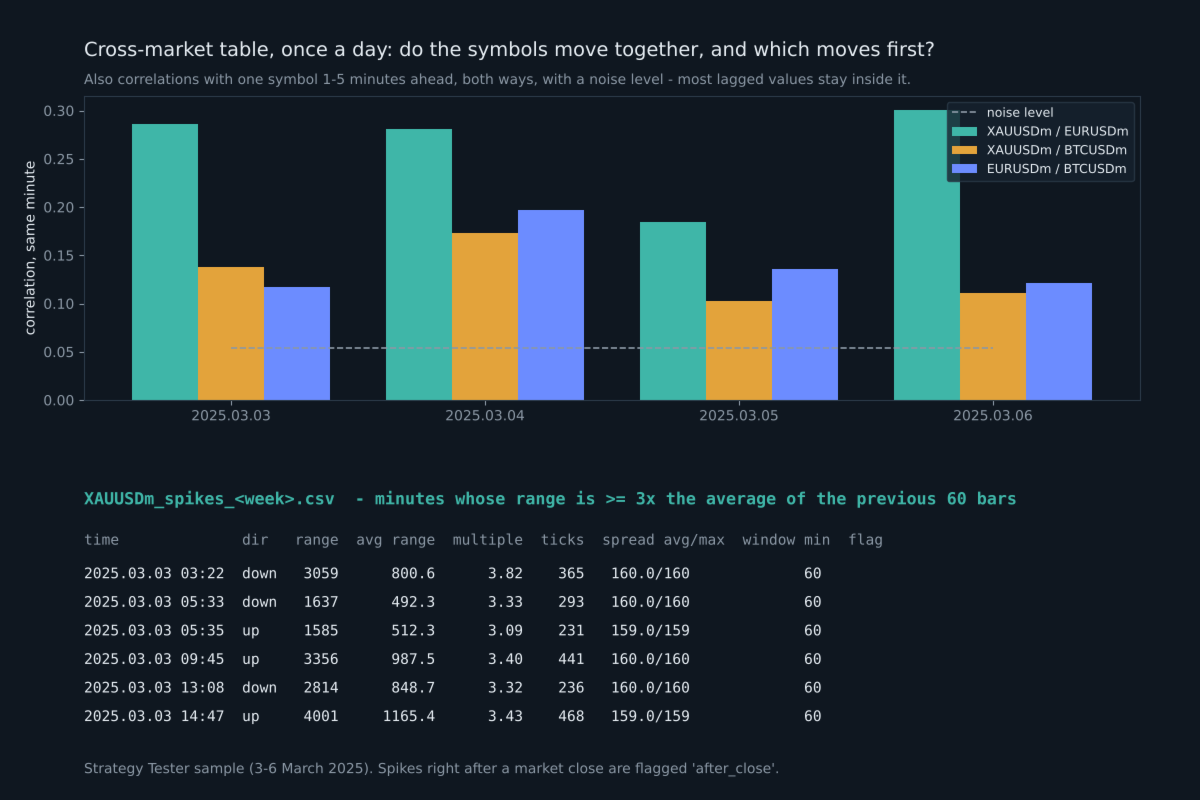
- every minute whose high-low range is at least N times (default 3) the average range of the previous 60 bars
- direction, range and body in points, the multiple, ticks and spread in that minute, minutes since the previous spike
- spikes right after a market close (Sunday open, daily break) are flagged separately
Spread widening (the symbols you choose)
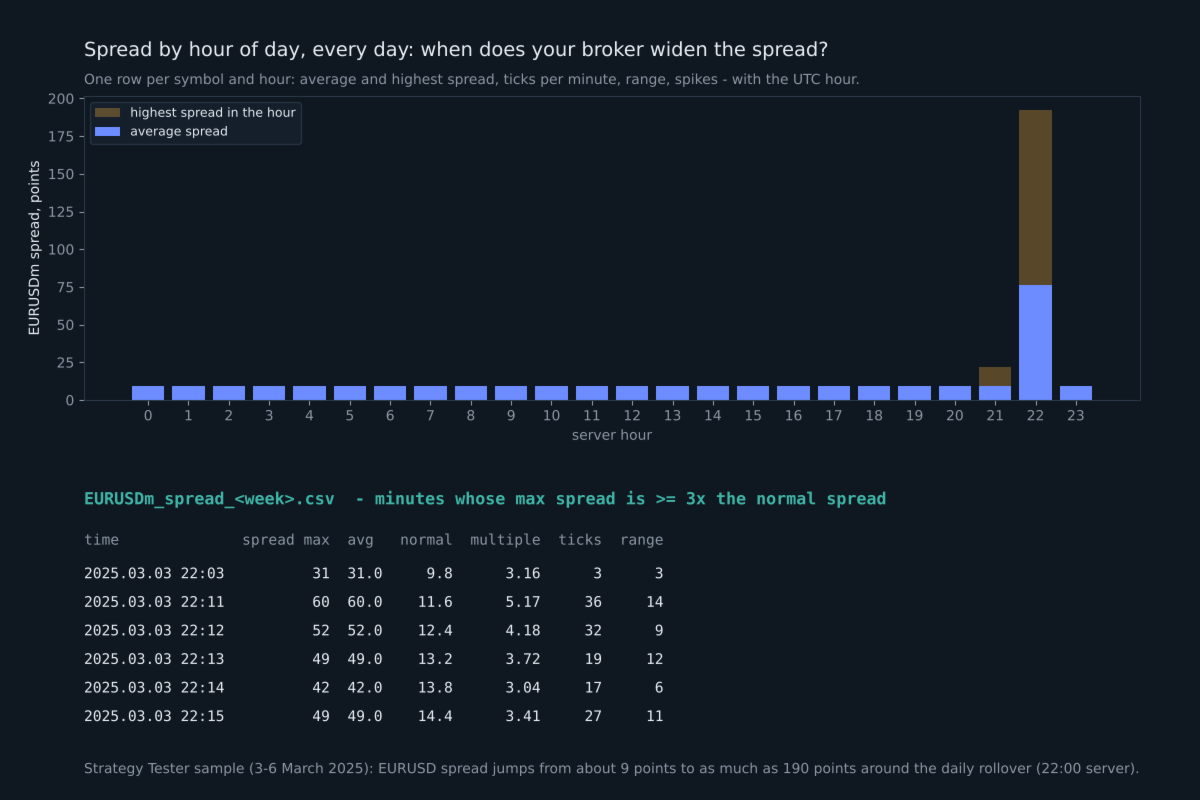
- every minute whose maximum spread is at least N times (default 3) the normal spread of the previous 60 minutes
- the spread, the normal spread, the multiple, ticks and range in that minute
- shows exactly when your broker widens the spread: news, rollover, market open
Spread by hour of day (once a day)
- for every symbol and hour: average and highest spread, ticks per minute, average range, spike and widening counts
- with the UTC hour, so you can read it in your own time zone; opens straight in Excel
Cross-market table (the symbols you choose, once a day)
- for every pair: how closely their 1-minute moves follow each other in the same minute (correlation from -1 to +1)
- the same with one symbol 1 to 5 minutes ahead of the other, in both directions, and which lag was strongest
- noise levels for that day (one for a single value, a stricter one for the strongest of the 10 lags), so you can see whether a value means anything
- how often the two symbols spike in the same minute, or one 1-5 minutes after the other, next to what pure chance would give
At 1-minute resolution most "which moves first" values are close to zero on most days. The table measures; it does not predict.
Symbol specifications, once a day
- swap long and short (also as % of the position value per night), triple swap day, contract size, tick value, stops and freeze level, volume min/step/max, server time offset to UTC
Closed trades (all magic numbers, or only the ones you choose)
- open and close time and price, volume, magic number, exit reason (SL, TP, EA, manual, stop out)
- spread at entry
- server execution time of the entry order
- requested price and slippage, when the broker keeps the requested price in the order
- holding time, maximum favorable and maximum adverse excursion (from ticks for trades up to 6 hours, otherwise from M1 bars)
- commission, swap, profit and net result
- the exit side too: spread at exit, execution time of the closing order, requested close price and slippage (SL slippage when the broker keeps the SL level), number of closing deals
How the files are organized
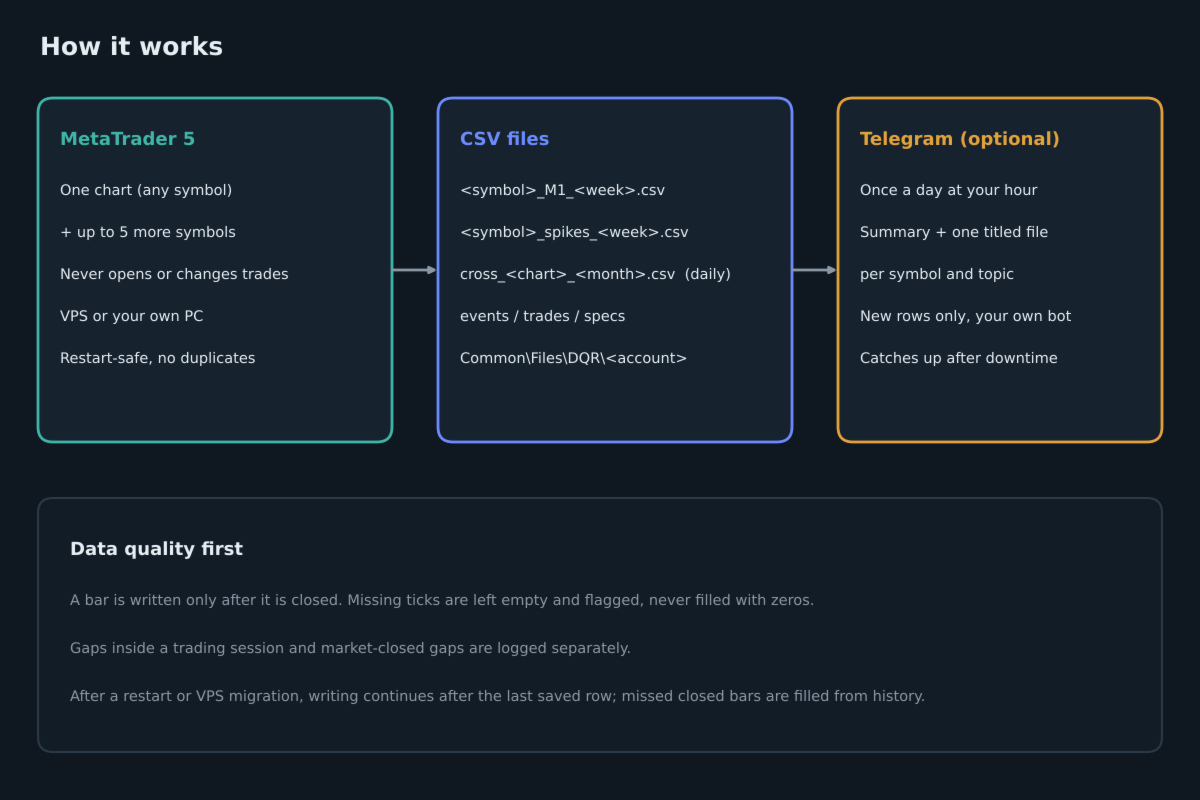
All files are plain UTF-8 CSV in the common data folder of MetaTrader: Common\Files\DQR\account number. The full path is printed in the Experts tab and shown on the chart. There is one file per symbol per week (Sunday open to Friday close), one spike file per symbol per week, plus events, trades and monthly specs and cross-market files. The files open directly in Python, R, Excel or any database.
Running on your own PC: nothing else is needed, the files are already on your computer.
Running on an MQL5 VPS: files there cannot be downloaded, so turn on the daily Telegram report.
Built for clean data
- A bar is written only after it is closed and after a short delay, so a forming bar is never recorded.
- After a restart, an input change or a VPS migration, writing continues after the last saved row. Closed bars that were missed are filled from history. No row is written twice.
- If the terminal's history is still loading, the program waits instead of writing incomplete data.
- Two charts on the same account cannot record the same symbol twice.
- After an update that adds columns, an older file is renamed and a new one is started, so columns are never mixed.
Daily Telegram report (optional)
Once a day, at the hour you choose, your own Telegram bot receives a short summary and CSV files with only the rows added since the previous report: one file per symbol and topic, each with a title such as "XAUUSD | Spikes | from -> to | 7 rows". If the computer or VPS was off, the next report catches up. Your data goes only to your own bot. Telegram is off by default.
To use it, add https://api.telegram.org in Tools, Options, Expert Advisors, Allow WebRequest, and fill in the bot token and chat id. A step-by-step guide, including how to download the files from Telegram to your PC automatically, and a guide to every column are in the comments of this product.
Inputs
- InpSymbols: up to 5 more symbols besides the chart, for example "EURUSD, BTCUSD" (exact names as in Market Watch)
- InpSpikeOn, InpSpikeSymbols, InpSpikeMult: spike recording, which symbols (empty = all), the multiple
- InpCrossOn, InpCrossSymbols: the daily cross-market table, which symbols (at least 2, empty = all)
- InpSpreadOn, InpSpreadSymbols, InpSpreadMult: spread widening and the hourly spread table, which symbols, the multiple
- InpBackfillHours: hours of history to record on the first start (0 to 168)
- InpLagSec: seconds to wait after a minute closes before writing it
- InpGapMin: minimum gap in minutes that is reported inside a trading session
- InpTrades, InpTradeMagics, InpTradeAllSymbols, InpTradeBackfillDays: closed-trade recording
- InpFolder: sub-folder name in the common Files folder
- InpTgOn, InpTgToken, InpTgChatId, InpTgHour, InpTgGmtOffset, InpTgSendFiles: daily Telegram report
- InpTesterDemo, InpTesterTicks: Strategy Tester only
What was tested
- Strategy Tester, three symbols with real ticks: no duplicate rows, no rows out of order, OHLC consistent in every row, daily breaks reported correctly. Spike minutes, spread widening minutes, the spread-by-hour table and cross-market values were recomputed independently from the M1 files and matched exactly.
- Strategy Tester, three months of EURUSD: one file per trading week, data gaps inside the session found and reported.
- Live demo account, three symbols with two test trades and a terminal restart: continuous minutes with no duplicates after the restart, trades recorded once, maximum favorable and adverse excursion checked against the M1 bars.
- A built-in self-test (input InpRunSelfTest) checks the calculations and writes the result to a file.
Notes
- The program does not trade on a live or demo chart. Only in the Strategy Tester it opens one small example trade per day (InpTesterDemo) so the trade file can be seen there.
- All times are broker server time; the specs file gives the server offset to UTC.
- In the Strategy Tester, tick and spread columns are empty unless InpTesterTicks is true, because reading ticks for every minute is slow. Use "Every tick based on real ticks" with it.
- Slippage needs the requested price in the order. Many market-execution accounts do not keep it; then those two columns stay empty.
- The program gives data, not trading signals, and makes no promise of any trading result.