Dolphin Wave Rider IMM
- Experts
-
Imad Saadeh
 🔹 Professional gold & crypto trader (GMT+2)
🔹 Developer of robust MT5 Expert Advisors & dashboards
🔹 Focused on risk management, equity protection & automation
🔹 Global community leader, sharing transparent trading solutions - Version: 1.23
- Mise à jour: 28 août 2026
- Activations: 10
Dolphin Wave Rider IMM is an automated MetaTrader 5 strategy designed to evaluate structured trend opportunities using hourly price data.
The strategy combines market-structure breaks with trend alignment and Relative Strength Index confirmation. By default, trading decisions use completed candles to reduce intrabar signal changes.
### Trade management
Automatic entries use broker-adapted stop-loss and take-profit prices. Position volume can be calculated from an equity-risk percentage or a fixed lot value.
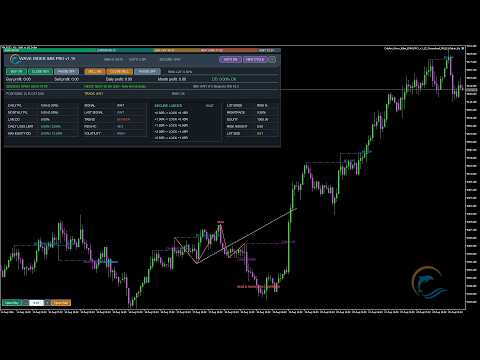
The Secure Ladder contains five configurable stages. When price reaches a stage trigger, the stop is advanced to the corresponding secured reward-to-risk level. Reached stages are shown as locked on the chart panel. Optional Average True Range trailing can continue after the fifth stage.
The user can select a fixed reward-to-risk target or remove the fixed target and allow the Secure Ladder to manage the position.
### Safety controls
The Expert Advisor includes:
- Maximum equity drawdown protection- Daily profit target- Daily loss limit- Consecutive-loss cooldown- Maximum spread filter- Trading-session schedule- Monday start and Friday cutoff controls- Optional MetaTrader economic-calendar filter- Symbol, volume, margin, filling-policy, stop-level and freeze-level checks- Symbol and magic-number filtering for managed positions
### Chart interface
The expanded and minimized panels display position statistics, daily and monthly results, drawdown, signal state, risk state, news status and Secure Ladder progress.
Panel buttons provide automatic-trading controls, direction controls, managed-position closing and manual buy or sell orders. A Dolphin watermark identifies the product on live and visual-test charts.
### Testing and operation
The default signal timeframe is H1. The Expert Advisor may be attached to a chart of the symbol to be traded. Broker server time is used for the trading schedule.
The MetaTrader economic calendar is used on live charts. Calendar filtering is bypassed in Strategy Tester because live calendar history is not reproduced by tester agents.
Trading results depend on market conditions, spread, slippage, symbol specifications, broker execution and selected settings. Historical tests do not represent future or live results. Test the Expert Advisor in Strategy Tester and on a demo account before considering live use.
### Support
For support, use the product comments section or MQL5 messaging. Include the MetaTrader 5 build, broker, symbol, chart timeframe, input settings and relevant Experts and Journal messages.
## 5. Input parameters
### Strategy
| Parameter | Default | Purpose ||---|---:|---|| Signal timeframe | H1 | Timeframe used by the signal engine || Evaluate completed candles only | true | Uses closed candles by default |
### Risk and Orders
| Parameter | Default | Purpose ||---|---:|---|| Unique magic number | 240826001 | Identifies positions managed by this instance || Use equity-risk position sizing | true | Selects risk-percent sizing || Equity risk per automatic trade | 0.50% | Risk allocation for automatic entries || Fixed lot when risk sizing is off | 0.01 | Automatic-entry lot in fixed mode || Initial lot for panel orders | 0.01 | Starting lot for manual panel orders || Fixed target reward-to-risk ratio | 2.00 | Target distance when a fixed target is used || Maximum spread in pips | 0.0 | Zero disables the spread ceiling || Close managed opposite position | true | Allows managed reversal handling |
### Secure Ladder
| Parameter | Default | Purpose ||---|---:|---|| Enable progressive stop protection | true | Enables the ladder || Remove fixed target and use ladder | false | Zeroes the fixed take profit when enabled || Step 1 trigger / secured level | 0.50R / 0.05R | First protected stage || Step 2 trigger / secured level | 1.00R / 0.35R | Second protected stage || Step 3 trigger / secured level | 1.50R / 0.80R | Third protected stage || Step 4 trigger / secured level | 2.00R / 1.25R | Fourth protected stage || Step 5 trigger / secured level | 2.50R / 1.75R | Fifth protected stage || Trail after step 5 | true | Enables post-stage-five trailing || ATR trailing distance | 1.20 | Average True Range multiplier used by trailing |
Triggers must increase from step 1 through step 5. Secured values must not decrease and cannot exceed their corresponding triggers.
### Safety and News
| Parameter | Default | Purpose ||---|---:|---|| Maximum equity drawdown | 12.0% | Closes managed exposure and locks trading at the limit || Use daily profit target | true | Blocks new entries after reaching the target || Daily profit target | 6.0% | Daily managed-profit threshold || Use daily loss protection | true | Enables the daily loss limit || Daily loss limit | 2.5% | Closes managed exposure and locks trading at the limit || Losses before cooldown | 2 | Zero disables the cooldown trigger || Cooldown duration | 12 hours | Pause after the configured consecutive losses || Use economic-calendar filter | true | Uses the native MetaTrader calendar || Close positions in news window | false | Optional managed-position closure || Block minutes before news | 60 | Pre-event entry blackout || Block minutes after news | 30 | Post-event entry blackout |
### Trading Schedule
| Parameter | Default | Purpose ||---|---:|---|| Use session filter | true | Restricts automatic entries by broker server time || Session start hour | 02:00 | Automatic-entry start || Session end hour | 19:00 | Automatic-entry end || Friday cutoff hour | 18:30 | Friday automatic-entry cutoff; minutes are protected internally || Monday start hour | 03:00 | Monday automatic-entry start |
### Display
| Parameter | Default | Purpose ||---|---:|---|| Show chart visuals | true | Shows market-structure and risk drawings || Show Dolphin control panel | true | Displays the chart interface || Start panel minimized | false | Selects initial panel mode |
The Dolphin watermark is always active on live and visual-test charts. Its visibility and appearance are protected settings and do not appear in customer inputs.
## 6. Suggested screenshot set
Use PNG or JPG files under 2 MB. Prepare 1280 × 720 or 1920 × 1080 images so at least one side exceeds 720 pixels and the image remains within 1920 × 1080. All visible text must be English.
Recommended sequence:
1. Expanded panel with no open position, showing the complete interface.2. Minimized panel showing logo and compact status fields.3. Chart with a bullish market-structure break and entry/risk drawings.4. Chart with a bearish market-structure break.5. Secure Ladder with one or more rows visibly marked `[LOCKED]`.6. Panel showing the configurable five-stage ladder values.7. Native-news status and trading-session ribbon.8. Dolphin watermark on a clean chart area.9. Input dialog showing the six streamlined groups.10. Strategy Tester settings used for a demonstration test.
Do not add profit guarantees, account-growth claims, money imagery, awards, testimonials, external URLs or messenger details. If showing a backtest, label it clearly as a historical Strategy Tester result.
## 7. Recommended test disclosure
Use this caption whenever a historical test is shown:
> Historical Strategy Tester demonstration using the stated symbol, dates, model and settings. This is not a live trading result and does not predict future performance.
## 8. Version 1.15 release notes
Paste this into the version update field:
> Initial Market submission. Includes streamlined customer inputs, broker-adaptive filling and volume handling, margin and directional-volume checks, completed-candle IMM signals, five-stage Secure Ladder status, daily and equity protection, native news filtering, stable expanded and minimized panels, and an embedded Dolphin watermark.
## 9. Upload and validation sequence
1. Confirm that the MQL5 account has approved Seller status.2. Select Add Product and choose MetaTrader 5 Expert Advisor.3. Enter the product name, version, price and activation count.4. Upload the three logo sizes.5. Paste the short and full descriptions.6. Upload the prepared screenshots in the recommended order.7. Upload only the v1.15 EX5 as the Product file.8. Start automatic validation.9. Save the full validation log if any test fails.10. Correct only the condition identified by the validation report and upload a newly compiled version.11. After validation passes, review the public page in both desktop and terminal views before publishing.
## 10. Final engineering checklist
- MetaEditor compilation: 0 errors, 0 warnings- Product file is EX5- No DLL imports- No WebRequest or socket dependency- No external licensing or account/broker restriction- No external image or indicator dependency- English input labels and output messages- Broker filling mode selected from symbol settings- Volume normalized to minimum, maximum and step- Directional symbol-volume limit checked- Free margin checked before entry- Stop and freeze levels handled- Trade-server result codes checked- Nonvisual tester drawing suppressed- Live calendar bypassed safely in Strategy Tester- Watermark active and hidden from customer inputs- Input surface limited to 43 settings in 6 groups
## 11. Risk notice
> Trading financial instruments involves risk. This Expert Advisor cannot guarantee results. Market conditions, spread, slippage, symbol specifications, broker execution and user settings can materially affect performance. Use Strategy Tester and demo testing before live operation, and select risk settings appropriate for the account.
## 12. Logo production record
The logo was created with the built-in ImageGen workflow using this production brief:
> Create an original vector-like emblem for Dolphin Wave Rider IMM: a streamlined dolphin rising through one ocean wave, enclosed by a partial amber-gold circular arc. Use a deep navy background with cyan and teal artwork. Keep a strong centered silhouette and generous safe margin that remains recognizable at 60 × 60 pixels. Include no text, letters, numbers, currency symbols, money, valuables, candlestick charts, profit arrows, mockups, three-dimensional effects or watermarks.
The generated master was flattened onto a solid navy background and resized individually with high-quality resampling for each required Market placement.
The strategy combines market-structure breaks with trend alignment and Relative Strength Index confirmation. By default, trading decisions use completed candles to reduce intrabar signal changes.
### Trade management
Automatic entries use broker-adapted stop-loss and take-profit prices. Position volume can be calculated from an equity-risk percentage or a fixed lot value.
The Secure Ladder contains five configurable stages. When price reaches a stage trigger, the stop is advanced to the corresponding secured reward-to-risk level. Reached stages are shown as locked on the chart panel. Optional Average True Range trailing can continue after the fifth stage.
The user can select a fixed reward-to-risk target or remove the fixed target and allow the Secure Ladder to manage the position.
### Safety controls
The Expert Advisor includes:
- Maximum equity drawdown protection- Daily profit target- Daily loss limit- Consecutive-loss cooldown- Maximum spread filter- Trading-session schedule- Monday start and Friday cutoff controls- Optional MetaTrader economic-calendar filter- Symbol, volume, margin, filling-policy, stop-level and freeze-level checks- Symbol and magic-number filtering for managed positions
### Chart interface
The expanded and minimized panels display position statistics, daily and monthly results, drawdown, signal state, risk state, news status and Secure Ladder progress.
Panel buttons provide automatic-trading controls, direction controls, managed-position closing and manual buy or sell orders. A Dolphin watermark identifies the product on live and visual-test charts.
### Testing and operation
The default signal timeframe is H1. The Expert Advisor may be attached to a chart of the symbol to be traded. Broker server time is used for the trading schedule.
The MetaTrader economic calendar is used on live charts. Calendar filtering is bypassed in Strategy Tester because live calendar history is not reproduced by tester agents.
Trading results depend on market conditions, spread, slippage, symbol specifications, broker execution and selected settings. Historical tests do not represent future or live results. Test the Expert Advisor in Strategy Tester and on a demo account before considering live use.
### Support
For support, use the product comments section or MQL5 messaging. Include the MetaTrader 5 build, broker, symbol, chart timeframe, input settings and relevant Experts and Journal messages.
## 5. Input parameters
### Strategy
| Parameter | Default | Purpose ||---|---:|---|| Signal timeframe | H1 | Timeframe used by the signal engine || Evaluate completed candles only | true | Uses closed candles by default |
### Risk and Orders
| Parameter | Default | Purpose ||---|---:|---|| Unique magic number | 240826001 | Identifies positions managed by this instance || Use equity-risk position sizing | true | Selects risk-percent sizing || Equity risk per automatic trade | 0.50% | Risk allocation for automatic entries || Fixed lot when risk sizing is off | 0.01 | Automatic-entry lot in fixed mode || Initial lot for panel orders | 0.01 | Starting lot for manual panel orders || Fixed target reward-to-risk ratio | 2.00 | Target distance when a fixed target is used || Maximum spread in pips | 0.0 | Zero disables the spread ceiling || Close managed opposite position | true | Allows managed reversal handling |
### Secure Ladder
| Parameter | Default | Purpose ||---|---:|---|| Enable progressive stop protection | true | Enables the ladder || Remove fixed target and use ladder | false | Zeroes the fixed take profit when enabled || Step 1 trigger / secured level | 0.50R / 0.05R | First protected stage || Step 2 trigger / secured level | 1.00R / 0.35R | Second protected stage || Step 3 trigger / secured level | 1.50R / 0.80R | Third protected stage || Step 4 trigger / secured level | 2.00R / 1.25R | Fourth protected stage || Step 5 trigger / secured level | 2.50R / 1.75R | Fifth protected stage || Trail after step 5 | true | Enables post-stage-five trailing || ATR trailing distance | 1.20 | Average True Range multiplier used by trailing |
Triggers must increase from step 1 through step 5. Secured values must not decrease and cannot exceed their corresponding triggers.
### Safety and News
| Parameter | Default | Purpose ||---|---:|---|| Maximum equity drawdown | 12.0% | Closes managed exposure and locks trading at the limit || Use daily profit target | true | Blocks new entries after reaching the target || Daily profit target | 6.0% | Daily managed-profit threshold || Use daily loss protection | true | Enables the daily loss limit || Daily loss limit | 2.5% | Closes managed exposure and locks trading at the limit || Losses before cooldown | 2 | Zero disables the cooldown trigger || Cooldown duration | 12 hours | Pause after the configured consecutive losses || Use economic-calendar filter | true | Uses the native MetaTrader calendar || Close positions in news window | false | Optional managed-position closure || Block minutes before news | 60 | Pre-event entry blackout || Block minutes after news | 30 | Post-event entry blackout |
### Trading Schedule
| Parameter | Default | Purpose ||---|---:|---|| Use session filter | true | Restricts automatic entries by broker server time || Session start hour | 02:00 | Automatic-entry start || Session end hour | 19:00 | Automatic-entry end || Friday cutoff hour | 18:30 | Friday automatic-entry cutoff; minutes are protected internally || Monday start hour | 03:00 | Monday automatic-entry start |
### Display
| Parameter | Default | Purpose ||---|---:|---|| Show chart visuals | true | Shows market-structure and risk drawings || Show Dolphin control panel | true | Displays the chart interface || Start panel minimized | false | Selects initial panel mode |
The Dolphin watermark is always active on live and visual-test charts. Its visibility and appearance are protected settings and do not appear in customer inputs.
## 6. Suggested screenshot set
Use PNG or JPG files under 2 MB. Prepare 1280 × 720 or 1920 × 1080 images so at least one side exceeds 720 pixels and the image remains within 1920 × 1080. All visible text must be English.
Recommended sequence:
1. Expanded panel with no open position, showing the complete interface.2. Minimized panel showing logo and compact status fields.3. Chart with a bullish market-structure break and entry/risk drawings.4. Chart with a bearish market-structure break.5. Secure Ladder with one or more rows visibly marked `[LOCKED]`.6. Panel showing the configurable five-stage ladder values.7. Native-news status and trading-session ribbon.8. Dolphin watermark on a clean chart area.9. Input dialog showing the six streamlined groups.10. Strategy Tester settings used for a demonstration test.
Do not add profit guarantees, account-growth claims, money imagery, awards, testimonials, external URLs or messenger details. If showing a backtest, label it clearly as a historical Strategy Tester result.
## 7. Recommended test disclosure
Use this caption whenever a historical test is shown:
> Historical Strategy Tester demonstration using the stated symbol, dates, model and settings. This is not a live trading result and does not predict future performance.
## 8. Version 1.15 release notes
Paste this into the version update field:
> Initial Market submission. Includes streamlined customer inputs, broker-adaptive filling and volume handling, margin and directional-volume checks, completed-candle IMM signals, five-stage Secure Ladder status, daily and equity protection, native news filtering, stable expanded and minimized panels, and an embedded Dolphin watermark.
## 9. Upload and validation sequence
1. Confirm that the MQL5 account has approved Seller status.2. Select Add Product and choose MetaTrader 5 Expert Advisor.3. Enter the product name, version, price and activation count.4. Upload the three logo sizes.5. Paste the short and full descriptions.6. Upload the prepared screenshots in the recommended order.7. Upload only the v1.15 EX5 as the Product file.8. Start automatic validation.9. Save the full validation log if any test fails.10. Correct only the condition identified by the validation report and upload a newly compiled version.11. After validation passes, review the public page in both desktop and terminal views before publishing.
## 10. Final engineering checklist
- MetaEditor compilation: 0 errors, 0 warnings- Product file is EX5- No DLL imports- No WebRequest or socket dependency- No external licensing or account/broker restriction- No external image or indicator dependency- English input labels and output messages- Broker filling mode selected from symbol settings- Volume normalized to minimum, maximum and step- Directional symbol-volume limit checked- Free margin checked before entry- Stop and freeze levels handled- Trade-server result codes checked- Nonvisual tester drawing suppressed- Live calendar bypassed safely in Strategy Tester- Watermark active and hidden from customer inputs- Input surface limited to 43 settings in 6 groups
## 11. Risk notice
> Trading financial instruments involves risk. This Expert Advisor cannot guarantee results. Market conditions, spread, slippage, symbol specifications, broker execution and user settings can materially affect performance. Use Strategy Tester and demo testing before live operation, and select risk settings appropriate for the account.
## 12. Logo production record
The logo was created with the built-in ImageGen workflow using this production brief:
> Create an original vector-like emblem for Dolphin Wave Rider IMM: a streamlined dolphin rising through one ocean wave, enclosed by a partial amber-gold circular arc. Use a deep navy background with cyan and teal artwork. Keep a strong centered silhouette and generous safe margin that remains recognizable at 60 × 60 pixels. Include no text, letters, numbers, currency symbols, money, valuables, candlestick charts, profit arrows, mockups, three-dimensional effects or watermarks.
The generated master was flattened onto a solid navy background and resized individually with high-quality resampling for each required Market placement.