MTF Trend Helper
- Indicateurs
-
Vedran Brkic
 Hello,
welcome to my personal WALL.
I do trading for several years, using a strategy based on input signals and output.
I work on all currencies and follow the market trend.
I use a experimental strategy 5in1 with base the trend following.
---- NO --- MARTINGALA.
signals: - Version: 1.0
- Activations: 20
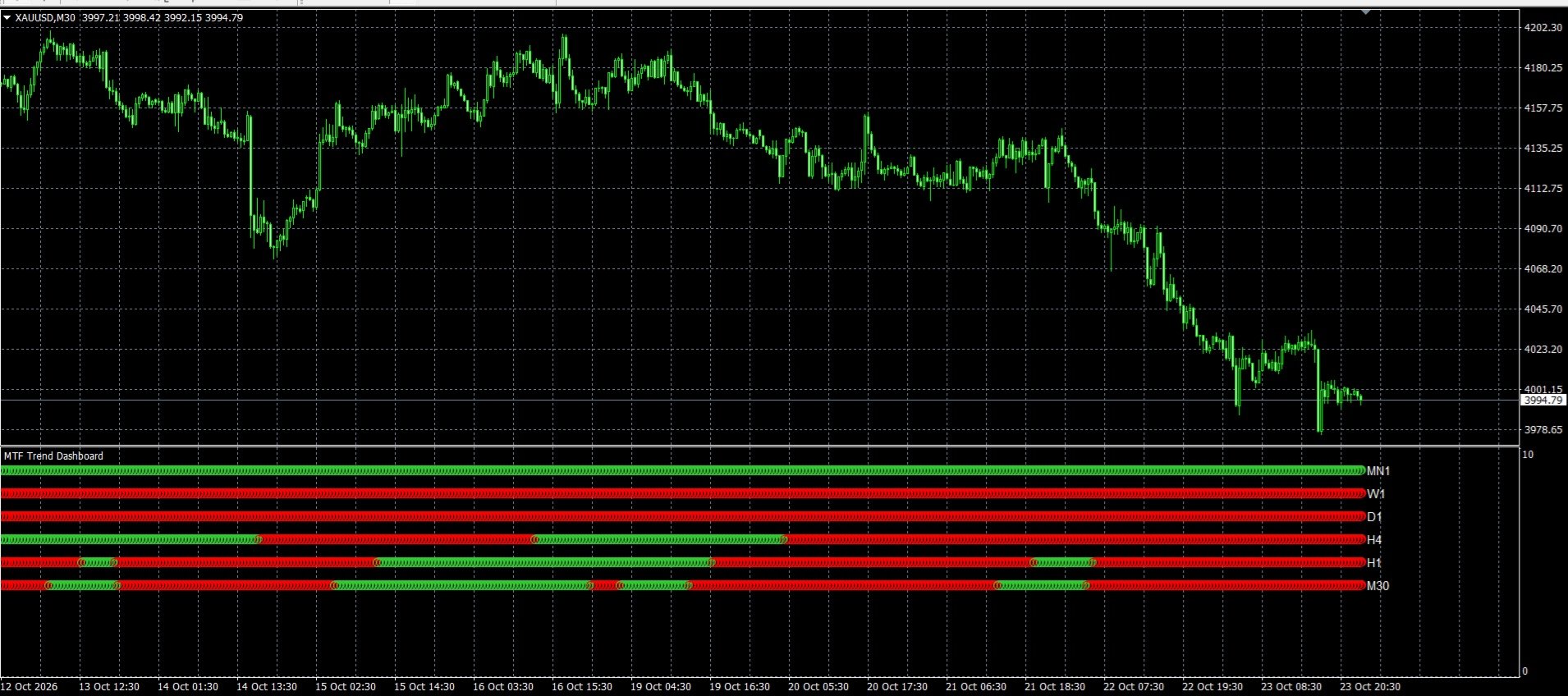
The MTF Trend Dashboard indicator is a visual technical analysis tool designed for MetaTrader 4 that centralizes the trend status of all timeframes into a single separate window below the main chart.
Instead of forcing you to constantly switch charts (from M5 to H4, D1, etc.) to check the macro trend, the indicator calculates real-time crossovers and maps the situation as a graphical matrix of colored bars.
Here is a detailed description of its operation and structure:
Here is a detailed description of its operation and structure:
📊 Visual Structure and Operation
The indicator is displayed in a chart sub-window (similar to classic oscillators like RSI or MACD) and is structured across 9 distinct horizontal rows, one for each official MT4 timeframe:
• MN1 (Monthly) - Top row
• W1 (Weekly)
• D1 (Daily)
• H4 (4 Hours)
• H1 (1 Hour)
• M30 (30 Minutes)
• M15 (15 Minutes)
• M5 (5 Minutes)
• M1 (1 Minute) - Bottom row
For every single bar on the main chart, the indicator plots a vertical column of small squares. The color of each square indicates the trend status on that specific timeframe at that particular moment:
• Green Square (clrLimeGreen): Bullish Trend. The Fast Moving Average is above the Slow Moving Average on the corresponding timeframe.
• Red Square (clrRed): Bearish Trend. The Fast Moving Average is below the Slow Moving Average on the corresponding timeframe.
• MN1 (Monthly) - Top row
• W1 (Weekly)
• D1 (Daily)
• H4 (4 Hours)
• H1 (1 Hour)
• M30 (30 Minutes)
• M15 (15 Minutes)
• M5 (5 Minutes)
• M1 (1 Minute) - Bottom row
For every single bar on the main chart, the indicator plots a vertical column of small squares. The color of each square indicates the trend status on that specific timeframe at that particular moment:
• Green Square (clrLimeGreen): Bullish Trend. The Fast Moving Average is above the Slow Moving Average on the corresponding timeframe.
• Red Square (clrRed): Bearish Trend. The Fast Moving Average is below the Slow Moving Average on the corresponding timeframe.
⚙️ Customizable Input Parameters
From the indicator's properties window, you can adjust the operational filters to match your trading strategy:
• FastMAPeriod (Default: 10): The period of the most reactive (Fast) Moving Average.
• SlowMAPeriod (Default: 50): The period of the baseline (Slow) Moving Average.
• MAMethod (Default: MODE_SMA): The type of Moving Average to use. You can choose between Simple (SMA), Exponential (EMA), Smoothed (SMMA), or Linear Weighted (LWMA).
• MAPrice (Default: PRICE_CLOSE): The price source used to calculate the averages (Close, Open, High, Low, etc.).
• FastMAPeriod (Default: 10): The period of the most reactive (Fast) Moving Average.
• SlowMAPeriod (Default: 50): The period of the baseline (Slow) Moving Average.
• MAMethod (Default: MODE_SMA): The type of Moving Average to use. You can choose between Simple (SMA), Exponential (EMA), Smoothed (SMMA), or Linear Weighted (LWMA).
• MAPrice (Default: PRICE_CLOSE): The price source used to calculate the averages (Close, Open, High, Low, etc.).
💡 Synchronization Logic and Trading Advantages
- Perfect Visual Backtesting: Thanks to the native MT4 iBarShift function, the indicator does not just show the current situation on the latest candle; it historically reconstructs the state of higher timeframes in the past. By scrolling the chart backward, you can see exactly what the H4 or D1 timeframes were indicating during an old signal on the 5-minute chart.
- Lower Timeframe Protection (Auto-Filtering): To avoid time interpolation errors (for instance, trying to display 1-minute data on a daily chart), the indicator applies an automatic protection: it only displays timeframes equal to or higher than that of the active chart. If you open a 1-Hour (H1) chart, the rows from M1 to M30 will remain blank ( EMPTY_VALUE ), eliminating unnecessary chart noise.
- Confluence Analysis (Trend Alignment): The primary objective of this indicator is to simplify the search for "confluence". When you see most of the squares (for example, from M15 up to D1) turning Green at the same time, you get mathematical confirmation of a strongly aligned trend, drastically reducing the risk of trading against the counter-trend.