Super Breakout Robot
- Experts
-
Nuttapon Maneechote
 📊 CRYPTOWANLANID EA DASHBOARD
A centralized platform for monitoring the group’s EAs and real trading portfolios—all in one dashboard.
✅ Members who register under the group’s IB can access Copy Trading for every available system in the group—with 0% Profit Sharing. - Version: 2.81
- Mise à jour: 6 septembre 2026
- Activations: 10
Automated Gold Breakout Trading for MetaTrader 5
Super Breakout Robot is an automated trading system developed specifically for XAUUSD on MetaTrader 5.
The Expert Advisor monitors market conditions and searches for qualified breakout opportunities. It combines breakout confirmation, market direction analysis, volatility evaluation, and built-in risk controls before placing an order.
The internal entry and exit algorithms are proprietary. This description explains the general operation of the EA without disclosing its confidential trading logic.
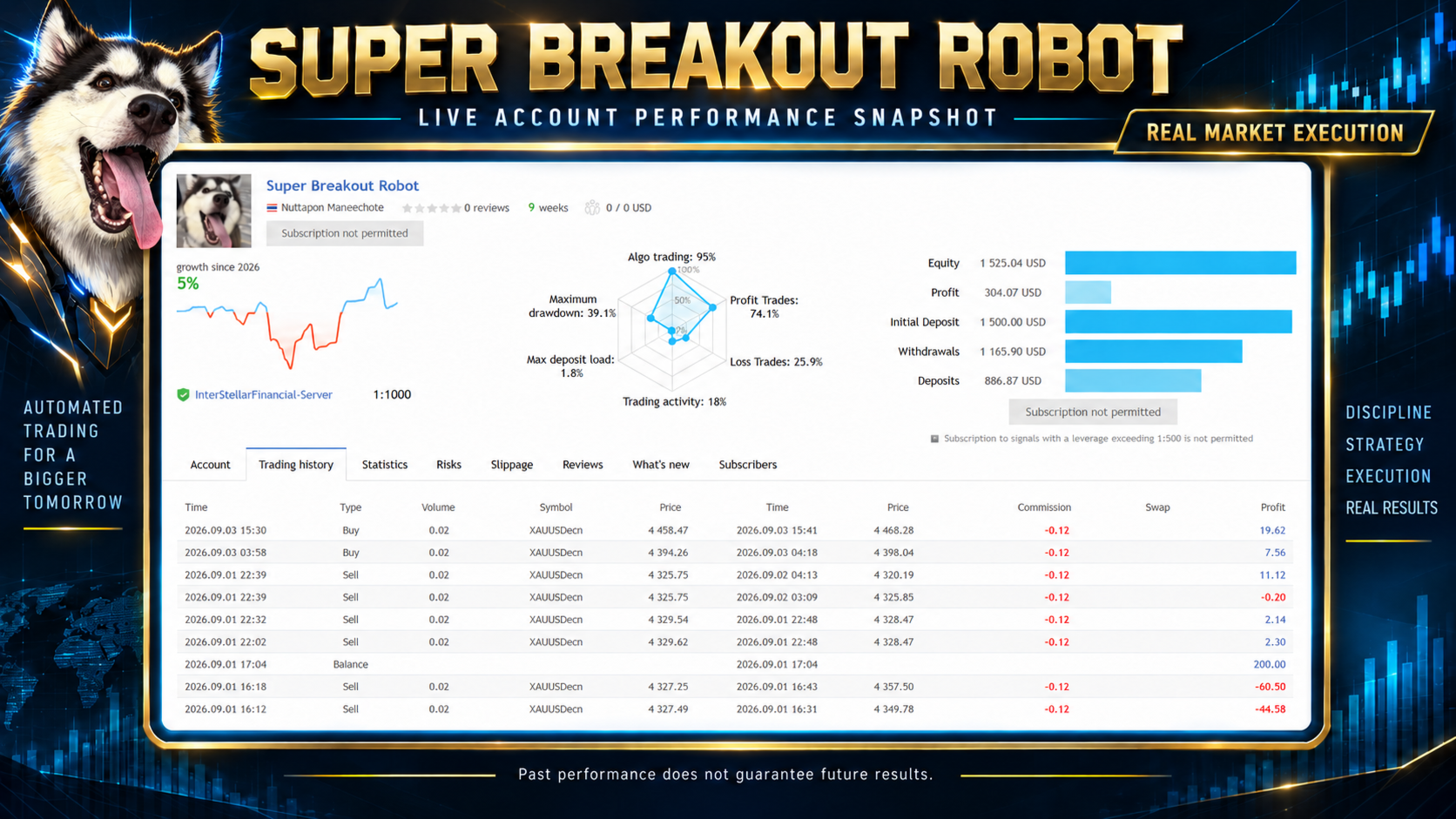
Live Signal : https://www.mql5.com/en/signals/2382395
Community : Private Messages - Nuttapon Maneechote - Cryptowanlanid - Trader's profile
Main Features
-
Designed specifically for XAUUSD
-
Automated breakout opportunity detection
-
Multi-timeframe market analysis
-
Trend and market-strength confirmation
-
Volatility-based trade filtering
-
Automatic Buy and Sell order management
-
Stop Loss protection for every position
-
Automatic Take Profit management
-
Pending-order expiration management
-
Maximum spread filter
-
Drawdown protection
-
Daily, weekly, and monthly closed-profit display
-
Real-time trading dashboard
-
Manual Pause and Resume button
-
Unique Magic Number support
-
Multiple money-management options
-
No Martingale lot multiplication
-
No Grid recovery system
How the EA Works
Super Breakout Robot analyzes Gold price movement across multiple timeframes and waits for a qualified market breakout.
The EA does not place a trade simply because the price crosses a previous high or low. It performs additional internal confirmation before allowing an entry. These filters are intended to reduce low-quality signals and avoid unsuitable market conditions.
When the required conditions are confirmed, the EA automatically calculates and manages:
-
Entry price
-
Stop Loss
-
Take Profit
-
Trading volume
-
Pending-order lifetime
The detailed formulas, internal filters, profile structure, and exact entry conditions are proprietary and are not disclosed.
Money Management
The EA provides several position-sizing methods.
Fixed Lot
The EA uses the lot size entered in the InpStartLots parameter.
This is the default mode and is suitable for users who want direct control over their trading volume.
Risk Per Trade
The EA calculates the lot size using:
-
Current account balance
-
Selected risk percentage
-
Actual Stop Loss distance
-
Symbol tick size
-
Symbol tick value
Lot Per Balance
The EA automatically increases or decreases the base lot size in proportion to the current account balance and the selected reference balance.
Risk Per Equity
The EA calculates the lot size using current account equity instead of account balance.
This mode considers floating profit or loss when calculating the next position size.
Maximum Lot Protection
The MaximumLot parameter limits the maximum trading volume calculated by the selected money-management mode.
Risk Management
Super Breakout Robot includes the following risk-control functions:
-
Maximum spread filter
-
Maximum drawdown control
-
Monetary drawdown guard
-
Daily drawdown protection
-
Optional equity-based protection
-
Maximum lot limitation
-
Automatic pending-order cleanup
-
Position and pending-order monitoring
-
Optional Friday trading restriction
-
Manual trading pause from the Dashboard
These functions are intended to help control trading exposure. They cannot eliminate financial risk or guarantee a specific maximum loss under all market conditions.
Trading Dashboard
The on-chart Dashboard displays the following information:
-
EA operating status
-
Current account balance
-
Starting balance
-
Current equity
-
Floating profit or loss
-
Current drawdown
-
Current spread
-
Maximum allowed spread
-
Selected money-management mode
-
Selected risk profile
-
Open positions
-
Pending orders
-
Today’s closed profit
-
Weekly closed profit
-
Monthly closed profit
The EA can be paused or resumed directly from the Dashboard.
When new trading is paused, the management of existing positions remains active.
Recommended Setup
-
Platform: MetaTrader 5
-
Trading instrument: XAUUSD
-
Recommended timeframe: H1
-
Default money-management mode: Fixed Lot
-
Default fixed lot: 0.02
-
Default maximum spread: 50 points
-
Recommended account type: Hedging
-
One chart per trading account is recommended
-
Algorithmic Trading must be enabled
Gold symbol names and trading specifications may differ between brokers.
A broker may use symbol names such as:
-
XAUUSD
-
XAUUSDm
-
XAUUSD.a
-
GOLD
-
Another broker-specific symbol suffix
Please confirm that the EA is attached to the correct Gold symbol offered by your broker.
Maximum Spread
The MaxSpread value is measured in broker points. Broker points may differ from traditional pips.
If the current spread is higher than the configured maximum, the EA will wait and will not open a new trade. Existing positions will continue to be managed.
Gold spreads may vary depending on the broker, account type, trading session, market liquidity, rollover period, and economic events.
Check your broker’s XAUUSD specifications before adjusting the maximum-spread setting.
Installation
-
Install the EA through MetaTrader 5.
-
Open the correct XAUUSD chart.
-
Select the H1 timeframe.
-
Attach Super Breakout Robot to the chart.
-
Select the required money-management mode.
-
Enter an appropriate lot size or risk percentage.
-
Confirm the maximum-spread setting.
-
Enable Algorithmic Trading.
-
Monitor the Experts and Journal tabs for operating messages.
Test the EA in the MetaTrader 5 Strategy Tester and on a demo account before using it with real funds.
Before Using the EA
Please check the following information:
-
Broker’s minimum lot size
-
Broker’s maximum lot size
-
Volume step
-
Tick size
-
Tick value
-
Spread
-
Stop Level
-
Account type
-
Gold symbol name
-
Trading commission
-
Swap charges
Trading conditions vary between brokers. Different trading conditions can produce different results.
Risk Warning
Trading Gold involves substantial financial risk.
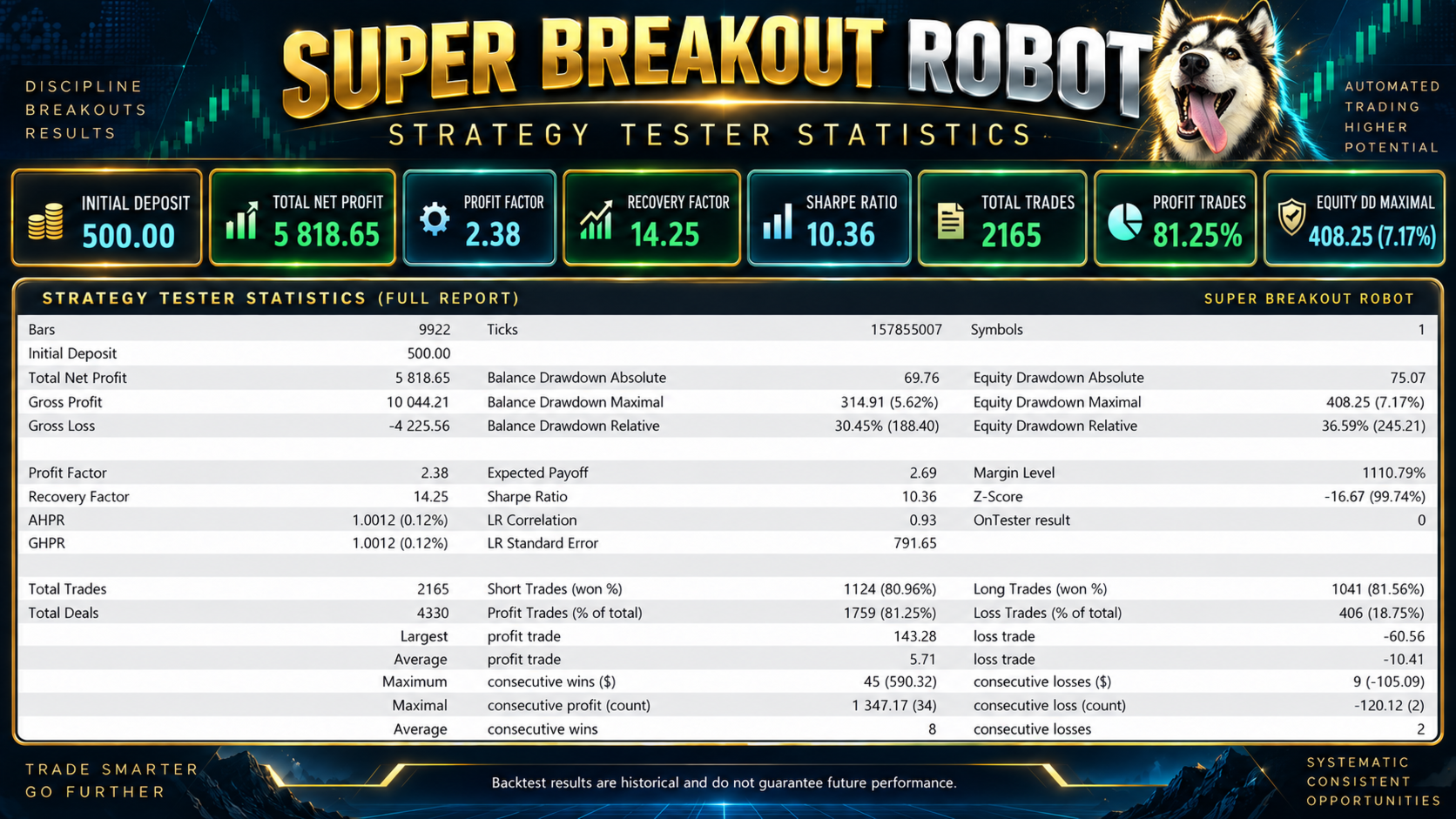
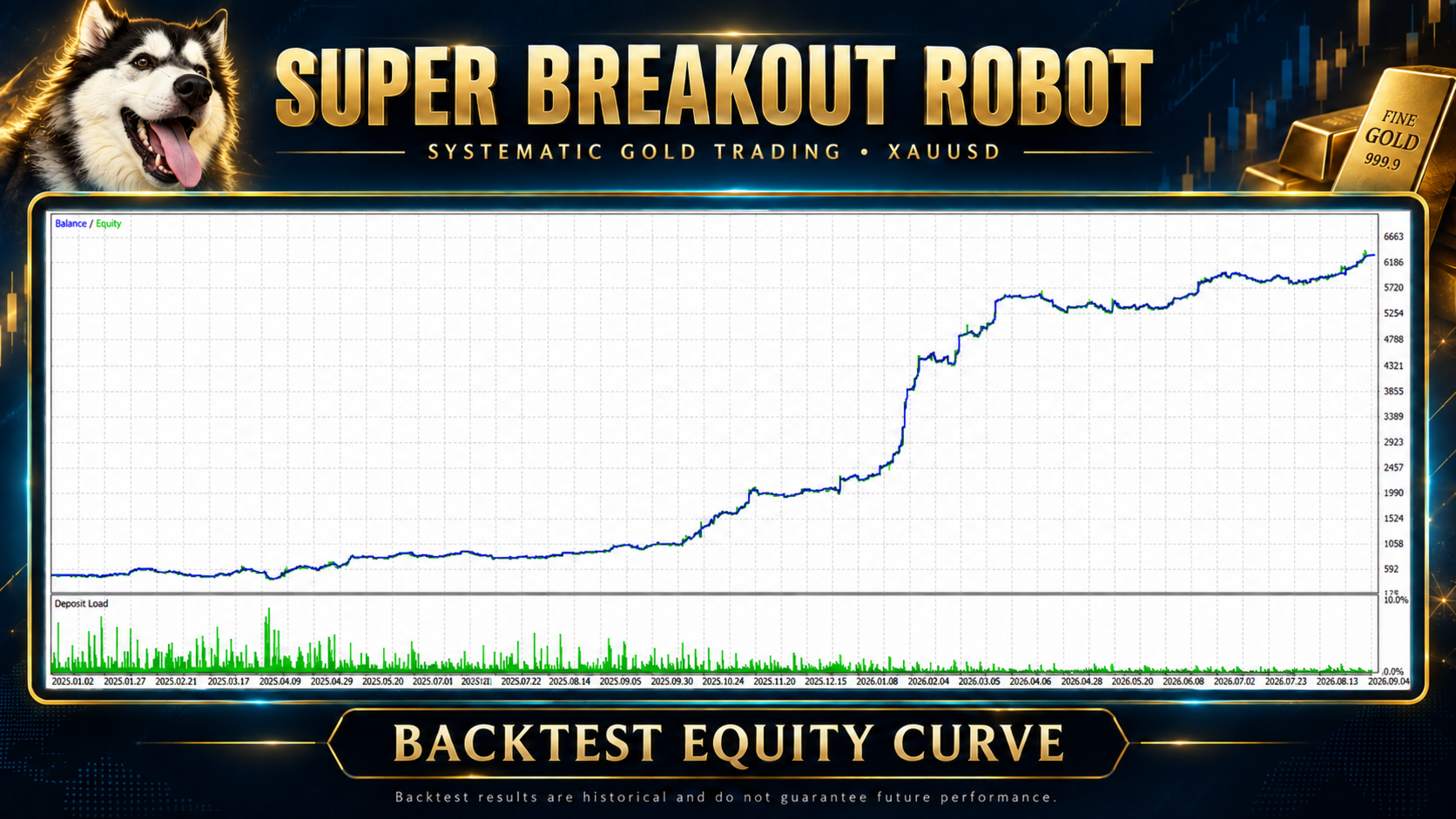
Historical backtests, screenshots, and previous trading results do not guarantee future performance.
Results may vary due to spread, commission, swap charges, slippage, execution speed, market liquidity, broker specifications, historical data quality, account type, and selected parameters.
Drawdown-protection functions are risk-management tools. They do not guarantee that losses will remain below a specific amount under every market condition.
Users are responsible for selecting appropriate settings and monitoring their trading accounts.
Always test the EA in the Strategy Tester and on a demo account before using real funds.
Customer Support
If you require assistance with installation or configuration, please provide:
-
Screenshot of the MetaTrader 5 chart
-
Experts log
-
Journal log
-
Broker name
-
Gold symbol name
-
Account type
-
Selected timeframe
-
Screenshot of the EA Inputs
This information will help identify configuration issues more efficiently.