Trade Pilot Pro

TradePilot — Position Sizer, Multi-TP Execution Panel & Trade Management Cockpit for MT5

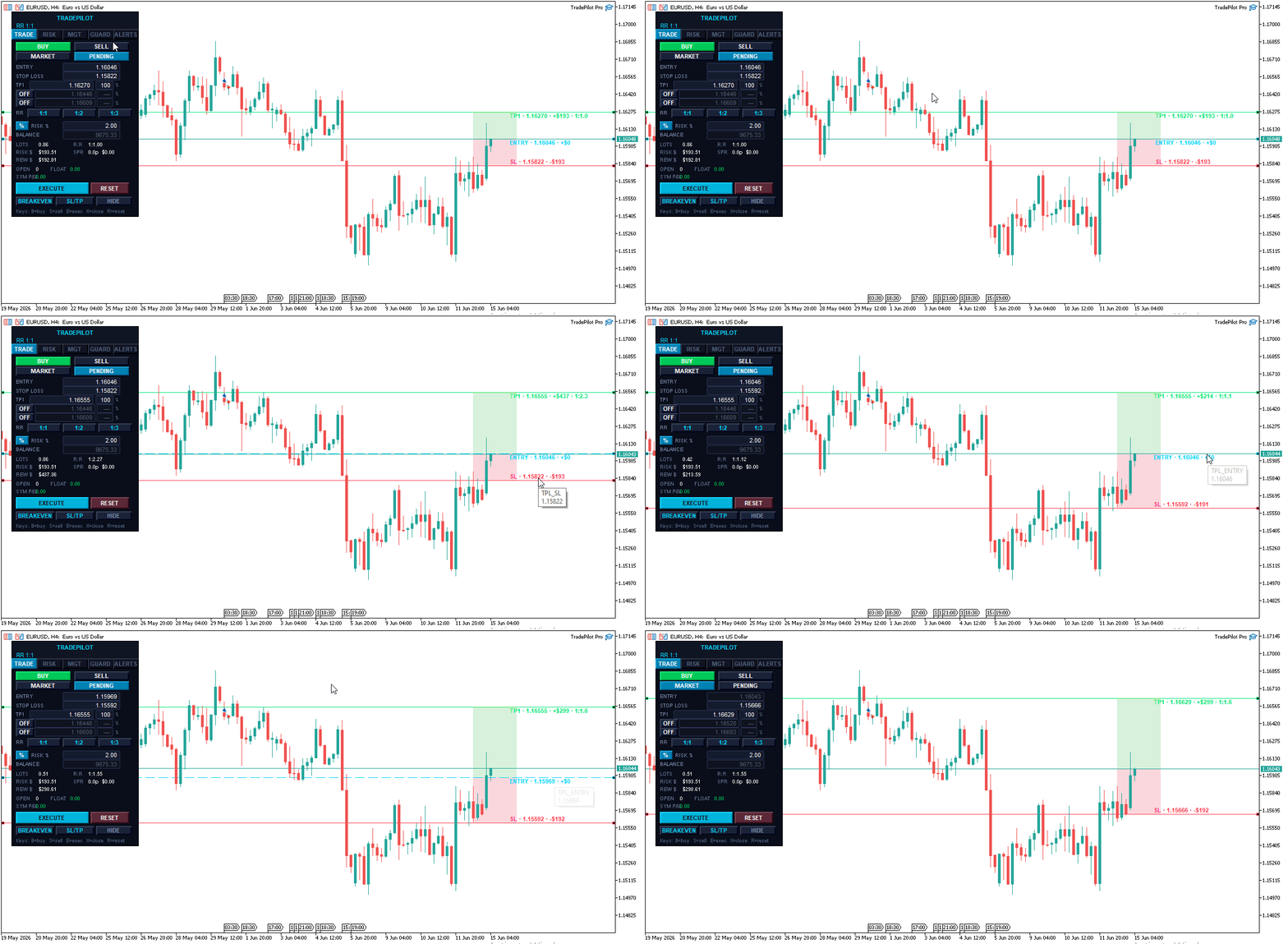
TradePilot is a professional trading cockpit for MetaTrader 5 that combines precision position sizing, multi-target execution, draggable chart lines, visual trade zones, a prop-firm risk dashboard, and automated trade management — all in one compact tabbed panel. Whether you're scalping, swing trading, running a funded account, or planning complex multi-TP setups, TradePilot keeps everything visible and executable in a single click.

Designed to do the heavy lifting so you can focus on the chart, not the math.

  Multi-Target Execution with Automatic Partial Closes

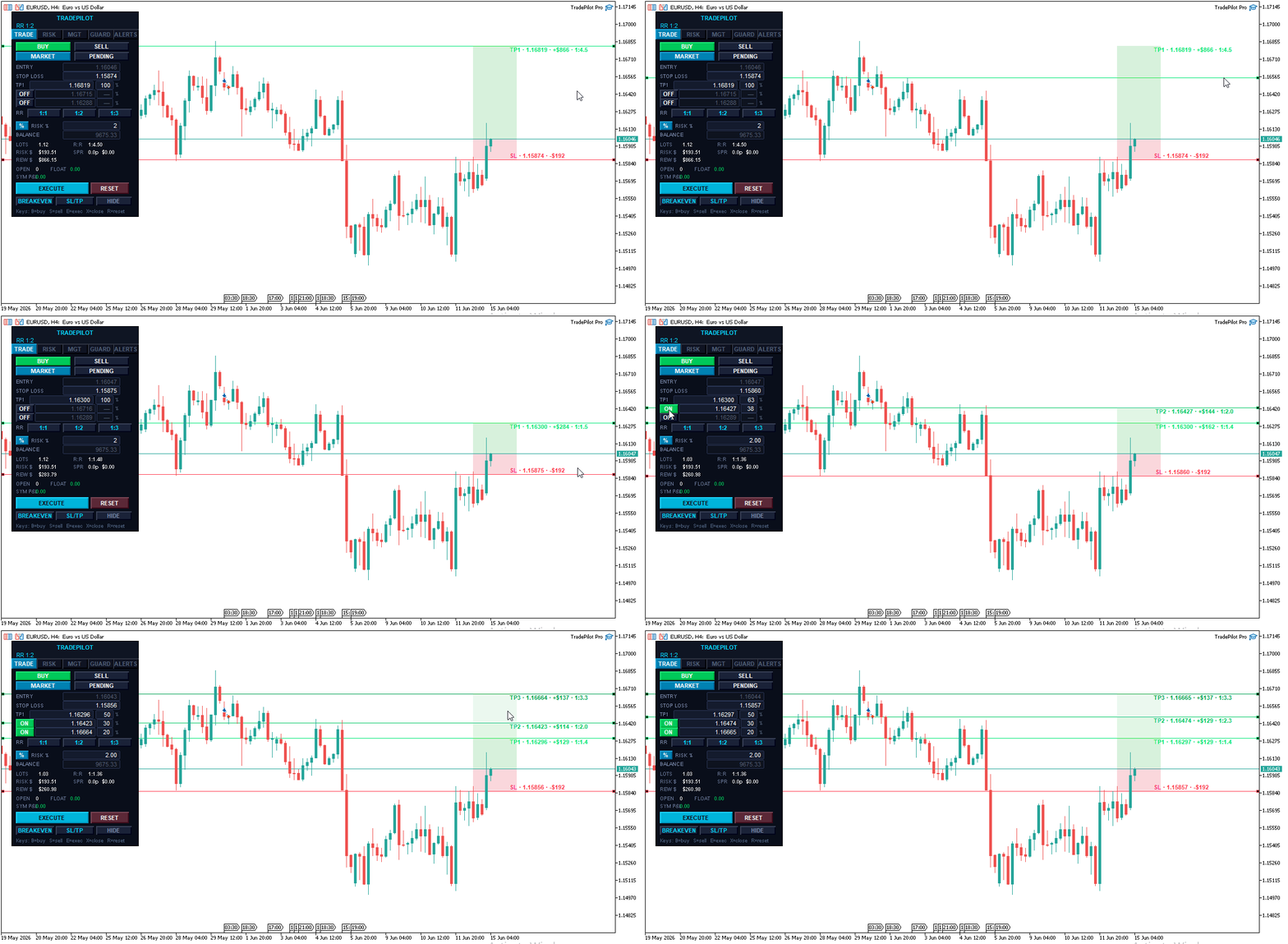
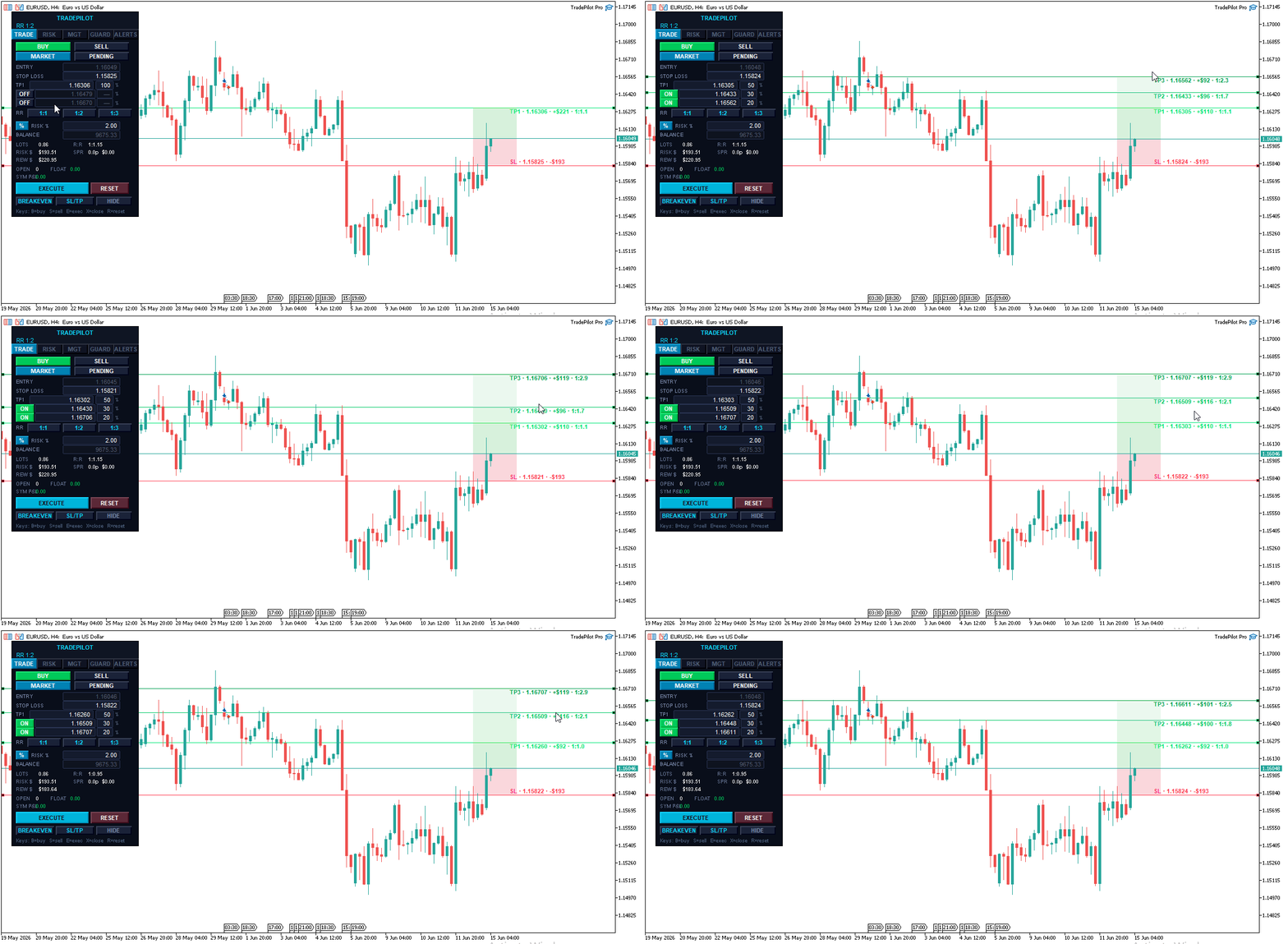
TradePilot is built around the way professional traders actually exit — in stages, not all at once. Set up to three independent take-profit levels, each with its own share of the position, and TradePilot manages the scale-out automatically.

  • TP1, TP2, TP3 — enable or disable each level independently with a single button
  • Set the exact percentage split between each target directly on the panel (for example 50% at TP1, 30% at TP2, 20% at TP3) — the percentage fields are fully editable
  • When TP1 is hit, TradePilot automatically partial-closes the configured portion of your position
  • When TP2 is hit, it partial-closes again — leaving the runner for TP3
  • The broker take-profit is always set to your final active level, so the position has a hard safety net even if your terminal is offline
  • After a trade is placed, each take-profit level is drawn on the chart as its own line — and you can drag any of them to modify the level on a live position
  • If a partial close would fall below the broker's minimum lot, TradePilot holds the runner and marks the level done — no crashes, no ghost orders
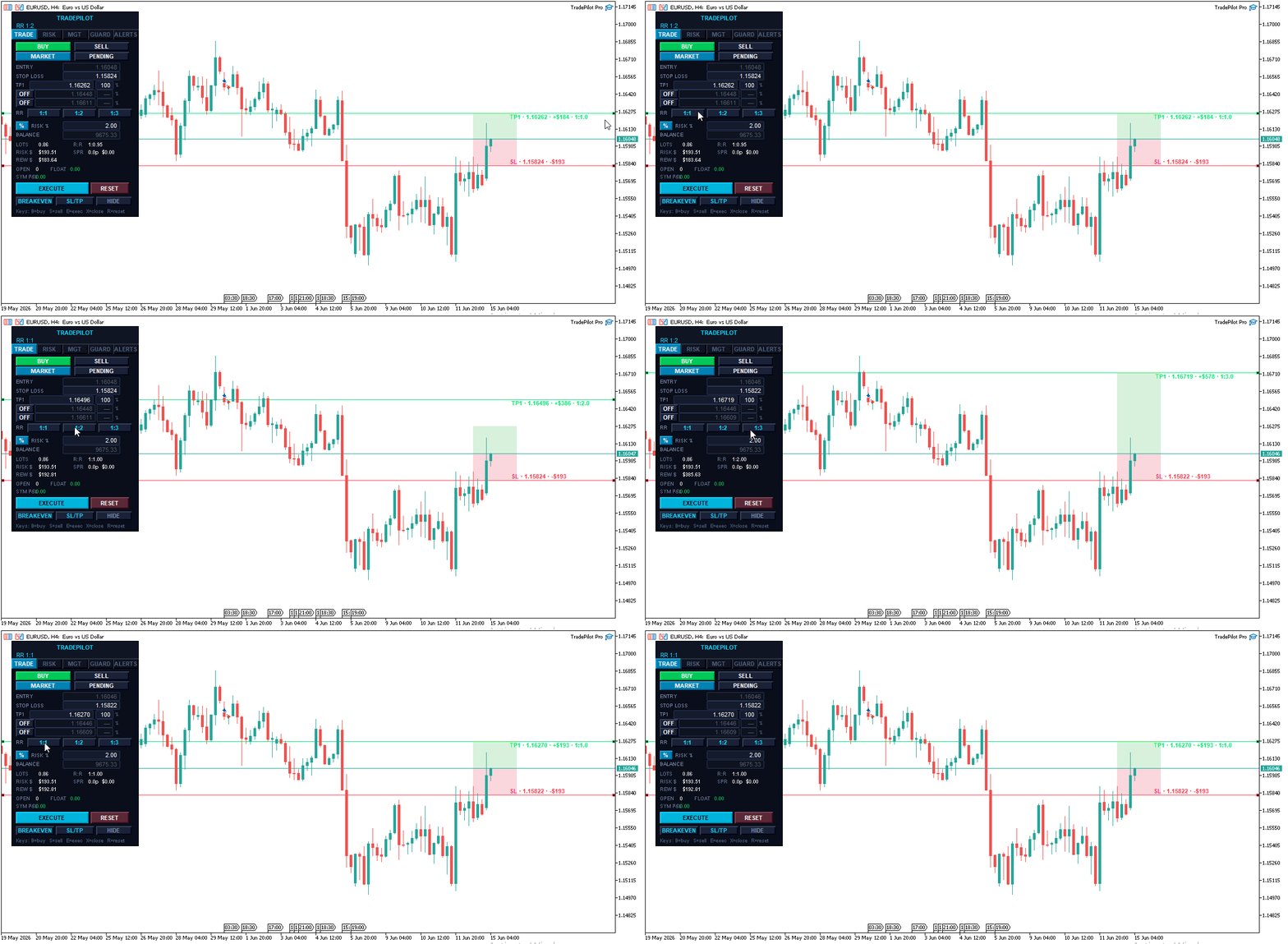
  • Quick RR buttons (1:1, 1:2, 1:3) set your TP1 distance in one click based on your current stop

   Prop Firm Risk Dashboard

Built for funded-account and challenge traders who have to respect strict daily and total drawdown limits.

  • Live graphical bars showing daily loss used and total drawdown used against your configured limits
  • Color-coded status — SAFE, CAUTION, DANGER, LOCKED — so you always know where you stand at a glance
  • High-water-mark tracking for accurate trailing-drawdown calculation, preserved across restarts
  • Configurable early-warning threshold sends an alert before you approach the limit
  • Automatic position close when the hard limit is reached, with a clear panel lock
  • One-click UNLOCK / RESET to clear the lock and start a fresh trading session

   Draggable Lines with Live Visual Zones

Every price level is a draggable horizontal line on the chart. Drag your SL, TP1, TP2, or TP3 to exactly where you want it — every calculation updates in real time.

  • SL zone shaded between entry and stop — shows exactly how much price can move against you
  • TP zones shaded between each target — an instant visual of your reward structure
  • Five zone color schemes for any chart background: Pale Light, Muted Dark, Neon Dark, Monochrome Soft, and Classic
  • In Market mode, lines glide with price automatically, preserving all distances and risk calculations
  • In Pending mode, the Entry line is also draggable — place limits and stops at any level
  • The SL line turns orange as a warning when the geometry is invalid — you see the problem before you can click Execute
  • Show/Hide all lines with one button for a clean chart view

  Risk Safety System

Automatic position sizing — Enter your risk as a percentage of balance or a fixed dollar amount. TradePilot calculates the exact lot size for every trade from your SL distance, tick value, and account balance. Switch between % and $ mode with one button.

Commission-aware sizing — TradePilot automatically detects your broker's per-lot commission from recent trade history and factors round-turn commission into the lot calculation, so your real risk matches your intended risk. No configuration needed — it just works, and falls back cleanly on spread-only accounts.

Margin pre-check — Before every execution, TradePilot confirms you have enough free margin. If the trade would exceed 95% of your available margin, it's blocked with a clear message before it ever reaches the broker.

Geometry validation — The Execute button turns red and displays the exact problem if your setup is invalid — SL on the wrong side, TP below entry, TP2 less than TP1, and so on. You cannot accidentally send a broken trade.

Daily loss kill switch — Set a maximum daily loss as a percentage of starting equity. When hit, TradePilot closes all positions and locks the panel until you manually reset.

Confirm-before-execute — Optional double-click confirmation on both Execute and Close All. Turn it on for fat-finger protection, or off for one-click speed — your choice via the inputs.

   Trade Management Suite

  • ATR-based trailing stop — the trail distance adapts to live volatility using ATR rather than a fixed pip value, so it breathes with the market. Multiplier and step are fully configurable.
  • Auto Breakeven — automatically moves SL to entry (plus a configurable buffer) after TP1 is hit
  • Manage external trades — optionally apply breakeven, trailing, and close-all to positions opened outside TradePilot, including trades from your phone, signals, or other EAs
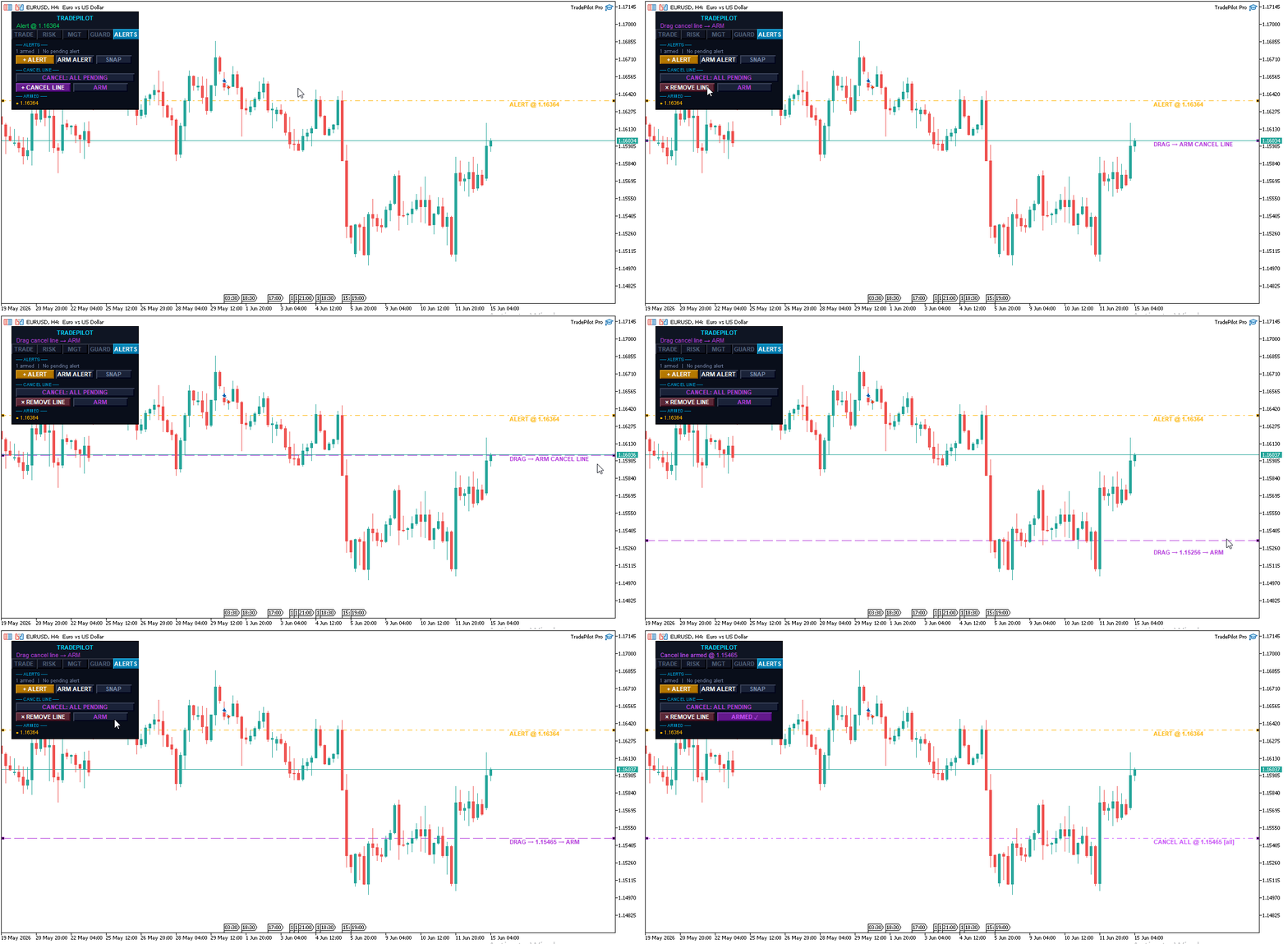
  • Order cancellation line — drop a line on the chart; if price touches it, your pending orders are cancelled automatically. Choose to cancel all pending orders or only TradePilot's.
  • Apply SL/TP — push updated SL and TP from the panel to open positions
  • Breakeven button — move all positions to breakeven in one click
  • Close All — close everything instantly with optional double-confirm
  • Market and Pending modes — market orders, buy/sell limits, and buy/sell stops from the same panel
  • Settings are automatically saved and restored between sessions — your setup survives a terminal restart

  Keyboard Shortcuts — Trade Without Touching the Mouse

Every critical action has a dedicated hotkey. The whole shortcut system can be toggled off in the inputs if you prefer mouse-only.

Key Action
B Switch to Buy setup — flips all lines to the long side
S Switch to Sell setup — flips all lines to the short side
E Execute trade
X Close all positions
R Reset the panel to ATR-based defaults

When confirm-before-execute is on, E and X arm on the first press and fire on the second — you always get one last chance to cancel.

  Draggable Price Alerts

A built-in alert system that needs no external service.

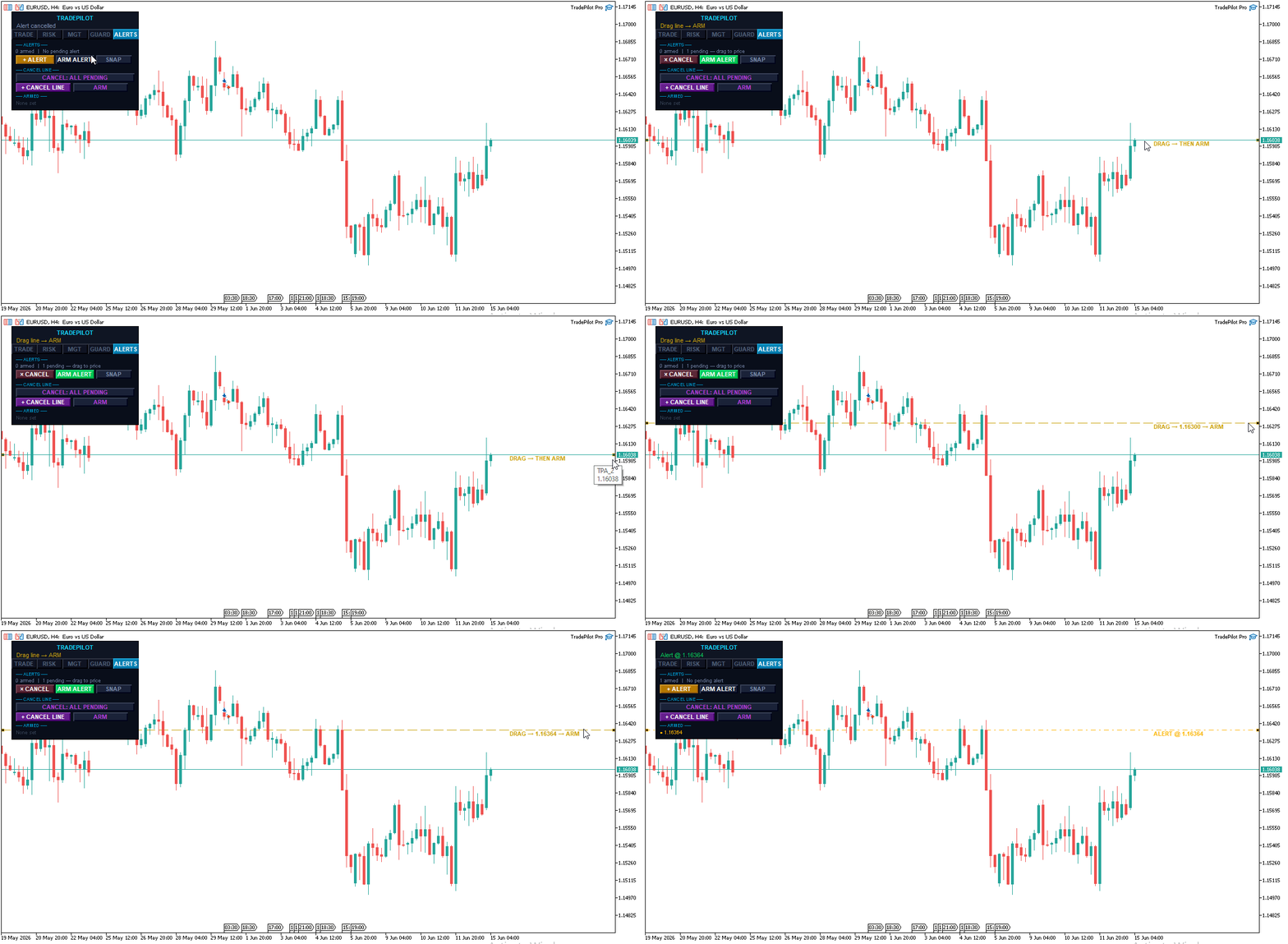
  • Click + Alert to drop an alert line at the current price
  • Drag it to any level you want to monitor
  • Click ARM Alert to activate it — the line changes color to confirm it's live
  • When price crosses the level, TradePilot fires a push notification and/or popup (configurable)
  • Place as many alerts as you need — each is tracked independently
  • Cancel a pending alert before arming with a second click

  One-Click Chart Screenshot

A dedicated SNAP button saves a full 1920×1080 screenshot of your chart to the MT5 Files folder — perfect for journaling trades or sharing setups.

  Tabbed Panel & Live Statistics

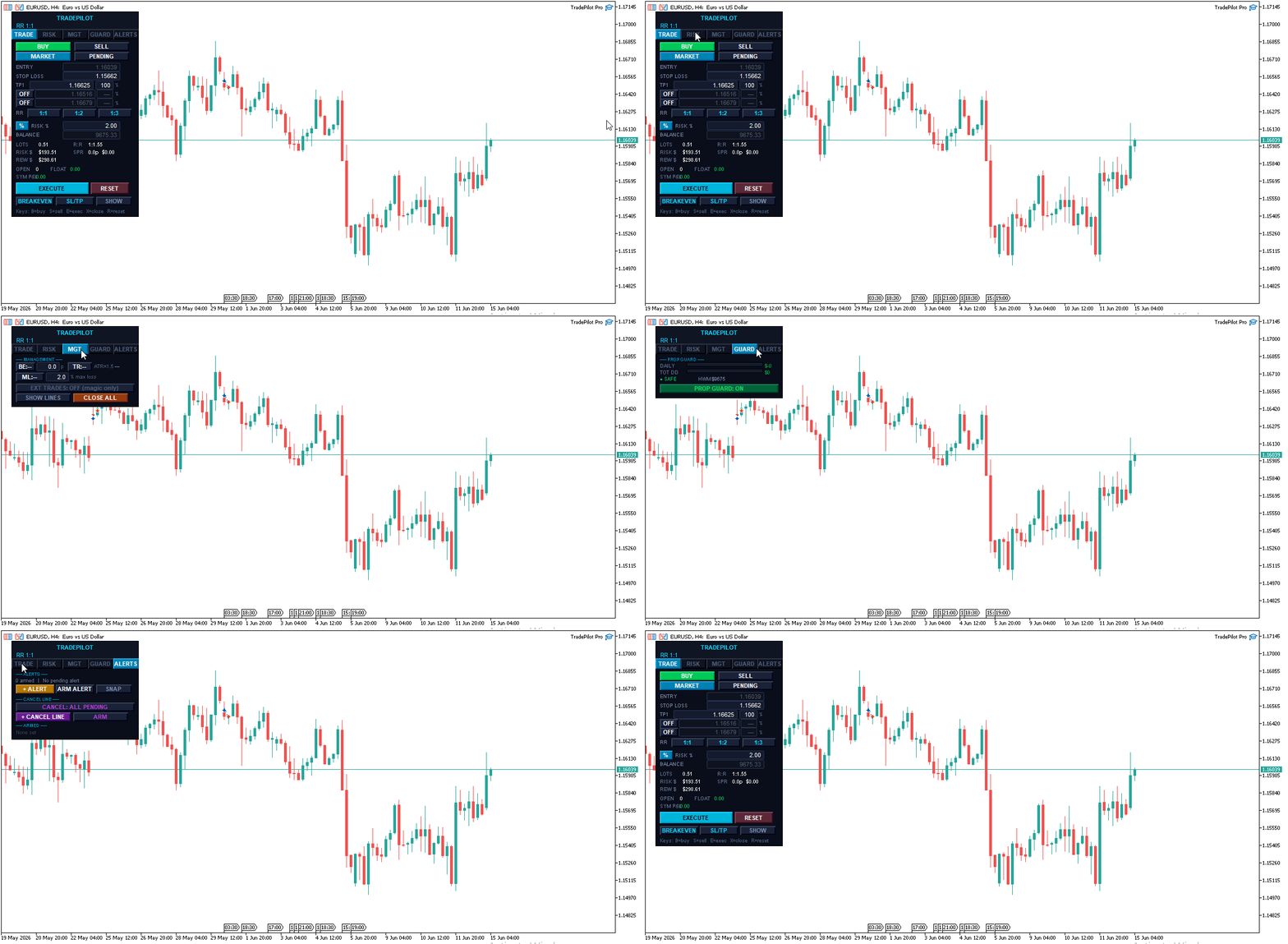
A clean five-tab layout keeps the panel compact while exposing everything you need: TRADE, RISK, MGT, GUARD, and ALERTS. The panel auto-calibrates to your screen DPI so it stays crisp on any monitor.

  • Lots — exact calculated lot size for the current setup
  • Risk $ — exact dollar risk for this trade
  • Reward $ — projected profit at TP1
  • R:R — live risk-to-reward ratio, updating as you drag
  • Spread — current spread in pips plus its cost, with detected commission when available
  • Open / Float — open position count and total floating P&L
  • Symbol P&L — realized profit and loss for the current symbol today

  Multi-Language Support

The full interface is available in five languages, switchable from the inputs:

Language Setting
English LANG_EN
Spanish LANG_ES
Portuguese LANG_PT
French LANG_FR
Chinese LANG_ZH

All buttons, status messages, and labels switch automatically.

Compatibility & Notes

Compatible with all MT5 brokers. Supports market, limit, and stop orders. Works on all symbols including forex, gold, indices, and crypto. Magic-number isolation lets you run multiple instances on different charts at once.

Please note: Multi-TP partial closes are managed by the EA on your running terminal. For the staged partial closes to execute, MT5 must remain open with TradePilot attached to the chart. A single broker-side stop loss and take profit are always placed as safety nets, so your position is never left fully unprotected if your terminal goes offline.

Have a feature request or found an issue? Leave a comment — TradePilot is actively developed and updated.
Produits recommandés
L'indicateur construit les cotations actuelles, qui peuvent être comparées aux cotations historiques et, sur cette base, faire une prévision de l'évolution des prix. L'indicateur dispose d'un champ de texte pour une navigation rapide jusqu'à la date souhaitée. Option : Symbole - sélection du symbole que l'indicateur affichera ; SymbolPeriod - sélection de la période à partir de laquelle l'indicateur prendra des données ; IndicatorColor - couleur de l'indicateur ; HorisontalShift - décalage
如果产品有任何问题或者您需要在此产品上添加功能,请联系我 Contact/message me if you encounter any issue using the product or need extra feature to add on the base version. There is Demo version of this panel Dashboard Super Three MA MT5 Demo in my product list, please try it out to get familiar with all functionalities for free Free version: LINK MT4 version: LINK This system basically utilizes PA and three adjustable Moving Average as the main indicator set to generate trading signal. With the feature that all MA_timefram
Talents ATR Scalper Utility (MT5) The Talents ATR Scalper Utility is a professional-grade trade execution and management tool built for MetaTrader 5. Inspired by the Biblical Parable of the Talents , this utility is designed to help traders multiply their potential with precision risk control, one-click simplicity, and advanced automation. Whether you’re scalping forex, gold, or indices, this tool delivers speed, consistency, and confidence. Key Features One-Click Trade Preview Click below price
Mango Scalper
Mahmoud M A Alkhatib
Mango Scalper  is a fully automated scalping robot that uses a very Good and Smart breakout strategy, advanced money management and probabilistic analysis. Most effective in the price consolidation stages that occupy the bulk of the market time. Proven itself on real accounts with an excellent risk-to-reward ratio. Does not need forced optimization, which is the main factor of its reliability and guarantee of stable profit in the future. S uitable for both beginners and experienced traders.  
US500 Scalper
Sergey Batudayev
Le S&P 500 Scalper Advisor est un outil innovant conçu pour les traders souhaitant trader avec succès l'indice S&P 500. Cet indice est l'un des indicateurs les plus utilisés et les plus prestigieux du marché boursier américain, regroupant les 500 plus grandes entreprises des États-Unis. Particularités : Solutions de trading automatisées :       Le conseiller s'appuie sur des algorithmes avancés et des analyses techniques pour adapter automatiquement la stratégie aux conditions changeantes du mar
Risk Manager Best: The Benchmark for Professional Money Management Why do I consider this utility the best solution on the market? The answer is simple: it was created by a trader for traders who value their time and money. Unlike overloaded alternatives, it doesn't have a single unnecessary feature that could distract you from chart analysis. This is a tool that turns routine risk calculations into instant action. Here are the key advantages, broken down into sections: 1. Intuitive Interfac
Make grid trading safe again | Built by a grid trader >> for grid traders.     Walkthrough Video  <==   Get Grid Rescue up and running in 5 minutes   This is MT5 version, click  here  for  BlueSwift GridRescue MT4     (settings and logics are same in both versions)   BlueSwift Grid Rescue   MT5    is a risk management   utility  MT5 EA  (used together with other grid trading experts) that can help you trade aggressive grid / averaging / martingale systems with manageable drawdown, therefore
Scalping bot for the gold/dollar pair (XAU/USD) — a powerful and versatile solution for traders, designed to deliver maximum efficiency in a dynamic market. This bot is specifically engineered for scalping: it analyzes price changes and places trades even before significant market movements begin. This allows it to secure advantageous positions early and capitalize on even the smallest market fluctuations. Key Features: Flexibility: Adapts to any market conditions and suits your trading strategy
Impulse Hadge
Dilmurad Zamitov
5 (1)
English Version: ImpulseHedger XAU Tame the Gold Market with Mathematical Precision. Are you tired of "Grid" EAs that blow your account during long gold trends? Most grid systems fail because they lack a solid exit strategy for explosive moves. ImpulseHedger was specifically designed to turn Gold’s high volatility into a calculated advantage using a hybrid "Impulse Grid" and "Smart Shield" system. Key Features: Extended 7-Level Grid: A conservative lot progression ( $0.01$ to $0.03$ ) designed
This EA capitalizes on market anomalies and price movements specific to the AUDNZD pair. It does not rely on complex AI or algorithms. Instead, it employs a simple, straightforward logic, thereby eliminating the risks of overfitting or curve-fitting. You can customize the risk/return settings based on your risk tolerance. Please refer to the attached screenshot showing the backtest results for the period from January 1, 2021, to September 9, 2026. Lot size * you can customize any PF RF DD R
PredictiveBreakout — Smart Breakout Trading with a Neural Network Filter (ONNX) Support and after-sales: After purchasing, please contact me via my official MQL5 profile to receive the user manual, exclusive bonuses, and ongoing support: https://www.mql5.com/pt/users/johnnysilva37 PredictiveBreakout is a breakout Expert Advisor that combines a proven price-action strategy with an AI filter running directly inside the robot through the ONNX  — a real neural network, not a repackaged indicator
Crash5 EA ,I s a automatic robot that has the level of professional decision when to take a trade without any emotion. The bot will help in your scalping decision making with its own TP (take profit) and SL (stop loss) with the trail stop when in profit. This is a trend based spike catching ,looking on whats happening in real time charts no repainting of any signals. The robot helps in making decisions on the candle stick pattern opened and closed lat price with the help of RSI ,MACD and the EMA
DESCRIPTION Liquidity Counter Pro   is an advanced automated trading system for MetaTrader 5 that specializes in detecting and capitalizing on institutional liquidity sweeps and retail stop-hunting events. The EA uses pure price action and market structure analysis without relying on traditional lagging indicators. The system applies a   multi-layered scoring methodology   with a base threshold of   90 points , requiring strong confirmation from multiple market factors before any entry. It i
Smart Grid Multi-Symbol EA Fully Automated Trading with Dynamic Lot Scaling & Risk Control Overview Smart Grid Multi-Symbol EA is a powerful automated trading system designed to trade multiple currency pairs and gold simultaneously using a dynamic grid strategy with intelligent lot scaling . Built for traders who want: Consistent execution Hands-free trading Flexible risk control Portfolio diversification ️ Core Strategy This EA uses a Grid + Position Scaling system : Opens positions base
Tick Volume Chart - un outil unique pour créer des graphiques basés sur les volumes de ticks dans MetaTrader 5 . Grâce à Tick Volume Chart , vous pouvez construire des graphiques où chaque bougie est formée non pas en fonction du temps, mais selon un nombre défini de ticks. Cela vous offre une précision d'analyse idéale de l'activité du marché, inaccessible sur les graphiques temporels classiques. Vous pouvez utiliser tous les indicateurs et conseillers experts compatibles avec les symboles pers
Overview Impulsive OB Scalper Pro is a fully automated Expert Advisor for MetaTrader 5 that focuses on   institutional order blocks   and   impulsive price movements . The system identifies supply and demand zones formed after a strong impulsive candle (range ≥ ATR × multiplier) and executes trades when price retests those zones. This approach follows the footprints of large institutional players (banks, hedge funds) that create significant directional moves. Unlike traditional indicator‑based s
TAM Premium – Ultimate Visual Trading Assistant & Risk Manager TAM Premium (Trading Assistant Manager) is a revolutionary trading panel for MetaTrader 5 that brings the smooth TradingView-style trading experience directly into your chart. Say goodbye to confusing manual lot calculations and slow order execution! With TAM Premium, simply define the maximum loss you are willing to take ( Risk % or Risk $ ), visually drag and drop your target levels on the chart, and let the Assistant calculate the
Galaxy Elegance
Gezani Paulus Nkuna
G.X.L (GALAXY ELEGANCE) Product Overview G.X.L is an automated trading robot for MetaTrader 5 that operates based on price action analysis. The system processes real-time market data to identify trading opportunities. It provides information and recommendations aligned with user-defined trading preferences. Core Functionality The robot analyzes price movements without relying on traditional lagging indicators. It focuses on current market structure, including swing points and fractals, to determ
Gold Trade Manager PRO MT5 is a manual trade management utility for MetaTrader 5. It is designed for traders who want to open, protect and manage positions directly from the chart without switching between multiple terminal windows. Current price: $59 - increases by $10 after every 20 purchases until reaching the final price of $119 . Next price: $69 . Complete Buyer Kit: 40 Professional Resources included at no additional cost. MT5 Presets, PDF Guides, Checklists, Mindmaps, Reference Cards, and
如果产品有任何问题或者您需要在此产品上添加功能,请联系我 Contact/message me if you encounter any issue using the product or need extra feature to add on the base version. There is Demo version of this panel Dashboard Super MA RSI CCI Demo in my product list, please try it out to get familiar with all functionalities for free, LINK . Dashboard Super MA RSI CCI is an intuitive and handy graphic tool to help you to: Have 28 pairs under control with one dashboard Monitor price movement, identify possible trend based on MA, RS
Freddy V2
Ranaweera Wanasinghe Herath Bandara
Freddy V2 Contact to receive "Dark horse EA" for free Freddy Combo is a dual-engine pending-order Expert Advisor for MetaTrader 5. Two independent placement engines run side by side from a single chart, and either one can be switched off if you prefer to trade only the other. ENGINE 1 - ZONE ENGINE Six independent zones (A1, A2, A3, B1, B2, B3), each with its own magic number, lookback window and level parameters. Each zone identifies a confirmed swing extreme on H1 and places a stop order a
Net Z
Sugianto
5 (1)
NET Z uses a very well-known trend reversal technique to determine position entry with slight modifications by using virtual trade techniques and virtual pending orders so that position entry is not too early or too late. Why NETZ? NET Z does not require complicated settings and is easy to use because user only need to upload a set file that is already available. Currently there are set files for 20 fx pairs. The best GRID EA with the ability to control risks. I will share my personal daily rou
BoxChart MT5
Evgeny Shevtsov
5 (7)
The market is unfair if only because 10% of participants manage 90% of funds. An ordinary trader has slim changes to stand against these "vultures". This problem can be solved. You just need to be among these 10%, learn to predict their intentions and move with them. Volume is the only preemptive factor that faultlessly works on any timeframe and symbol. First, the volume appears and is accumulated, and only then the price moves. The price moves from one volume to another. Areas of volume accumu

Trend Of The Day
Jarmin Jamike Ugorji
5 (1)
Trend Of The Day Follow the trend. Control the risk. Protect the capital. ICMarkets Live Signal 1  https://www.mql5.com/en/signals/2387790   Blog Post  Trend Of The Day - Analytics & Forecasts - 1 September 2026 - Traders' Blogs No Martingale / No Grid /   No Recovery / No Hedging / one trade entry with hard stoploss Release price is $199.99 but price will increase to $299 after certain number of purchases. Trend Of The Day is a professional trend-following Expert Advisor designed to identify

VOLUME PROFILE SAF-XII Analyse Market Profile Professionnelle pour MT5 (L'indicateur idéal pour le trading de type Grid) QU'EST-CE QUE LE VOLUME PROFILE ? Le Volume Profile est un outil institutionnel qui affiche l'activité de trading à des niveaux de prix spécifiques, contrairement aux indicateurs de volume classiques qui montrent le volume en fonction du temps. Il révèle OÙ les transactions ont eu lieu, aidant ainsi à identifier : ZONES DE VALEUR (VAH/VAL) – Niveaux de prix où la majorité des
Cyclone Intraday
Mikhail Mitin
5 (1)
How the EA works (simple explanation) Trades on M5 timeframe Uses H1 timeframe to analyze global market context Analyzes 2 or 3 timeframes simultaneously On each timeframe: Checks price position relative to one or two Moving Averages Evaluates MA angle and distance between price and MA Entry logic is based on trend + volatility conditions , not on random signals The full algorithm is illustrated in the screenshots. Recommended usage Symbol: EURUSD Timeframe: M5 Trading style: Intraday
LevelXpertPro v1
Mindaugas Platkevicius
MT5 Trading Bot: Transforming $1,000 into $100,000 in One Year This powerful MT5 trading bot is designed for exceptional growth and consistent performance. Over the course of one year, it demonstrated the ability to transform an initial investment of $1,000 into $100,000, proving its effectiveness in dynamic market conditions. Key Features: Advanced Algorithmic Trading: Utilizes cutting-edge algorithms to identify high-probability trade setups. Optimized Risk Management: Smart stop-loss, take-p
Order Book, known also as Market Book, market depth, Level 2, - is a dynamically updated table with current volumes of orders to buy and to sell specific financial instument at price levels near Bid and Ask. MetaTrader 5 provides the means for receiving market book from your broker, but in real time only, without access to its history. The indicator OrderBook Cumulative Indicator accumulates market book data online and visualizes them on the chart. In addition, the indicator can show the market
Short Description Swing Timing Breakout EA is a smart Expert Advisor for MetaTrader 5 that combines trend filtering, momentum timing, and dynamic risk management to capture high-probability swing and breakout opportunities. Full Description Swing Timing Breakout EA is a professional trading robot designed for MetaTrader 5, suitable for traders who want a balance between automation, control, and disciplined risk management. This EA uses a trend-following and momentum confirmation approach ,
Aurum Intraday EA
Rodrigo Leonardo Favreau Giuliodoro
Aurum Intraday EA – Advanced Gold Trading Algorithm The Aurum Intraday EA is a powerful automated trading system designed specifically for Gold (XAUUSD) traders who want to capture strong intraday movements while maintaining full control over risk and strategy configuration. Built with a robust algorithm and optimized for H1 and H4 timeframes (H4 recommended) , this Expert Advisor is capable of identifying high-probability opportunities in the gold market and executing trades with precision and
Les acheteurs de ce produit ont également acheté
Trade Assistant MT5
Evgeniy Kravchenko
4.43 (216)
It helps to calculate the risk per trade, the easy installation of a new order, order management with partial closing functions, trailing stop of 7 types and other useful functions. Additional materials and instructions Installation instructions - Application instructions - Trial version of the application for a demo account Line function -   shows on the chart the Opening line, Stop Loss, Take Profit. With this function it is easy to set a new order and see its additional characteristics bef
Bienvenue sur Trade Manager EA, l’outil ultime de gestion des risques conçu pour rendre le trading plus intuitif, précis et efficace. Ce n’est pas seulement un outil d’exécution d’ordres ; c’est une solution complète pour la planification des trades, la gestion des positions et le contrôle des risques. Que vous soyez débutant, trader expérimenté ou scalpeur ayant besoin d’une exécution rapide, Trade Manager EA s’adapte à vos besoins, offrant une flexibilité sur tous les marchés, des devises et i
Local Trade Copier EA MT5
Juvenille Emperor Limited
4.94 (149)
Local Trade Copier EA MT5 est un copieur de trades rapide et flexible permettant de copier et de gérer des trades entre plusieurs comptes MetaTrader 5 sur le même ordinateur Windows ou Windows VPS. Il combine la synchronisation locale des trades avec des contrôles côté Receiver pour la taille des lots, la gestion du risque, le filtrage des trades, le mappage des symboles, la gestion des trades et la protection du compte. Configurez vos terminaux Transmitter et Receiver en environ 1 minute et co
Telegram to MT5 Multi-Channel Copier   copie automatiquement les signaux de trading de vos canaux Telegram et Discord directement vers MetaTrader 5. Pas de bots, pas d'extensions de navigateur, pas de copie manuelle. Un signal arrive sur Telegram ou Discord et l'EA ouvre le trade dans votre terminal en quelques secondes. Et avant de copier un canal, le backtester intégré vous montre ce que ce canal aurait fait sur votre compte. Le produit comprend deux composants : une application Windows qui éc
================================================================================ POC BREAKOUT - V20.72. Full Professional Grade Toolkit ================================================================================ POC Breakout is a full MetaTrader 5 trading dashboard for discretionary traders who want breakout signals, Point of Control (POC) context, volume profiles, order flow, market structure, news, alerts, and advanced trade planning in one professional workspace. Attached directly to you
TradePanel MT5
Alfiya Fazylova
4.88 (170)
Trade Panel est un assistant commercial multifonction. L'application contient plus de 50 fonctions de trading pour le trading manuel et permet d'automatiser la plupart des tâches commerciales. Instructions d'utilisation : https://www.mql5.com/fr/blogs/post/762589 Version d'essai de l'application pour un compte démo : https://www.mql5.com/fr/blogs/post/762644 Comment installer l'application : https://www.mql5.com/fr/blogs/post/762645 Comment tester l'application en mode visuel : https://www.mql5.
The Patch
Mian Rameez Ali
The Patch It never opens a trade. It walks behind the ones that did. Every open position, every pending order — checked twice a second for the one thing that's easy to forget: a stop, a target. Found bare, it doesn't ask. It writes the missing number in, measured in points from wherever the position began, and moves on to the next. No strategy, no opinion on direction. Just the quiet assumption that nothing should ever sit on the market unprotected — not because someone decided it shouldn't,
Copiez les signaux Telegram avec vos propres règles de trading Telegram to MT5 Signal Trader copie automatiquement les signaux de trading au format texte provenant de canaux et de groupes Telegram publics et privés vers MetaTrader 5. Gérez plusieurs fournisseurs et comptes MT5 depuis une seule application de bureau, avec des paramètres de risque et de trading propres à chaque fournisseur . Aucun bot Telegram ni configuration d'API n'est nécessaire pour copier les signaux. Connectez-vous simpleme
Floor Watch
Syed Tauqeer Hussain Shah
Floor Watch One number, watched every thirty seconds: how far equity has fallen since the day began — or since its highest point, if it's told to trail the peak instead of the open. Cross the line and it doesn't argue. Every open position closes, every pending order vanishes, and anything that slips through afterward gets shut the moment it appears. Not asked. Removed. The floor holds until the clock turns 5 AM Pakistan time — then, and only then, does the day start over. One rule. No except
Un seul achat. Tous mes indicateurs MT4 et MT5, disponibles aujourd’hui et publiés à l’avenir, sans frais supplémentaires. Contactez-moi après l’achat pour connaître la procédure de réception. Il est prévu d’augmenter le prix de 50$ toutes les 10 ventes, jusqu’à 999$. Le prix du Market au moment du paiement fait foi. Gardez l’indicateur auquel vous faites confiance. Automatisez les tâches qui l’entourent. Votre signal. Vos règles. Votre exécution. Vous utilisez déjà un indicateur MT5 fiable, ma
Grid Manual MT5
Alfiya Fazylova
4.73 (22)
Grid Manual est un panneau de trading permettant de travailler avec une grille d'ordres. L'utilitaire est universel, possède des paramètres flexibles et une interface intuitive. Il fonctionne avec une grille d'ordres non seulement dans le sens des pertes, mais aussi dans le sens de l'augmentation des profits. Le commerçant n'a pas besoin de créer et de maintenir une grille d'ordres, l'utilitaire le fera. Il suffit d'ouvrir une ordre et "Grid Manual" créera automatiquement une grille de ordres po
Power Candles Strategy Scanner - Outil de recherche de configurations multi-symboles à optimisation automatique Le Power Candles Strategy Scanner utilise le même moteur d'auto-optimisation que celui qui alimente l'indicateur Power Candles, pour chaque symbole de votre Market Watch, en parallèle. Un panneau vous indique quels symboles sont statistiquement négociables à l'instant, quelle stratégie est la plus performante pour chacun, la paire Stop Loss / Take Profit optimale, et vous alerte dès qu
MT5 to Telegram Signal Provider est un utilitaire facile à utiliser et entièrement personnalisable qui permet l'envoi de signaux spécifiés vers un chat, un canal ou un groupe Telegram, transformant ainsi votre compte en fournisseur de signaux. Contrairement à la plupart des produits concurrents, il n'utilise pas d'importations DLL. [ Démonstration ] [ Manuel ] [ Version MT4 ] [ Version Discord ] [ Canal Telegram ]  New: [ Telegram To MT5 ] Configuration Un guide utilisateur étape par étape est
Daily Trading Limiter
AL MOOSAWI ABDULLAH JAFFER BAQER
5 (8)
• Please test the product in the Strategy Tester before purchasing to understand how it works. • If you face any issues, contact me via private message—I’m always available to help. • After purchase, send me a screenshot of your order to receive a FREE EA as a gift. Daily Trading Limiter — the rule you cannot break Every trader knows the number. Three trades. Two percent. One bad day and stop. And every trader has watched themselves take the fourth trade anyway. The problem was never knowing th
Welcome to ENTRY IN THE ZONE with SMC MULTI TIMEFRAME SPECIAL BENEFIT / FOR OUR MQL5 CUSTOMERS FREE ACCESS TO THE NEW TOOL  — COMING SOON — Learn more on our official website  : https://www.fableedge.net Entry In The Zone with SMC Multi Timeframe is a real-time market analysis tool based on Smart Money Concepts (SMC), designed to analyze market structure, price direction, and key trading zones. It supports both Single-Timeframe and Multi-Timeframe Analysis, providing a clearer view of overall ma
VirtualTradePad PRO SE MT5 — centre de contrôle de trading professionnel pour MetaTrader 5 VirtualTradePad PRO SE est un panneau de trading premium basé sur le graphique et un espace de gestion des trades pour MetaTrader 5 . Il est conçu pour les traders qui souhaitent une exécution plus rapide, un contrôle plus clair des positions, une gestion structurée des trades, une planification visuelle des niveaux et un flux de travail professionnel directement depuis le graphique. Ce n’est pas seulement
Trading Chaos Expert
Hennadii Stanilevych
5 (11)
This software has no equals in the world and represents a universal trade "console" covering trading signals, automated market entry, setting of Stop Loss and Take Profit, as well as Trailing Profit for multiple trades at the same time in a single open window. Intuitive control of the Expert Advisor in "three clicks" ensures a comprehensive use of all its functions on different computers, including tablets PCs. Interacting with additional signal indicators that mark the chart to give a real mark
Exp COPYLOT CLIENT for MT5
Vladislav Andruschenko
3.97 (35)
Copieur professionnel de trades pour MetaTrader 5 Un copieur de trades rapide, professionnel et fiable pour MetaTrader . COPYLOT permet de copier des trades Forex entre les terminaux MT4 et MT5 avec prise en charge des comptes Hedge et Netting . La version MT5 de COPYLOT prend en charge : - MT5 Hedge → MT5 Hedge - MT5 Hedge → MT5 Netting - MT5 Netting → MT5 Hedge - MT5 Netting → MT5 Netting - MT4 → MT5 Hedge - MT4 → MT5 Netting Version MT4 Description complète + DEMO + PDF Comment acheter Comme
Trade Copier Ultimate
Janitha Sandaruwan Amaradasa Wickramasingha Arachchilage
5 (5)
Trade Copier Ultimate - Telegram to MT5 Signal Copier Trade Copier Ultimate automatically copies Telegram trading signals into MetaTrader 5. The EA can read signal messages, detect the symbol, order type, entry price, Stop Loss, Take Profit levels and selected update commands, then execute or manage the trade in MT5 using your lot and risk settings. It is more than a basic Telegram to MT5 copier. TCU also supports Bot API and user-account Bridge workflows, Discord signal routing, local MT5 to MT
YuClusters
Yury Kulikov
4.93 (43)
Attention: You can view the program operation in the free version  YuClusters DEMO .  YuClusters is a professional market analysis system. The trader has unique opportunities to analyze the flow of orders, trade volumes, price movements using various charts, profiles, indicators, and graphical objects. YuClusters operates on data based on Time&Sales or ticks information, depending on what is available in the quotes of a financial instrument. YuClusters allows you to build graphs by combining da
Trade Manager DaneTrades
Levi Dane Benjamin
4.23 (30)
Trade Manager pour vous aider à entrer et sortir rapidement des transactions tout en calculant automatiquement votre risque. Y compris des fonctionnalités pour vous aider à éviter le sur-trading, le trading de vengeance et le trading émotionnel. Les transactions peuvent être gérées automatiquement et les mesures de performances du compte peuvent être visualisées dans un graphique. Ces fonctionnalités rendent ce panneau idéal pour tous les traders manuels et contribuent à améliorer la plateforme
Signal Trading View to MT5 Pro
Mirel Daniel Gheonu
4.5 (2)
Signal TradingView to MT5 Pro Automator Exécution professionnelle instantanée entre TradingView et MetaTrader 5 Automatisez votre stratégie de trading avec le pont de communication le plus robuste entre les alertes TradingView et l'exécution réelle sur MT5. Conçu pour les traders qui exigent vitesse, flexibilité et une gestion des risques impeccable, cet Expert Advisor transforme tout message d'alerte en un ordre au marché ou à cours limité précis. POINTS FORTS ET AVANTAGES Moteur d'analyse univ
Footprint Chart Pro — Professional OrderFlow EA for MetaTrader 5 Version 6.34 | Professional tool for real traders | Institutional-Grade Visualization DEMO USERS - PLEASE SELECT EVERY TICK / REAL TICK WHEN TESTING AND YOU HAVE DOWNLOADED HISTORICAL DATA. IF YOU SEE A WAITING SCREEN AND IT IS NOT DOWNLOADING, IT MEANS YOU HAVE LOW HISTORICAL DATA. TRY 1 MIN AND 5 MIN FIRST ON 1 DAY DATA. ONE DAY DATA SHOULD BE THE NEWEST AND MOST CURRENT DATE. PLEASE WAIT UNTIL THE MARKET HAS ROLLED OVER PERIOD.
Trade Indicator Assistant   is a powerful MT5 utility designed to turn indicators into automated trading systems. Its main feature is the ability to automatically detect an indicator’s   BUY and SELL signal buffers , without requiring you to know the buffer numbers, search through indicator settings, or modify the indicator source code. Bonus Indicator:   After purchasing Trade Indicator Assistant, contact me to receive   Trade Signal Pro   completely free as a bonus indicator. [Download Demo V
Anchor Trade Manager
Kalinskie Gilliam
5 (9)
Your EAs cannot see each other, but Anchor can. Anchor gives you one place to coordinate your EAs, manage risk, and decide when trading is allowed. It works alongside the trading bots you already use without any changes to them. The Problem One EA opens a trade. Then another starts trading. The next thing you know, you wake up to multiple grids built across your account. Each EA may be doing exactly what it was designed to do, but together they can place far more risk on your account than you in
EA Overfitter
Stephen J Martret
5 (1)
That backtest looks great. But will it still be making money tomorrow, next week, next month? EA Overfitter re-runs your EA on 100 price histories it has never seen. One score tells you if the edge is real. A backtest tells you what an EA did on one price history — the one that happened to occur. What you cannot tell from it is how much of that result was the strategy and how much was the particular path. EA Overfitter answers that. It builds up to 100 synthetic price histories your EA has n
Astro Trade MT5
Indra Maulana
5 (8)
25% discount on the release of the tool: only for the next 3 buyers Send a message to receive a demo version. AstroTrade Trading Assistant AstroTrade is a comprehensive multi-functional trading utility developed for the MetaTrader 5 platform. It integrates essential tools for trade execution, risk management, and technical monitoring into a single unified interface. The application is designed to assist traders in managing their daily operations through a visual and structured environment. Vi
Premium Trade Manager - Le panneau de trading avec un coach intégré Premium Trade Manager intègre un coach de trading directement dans votre graphique, avec un moteur d'exécution complet en dessous. Configurez le trade comme vous le faites toujours, puis laissez Max, votre coach de trading IA, analyser ce setup exact par rapport à votre compte en direct et vous donner un verdict clair avant de vous engager : le stop est-il discipliné, le risque est-il raisonnable, une publication à fort impact e
Panneau de trading pour MetaTrader 5 — contrôle professionnel du trading en un clic depuis le graphique et le clavier Un panneau de trading avancé conçu pour les traders actifs, afin d’ouvrir, gérer et clôturer des positions bien plus rapidement qu’avec l’interface standard de MetaTrader. Cette solution s’adresse à ceux qui veulent contrôler positions, ordres en attente, profit global et exécution depuis un seul espace de travail professionnel. Il ne s’agit pas d’un simple utilitaire. C’est un
Telegram to MT5 Coppy
Sergey Batudayev
5 (10)
Télégramme vers MT5 :   la solution ultime pour copier des signaux Simplifiez votre trading avec Telegram vers MT5, l'outil moderne qui copie les signaux de trading directement des canaux et chats Telegram vers votre plateforme MetaTrader 5, sans DLL. Cette solution puissante garantit une exécution précise des signaux, de nombreuses options de personnalisation, un gain de temps et une efficacité accrue. [ Instructions and DEMO ] Caractéristiques principales Intégration directe de l'API Telegram
Plus de l'auteur
Tu fermes des trades mais tu ne comprends pas vraiment pourquoi tu gagnes ou tu perds. Quelle session te nuit ? Quelle paire devrais-tu arrêter de trader ? À quelle heure de la journée gagnes-tu vraiment de l'argent ? Trade Journal Edge répond à tout cela automatiquement, chaque fois que tu ouvres MT5. Attache-le à n'importe quel graphique. Tout ton historique de compte devient instantanément un tableau de bord analytique en direct. Sans saisie manuelle, sans tableurs, sans configuration compliq
ScalperPro Assistant — Ultra-Fast Manual Scalping Execution Panel for MT5 ScalperPro is a professional-grade execution panel designed for manual traders who need speed, precision, and risk discipline in a single interface. Built for MetaTrader 5, it gives you everything you need to enter, manage, and close trades in milliseconds — without ever touching the order dialog. Execute at the speed of price Place buy or sell orders with a single keypress or button click. Your SL and TP lines are always
Filtrer:
Aucun avis
Répondre à l'avis