Visual Trend Flux Analyzer Indicator
- Indicateurs
-
AL MOOSAWI ABDULLAH JAFFER BAQER
 To trade successfully we need to go through the proven path that others had gone and reached!
Here are 17 quotes from such successful investors:
1- Limit your size in any position so that fear does not become the prevailing instinct guiding your judgment.
Joe Vidich - Version: 5.0
- Mise à jour: 20 octobre 2026
- Activations: 5
|
|---|
Feel the pressure behind every move
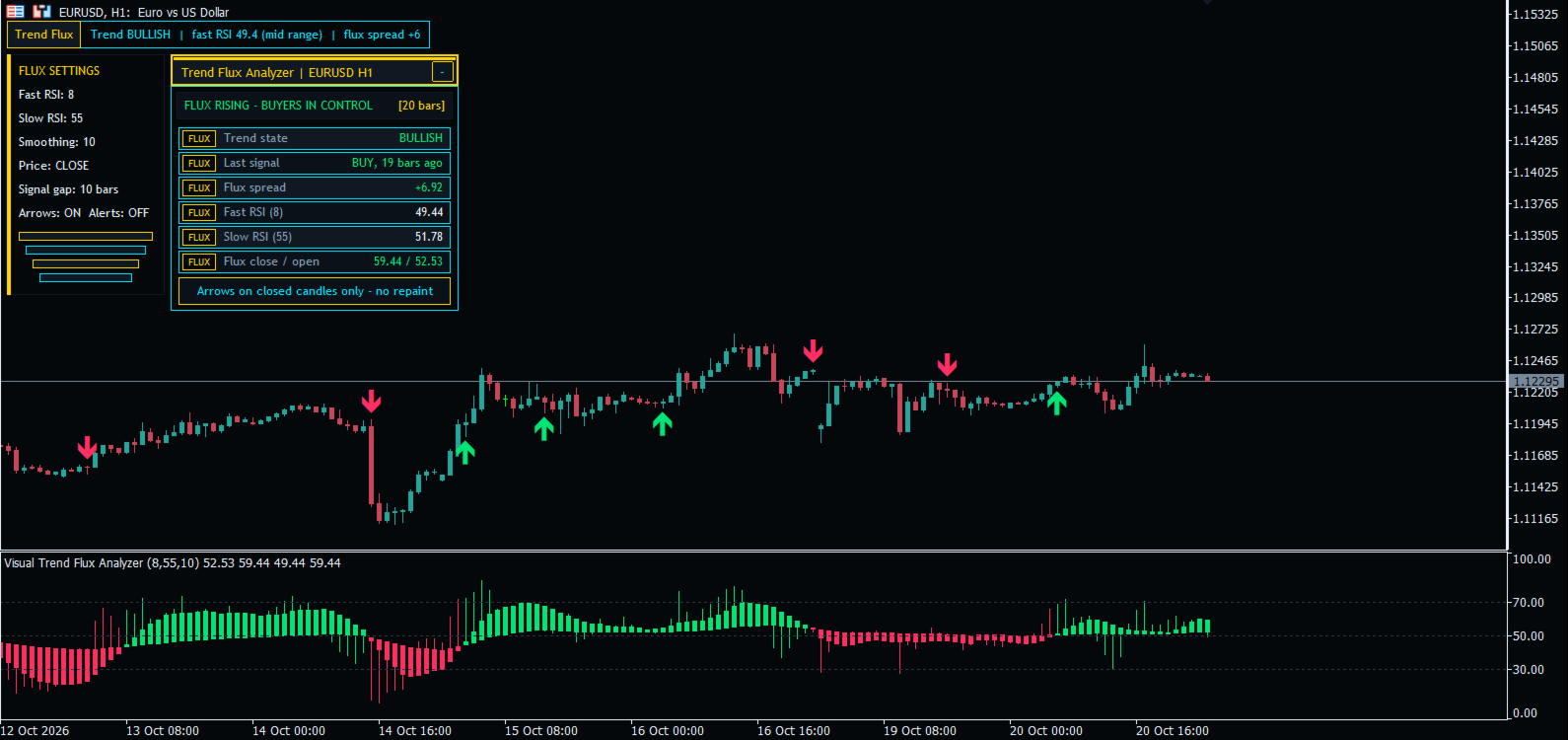
A price chart shows you where the market has been. It does not tell you how much force is pushing it, or when that force is quietly fading. Visual Trend Flux Analyzer turns momentum into something you can actually see: a second chart of flux candles that glow green while buyers carry the trend, red while sellers take over, and grey when neither side is in control.
The idea is simple. A fast momentum stream and a slow momentum stream are blended into one candle per bar. When the fast stream leads, the candle body opens in the trend direction. When the two streams cross, the colour flips, and you see the change of control long before most price patterns finish forming. Clear buy and sell arrows are drawn right on the price candles, so you never have to translate between two windows.
Version 5.00: a brand-new cockpit
This release is a complete rebuild of the interface and the signal engine. The chart now wears a deep slate-black theme with a golden crown header, cyan frames and emerald status text, designed to be readable for hours without tiring your eyes.
- Signal arrows on the price chart - until now signals existed only in the journal. They are now real arrows placed under the low of a buy bar and above the high of a sell bar.
- Live flux panel - trend state, last signal and its age, flux spread, fast and slow readings, flux close and open, last signal price and the signal count of the recent history.
- Summary bar - one line with the trend, the fast reading and its zone (overbought, oversold, mid range) and the current flux spread.
- Settings card - all active settings are always visible, so every screenshot explains itself.
- No repainting - signals are checked only on closed candles, once per bar. An arrow that appears stays where it is.
- Bug fixes - the bar delay between signals now really counts bars (it measured zero before), signals are produced even with logging switched off, the log file no longer overflows for large size limits and no longer reopens after removal, a flux candle body can never poke outside its own wicks, and every start-up input is validated.
- Lighter on the CPU - only new bars are calculated after the first pass, and the panel refreshes at most once a second.
Clean chart on any screen size
Everything the indicator draws on the price chart lives on the left side. The right side, where price is being made, stays completely free. The panel measures its own text and adapts to your window: on a smaller chart it uses a smaller font and shows the most important rows first instead of covering your candles. The price scale is adjusted so candles and arrows always sit below the panel, the flux window opens at a compact height, and all original chart colours and settings are restored the moment you remove the indicator. Drag the panel by its header or minimise it with one click.
How to use it
- Attach the indicator to any chart: forex pairs, gold, indices, crypto or stocks, on any timeframe from M1 to MN.
- Read the colour of the flux candles. Green means buyers are pushing, red means sellers are pushing, grey means a balance phase where patience pays.
- Watch for an arrow on the price chart. It marks the closed bar where control changed hands or where momentum disagreed with a fresh price extreme.
- Use the panel to judge strength: a wide flux spread shows a confident move, a shrinking spread warns that the move is running out of fuel.
- Combine it with your own levels or trend filter. Many traders only take arrows in the direction of the higher timeframe flux colour.
- Adjust the speeds to your style: shorter periods react faster for scalping, longer periods give calmer signals for swing trading.
All inputs explained
RSI Settings
- Fast RSI period - length of the fast momentum stream. Default 8. Lower values react quicker.
- Slow RSI period - length of the slow momentum stream. Default 55. Higher values give a steadier backbone.
- Smoothing period - how strongly the candle open and close are smoothed. Default 10. Larger values remove more noise.
- Price - the price used for the calculation (close, open, high, low, median, typical or weighted).
Signal Arrows
- Buy / sell arrows on the price candles - show or hide the arrows on the main chart.
- Arrow size (1-5) - size of the arrows.
- Buy arrow colour / Sell arrow colour - colours of the arrows.
- Bars with arrows (history depth) - how many recent bars receive arrows and are counted in the panel. Default 3000.
- Pop-up alert on a new signal - an alert window with sound when a new arrow appears on a just-closed bar.
Signal Controls
- Enable bars between signals - keeps arrows from crowding together in choppy markets.
- Bars to wait between signals - the minimum number of bars between two arrows. Default 10.
Display
- Show information panel - turns the panel, summary bar and settings card on or off. With it off, the chart keeps its own colours.
Journaling Settings
- Show detailed logs in journal - writes every signal with time, price and flux value to the Experts journal.
- Log to file instead of terminal - sends the same records to a text file in the MQL5\Files folder.
- Log file name prefix - the start of the log file name.
- Maximum log file size in MB - when a file reaches this size a new numbered file is started.
Why traders keep it open
Momentum is the engine of every trend, and the flux candles let you watch that engine directly. You see when a rally is backed by real strength, when a pullback is only a pause, and when control is really changing. The arrows sit on the candles you trade, the panel answers the key questions in a glance, and the right side of your chart stays yours.
Load the free demo into the Strategy Tester, replay a few weeks of your favourite market, and judge the arrows with your own eyes before you decide.