Discussion of article "How to create bots for Telegram in MQL5"
Interesting article!
Do the codes work on MT4?
Do the codes work on MT4?
Yes, try it.
I tried Telegram_bot_EA on MT4. It installed normally. I entered the token in the settings. Added URL: https://api.telegram.org to the list of allowed addresses. At the beginning it worked fine after requesting 2-3 commands the Expert Advisor is automatically removed from the chart due to lack of memory....
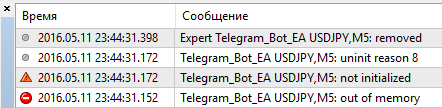
I thank readers for positive feedback.
The first joint tests revealed errors in the code, so I will post here an archive with corrections. It will be updated in the article soon.
Thank you very much for the material. There is only one question: I can't configure sending messages to the channel. The error is "Bad Request". Token and channel name are correct. I can't understand what the problem is.
BadRequest is a reaction to sending a message to a private channel. Actually, the developers originally planned to have bots work only with public channels.
But you can work with private channels by ID.
The scheme of getting ID is as follows:
- Make the channel public, set username for it.
- Add a bot to the channel as an administrator.
- Follow the link: https://api.telegram.org/bot[ BOTA TOKEN]/sendMessage?chat_id=@[USERNAME_CHANNEL]&text=test
After clicking the link the channel ID will be displayed, remember it.
- Make the channel private.
- Send messages via SendMessage() by ID or so https://api.telegram.org/bot[ TOKEN_BOTA]/sendMessage?chat_id=[CHANNEL ID]&text=test
Channel ID does not change over time, so this scheme is quite workable.

- Free trading apps
- Over 8,000 signals for copying
- Economic news for exploring financial markets
You agree to website policy and terms of use
New article How to create bots for Telegram in MQL5 has been published:
This article contains step-by-step instructions for creating bots for Telegram in MQL5. This information may prove useful for users who wish to synchronize their trading robot with a mobile device. There are samples of bots in the article that provide trading signals, search for information on websites, send information about the account balance, quotes and screenshots of charts to you smart phone.
Telegram has three schemes of interaction between bots and users. First - private chats. Every user communicates with a bot independently from each other, as shown if Fig 3, by making requests and receiving replies.
Fig.3. Bot and private chats.
Users send messages to a bot. They are stored on the server for no longer than 24 hours, and are removed afterwards. A bot has time to request these messages and to respond to them. This is the main mode that our bots will be operating in.
Author: Andrey Voytenko