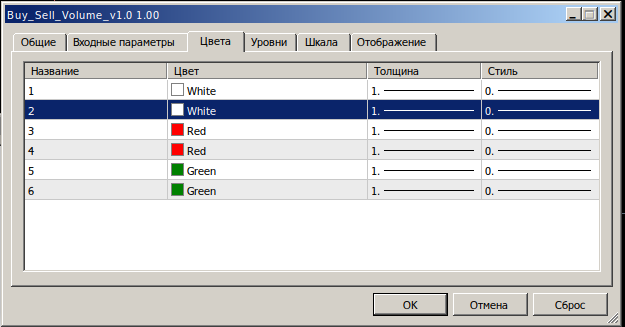
For MT5 I can not change the colour of the indicator, the dialogue window is not called, but the adjacent components of changing the thickness of the line and its style work without problems. In MT4 there are no such problems. Can anyone tell me how to change the colour?
Все объекты, используемые в техническом анализе, имеют привязку на графиках по координатам цены и времени – трендовая линия, каналы, инструменты Фибоначчи и т.д. Но есть ряд вспомогательных объектов, предназначенных для улучшения интерфейса, которые имеют привязку к видимой всегда части графика (основное окно графика или подокна индикаторов...
For MT5 I can not change the colour of the indicator, the dialogue window is not called, but the adjacent components of changing the thickness of the line and its style work without problems. In MT4 there are no such problems. Can anyone tell me how to change the colour?
You can tweak the indicator code and compile it. I sometimes use it as an option, if I can't change something using standard tools.
I agree, but this option can only be used when there is a source, but what to do when there is no source? I thought to cheat by creating a settings file from a windows virtual machine, but alas, the file does not contain information about colours. I am surprised by the fact that everything works without problems in MT4, so this problem is definitely not in Wine.
Konstantin Nikitin:
You can tweak the indicator code and compile it. I sometimes use it as an option, if I can't change something using standard tools.
For MT5 I can not change the colour of the indicator, the dialogue window is not called, but the adjacent components of changing the thickness of the line and its style work without problems. In MT4 there are no such problems. Can anyone tell me how to change the colour?
Press F2, F3, F4. There (in wine) was some sort of trick related to this.
Yay! Thank you! It worked. You need to hold down the F4 key and double click with the left mouse button on the desired colour selection field. One thing I don't understand is why there is no need in such magic for MT4 and everything works fine out of the box? There is only one Wine for both programmes. Or does bitness (32-MT4, 64-MT5) have an effect? .
trader_number_one: Try pressing F2, F3, F4. There (in wine) was some kind of a trick related to this.
Both mt4 and mt5 have this problem. How to be?
Ubuntu 18.04 Gnome manager out of the box.
For MT5 I can not change the colour of the indicator, the dialogue window is not called, but the adjacent components of changing the thickness of the line and its style work without problems. In MT4 there are no such problems. Can anyone tell me how to change the colour?
Ubuntu 18.04 Gnome manager out of the box.
For MT5 I can not change the colour of the indicator, the dialogue window is not called, but the adjacent components of changing the thickness of the line and its style work without problems. In MT4 there are no such problems. Can anyone tell me how to change the colour?
You can tweak the indicator code and compile it. I sometimes use it as an option, if I can't change something using standard tools.
Ubuntu 18.04 Gnome manager out of the box.
For MT5 I can not change the colour of the indicator, the dialogue window is not called, but the adjacent components of changing the thickness of the line and its style work without problems. In MT4 there are no such problems. Can anyone tell me how to change the colour?
.
Try pressing F2, F3, F4. There (in wine) was some kind of a trick related to this.
shista2010:
Or does bitness (32-MT4, 64-MT5) have an effect?
.
I don't know. On 32-MT5 I've clicked the inbuilt indices, everything works with the mouse. I don't have other ones, so I can't check them.
I don't think wine is the only one, by the way. My system is 64 and wine is special, 32-bit. And 64-MT5 did not want to install under it.