 MetaTrader 5
 Experts
 Indicators
 Scripts
 Libraries
 Storage
Join our fan page
- Published by:
- [Deleted]
- Views:
- 7580
- Rating:
- Published:
- Updated:
-
 You are missing trading opportunities:
- Free trading apps
- Over 8,000 signals for copying
- Economic news for exploring financial markets
Registration Log inYou agree to website policy and terms of use
If you do not have an account, please register -
 Need a robot or indicator based on this code? Order it on Freelance
Go to Freelance
Need a robot or indicator based on this code? Order it on Freelance
Go to Freelance
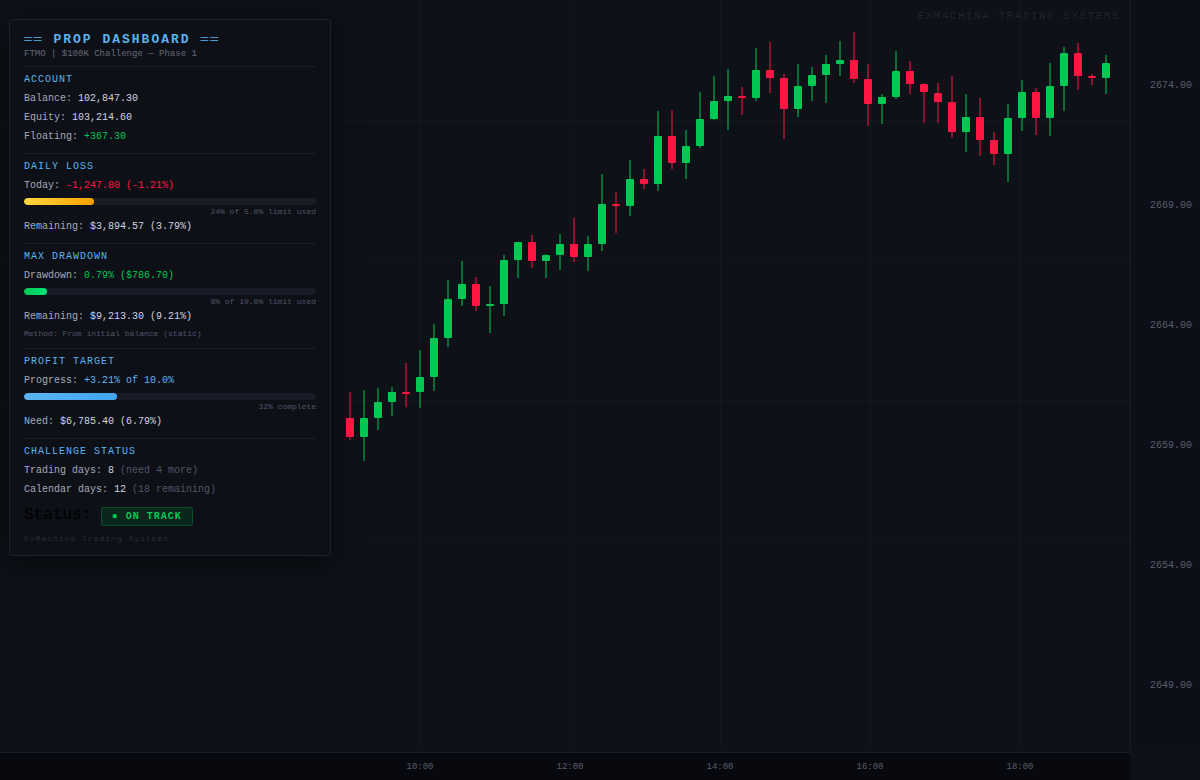
ExMachina Prop Dashboard — Never Lose a Funded Account to Math
Precision before profit.
You’re in the middle of a $100K FTMO challenge. You’ve been trading well for 2 weeks. Then one bad session and you’re not sure — did you breach the daily limit? How close are you to the max drawdown? How many trading days do you still need?
You check the FTMO dashboard on your phone. By the time it loads, the numbers are already 30 seconds old. Meanwhile your positions are still open.
Prop Dashboard shows you all of this in real time, right on your chart, updating on every tick.
Why This Exists
Every prop firm has slightly different rules. Daily loss limits. Max drawdown (static vs trailing). Profit targets. Minimum trading days. Calendar deadlines. The mental overhead of tracking all of this while trading is a real problem.
Most traders rely on the prop firm’s web dashboard, which:
- Updates with delay (30s to several minutes)
- Requires switching windows
- Doesn’t show how close you are to limits in percentage terms
- Doesn’t warn you before you breach
Prop Dashboard solves all of this with a single indicator.
Core Features
Pre-Built Prop Firm Presets
Select your firm from the dropdown and all rules auto-configure:
- FTMO: 5% daily, 10% max DD (static), 10% target, 4 min days, 30 day limit
- MyFundedFX: 5% daily, 12% max DD, 8% target, 5 min days, 30 day limit
- The Funded Trader: 5% daily, 10% max DD, 10% target, 35 day limit
- E8 Funding: 5% daily, 8% max DD (trailing HWM), 8% target, no time limit
- Bulenox: Trailing max DD, 6% target, no time limit
- Custom: Set any rules manually
Daily Loss Tracking
- Current day P&L in dollars and percentage
- Visual progress bar (green → yellow → red as you approach the limit)
- Exact dollar and percentage remaining before breach
- Auto-resets at configurable time (midnight default, adjustable for different broker servers)
Max Drawdown Tracking
- Three calculation methods to match your prop firm’s rules:
- Static (from initial balance) — FTMO, MFF, TFT
- Trailing equity high-water mark — E8, Bulenox
- End-of-day balance — some newer firms
- Visual progress bar with color coding
- Exact remaining buffer in dollars and percentage
Profit Target Progress
- How much you’ve made vs how much you need
- Visual completion bar
- Exact remaining amount
- Celebrates when target is reached
Challenge Status
- Trading days counter (auto-detects days with actual trades)
- Calendar days counter with remaining days
- Overall verdict: ON TRACK / AT RISK / PASSED / FAILED
Early Warning Alerts
- Alerts at 80% of any limit (configurable)
- Alerts on breach
- Popup, sound, push notification, and email options
The Verdict System
The dashboard shows an overall challenge status:
| Status | Meaning |
|---|---|
| ON TRACK | All metrics within safe range |
| AT RISK | Approaching 80%+ of daily or max DD limit |
| TARGET HIT — Need more days | Profit target reached but minimum trading days not met |
| PASSED! | All conditions met |
| FAILED — LIMIT BREACHED | Daily or max DD limit exceeded |
| FAILED — TIME EXPIRED | Calendar deadline passed without hitting target |
Parameters
| Group | Parameter | Default |
|---|---|---|
| Preset | Prop Firm | Custom |
| Account Size | $100,000 | |
| Rules | Daily Loss Limit | 5.0% |
| Max Drawdown | 10.0% | |
| Profit Target | 10.0% | |
| Min Trading Days | 0 | |
| Max Calendar Days | 0 (unlimited) | |
| DD Calc Method | From initial balance | |
| Reset | Day Reset Hour | 0 (midnight) |
| Alerts | Alert at 80% | Yes |
| Alert on Breach | Yes | |
| Push / Email | Off |
Installation
- Download the .mq5 file
- Place in MQL5/Indicators/ folder
- Compile in MetaEditor
- Drag onto any chart
- Select your prop firm preset or configure custom rules
Important Notes
- This is a pure indicator — it does NOT open, modify, or close any trades
- It monitors ALL positions on the account (not filtered by symbol or magic)
- For accurate tracking, set InpAccountSize to your challenge starting balance
- Day reset time should match your prop firm’s server rollover time
- Test on demo first to verify calculations match your firm’s dashboard
Compatibility
- MetaTrader 5, all brokers
- All instruments
- All timeframes
- Netting and Hedging accounts
ExMachina Trading Systems — Precision before profit.
 ExMachina TradePilot
Professional trade management panel: one-click Buy/Sell with auto lot sizing, smart trailing stop (ATR/Fixed/Candle), automatic breakeven, multi-TP partial close system (TP1/TP2/TP3), and one-click pending orders. All-in-one order management for serious traders.
 Last Structure Indicator : LSB Explorer
This is an experimental Last Structure Break (LSB) price action indicator that uncovers meaningful market structures and potential trading edges through intelligent support and resistance analysis.
SilviosEAbest26
SilviosEAbest26 is a high-precision Expert Advisor for MetaTrader 5, designed to trade market reversals using a sophisticated combination of dynamic price channels and momentum filters. The system is engineered for consistent returns while maintaining strict risk management protocols.
CRT Indicator(STF) : Explorer
This is a minimalist CRT (Candle Range Theory) visualizer built in under 100 lines, revealing what “picture-perfect” single-timeframe setups actually produce across real markets.