 MetaTrader 5
 Experts
 지표
지표
 스크립트
스크립트
 라이브러리
라이브러리
 보관함
보관함
당사 팬 페이지에 가입하십시오
- 게시자:
- [삭제]
- 조회수:
- 119
- 평가:
- 게시됨:
- 업데이트됨:
-
 이 코드를 기반으로 한 로봇이나 지표가 필요하신가요? 프리랜스로 주문하세요
프리랜스로 이동
이 코드를 기반으로 한 로봇이나 지표가 필요하신가요? 프리랜스로 주문하세요
프리랜스로 이동

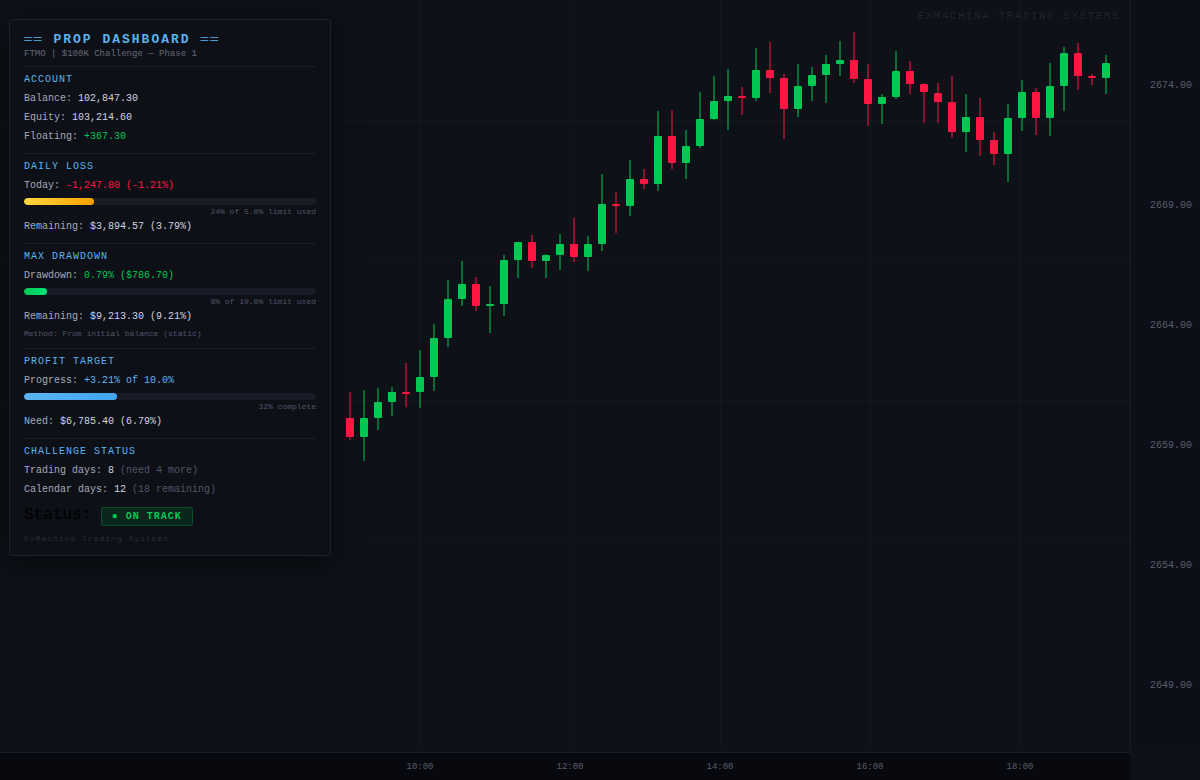
ExMachina 소품 대시보드 - 수학 때문에 펀딩 계정을 잃지 않기
수익보다 정확성을 먼저 생각하세요.
여러분은 $100,000 FTMO 챌린지를 진행 중입니다. 2주 동안 잘 거래하고 있습니다. 그러다 한 번의 나쁜 세션이 있었고 확실하지 않습니다 - 일일 한도를 위반 했습니까? 최대 드로다운에 얼마나 근접했나요? 아직 거래일수가 얼마나 남았나요?
휴대폰에서 FTMO 대시보드를 확인합니다. 대시보드가 로드될 때쯤이면 이미 30초 전의 숫자가 표시됩니다. 그 동안 포지션은 아직 열려 있습니다.
Prop 대시보드는 이 모든 것을 차트에 실시간으로 표시하며 매 틱마다 업데이트합니다.
이것이 존재하는 이유
소품 회사마다 조금씩 다른 규칙이 있습니다. 일일 손실 한도. 최대 드로다운(정적 대 후행). 수익 목표. 최소 거래일. 캘린더 마감일. 거래하는 동안 이 모든 것을 추적하는 데 드는 정신적 오버헤드는 실제 문제입니다.
대부분의 트레이더는 소품 회사의 웹 대시보드에 의존하는데,
- 업데이트가 지연됨(30초에서 몇 분)
- 창을 전환해야 함
- 한도에 얼마나 근접했는지 백분율로 표시하지 않음
- 위반하기 전에 경고하지 않음
Prop 대시보드는 이 모든 문제를 하나의 지표로 해결합니다.
핵심 기능
사전 구축된 소품 회사 프리셋
드롭다운에서 회사를 선택하면 모든 규칙이 자동으로 구성됩니다:
- FTMO: 매일 5%, 최대 DD 10%(고정), 목표 10%, 4일, 30일 제한
- MyFundedFX: 일일 5%, 최대 DD 12%, 목표 8%, 5분일, 30일 한도
- 펀딩 트레이더: 매일 5 %, 최대 DD 10 %, 목표 10 %, 35 일 한도
- E8 펀딩: 매일 5 %, 최대 DD 8 % (후행 HWM), 목표 8 %, 시간 제한 없음
- 불레 녹스: 후행 최대 DD, 6 % 목표, 시간 제한 없음
- 사용자 지정: 수동으로 모든 규칙 설정
일일 손실 추적
- 현재일 손익(달러 및 백분율)
- 시각적 진행률 표시줄(한도에 가까워질수록 녹색 → 노란색 → 빨간색)
- 위반 전 남은 정확한 달러 및 비율
- 구성 가능한 시간에 자동 재설정(기본값 자정, 브로커 서버에 따라 조정 가능)
최대 드로다운 추적
- 프롭 회사의 규칙에 맞는 세 가지 계산 방법:
- 정적(초기 잔고 기준) - FTMO, MFF, TFT
- 후행 주식 고점 - E8, Bulenox
- 일말 잔고 - 일부 신규 회사
- 색상 코딩이 있는 시각적 진행률 표시줄
- 정확한 잔여 버퍼 달러 및 백분율로 표시
수익 목표 진행률
- 달성한 금액과 필요한 금액 비교
- 시각적 완료 바
- 정확한 잔액
- 목표 달성 시 축하 메시지 표시
도전 상태
- 거래일 카운터(실제 거래가 있는 날 자동 감지)
- 남은 일수가 있는 달력 일수 카운터
- 전체 평결: 정상 / 위험 / 통과 / 실패
조기 경고 알림
- 한도의 80%에서 알림 (구성 가능)
- 위반시 알림
- 팝업, 소리, 푸시 알림 및 이메일 옵션
평결 시스템
대시보드에는 전반적인 챌린지 상태가 표시됩니다:
| 상태 | 의미 |
|---|---|
| 진행 중 | 모든 지표가 안전 범위 내에 있음 |
| 위험 | 일일 또는 최대 DD 한도의 80% 이상에 근접함 |
| 목표 달성 - 일수가 더 필요함 | 수익 목표에 도달했지만 최소 거래일 미충족 |
| 통과! | 모든 조건 충족 |
| 실패 - 한도 위반 | 일일 또는 최대 DD 한도 초과 |
| 실패 - 시간 만료 | 목표 달성 없이 캘린더 마감일 통과 |
매개변수
| 그룹 | 매개변수 | 기본값 |
|---|---|---|
| 프리셋 | 소품 회사 | 사용자 지정 |
| 계정 크기 | $100,000 | |
| 규칙 | 일일 손실 한도 | 5.0% |
| 최대 드로다운 | 10.0% | |
| 수익 목표 | 10.0% | |
| 최소 거래일 | 0 | |
| 최대 달력 일수 | 0 (무제한) | |
| DD 계산 방법 | 초기 잔고에서 | |
| Reset | 일 초기화 시간 | 0 (자정) |
| 알림 | 80%에서 알림 | 예 |
| 위반 시 알림 | 예 | |
| 푸시/이메일 | 꺼짐 |
설치
- .mq5 파일 다운로드
- MQL5/Indicators/ 폴더에 넣습니다.
- 메타에디터에서 컴파일
- 아무 차트에나 드래그
- 소품 회사 프리셋을 선택하거나 사용자 정의 규칙을 구성합니다.
중요 참고 사항
- 이 인디케이터는 순수 지표로 거래를 개시, 수정 또는 청산하지 않습니다.
- 계좌의 모든 포지션을 모니터링합니다(심볼이나 매직으로 필터링되지 않음).
- 정확한 추적을 위해 InpAccountSize를 챌린지 시작 잔고로 설정하세요.
- 일일 재설정 시간은 소품 회사의 서버 롤오버 시간과 일치해야 합니다.
- 먼저 데모에서 테스트하여 계산이 회사의 대시보드와 일치하는지 확인합니다.
호환성
- 메타트레이더 5, 모든 브로커
- 모든 상품
- 모든 차트주기
- 네팅 및 헤징 계좌
ExMachina 트레이딩 시스템 - 수익 전 정밀도.
MetaQuotes Ltd에서 영어로 번역함.
원본 코드: https://www.mql5.com/en/code/70268
 ASQ Command Desk
ASQ CommandDesk is a professional order management panel for manual traders on MetaTrader 5. You make the trading decisions — CommandDesk handles execution, risk control, and exit management automatically.
 ASQ Candle Scanner
On-chart candle analysis indicator with structure tags, sentiment, and trend arrows for MetaTrader 5.
ExMachina TradePilot
전문 거래 관리 패널: 원클릭 매수/매도, 자동 로트 사이징, 스마트 추적손절(ATR/고정/캔들), 자동 손익분기점, 다중 TP 부분 청산 시스템(TP1/TP2/TP3), 원클릭 지정가 주문 등입니다. 진지한 트레이더를 위한 올인원 주문 관리.
KSQ CommandCenter Remote Google Sheets Trade Manager
KSQ Command Centre is a production-ready, two-way bridge between MetaTrader 5 and Google Sheets. It was originally designed to help fund managers and quantitative traders remotely monitor and manage large, funded accounts (e.g., Darwinex Zero, Prop Firms, PAM, MAM) directly from a mobile browser, without needing to log in to a VPS. This Expert Advisor not only exports data—it actively listens for commands typed into your Google Sheet and executes them in MT5 in near real-time.