 MetaTrader 5
 Experts
 Indicators
 Scripts
 Libraries
 Storage
Join our fan page

Control_Trade_Sessions - library for MetaTrader 5

Optimizing trading strategies in Meta Trader 5 (MT5)? Use an advanced and more visual representation of optimization results with the benefits of interactive HTML pages.
Briefly about the benefits:
- Filters by any criterion and threshold (min/max).
- Views:
- 2052
- Rating:
- Published:
- Updated:
-
 You are missing trading opportunities:
- Free trading apps
- Over 8,000 signals for copying
- Economic news for exploring financial markets
Registration Log inYou agree to website policy and terms of use
If you do not have an account, please register -
 Need a robot or indicator based on this code? Order it on Freelance
Go to Freelance
Need a robot or indicator based on this code? Order it on Freelance
Go to Freelance
Library for trading session control. On startup it counts trading session times for all 7 days of the week (there can be cryptocurrency trading on Sat and Sun), up to 10 sessions per day. Then in OnTick() you can do checks, and if a tick came outside the trading session, you can exit further processing of it.
Example of use:
//+------------------------------------------------------------------+
//|testControl_Trade_Sessions.mq5 |
//+------------------------------------------------------------------+
// #define LoadSessionFromInputs // Read sessions from inputs
#include <Forester\Control_Trade_Sessions.mqh> // connecting the code for controlling the trading session

int OnInit()  {   return(INIT_SUCCEEDED);  }

void OnTick() {
  static TRADE_SESSIONS TradeSession(_Symbol);// getting market open/close times and saving them into arrays by days of the week. Called once when launching the Expert Advisor (see static).
  if(!TradeSession.isSessionTrade(TimeCurrent())){Print("Market closed. OnTick return"); return;}

  // your actions
  }
The result is a printout like this:
2022.01.10 00:05:00 Day: 0 Trade sessions: 1: 00:00-00:00 - это воскресенье
2022.01.10 00:05:00 Day: 1 Trade sessions: 1: 00:15-23:55
2022.01.10 00:05:00 Day: 2 Trade sessions: 1: 00:15-23:55
2022.01.10 00:05:00 Day: 3 Trade sessions: 1: 00:15-23:55
2022.01.10 00:05:00 Day: 4 Trade sessions: 1: 00:15-23:55
2022.01.10 00:05:00 Day: 5 Trade sessions: 1: 00:15-23:55
2022.01.10 00:05:00 Day: 6 Trade sessions: 1: 00:00-00:00
2022.05.30 00:05:00 Market closed. OnTick return
2022.05.30 00:05:01 Market closed. OnTick return
...
2022.05.30 00:14:36 Market closed. OnTick return
2022.05.30 00:14:40 Market closed. OnTick return
2022.05.30 23:55:00 Market closed. OnTick return
2022.05.30 23:55:00 Market closed. OnTick return
...
2022.05.30 23:59:30 Market closed. OnTick return
2022.05.31 00:00:01 Market closed. OnTick return
...
New MQL5 functions are used to read the trading session for any day, including weekends.
Works as fast as possible, only 1 check is made on each tick inside the trading session:
.
if(time < this.NextTradeStop ) { return true; }Where NextTradeStop is the end time of the current trading session.
At each tick outside the trading session 1 check is also made:
if(time < this.NextTradeStart ) { return false; }Only at the transition between sessions the arrays are accessed to get the time of the next session.
For example on my DC the trading session is from 00:15 to 23:55. With the first tick after 00:15 NextTradeStop will be set to 23:55 and then only this condition will be checked all day long.
Your trading sessions
You can also specify the time of trading sessions manually. To activate this option, add the line
.
#define LoadSessionFromInputs // Read sessions from inputs
It will create 7 sinputs for entering trading sessions by days of the week.
Enter session times without spaces, strictly with : - and ,
It looks like this in the parameters tab:
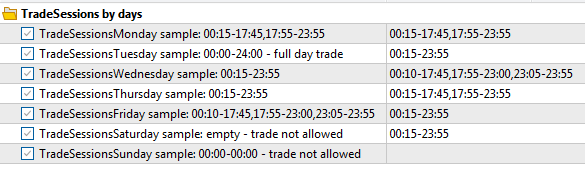
And this is how it will be output in the log:
TradeSessionsTuesday=00:15-23:55
TradeSessionsWednesday=00:10-17:45,17:55-23:00,23:05-23:55
TradeSessionsThursday=00:15-17:45,17:55-23:55
TradeSessionsFriday=00:15-23:55
TradeSessionsSaturday=00:15-23:55
TradeSessionsSunday=
EURUSD : real ticks begin from 2022.05.10 00:00:00, every tick generation used
2022.01.10 00:05:00 Day: 1 Trade sessions: 1: 00:15-17:45, 2: 17:55-23:55
2022.01.10 00:05:00 Day: 2 Trade sessions: 1: 00:15-23:55
2022.01.10 00:05:00 Day: 3 Trade sessions: 1: 00:10-17:45, 2: 17:55-23:00, 3: 23:05-23:55
2022.01.10 00:05:00 Day: 4 Trade sessions: 1: 00:15-17:45, 2: 17:55-23:55
2022.01.10 00:05:00 Day: 5 Trade sessions: 1: 00:15-23:55
2022.01.10 00:05:00 Day: 6 Trade sessions: 1: 00:15-23:55
2022.01.10 00:05:00 Market closed. OnTick return
...
If the end time of the session is less than the start time, for example 20:00-8:00, then the session will continue until 8:00 of the next day. This can be useful in cases when the trading session is in a different time zone from the server time.
The time of trading sessions can also be specified in the code without inputs. The LoadFromInputs() function is created for this purpose. It can be called without Inputs, but directly from the code with a string array, as in the example.
string s=["00:15-17:45,17:55-23:55","00:00-24:00",....]
void LoadFromInputs(string &s[]){...}
If the Expert Advisor is multicurrency and different instruments have different trading session times, you can make a separate instance of TRADE_SESSIONS for each instrument and call LoadFromInputs() with session data and check isSessionTrade(). To do this, you will have to modify the code similar to this example.
Translated from Russian by MetaQuotes Ltd.
Original code: https://www.mql5.com/ru/code/48059
 Grid Master
Overview Grid Master EA is an automated trading system that implements a bidirectional grid strategy. It places multiple pending orders above and below the current market price, capturing profits from market oscillations in both directions.
 PHSB Screener
This Screener was created to simplify the process of finding assets trading at discounted prices. Initial usage may take slightly longer due to the data loading process for all selected instruments. The tool can scan all available broker assets or be limited to specific asset classes.
Simple_Price_EA
The simplest Expert Advisor that analyses the price movement on a given number of bars and opens a corresponding position.
Simple_Pending_Orders_Time
The Expert Advisor works with pending orders Buy Stop and Sell Stop according to the time specified in its input parameters.