
Introduction
AbacuQuant Portfolio is a multi-configuration Expert Advisor for MetaTrader 5. Instead of running one strategy with one set of parameters on one instrument, it runs up to 48 independent configurations at the same time, across EURUSD, GBPUSD, USDJPY and AUDUSD, from a single H1 chart. Each configuration owns its own trading window, its own combination of strategies, its own indicator periods, and its own ATR-based stop and target. Risk is not managed configuration by configuration; it is measured across the whole account, so running several instruments together does not quietly multiply your exposure.
This manual documents how the engine actually works, with the real numbers from the validation tests and the real log lines the Experts tab prints. It is written for someone deciding whether to run this on their own account, not as a sales page, so it spends more time on mechanics and honest limitations than a product listing would.
- What this EA does not do
- Architecture: the portfolio engine
- The four validated presets
- The two experimental presets
- How a trade is decided, step by step
- Position sizing and the three risk ceilings
- Running it on a small account
- Broker server time and the GMT offset
- Symbol names across different brokers
- Manual mode: building your own configuration
- The custom optimization criterion
- How the presets were validated
- Requirements and account type
- Setting it up
- Honest limitations
- Support and updates
1. What this EA does not do
It is easier to explain what the engine will never do than to list what it does, so this comes first.
- No martingale. Position size never increases because a previous trade lost.
- No grid, no averaging down. A losing position is never rescued by opening more positions against it.
- No loss-recovery logic. There is no code path that tries to win back a previous loss.
- No trade without a stop loss. The stop and the target are sent together with the order that opens the position, never added a moment later.
- No repainting. Every signal is read from a completed H1 bar. Nothing ever reads the bar that is still forming, which is why a Strategy Tester run and live behavior agree.
If you are looking for an equity curve with no visible losses, this is not that kind of system. Losses are closed at a predefined stop and are part of the design, not a malfunction.
2. Architecture: the portfolio engine
The internal unit of work is called a slot. A slot is one configuration: a symbol, a trading window, a set of enabled strategies, an agreement threshold, and a stop/target geometry. The engine can hold up to 48 slots at once. A preset is simply a fixed group of slots that ships already configured for one instrument.
Slots are independent at the strategy level. A slot tuned for the London open does not know or care what a slot tuned for the New York afternoon is doing. What is shared is the risk engine: before any slot is allowed to open a position, the EA looks at what every other slot, on every instrument, on every chart running this EA on the same account, already has open, and only allows the trade if the account-wide ceilings still have room.
On start-up the EA builds its slot list and prints a summary to the Experts tab. Here is what that looks like with only the EURUSD preset enabled, which is how the EA ships by default:
 ABQ PORTFOLIO  EURUSD  |  8 slot(s) live
 risk per trade  0.50% of balance
 risk scope      whole account, shared with every chart running this EA
 GLOBAL caps    open risk 30.0%   deposit load 30.0%   equity drawdown 30.0%
 positions cap   10 concurrent, account-wide
 magics         unique, derived from the canonical symbol name
 server clock    GMT+2.0   reference GMT+2.0   session shift +0 min (no adjustment)
 slot  0  EURUSD   EU 02:21     02:21-03:45  SL 4.00 x ATR(51)  TP 1.10  magic 7986900
 slot  1  EURUSD   EU 03:49     03:49-04:35  SL 9.30 x ATR(72)  TP 0.40  magic 7986901
 slot  2  EURUSD   EU 05:16     05:16-06:44  SL 2.20 x ATR(88)  TP 0.30  magic 7986902
 slot  3  EURUSD   EU 07:40     07:40-09:45  SL 7.00 x ATR(89)  TP 0.40  magic 7986903
 slot  4  EURUSD   EU 11:39     11:39-12:44  SL 3.70 x ATR(72)  TP 0.20  magic 7986904
 slot  5  EURUSD   EU 13:22     13:22-16:39  SL 5.70 x ATR(88)  TP 0.40  magic 7986905
 slot  6  EURUSD   EU 16:57     16:57-17:35  SL 2.90 x ATR(42)  TP 0.70  magic 7986906
 slot  7  EURUSD   EU 19:43     19:43-20:45  SL 5.00 x ATR(40)  TP 2.70  magic 7986907
Notice the eight EURUSD slots cover eight separate, non-overlapping windows through the day, each with its own stop and target expressed in ATR multiples rather than fixed pips. That non-overlap is not an accident of formatting; it is the result of the selection method described in section 12.
3. The four validated presets
Four instruments ship with a complete set of slots that passed the acceptance procedure described later in this manual: EURUSD, GBPUSD, USDJPY and AUDUSD. EURUSD is enabled by default so the EA is ready to trade the moment it is attached to a chart. The other three ship switched off and are turned on deliberately, individually or combined into one portfolio.
The table below is measured on the out-of-sample forward period, the half of the historical data the selection process never saw while choosing these slots. "Margin" is how far the observed win rate sits above its own break-even win rate, in percentage points. "t" expresses that margin in standard errors, which is what separates a real statistical edge from a lucky run; values above 2 are conventionally treated as significant.
| Preset | Slots | Margin over break-even | t-statistic | Max drawdown |
| GBPUSD | 6 | +3.78 | 4.42 | 4.70% |
| AUDUSD | 5 | +8.94 | 4.04 | 7.04% |
| USDJPY | 4 | +7.97 | 3.75 | 9.13% |
| EURUSD | 8 | +4.24 | 3.56 | 8.17% |
All four clear the acceptance bar independently. That is the reason four instruments are shipped instead of one: an edge measured on four uncorrelated instruments, at different hours of the day, is harder to explain away as luck than an edge measured on any single one of them.
Run as one portfolio on a single account, the combined result over the same forward period was a t-statistic of 7.60 across 1,540 trades, with 158 losses, at a maximum drawdown of 10.34 percent. That is higher than any individual preset, the best of which was GBPUSD at 4.42.
The four presets do not simply stack their profits on top of each other. They trade at different hours on different currencies, so their losing periods do not line up, and the combined edge is measured with more confidence than any single instrument on its own. One concrete way to see the risk engine actually doing something rather than being decorative: each pair traded slightly fewer times inside the combined portfolio than it did running alone, for example EURUSD closed 492 trades combined against 521 alone, and USDJPY closed 278 against 315 alone. Those missing trades are entries the shared risk ceiling refused, because another instrument was already using the risk budget at that moment.
- Broker: Darwinex, on a server clock of GMT+2 in winter and GMT+3 in summer.
- Period: 1 January 2020 to 3 August 2026, split into a selection half and an untouched forward half.
- Modelling: "Every tick based on real ticks," the most demanding setting the Strategy Tester offers.
- Deposit: 100,000, a single account shared by all four presets running together.
- Clock setting: the broker winter offset input set to 2, matching that server.
The clock setting is not a footnote. A preset pointed at the wrong trading hours is not the same preset that produced these numbers; section 8 explains why and how the EA handles it.
4. The two experimental presets
Two additional instruments, XAUUSD and GBPJPY, are included in the EA but switched off by default and marked as experimental. They are neither hidden failures nor padding to make the product look larger. Here is exactly where each one stands, with numbers.
Seven slots, forward-period margin over break-even of +1.08, t-statistic of 1.00, drawdown 5.63 percent. A t of 1.00 means the margin sits about one standard error above zero, which is the kind of result that occurs by chance often enough that it should not be relied on as a standalone edge. The same conclusion shows up a second way: it would take only about 2.5 additional losing trades to erase gold's entire forward-period result, compared with roughly 19 for EURUSD over the same period. The result is not negative. It is simply too thin to publish as validated.
Six slots. In the selection half the margin over break-even was negative, at -0.33, with a t-statistic of -0.43 over roughly 37 losing trades. In the forward half it turned positive, +2.99 with a t-statistic of 3.82, but that positive result rests on only about 10 losing trades, below the minimum this method requires before treating a margin as measured at all (see section 12). A result that flips sign between halves and is built on ten losses is not yet an edge, whatever the second number looks like in isolation.
Both presets ship so a curious user can research or extend them without rebuilding the slot configurations from scratch. They are included for observation, not for allocation. If either one clears the acceptance procedure in a later validation pass, it becomes a fifth or sixth validated preset in a free update, and it will be presented that way explicitly rather than folded quietly into the validated set.
5. How a trade is decided, step by step
The decision path for every slot is the same seven steps, in the same order, every time. Nothing about it is hidden inside a black box; it can be read directly from the Experts log while the EA runs.
- The slot must be inside its own trading window. A slot ignores the market entirely outside the hours it was tuned for.
- The signal bar must be closed. Every strategy reads the previous completed H1 bar. The bar still forming is never touched, which is why a backtest and live trading produce the same entries for the same data.
- Enough of the slot's enabled strategies must agree. Each slot has its own subset active out of ten available strategies (order-flow imbalance, Fibonacci break, candlestick patterns, support and resistance, Bollinger Bands, RSI, moving average cross, MACD, ADX, Stochastic) and its own required number of them pointing the same direction before a trade is even considered. One indicator alone is never enough.
- Position size is calculated backwards from the stop. The EA first works out where the stop belongs, in ATR terms, then asks how many lots put the configured risk percentage of the account balance at exactly that distance. A wider stop always produces a smaller lot, so the money placed at risk stays constant across every slot regardless of how wide or narrow its particular stop happens to be.
- Three account-wide risk ceilings are checked. Total open risk, deposit load, and equity drawdown from its peak, described in full in section 6. Any one of them can refuse the trade, and a refusal is treated as a perfectly normal outcome, not an error.
- The stop loss and take profit travel with the opening order. They are part of the same instruction that opens the position, never added a moment afterward. If the connection drops the instant after the trade fills, the protection is already sitting on the broker's server.
- Nothing happens after that. No trailing tricks, no moving the stop further away, no adding to the position, no re-entry to chase back a loss. The position closes at its stop or its target, and the slot goes back to waiting for its next window.
Here is a real example line from the Experts tab when a slot opens a position, showing the lot size it calculated, the money it placed at risk, the resulting stop and target prices, and which internal signal triggered the entry:
2020.01.02 08:00:09 SLOT 3 (EU 07:40 EURUSD) BUY 1.61 lots | risk 1001.26 | SL 1.11423 TP 1.12081 | BB_Lower_Bounce
6. Position sizing and the three risk ceilings
The lot for every risk-based trade is derived from the broker's own contract arithmetic, through OrderCalcProfit and OrderCalcMargin, rather than from any fixed pip-value assumption baked into the code. That is what makes the same risk percentage behave consistently across brokers with different contract sizes, tick values, and quote conventions.
Every broker enforces a minimum lot. On a small account, or on a slot with a wide stop, that minimum can risk more money than the configured risk percentage actually calls for. Most expert advisors round up silently and say nothing. This one measures the gap and reports it. A representative line looks like this:
SLOT 3 (EURUSD EURUSD): the minimum lot of 0.01 risks 6.35 but you allow 2.50. This slot needs a balance of about 1270 to size correctly. Its trades are being SKIPPED.
The input SkipTradeIfMinLotExceedsRisk (false by default) controls what happens next. Left off, the slot takes the trade at the broker minimum, over the configured budget, and logs it as such. Turned on, the slot refuses the trade entirely rather than exceed the limit, which can legitimately mean zero trades on an account too small for that particular configuration; that is the honest answer for an account that genuinely cannot carry the position, not a bug.
The EA also checks SYMBOL_VOLUME_LIMIT, the broker's cap on total volume outstanding on one symbol across every open position and pending order, not just the maximum size of a single order. If the calculated lot would push the account over that combined limit, it is trimmed to whatever room remains rather than being sent as an order the broker would simply reject.
- Total open risk (MaxAccountRiskPercent, 30 percent by default): what the account would lose if every currently open stop were hit at the same time.
- Deposit load (MaxDepositLoadPercent, 30 percent by default): how much margin is committed. This is collateral, not risk of loss, and the two are easy to mix up.
- Equity drawdown (MaxEquityDrawdownPct, 30 percent by default): how far equity may fall from its peak before the EA closes everything and halts.
All three are evaluated across every slot, every instrument, and every chart running this EA on the same account, using shared global variables namespaced to the account login. Running four instruments together therefore does not silently multiply the account's permitted exposure by four; the same three ceilings apply to the combined total.
Finally, a set of start-up guards rejects any slot whose stop is tight enough that the spread alone would decide the outcome, or whose stop and target both fit inside a single bar's typical range. Both situations produce a backtest that cannot be reproduced live, so those slots are refused before the EA ever places a trade with them.
7. Running it on a small account
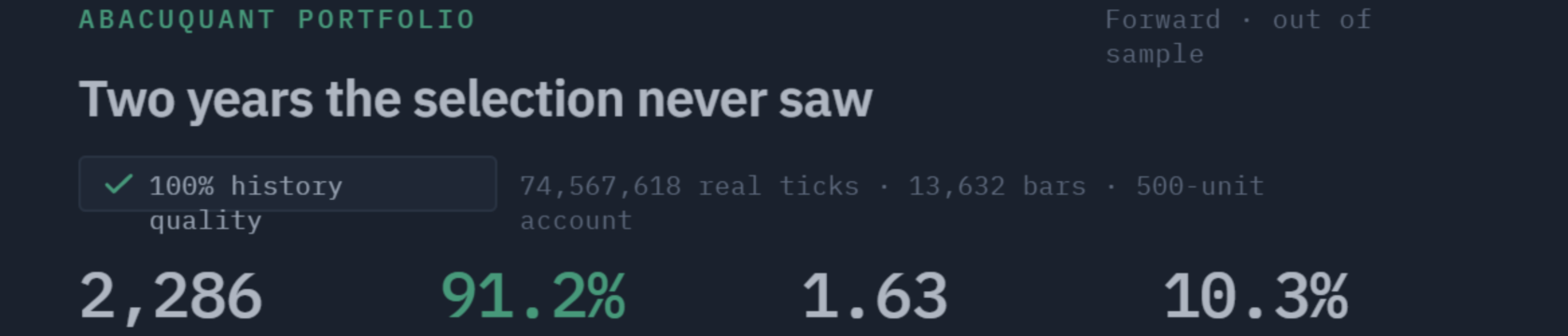
Rather than assert that this runs on a small account, it was tested. The full portfolio, all six presets enabled including the two experimental ones, was run over the same historical period on a 500-unit account. The margin level never fell below 259 percent, and over roughly 2,286 forward-period trades the account closed 91.2 percent of them in profit, with a maximum drawdown of 10.3 percent on balance and 14.4 percent on equity. Lot sizes scaled automatically from the broker minimum upward as the balance grew, without a single setting being touched during the run.
The part worth understanding in detail is what happens below roughly 2,500 units, because the risk control cannot fully do its job there. When half a percent of a 500-unit account is smaller than what the broker's own minimum lot risks, the minimum is what the account gets, and the trade risks more than was configured. Measured on that same 500-unit run, while the balance was still close to its starting point, the typical losing trade cost about 1.0 percent of the account against the 0.5 percent that was configured, roughly double. This is not something any expert advisor can avoid, because nothing can trade in a size smaller than the broker's floor. What this one does is measure the gap, name the exact balance each slot needs, and let the user decide rather than silently doubling the risk and saying nothing about it.
Many brokers offer cent accounts, where the balance is denominated in cents and a lot represents one hundredth the exposure of a standard lot. Depositing 100 units of currency shows up as a balance of 10,000. The money is identical; what changes is the granularity of position sizing, because the broker's minimum lot now represents a much smaller monetary exposure relative to that larger-looking balance, letting the EA size closer to the risk percentage that was actually configured.
No setting needs to change for this to work, because every lot calculation already reads the broker's real contract specifications rather than assuming a fixed value. This should be understood as a reasoned option rather than a proven one: it has not yet been run through the same empirical validation as the rest of this manual, so treat it as a mechanism that follows logically from how the lot sizing works, and confirm it on a demo before funding a live cent account. A cent account does not multiply returns; 100 units of currency remain 100 units of currency, and the percentages involved are unchanged.
Do not enable the two experimental presets on a small balance. In the same 500-unit run, the four validated presets kept their single worst trade to roughly 3 percent of the account. Gold, in one trade, took 9.9 percent. On a small balance the experimental slots concentrate risk exactly where an account can least afford it, which is a second, independent reason to leave them switched off beyond the statistical thinness described in section 4.
8. Broker server time and the GMT offset
Every trading window shown in section 2's log block was tuned against a specific server clock. A different broker runs its own clock, usually at a different offset from GMT, so those same hour ranges would watch the wrong part of the trading day if compared to the broker's local time literally. Every figure quoted anywhere in this manual depends on this being set correctly.
Two inputs control it. AutoGmtOffset ships set to false. ManualGmtOffsetHours ships set to 2.0, read as the broker's winter offset; the EA adds daylight saving on top automatically using the same rule the reference clock uses, so a fixed manual value stays correct across the whole year, not only in winter. The default of 2.0 matches the server the presets were validated on, and the large majority of MetaTrader brokers run on the same convention, so most users never touch this input.
Automatic detection exists as an option but is deliberately not the default. The platform function that reports a broker's own GMT offset has been observed misreporting it inside the Strategy Tester for at least one real account, which would silently shift every trading window while the EA otherwise appeared to run normally. A fixed, user-set reference offset is predictable and can be checked; the log line shown in section 2 prints the offset used, the reference, and the resulting shift in minutes at every start-up, so nothing about this is left to guesswork. If a broker genuinely runs a different winter clock, entering the correct figure in ManualGmtOffsetHours is the fix, and it can be confirmed by comparing the Market Watch clock against GMT directly.
9. Symbol names across different brokers
Brokers name the same underlying instrument differently. EURUSD might be listed as EURUSD, EURUSD.pro, or mEURUSD; gold might be listed as XAUUSD or as GOLD. A preset written against the plain name "EURUSD" needs a way to find whatever that broker actually calls it.
The EA resolves this automatically. It reads the currencies each canonical symbol represents rather than only the string itself, detects the current chart's own prefix and suffix, and applies that same pattern to every preset it is trying to resolve. When that still is not enough for something unusual, the SymbolMap input accepts an explicit override, for example "XAUUSD=GOLD,USDJPY=USDJPY.pro".
Magic numbers are derived per instrument through a hash of the canonical symbol name, so two configurations can never collide by accident even across different instruments sharing the same base magic. The EA verifies this uniqueness at start-up and refuses to run at all if it ever detects a conflict, rather than trading with ambiguous position ownership.
10. Manual mode: building your own configuration
The validated presets are one way to use this engine; they are not the only way. Manual mode exposes the exact same underlying framework for a single, user-defined slot, with nothing held back from what the presets themselves use.
Available controls include which of the ten strategies are active, how many of them must agree before a trade is allowed, the trading window down to the minute, every relevant indicator period, the allowed direction (both, long only, or short only), the maximum number of concurrent positions for that slot, and the stop and target distances expressed in ATR multiples.
The shipped presets always use risk-based sizing, because that is what they were validated on. A user's own manual slot can choose differently:
- Risk based (the default): the lot follows the stop distance and the configured risk percentage, identical to how every preset sizes its trades.
- Fixed lot: the same lot size regardless of the stop distance. This is a natural choice while researching a new configuration, because it holds one variable still while everything else is being tuned.
- Proportional: the lot scales with account balance, expressed as a number of lots per 10,000 units of balance.
Whichever mode is chosen, the resulting lot is still normalized to the broker's minimum, maximum, and volume step, still trimmed against the symbol volume limit described in section 6, and the money it puts at risk is still counted against all three global risk ceilings. Choosing a different sizing mode changes how the size is calculated; it does not exempt the trade from any of the account-wide safety checks.
11. The custom optimization criterion
For a user researching their own manual configuration in the Strategy Tester, the EA includes a custom optimization criterion, selectable as "Custom max" in the tester's optimization settings.
It does not rank results by net profit. It ranks by how far the observed win rate sits above the break-even win rate implied by that configuration's own stop and target distances, and it returns zero for any result built on too few losing trades to be measured at all. The reason is that a very distant stop paired with a very close target produces a smooth, high-profit-factor equity curve simply because the stop was rarely reached inside the test window, not because the underlying signal has any edge. Ranking by profit alone would surface exactly those misleading results first; this criterion is built specifically to reject them instead.
12. How the presets were validated
Every validated preset in section 3 passed the same three-part acceptance procedure, on real-tick historical data, with a forward period the selection process never had access to while choosing the slots.
- Statistical significance. The observed win rate must sit above its own break-even line by a margin large enough that it would be unlikely to appear by chance, measured with a t-statistic on the out-of-sample data. A configuration that merely looks profitable in one specific test window does not qualify on that basis alone.
- A minimum number of losing trades. A result built on a handful of losses is not a measurement; it is a guess dressed up as one. Below that minimum, a result is rejected outright regardless of how good it appears, which is exactly what happened to the forward-half result for GBPJPY in section 4.
- Stop validation. Nearly all losing trades in the sample must actually close at the configured stop. If they do not, the stop distance was never genuinely tested by that data, and the backtest is describing a particular stretch of market conditions rather than a strategy's real behavior under stress.
Two instruments researched during development failed these criteria and were kept out of the validated set rather than shipped anyway to make the product appear larger. The same standard applies to every future instrument added to the EA.
Across the four validated presets, the average stop sits at roughly 5.8 times ATR against an average target of roughly 1.1 times ATR. For a stop-to-target ratio like that, the break-even win rate, the win rate needed just to end at zero before costs, follows directly from the geometry:
p0 = SL / (SL + TP)
For the average validated geometry: p0 = 5.8 / (5.8 + 1.1) = 5.8 / 6.9, or approximately 84 percent. A historical win rate around 90 percent, which is roughly what the validated presets show, only means something once it is compared against that 84 percent line rather than looked at in isolation. This is also why occasional losses in this system are noticeably larger than typical wins: a stop several times wider than the target is what produces both the high win rate and the size of an individual loss when one does occur, and the acceptance procedure above exists specifically to check whether the margin above that break-even line is real or just noise.
13. Requirements and account type
- MetaTrader 5, any broker offering the instruments used.
- A hedging account is required for the multi-slot presets. Each preset holds several independent positions on the same instrument at once, each with its own stop. A hedging account keeps those positions separate, which is the condition the presets were validated under. A netting account merges same-symbol positions into one by platform design, so the slots cannot stay independent and the presets will not reproduce the behavior described in this manual.
- H1 chart, and only one is needed regardless of how many instruments are enabled; the EA drives every enabled preset from that single chart.
- A low-spread account and a VPS for continuous uptime are both recommended, neither is mandatory.
If a broker is regulated by the NFA in the United States, the account attached is almost certainly a netting account, because NFA Rule 2-43(b) prohibits hedging for retail forex accounts there. On that kind of account, Manual mode with a single configuration is the appropriate way to use this EA rather than the multi-slot presets.
When the EA detects a netting account at start-up, it prints a plain-language warning rather than silently behaving differently, since MQL5 Market rules do not permit functionality to change based on account type. The message reads:
 ACCOUNT MODE    this account is NETTING, not hedging.
   The presets run several configurations on one instrument, each with its
   own stop. Netting keeps a single position per symbol, so those merge and
   their stops overwrite each other. The presets will NOT reproduce the
   behaviour they were validated on. Use STEP 4 manual mode with one
   configuration instead, or run the EA on a hedging account.
14. Setting it up
- Attach the EA to any H1 chart. One chart drives every instrument that is enabled, so there is no need for a separate chart per pair.
- Turn on the presets, or the manual configuration, that should trade.
- Set the risk percentage per trade, then open the Experts tab and read the start-up block: the server-clock line, the balance each slot needs to size correctly, and the local symbol each preset resolved on that broker.
An on-chart dashboard mirrors the current status while the EA runs, and VerboseLog can be switched on to have the EA log the specific reason behind every trade it skips, which is useful the first time a configuration is run on a new broker.
15. Honest limitations
- This is not a set-and-forget system. The presets are the result of historical research and will need revisiting as market conditions change, which is the purpose of ongoing free updates rather than a one-time release.
- Coverage is not continuous. A slot only trades inside its own validated window, so quiet stretches with no activity from a given preset are expected behavior, not a malfunction.
- The high historical win rate comes with a specific trade-distribution shape, described with real numbers in section 12: individual losses can be roughly five times the size of a typical win, and the break-even line for that geometry sits close to 84 percent before costs. A run of losses under that shape is normal, not a sign the system has stopped working.
- Every figure in this manual was measured on historical data, on one broker, over a specific period. It describes what happened, not what will happen. No expert advisor, including this one, can guarantee a profit or remove the risk of losing capital.
16. Support and updates
Direct support is available in English and Spanish through MQL5 private messages or the product's discussion page. New instruments that clear the acceptance procedure in section 12 are added as free updates for the duration of an active subscription, and engine improvements ship the same way.
This manual will be revised as the EA itself changes. If a section here ever stops matching the current version's behavior, that is worth reporting directly, since keeping the documentation accurate is part of what this product is meant to deliver.




