Konstantin Chechnev
Konstantin Chechnev
4.2 (5)
  • Information
7+ Jahre
Erfahrung
18
Produkte
47
Demoversionen
0
Jobs
0
Signale
0
Abonnenten
Software engineer in Eqorex RnD Studio
💻 01 / METATRADER-ENTWICKLUNG
────────────────────────

Ich entwickle Lösungen jeder Komplexität – von Indikatoren, Trading-Panels und Utilities bis hin zu mehrstufigen Analysesystemen, Expert Advisors, Optimierern und spezialisierten Werkzeugen für die Marktforschung.

Wenn sich eine Handels- oder Analyseidee formalisieren lässt, kann ich sie in ein vollständiges MetaTrader-Werkzeug umsetzen.


⚙️ 02 / WAS ICH ENTWICKELN KANN
────────────────────────

• Automatisierung von Handelsalgorithmen und Strategien;
• Indikatoren und Systeme zur Analyse von Marktdaten;
• Verarbeitung von Tickdaten, Kursströmen und Statistiken;
• Optimierung und Validierung von Handelsparametern;
• komplexe Benutzeroberflächen, Bedienfelder und Datenvisualisierung;
• individuelle Handels- und Analyselogik für konkrete Aufgaben.


🧩 03 / VON DER IDEE ZUM FERTIGEN PRODUKT
────────────────────────

Ich betreue das gesamte Projekt – von der Idee und mathematischen Logik über Architektur, Programmierung und Benutzeroberfläche bis hin zu Performance-Optimierung, Tests und einem einsatzbereiten Produkt.

Ein gutes Werkzeug ist mehr als nur funktionierender Code. Es muss schnell, verständlich, stabil und benutzerfreundlich sein und genau die Aufgabe lösen, für die es entwickelt wurde.


🧭 04 / ERFAHRUNG — MEHR ALS 7 JAHRE
────────────────────────

Seit mehr als 7 Jahren entwickle ich Software für MetaTrader und die Finanzmärkte.

In dieser Zeit hat sich meine Arbeit von kleinen Handelsalgorithmen zu komplexen Forschungs- und Analysesystemen entwickelt.


💬 05 / HABEN SIE EINE IDEE ODER EIN PROJEKT?
────────────────────────

Sie müssen Ihre Idee nicht vorab in eine umfangreiche technische Spezifikation umwandeln.

Schreiben Sie mir eine private Nachricht über MQL5 und beschreiben Sie die Aufgabe mit Ihren eigenen Worten. Ich prüfe die Umsetzbarkeit, schlage eine optimale Lösung ohne unnötige Funktionen vor und nenne Ihnen vorab den Arbeitsumfang, den Zeitrahmen und das Budget.

Kleinere Aufgaben versuche ich möglichst schnell umzusetzen. Komplexe Projekte teile ich in klare Etappen auf und betreue sie persönlich – vom ersten Gespräch bis zum fertigen Ergebnis.

Bei jedem Schritt sprechen Sie direkt mit dem Entwickler. Dadurch gehen wichtige Details zwischen der Besprechung und der technischen Umsetzung nicht verloren.
Konstantin Chechnev
Konstantin Chechnev
👉 Adaptive NeuroMatrix Trend on MQL5:
[https://www.mql5.com/ru/market/product/155563](https://www.mql5.com/ru/market/product/155563)

🚀 Adaptive NeuroMatrix Trend — price-action indicator with NO repainting 💹

Traders constantly face the same problems: lagging signals from classic MA/RSI/MACD, noisy breakouts, and indicators that repaint on history 😤
Adaptive NeuroMatrix Trend solves this with its own price-action model of price movement (not based on standard MT5 indicators) and works strictly on bar close, so there is NO repainting ✅

📈 What the indicator shows in a separate window:
🔵 Buy phase — bullish trend dominant
⚪ Flat / Exit — better to stay out or lock in profit
🔴 Sell phase — bearish trend dominant
🟡🟠 Gold/orange segments — impulse spikes and early warnings of potential reversals

✨ Key features:
✅ No repainting — signals are formed only at bar close; the picture does not change afterwards.
⚙️ Flexible tuning to your trading style via parameters:
⏱ Time-scale — reaction speed vs. smoothing
🎯 Entry sensitivity — how aggressively to enter
🚫 Anti-impulse strength — filters out noisy spikes
🧠 Predict layer strength — predictive smoothing of trend turns

🧩 Trend / flat / impulse separation — the internal algorithm combines smoothing filters, volatility and statistics to cut market “chop” and leave a clear trend structure.

📊 Built-in performance statistics:
📌 Cumulative result for the current symbol
🧾 Efficiency over the last 8 instruments
⏳ Tracking over a selected window in days — you immediately see where the model works best.

💡 How traders can use it:
🧭 As a trend filter for existing strategies and EAs
🔍 For pre-session instrument selection — finding “clean” trending symbols
📌 For spotting exit and re-entry zones after strong impulses

👇 Try it now:

Go to Adaptive NeuroMatrix Trend on MQL5, download the indicator and run it in the Strategy Tester on your favorite symbols and timeframes 🧪📉📊
If the results match your style — confidently add it to your trading setup as your main trend filter and statistics assistant 💼💰

➡️ Download Adaptive NeuroMatrix Trend:
[https://www.mql5.com/ru/market/product/155563](https://www.mql5.com/ru/market/product/155563)
Konstantin Chechnev Hat ein Produkt angeboten

Correlation Monitor ist ein Indikator zur schnellen Erkennung von Zusammenhängen zwischen Instrumenten: Er hilft, Paare mit starker positiver/negativer Korrelation zu finden, Divergenzen zu erkennen und fundiertere Entscheidungen für Hedging, Pair‑ und Basket‑Trading zu treffen. Meta traider 4. Hauptfunktionen • Korrelationsmatrix und kompakte Liste: zeigt sofort die Stärke der Beziehung zwischen ausgewählten Symbolen; farbliche Kennzeichnung erleichtert das Lesen. • Mini‑Chart des korrelierten

Konstantin Chechnev
Konstantin Chechnev
Version 3.1!
Fixed the advisor's slow backtest issue. On average, speed has increased 10×.
We kicked the snail out of the advisor that was dragging calculations from one logic to another 🐌➡️✈️
No changes to the trading logic — just a few speed-pills in the code.We may speed it up further. Stay tuned for updates.
https://www.mql5.com/ru/market/product/148422
Konstantin Chechnev
Konstantin Chechnev
Meet version 3.0 of the most honest advisor!

https://www.mql5.com/ru/market/product/148422?source=Site+Profile

--- Update recommendation ---
Install the update on a demo account and run it for 24–72 hours in live/demo trading mode.

In short: we added automatic closing on an opposite signal and a ban on simultaneously opened opposite trades in the market. We focused on visualization and usability — spend less time in settings and more time understanding exactly what the advisor does. It’s a bit “heavier” (codebase grew roughly twofold), but more informative and more tolerant in operation.

--- What’s important (brief) ---

The main goal of this update is better visual feedback: all key parameters are now visible directly on the chart.

New trading logics were added to control the appearance of “opposite” trades.

Panel interfaces are localized into five languages; English is used by default for other locales.

It’s recommended to test the update on a demo account before switching to a real account.

--- Changes — detailed list ---

[Added]

Close on Opposite Signal — an option to automatically close a trade (or group of trades) when an opposite signal appears. Allows positions to be closed when the market clearly changes direction.

Prohibit opening opposite trades — blocks opening opposite trades: if long positions exist, short entries are blocked and vice versa. Simple logic — less cross-fire and trade noise.

Disable Panels Display — fully hide all panels on the chart for users who prefer a “clean” chart.

[Navigation & Visualization]

New operational notifications on the control panel — short statuses and messages about key events (standalone, non-intrusive).

Info panel — displays main settings and current modes of the advisor (quick overview without opening menus).

Auto arrow-signal search panel — shows active search parameters and arrow placement status.

When switching timeframes in automatic mode, the advisor automatically recalculates parameters and repositions arrows so they match the new timeframe.

All panels are collapsible to save chart space.

[Localization]
Panels are localized into: Russian, English, Simplified Chinese, Japanese, and German. If the terminal uses another language, English will be applied by default.

[Trading behavior / logic]
New options for handling “opposite” signals let you configure either soft blocking or hard closing/forbidding, depending on your strategy.

P.S.
If the terminal starts complaining about chart space and things feel cramped — tell it this is an investment in clarity :) You can’t have too many panels.

Good trading!
Konstantin Chechnev
Konstantin Chechnev
The most honest EA. The price will triple soon. We're finishing up another big update. Don't miss out if you're interested!

Real-time fast auto-learning for 2024 and backtest for 2025.
Lot trade 0.01
https://www.mql5.com/ru/market/product/148422
Konstantin Chechnev
Konstantin Chechnev
Hello, dear friends!In this version 2.1,
I added a cool feature — multi-currency trading. Now the advisor can work not only on one pair (as before, on the one where it is installed), but also on several currency pairs at the same time.

This is useful if you want to diversify risks and trade different instruments such as EURUSD, GBPUSD, or USDCAD.Previously, the advisor traded only on the current pair and used one signal file ("Data File Name = SignalFile" in the advisor settings). If the file was missing, it took signals from the built-in code inside the advisor. Now, if you enable the multi-currency mode (parameter Enable Multi Currency Mode = true), the advisor can trade up to 3 additional pairs. For each pair, you can specify your own signal file. If the file is not specified, it uses the general file Data File Name = SignalFile.

If that is also missing, it uses the built-in signals.If the mode is disabled (false), everything works as before — only on the current pair.I also added an option to close positions by equity separately for each pair. This means that if one pair reaches the profit threshold, the advisor will close only the positions of that pair, without affecting others.In addition, the automatic signal placement mode now includes a function called "Minimum ZigZag Bars for Signal."

Now you can filter not only by the number of points but also by the length of the ZigZag indicator, in order to avoid false news movements that may consist of 2–4 bars and later produce poor trading signals.

The most honest EA.

The price will triple soon.

https://www.mql5.com/ru/market/product/148422
Konstantin Chechnev
Konstantin Chechnev
The most honest EA. The price will triple soon. We're finishing up another big update. Don't miss out if you're interested!

how auto-learning works. For the sake of interest, we trained on the signals of 2025, but demo test for 2024 :) https://www.mql5.com/ru/market/product/148422
Konstantin Chechnev
Konstantin Chechnev
The most honest EA. The price will triple soon. We're finishing up another big update. Don't miss out if you're interested!
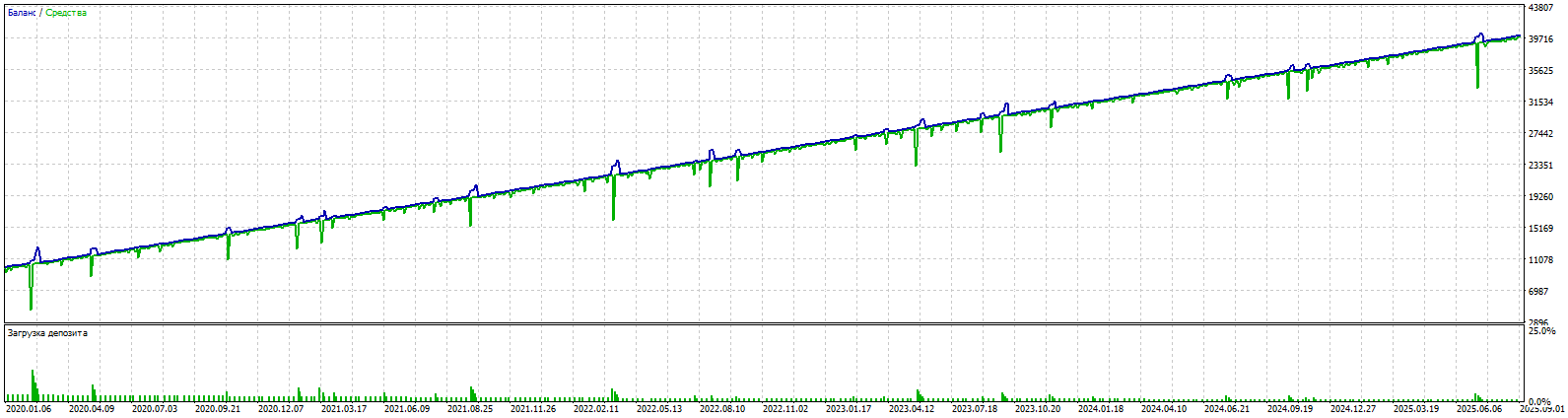
5 year backtest EURUSD M5. 100% quality tick.Set and SignalFile in comments https://www.mql5.com/ru/market/product/148422
Konstantin Chechnev Hat ein Produkt angeboten

Arrow Strategy Builder — ein Expert Advisor, der sich die vom Benutzer auf dem Chart platzierten Aufwärts-/Abwärtspfeile merkt und bei Wiederholung derselben Bedingungen Handelssignale generiert. Geeignet für Einsteiger und erfahrene Trader, mit einer intuitiven Oberfläche und Funktionen für den automatisierten Handel auf jedem Finanzinstrument. Eine vollständige Version des Multiwährungshandelsberaters für Metatraider 5 ist hier . Hauptmerkmale Einfache Strategieerstellung: Erstellen Sie

Konstantin Chechnev
Konstantin Chechnev
https://www.mql5.com/ru/market/product/148422?source=Site+Profile

Dear friends! Downloaded the update. In the default settings, SET for M1 EURUSD for an example of operation.
Version 2.0 released with extended signal management functionality, improved filtering, and a redesigned control panel.
New
[MACD Indicator (Trade Entry Filter)]Added as an auxiliary filter for determining trade direction.
MACD > 0: only long trades are allowed.
MACD < 0: only short trades are allowed.
The indicator is not used in training and is not stored in the signal database.Enabled/disabled via parameter Use MACD for Trade Opening.
[Parameter "Number of Bars Before Signal to Store"]Defines the depth of analysis before a signal. By default, the last 5 bars are taken into account for more accurate recognition of recurring market scenarios.
[Parameter "Show Indicators on Chart"]Controls the display of indicators on the chart. Default is false, simplifying chart view and signal analysis.

[Parameter "Delay from instant opening of trades after EA launch (in min.)"]Delay for opening the first trade. Required for the time of EA launch and signal settings, so that the EA does not open an unplanned trade on the available internal or previously created signal base. Default is 60 minutes.
Improvements
— Updated control panel on chart
— Redesigned interface for better usability
— Added multilingual support (automatic detection of terminal language: Russian, English, German, Japanese, Chinese; English is used in all other cases)
— Improved informational messages
Update Recommendations
1.Reset advisor parameters on the chart and in the strategy tester.
2.Use the built-in signal database or recreate and optimize your own (database structure has changed).
3.Lower the parameter Minimum Signal Match Percent to Open Trade — entry criteria across indicators have become significantly stricter.
Konstantin Chechnev
Konstantin Chechnev
Fibonacci EA — an automatic advisor based on Fibonacci levels
Features
Automatic detection of local extremes and the construction of Fibonacci levels.
Customizable conditions for opening and closing deals based on Fibonacci levels.
Flexible risk management options: stop loss, take profit, limit the volume and number of orders.

https://www.mql5.com/ru/market/product/148769
Konstantin Chechnev
Konstantin Chechnev
Set the signals, get the strategy on autopilot! Quickly. Effectively. Simply.

MT4 Free https://www.mql5.com/ru/market/product/148439
MT4 Full https://www.mql5.com/ru/market/product/148427
MT5 Free (Here in the "Discussion" there are several questions from traders and answers from me.) https://www.mql5.com/ru/market/product/148426
MT5 Full https://www.mql5.com/ru/market/product/148422
Konstantin Chechnev Hat ein Produkt angeboten

39.99 USD

Fibonacci MT5 ist ein Expert Advisor zur Automatisierung des Handels auf Basis von Fibonacci-Niveaus. Er bestimmt das Minimum und Maximum der Preise über eine bestimmte Anzahl von Balken, zeichnet Fibonacci-Niveaus und eröffnet Trades, wenn der aktuelle Preis die ausgewählten Niveaus erreicht. Der EA kann im Trend oder gegen den Trend handeln, abhängig von den Parametern. Außerdem können Niveaus für die Schließung von Trades, Risikomanagement und Zeitfilter konfiguriert werden. Besonderheiten