Konstantin Chechnev
Konstantin Chechnev
4.2 (5)
  • 정보
7+ 년도
경험
18
제품
47
데모 버전
0
작업
0
거래 신호
0
구독자
Software engineer Eqorex RnD Studio
💻 01 / METATRADER 맞춤 개발
────────────────────────

지표, 트레이딩 패널, 유틸리티부터 다층 분석 시스템, EA, 최적화 도구, 시장 연구용 전문 도구까지 난이도와 규모에 관계없이 개발합니다.

트레이딩 또는 분석 아이디어를 명확한 로직으로 정의할 수 있다면 완성된 MetaTrader 도구로 구현할 수 있습니다.


⚙️ 02 / 개발 가능한 분야
────────────────────────

• 트레이딩 알고리즘 및 전략 자동화
• 시장 데이터 분석 지표 및 시스템
• Tick, 가격 흐름 및 통계 데이터 처리
• 트레이딩 파라미터 최적화 및 검증
• 고급 인터페이스, 제어 패널 및 데이터 시각화
• 특정 요구사항에 맞춘 맞춤형 트레이딩 및 분석 로직


🧩 03 / 아이디어에서 완성된 제품까지
────────────────────────

아이디어와 수학적 로직부터 시스템 설계, 프로그램 구현, 인터페이스, 성능 최적화, 테스트 및 최종 제품까지 전체 프로젝트를 직접 진행합니다.

좋은 도구는 단순히 작동하는 코드가 아닙니다. 빠르고 이해하기 쉬우며 안정적이고 사용하기 편해야 하며, 처음 만들어진 목적을 정확하게 해결해야 합니다.


🧭 04 / 7년 이상의 개발 경험
────────────────────────

7년 이상 MetaTrader 및 금융시장용 소프트웨어를 개발해 왔습니다.

작은 트레이딩 알고리즘부터 시작해 현재는 복잡한 시장 연구 및 전문 분석 시스템까지 개발하고 있습니다.


💬 05 / 아이디어나 개발 과제가 있나요?
────────────────────────

처음부터 방대한 기술 명세서를 준비할 필요는 없습니다.

MQL5 개인 메시지로 원하는 작업을 편하게 설명해 주세요. 구현 가능성을 검토하고, 불필요한 기능을 제외한 최적의 구현 방법을 제안하며, 작업 범위와 개발 기간 및 예산을 미리 명확하게 안내해 드립니다.

작은 작업은 가능한 한 빠르게 완료합니다. 복잡한 프로젝트는 명확한 단계로 나누고 첫 상담부터 최종 결과물까지 제가 직접 진행합니다.

모든 단계에서 개발자와 직접 소통하므로 논의한 내용과 실제 구현 사이에서 중요한 세부사항이 누락되지 않습니다.
Konstantin Chechnev 출시돈 제품

캔들이 시작될 때 예측하고, 마감된 뒤 결과를 확인합니다. MetaTrader 5용 Forex Next Candle Forecast 3D는 새 캔들의 첫 틱에서 해당 캔들의 방향과 가격 범위를 추정합니다. 예측은 입체 패널에 표시되며, 실제 가격 움직임과 비교할 수 있도록 기록됩니다. 지표는 시세의 순서, 이미 끝난 시장 움직임, 현재 시장 상황을 사용합니다. 기록된 예측은 이후 데이터에 따라 바뀌지 않습니다. 적응형 메모리는 캔들이 마감된 후 갱신되며 다음 예측에 적용됩니다. 주요 기능 틱 분석. Deep Flow는 가격 변화의 방향과 순서, 모멘텀의 지속성, 활동 급증, 일시적인 정체, 반전, 스프레드 변화를 평가합니다. 시나리오 비교. Scenario Engine과 Context Layer는 추세, 변동성, 거래 시간을 고려하여 현재 상황을 이미 끝난 시장 움직임과 비교합니다. 이상 징후 확인. Shock Engine은 가격 급변, 스프레드, 틱 활동을 과거 기준값과

Konstantin Chechnev 출시돈 제품

MetaTrader 5용 Tick Flow Market Depth Signals는 틱 흐름, 가격 수준, 합성 시장 깊이를 함께 분석합니다. 현재 활동과 가격 움직임을 비교할 수 있도록 돕고, 모델의 조건이 충족되면 장중 신호를 생성하는 지표입니다. Smart DOM은 가격과 틱 데이터로 시장 깊이를 계산한 모델을 구성합니다. 표시되는 영역과 포지션 분포도는 모델의 추정치이며, 실제 대기 주문이나 다른 참여자의 포지션, 시장 전체의 주문장을 보여주는 정보가 아닙니다. 주요 기능 합성 시장 깊이. Smart DOM은 가격대별 활동 분포를 추정하고 잠재적인 지지와 저항 영역을 표시합니다. 틱 거래량, 캔들 형태, 관측 데이터의 시점, 주요 가격 수준 부근의 반응을 고려합니다. 흐름 분석. Flow와 Tick Flow는 방향성 있는 가격 움직임과 틱 거래량을 비교합니다. 활동이 증가해도 가격 변동이 제한적인 경우 흡수의 징후를 평가합니다. 가격 수준. Level Brain은 이전에 관측한

Konstantin Chechnev 출시돈 제품

가격 수준을 직접 그리고, 추적을 시작한 뒤 가격이 어떻게 반응하는지 살펴보세요. MetaTrader 5용 Support Resistance Price Action은 사용자가 그린 수평선, 사각형 영역, 추세선을 대상으로 접촉, 반등과 반락, 돌파를 기록하고 이후 가격 움직임의 통계를 수집합니다. 차트에 객체를 만든 뒤 선택하고 Track을 누르세요. 지표가 객체의 형태와 활성화 시점을 기록합니다. 그 시점 이전에 발생한 이벤트는 활성화된 해당 버전의 관측 기록에 포함되지 않습니다. 주요 기능 가격 수준의 버전 관리. 객체를 이동하거나 수정하면 새 버전이 만들어지며 이전 관측 기록은 대체되지 않습니다. 객체를 삭제하거나 유효기간이 끝나면 해당 형태의 추적이 종료됩니다. 접촉 기록. 가격의 접근, 확인된 접촉, 가격 갭으로 수준을 건너뛰는 움직임을 구분합니다. 접촉 간 간격과 재설정 거리는 새로운 사건을 같은 움직임 안에서 반복되는 접촉과 구분하는 데 사용됩니다. 반응 분류. 접촉 후

Konstantin Chechnev 출시돈 제품

8개 통화와 최대 28개 통화쌍의 움직임을 한 화면에서 살펴볼 수 있습니다. MetaTrader 5용 Pair Currency Strength Meter는 서로 연관된 통화쌍을 비교하고 각 통화의 상대 강도를 계산하여, 전체 통화 네트워크 안에서 선택한 통화쌍을 분석할 수 있도록 돕는 지표입니다. 분석 대상은 USD, EUR, GBP, JPY, CHF, CAD, AUD, NZD입니다. 지표는 먼저 사용 가능한 데이터와 각 통화의 상태를 평가합니다. 그런 다음 통화쌍을 선택하고, 모델의 조건이 충족되면 분석 계획을 생성합니다. 단기 움직임, 주된 방향, 장기적인 흐름은 각각 별도로 계산합니다. 주요 기능 통화쌍 선택 및 데이터 확인. 브로커의 종목명 접두사, 접미사, 종목 그룹을 고려하여 통화 간 연결마다 하나의 종목을 선택합니다. Network Grade는 A부터 D까지의 등급으로 네트워크 상태를 나타냅니다. 네트워크 연결성, 사용 가능한 통화쌍 수, 과거 데이터의 확보 범위

Konstantin Chechnev 출시돈 제품

가격이 특정 수준을 돌파한 뒤 원래 쪽으로 돌아오는 과정을 일련의 사건으로 살펴볼 수 있습니다. MetaTrader 5용 False Breakout Trap Radar는 주요 가격 수준 부근의 움직임을 추적하고, 확인 조건이 충족된 뒤 거짓 돌파의 징후를 표시합니다. 이벤트가 형성되는 과정을 관찰할 수 있습니다. 화살표와 활성화된 알림은 마감된 캔들로 확인된 뒤에만 표시됩니다. 지표는 잠시 가격 수준을 벗어났다가 돌아오는 움직임, 돌파 후 안착하지 못한 움직임, 변동폭이 좁아지는 구간을 구분합니다. 주요 기능 가격 수준 탐색. 국지적 고점과 저점, 전일 고가와 저가, 반복적인 접촉과 반등, 라운드 넘버와의 거리를 활용합니다. 돌파 과정 추적. 모델은 가격 수준에 접근하는 과정, 돌파, 복귀를 순서대로 평가합니다. 돌파한 거리, 해당 수준 바깥에서의 종가, 도달한 극값, 바깥에 머문 시간을 고려합니다. 이벤트 분류. Liquidity Sweep은 가격 수준 바깥에 지속적으로 안착하지

Konstantin Chechnev 출시돈 제품

진입 전에 거래 아이디어를 검토하고, 어떤 조건이 충족되었으며 무엇을 더 확인해야 하는지 살펴보세요. MetaTrader 5용 Entry Quality Filter Analyzer는 매수와 매도 시나리오를 여섯 가지 기준으로 평가하고, 제한 사유를 보여주며 분석 계획을 세울 수 있도록 돕습니다. BLOCKED, SKIP, WAIT, READY, LATE는 각각 차단, 제외, 확인 대기, 모델 조건 충족, 진입 시점이 늦었다는 징후를 나타냅니다. READY는 계산 조건이 충족되었다는 뜻이며, 거래 결과를 보장하지 않습니다. 주요 기능 Market. 시장의 움직임, 변동성, 모멘텀, 이례적인 캔들을 평가합니다. Strategy. 추세 방향의 되돌림, 돌파, 가격 수준 재확인, 반전, 박스권 움직임을 분석합니다. Location. 국지적 고점과 저점, 지지와 저항, 이동평균선, 일중 변동폭을 기준으로 진입 위치를 평가합니다. Trigger. 가격 구조와 움직임을 바탕으로 확인 조건을

Konstantin Chechnev 출시돈 제품

두 종목의 관계와 괴리를 한 패널에서 확인하세요. MetaTrader 5용 Correlation Impulse 3D는 H1(1시간) 주기에서 두 가격 시계열을 비교하고, 현재 차트의 종목에 대한 신호를 생성합니다. 판단에는 마감된 캔들을 사용하며 화살표는 다음 봉이 시작될 때 표시됩니다. 원본 과거 데이터와 설정이 바뀌지 않는 한, 이후 캔들은 이미 확인된 신호를 변경하지 않습니다. 두 번째 종목은 비교용이며 반대 방향의 거래를 함께 열라는 뜻이 아닙니다. 주요 기능 내장 프로필. EURUSD/GBPUSD, USDCAD/USDCHF, USDCHF/EURUSD, NZDUSD/AUDUSD, GBPJPY/EURJPY, XAUUSD/XAGUSD 조합을 포함합니다. 자동 선택은 브로커의 종목명 접두사와 접미사를 고려합니다. 모델 신호는 차트 종목, 비교 종목, H1 주기가 지원되는 조합일 때만 제공됩니다. 데이터 동기화. 두 종목의 봉을 정확한 시각으로 맞춥니다. 필요한 과거 데이터가 없거나

Konstantin Chechnev 출시돈 제품

Lexicon Pattern은 마감된 캔들의 연속 패턴을 분석하고 그 통계를 활용해 MetaTrader 5에서 자동매매를 수행합니다. 기본 설정은 EURUSD M5를 기준으로 구성되어 있습니다. 새 봉에서 처음 처리한 틱에 매수, 매도 또는 진입 보류(ABSTAIN)를 선택합니다. 알고리즘 거래가 허용되고 조건이 충족되면 Stop Loss와 Take Profit을 지정한 시장가 주문을 보냅니다. 주요 기능 캔들 분류. 마감된 각 봉을 여덟 가지 구조적 상태 중 하나로 분류합니다. 변동폭, 몸통, 꼬리, 종가 위치, 이전 봉과의 겹침을 고려합니다. 비교에는 이전 데이터만 사용하며 미래 캔들은 사용하지 않습니다. 적응형 메모리. 모델은 길이가 다른 연속 패턴을 학습하고, 기억을 사용하지 않는 모델과 비교해 해당 패턴이 제공하는 정보를 평가합니다. 관측이 부족하면 더 짧은 패턴을 판단 맥락으로 사용합니다. 가상 시나리오. 분석 준비가 된 맥락마다 매수와 매도를 별도로 추적하며, 목표

Konstantin Chechnev 출시돈 제품

한 차트에서 피보나치 가격 수준, 진입 규칙, 자동 실행을 함께 사용할 수 있습니다. MetaTrader 5용 Dynamic Fibonacci Levels EA는 확인된 두 가격 전환점을 선택하고, 두 점 사이에 피보나치 수준을 그린 뒤 선택한 수준 부근에서 거래합니다. 자동매매 프로그램은 가격 구조, 모멘텀, 전환점 이후의 경과 시간, 가격 범위, 변동성을 평가합니다. 시장 구조가 바뀌면 사용 중인 피보나치 수준이 다시 계산될 수 있습니다. 기준점을 직접 이동할 수도 있습니다. 주요 기능 기준점 선택. 최대 220개 봉을 분석합니다. 전환점의 확인 여부, 돌파 구조, 변동성을 고려해 후보를 비교합니다. 두 가지 거래 모드. 추세 추종과 반전 시나리오를 제공합니다. Buy와 Sell의 진입 수준을 별도로 설정하며, 가격과의 허용 거리 및 같은 피보나치 구성에서의 반복 진입 제한을 적용합니다. 거래 빈도 조절. 방향별 포지션 수, 거래 사이의 대기 기간, 시작 후 지연 시간, 거래

Konstantin Chechnev
Konstantin Chechnev
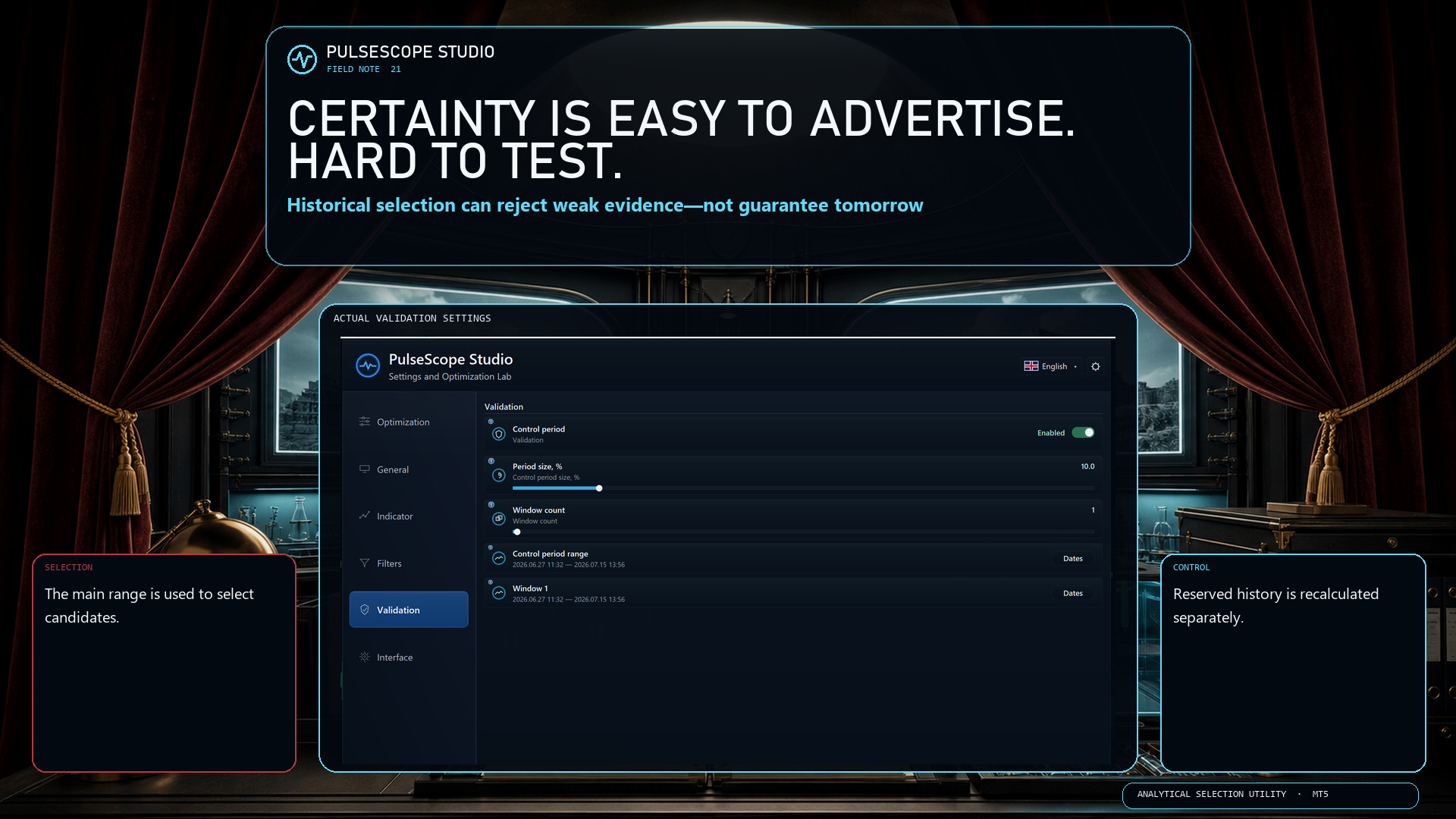
🎭 Certainty makes excellent stage lighting. It makes poor validation.

Historical analysis can compare configurations, reject weak evidence and expose dependence on one convenient segment. It cannot sign a contract with tomorrow.

PulseScope Studio keeps that limitation visible by separating the workflow:
🧭 the main range is used for selection;
🛡️ a reserved control period does not participate in that selection;
🔁 promising candidates are recalculated from scratch on the control window;
🗂️ the selected configuration and its context can be saved and reopened.

The product is a disciplined way to work with uncertainty—and to document how a decision was reached.

👉 PulseScope Studio:

https://www.mql5.com/ru/market/product/185833
Konstantin Chechnev
Konstantin Chechnev
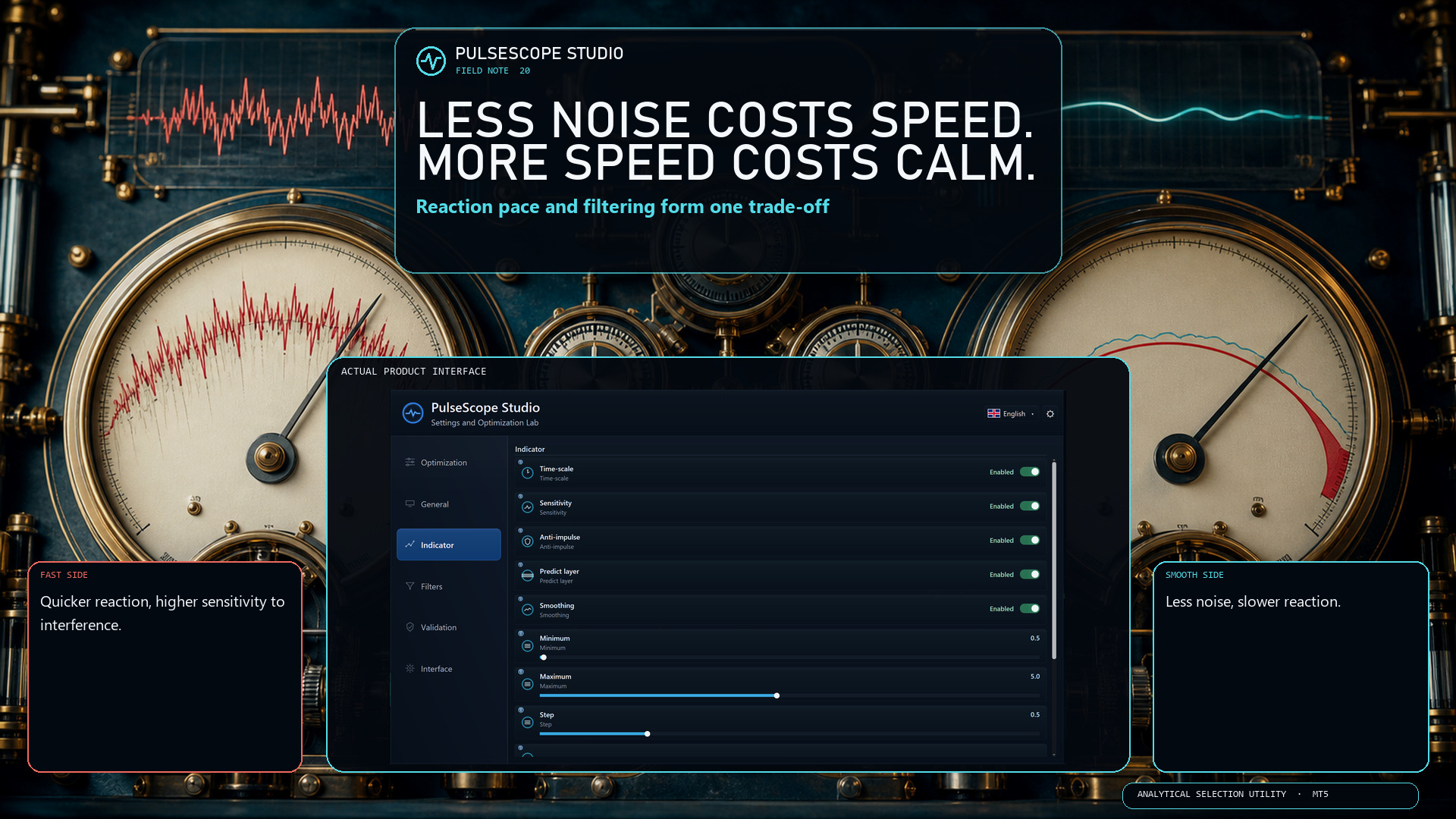
〰️ Every signal system pays for smoothness somewhere.

More smoothing can reduce noise, but it also slows the reaction. Less smoothing reacts faster, but becomes more sensitive to interference. Sensitivity and Time-scale change that balance again; Anti-impulse and Predict layer add their own effects.

PulseScope Studio treats these as interacting modules, not isolated cosmetic sliders. You can define a range for each one and search for a coordinated configuration for the selected instrument, timeframe and data window.

There is no universally perfect setting. There is only a trade-off that should be measured in context.

👉 PulseScope Studio:

https://www.mql5.com/ru/market/product/185833
Konstantin Chechnev
Konstantin Chechnev
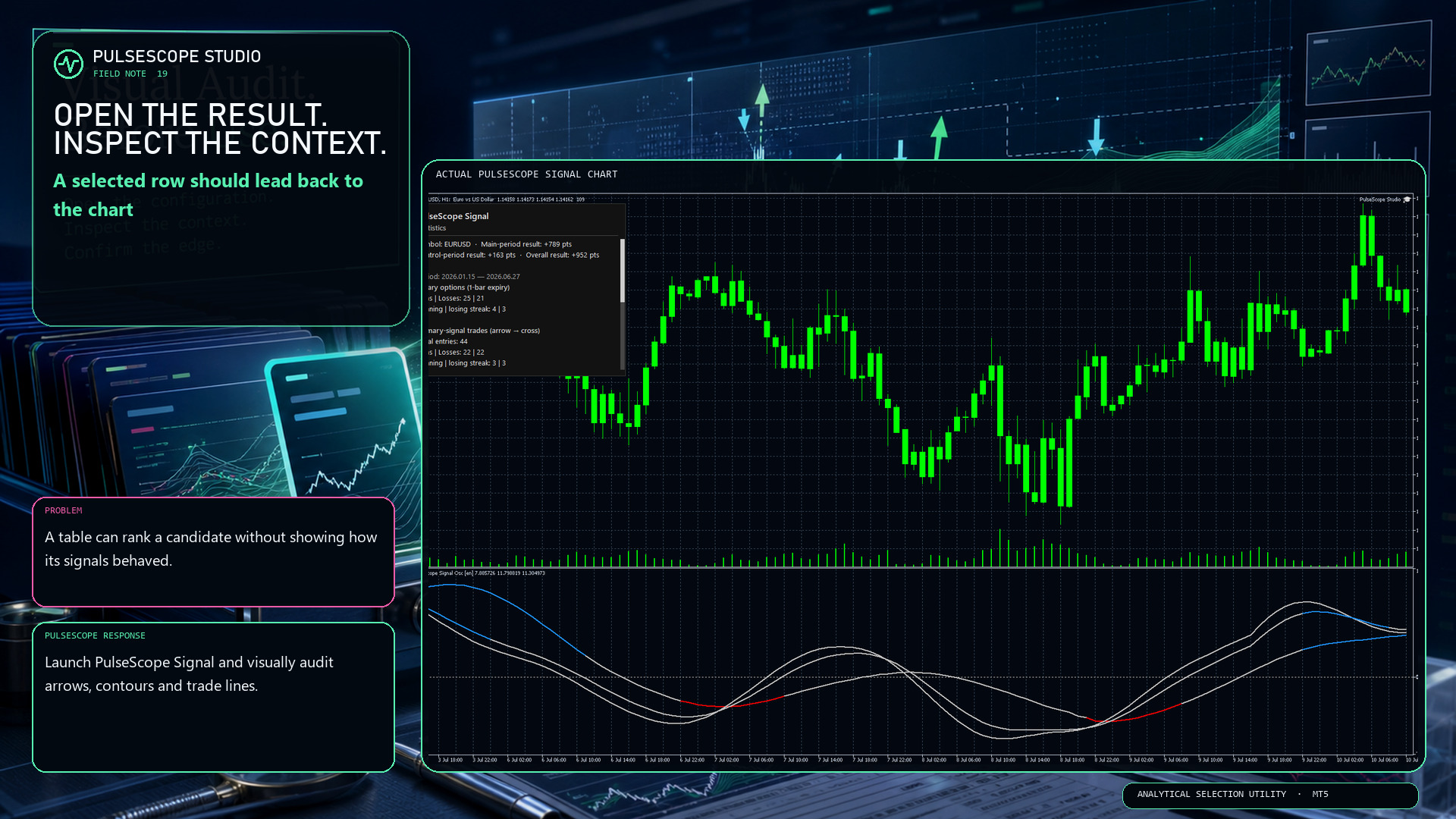
🔎 A ranked result is a starting point for inspection—not the end of it.

A table can summarize a candidate, but it cannot show every decision in context. PulseScope Studio can launch the built-in PulseScope Signal on the matching chart so you can inspect:
📍 signal arrows against the actual bars;
〰️ contour behavior through changing movement;
↔️ optional trade lines from entry to exit;
🧾 the result in points for visual verification.

Historical display is still historical evidence, not a forecast. Its value is that the path can be examined instead of being hidden behind one final number.


👉 PulseScope Studio:

https://www.mql5.com/ru/market/product/185833
Konstantin Chechnev
Konstantin Chechnev
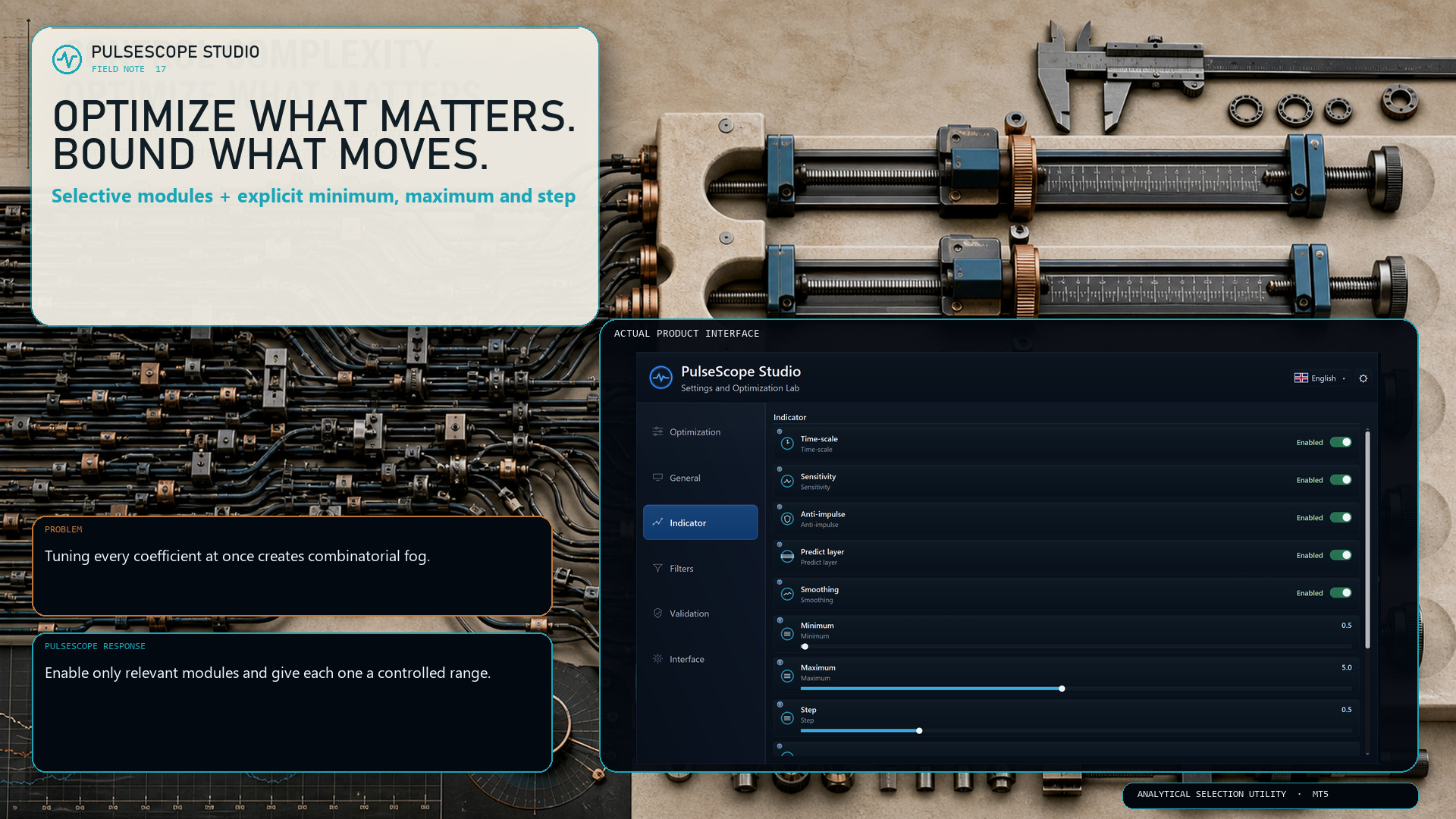
🎛️ More adjustable parameters do not automatically create a better search. They create a larger search.

PulseScope Studio lets you decide which parts of the signal architecture should move during optimization:
• Time-scale
• Sensitivity
• Anti-impulse
• Predict layer
• Smoothing

For each enabled module, the minimum, maximum and step define the searchable range. A smaller step increases precision—but it can also increase the number of combinations sharply.

The useful question is not “How much can I optimize?” It is “Which dimensions deserve the budget?”

👉 PulseScope Studio:

https://www.mql5.com/ru/market/product/185833
Konstantin Chechnev
Konstantin Chechnev
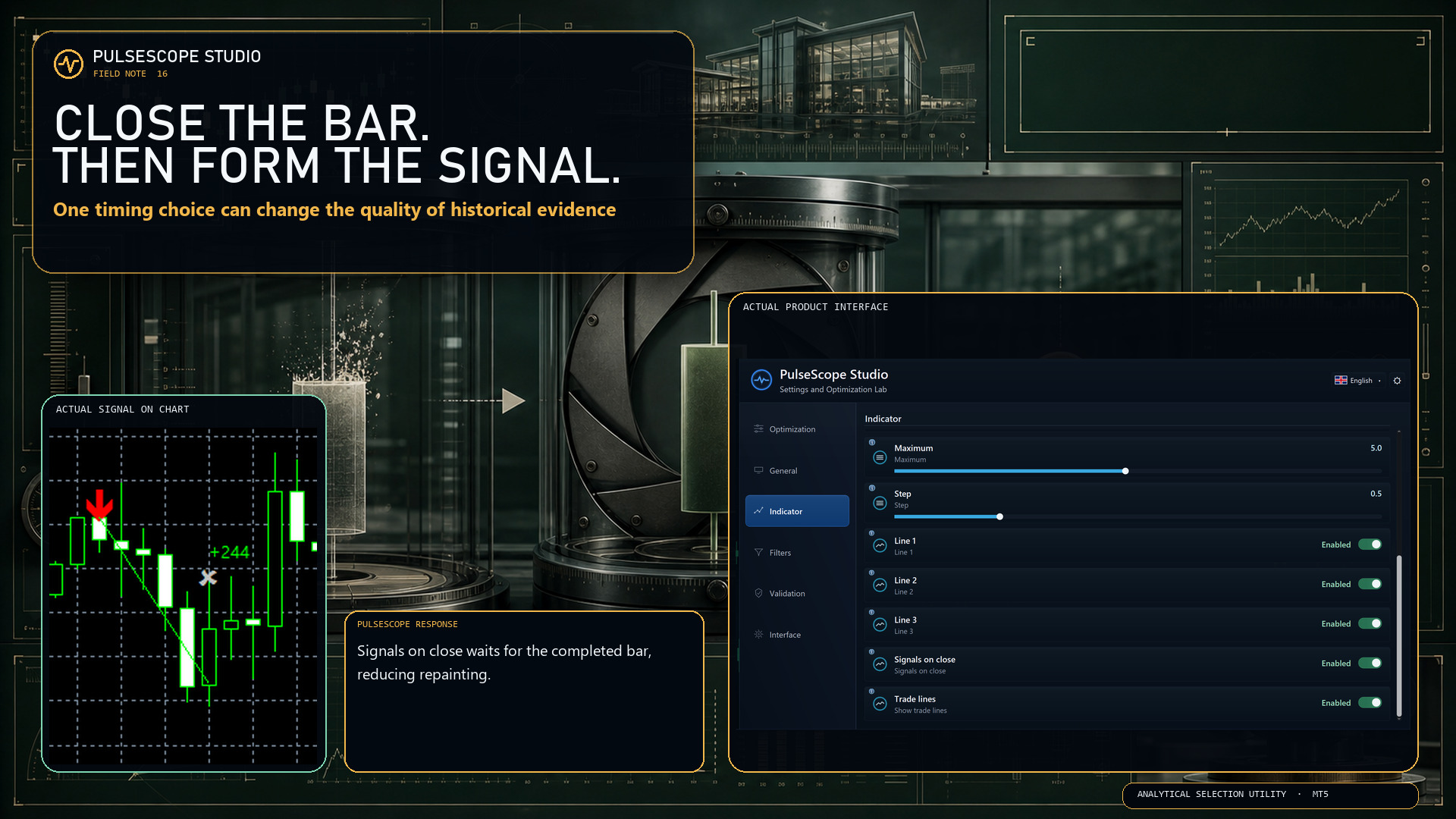
🕯️ An unfinished bar is still changing. A completed bar is evidence you can evaluate.

With Signals on close enabled, PulseScope forms the signal only after the bar has closed. The setting is designed to:
🔒 reduce repainting;
📊 produce more stable historical statistics;
🧭 make the timing rule explicit and reproducible.

This does not make every signal correct. It removes one avoidable source of ambiguity from how the signal is formed.

First close the bar. Then judge the decision.

👉 PulseScope Studio:

https://www.mql5.com/ru/market/product/185833
Konstantin Chechnev
Konstantin Chechnev
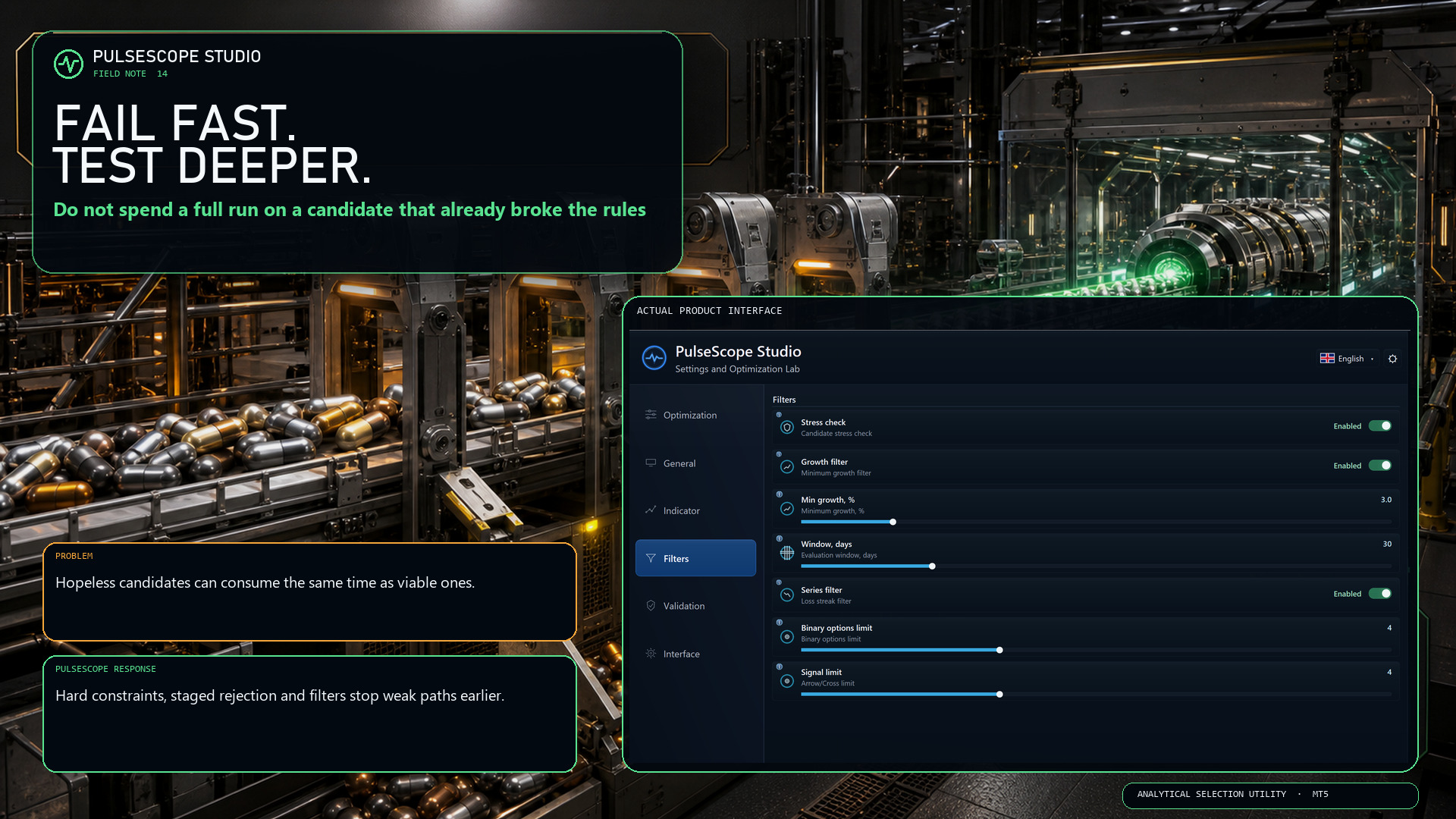
🚦 Not every candidate deserves a full-length evaluation.

If a configuration has already breached a hard condition, continuing the entire calculation only turns an obvious rejection into a slower rejection.

PulseScope Studio combines staged early abort with configurable quality gates, including robustness, growth and losing-series controls.

⛔ Reject a broken path when the evidence is already sufficient.
⏱️ Keep more of the run budget for candidates that still qualify.
🔍 Apply deeper checks where they can still change the decision.

“Fail fast” is not impatience. It is disciplined resource allocation.

👉 PulseScope Studio:

https://www.mql5.com/ru/market/product/185833
Konstantin Chechnev
Konstantin Chechnev
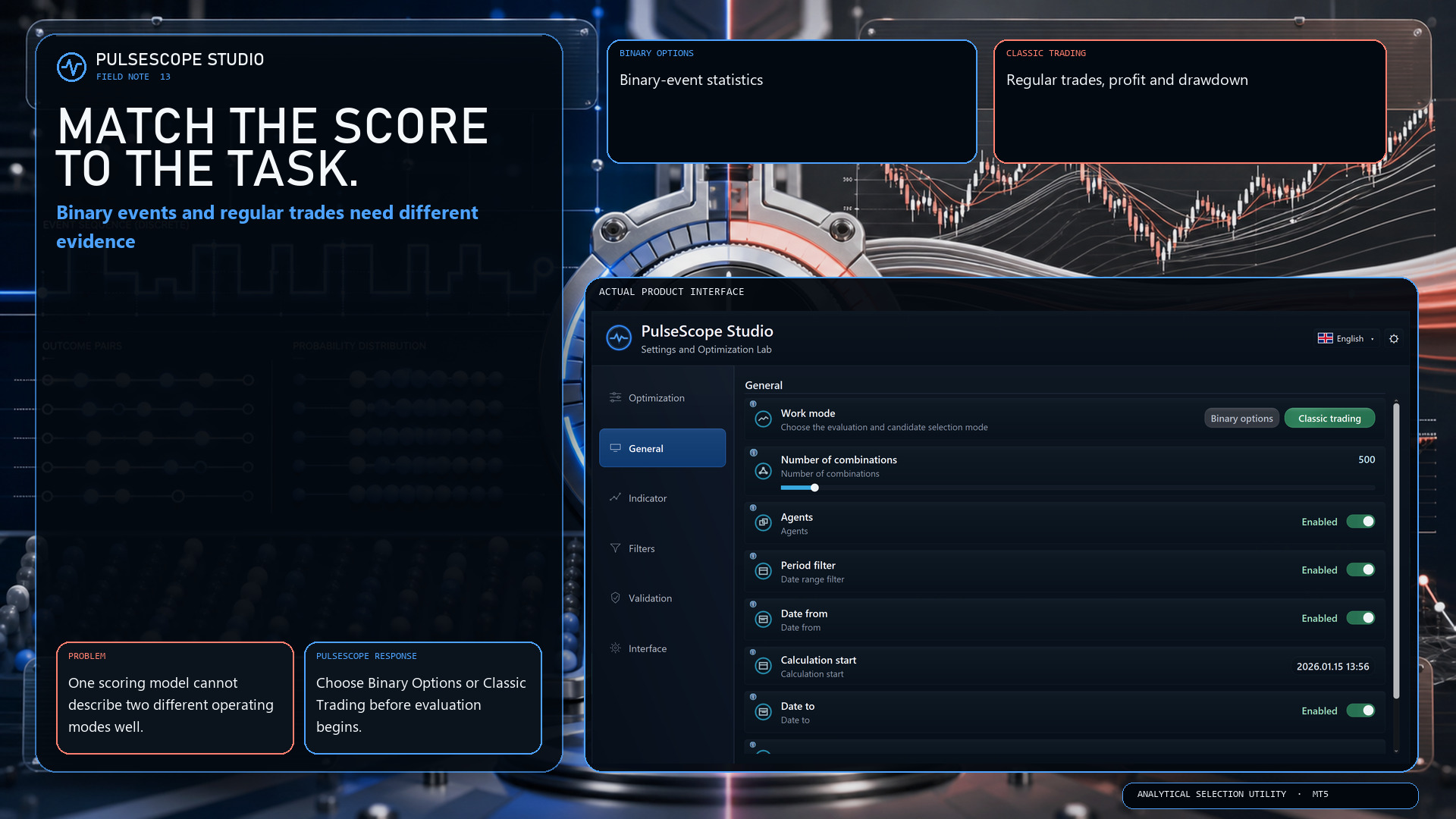
⚖️ The evaluation model should match the task being evaluated.

Binary options and classic trading do not describe outcomes in the same way. PulseScope Studio therefore separates the two work modes before the search begins:

🔹 Binary Options focuses on binary-event statistics.
🔸 Classic Trading evaluates regular trades, profit and drawdown.

This is not a cosmetic switch. It changes which evidence is relevant to candidate selection.

Choose the model first. Then compare configurations inside the correct analytical frame.

👉 PulseScope Studio:

https://www.mql5.com/ru/market/product/185833
Konstantin Chechnev
Konstantin Chechnev
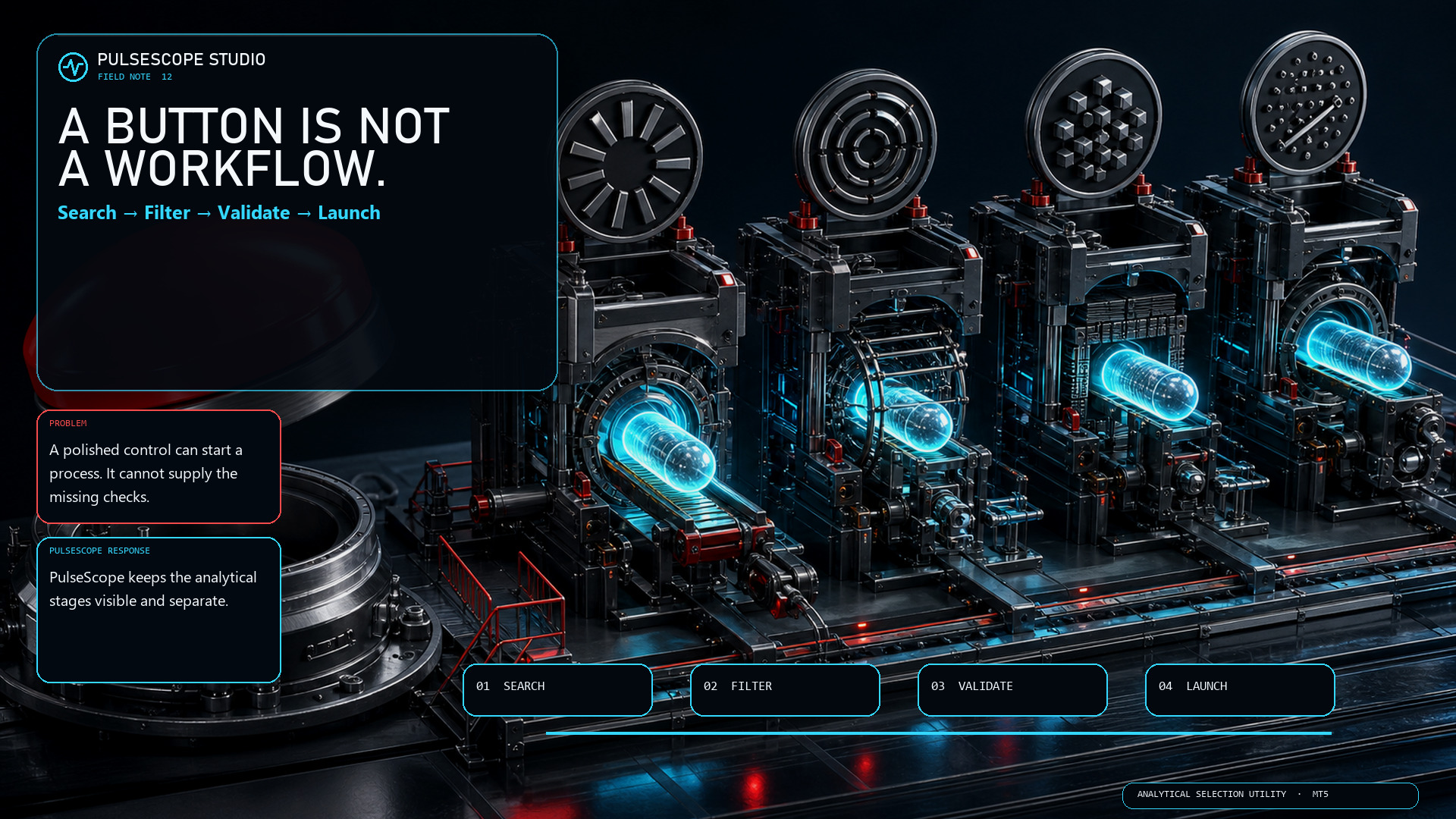
🧯 “One click” is a control. It is not a trading methodology.

A polished button can start a process. It cannot decide whether the data window is relevant, whether a parameter set survives neighboring checks, or whether a separate control period agrees.

PulseScope Studio is deliberately less theatrical:
🧭 search the parameter space;
🚧 filter weak and unsuitable candidates;
🛡️ recheck selected candidates on control data;
▶️ launch a saved configuration in its original context.

No instant certainty. Just visible stages, explicit criteria and a setup you can return to.

👉 PulseScope Studio:

https://www.mql5.com/ru/market/product/185833
Konstantin Chechnev
Konstantin Chechnev
🩻 A beautiful total can hide an unhealthy path.

A candidate may look strong overall while most of its growth is concentrated in one short window—or while the route includes a losing streak you would never accept in practice.

PulseScope Studio can add path-aware quality gates:
📈 Growth Filter checks whether the required development appears across defined windows;
🧱 Series Filter rejects configurations that exceed the allowed losing streak for the selected work mode.

These filters do not guarantee future behavior. They make the shortlist answer a harder question than “Which final number is highest?”

Inspect the journey before you trust the destination.

👉 PulseScope Studio:

https://www.mql5.com/ru/market/product/185833