Aura Neuron MT4

999 USD
Demo heruntergeladen:
1 761
Veröffentlicht:
10 Dezember 2024
Aktuelle Version:
2.2
Keinen passenden Roboter gefunden?
Geben Sie Ihren Eigenen in Auftrag
auf Freelance!
Gehen Sie zu Freelance
Geben Sie Ihren Eigenen in Auftrag
auf Freelance!
Wie man einen Roboter oder Indikator kaufen kann
Starte Deinen EA im
Virtual Hosting
Virtual Hosting
Teste einen Indikator/Roboter vor dem Kauf
Möchtest Du Geld im Market verdienen?
Wie man Produkte richtig präsentiert

Sie verpassen Handelsmöglichkeiten:
- Freie Handelsapplikationen
- Über 8.000 Signale zum Kopieren
- Wirtschaftsnachrichten für die Lage an den Finanzmärkte
Registrierung
Einloggen
Sie stimmen der Website-Richtlinie und den Nutzungsbedingungen zu.
Wenn Sie kein Benutzerkonto haben, registrieren Sie sich
MANUAL (How to set up)
https://www.mql5.com/en/blogs/post/759145
🔵Telegram Channel https://t.me/aura_gold_ea
🔵Site https://auraexperts.com/
🔵MQL5 Channel https://www.mql5.com/en/channels/fintex
🔵Mail fintexea@gmail.com
Ask your questions to author https://www.mql5.com/en/users/stanislav110685
ALL EXPERTS https://www.mql5.com/en/users/stanislav110685/seller
Aura Neuron MT5 https://www.mql5.com/en/market/product/123089
Aura Neuron
AN
Hello Bro,
I just bought your EA Aura Neuron. Can you send me the .set config for the EA?
Thanks.
hi what is euro/usd best to use time frame 1m 5m15m 1h 4h
Hello
Timeframe 1H
Default settings, just choose risk.
In general, I do not recommend using the advisor with EURUSD pair because the result is very mediocre.
At gold it works much better! That's why I recommend using it only on Gold.
Hi
I have no panel showing - despite reloading and making sure it is set to true.
Please advise - thanks
Hi
I have no panel showing - despite reloading and making sure it is set to true.
Please advise - thanks
Hello Christopher,
Try reinstalling the advisor and restarting the MetaTrader terminal, it should help.
Please also check the logs tab and experts tab for errors.
You can always contact me by private message
https://www.mql5.com/en/users/stanislav110685
Hello Christopher,
Try reinstalling the advisor and restarting the MetaTrader terminal, it should help.
Please also check the logs tab and experts tab for errors.
You can always contact me by private message
https://www.mql5.com/en/users/stanislav110685
That worked - thanks!
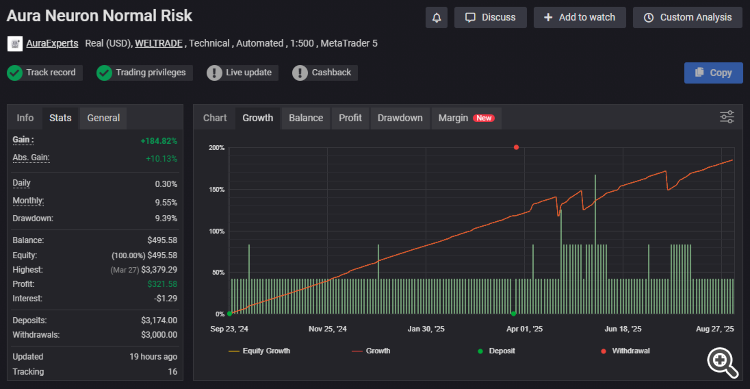
Unfortunately yesterday some monitorings of brokers Weltrade and Roboforex were removed from MQL (many authors suffered, not only me)
You can find these monitorings at the following links
--------------------------------------------------------------------------------
Telegram Channel >>>>>> https://t.me/aura_gold_ea/307
Official Aura Site >>>>> https://auraexperts.com/signals
Why have you removed the High Risk and Normal Risk signals? Is it because you don't want to show the big loss which happenedon Friday 25th?
Hello Christopher, please check comment #12
Aha! That explains it - thank you - and sorry for not reading your previous post. My mistake!
Version 1.561 2025.04.29
It is recommended to update.
But for more advanced users a number of options have been added.
-----------------------------------------------------------------------------------------------------------------------------
>>>Force Close in Hours - force close a trade after a specified time.
>>>Hours for Force Close - this parameter is responsible for the number of hours after which a trade should be forcefully closed.
* About 85% of trades are closed within 2 hours, but about 15% of trades can be in drawdown for a longer period of time, including being carried overnight and accumulating swaps and in the worst case getting a Stop Loss.
This option has been added to force trades to close at a set time, it may bring more localized small losses but in the long run will allow you to avoid large losses due to a large stop loss. When using this option, the winning percentage decreases but the Risk Reward improves.
------------------------------------------------------------------------------------------------------------------------------------------
>>>Take market close into account - this function allows you to bypass the market close problem. (disabled by default)
*Many users have encountered that their brokers start broadcasting quotes after overnight transfer before trading on the server starts, so the EA tries to open a trade, as the quotes broadcasting has already started, but the market is closed and the EA misses opening trades.
--------------------------------------------------------------------------------------------------------------------------------------------
Added an alternative method of risk calculation based on the Balance Step parameter (by default, risk calculation is based on the percentage of the deposit work).
>>>Use Balance Step - use the parameter to calculate the on/off switch of the autolot
>>>Volume for Balance - volume for the specified deposit step
>>>Balance step - deposit step for risk calculation
Autolot is calculated using the formula Deposit / Balance Step * Volume for Balance = trading volume.
----------------------------------------------------------------------------------------------------------------------------------------------------
>>>Maximal Spread - spread filter (optimal values are set by default)
>>>Time Filter - time filter (optimal values are set by default)
----------------------------------------------------------------------------------------------------------------------------------------------------
-Improved filters and neural network operation taking into account Gold's recent dynamics and entry into new price ranges
Aha! That explains it - thank you - and sorry for not reading your previous post. My mistake!
You are welcome! If you have any questions, just let me know.
Dear friends,
I always stand by those who support me. While Aura Neuron EA navigates through the current market turbulence, high volatility, and temporary drawdowns, I’d like to offer something in return — a gift.
🎁 Get any of my other Expert Advisors absolutely FREE!
-------------------------------------------------
How? Simply send me a direct message.
https://www.mql5.com/en/users/stanislav110685/seller
📌 Note: This offer is available exclusively to current owners of my EAs and to a new customers who make a purchase.
*The bonus Expert is sent as a file with a link to the name from the trading terminal Metatrader or account numbers.
Thank you for your trust and support!
🔵Telegram Channel https://t.me/aura_gold_ea🔵MQL5 Channel https://www.mql5.com/en/channels/fintex
🔵Site https://auraexperts.com/
🔵Check out the live results here: https://auraexperts.com/signals
🔵Mail fintexea@gmail.com