Auf einem VPS mit zwei identischen MT5-Konten variiert der benötigte RAM/CPU-Speicher stark. Warum ist mir das völlig unklar?
- Es ist also keine MQ-VPS, sondern eine 'eigene'?
- Sind die EA selbst programmiert oder von wo gekauft?
- Was sagt der Task-Manager?
- Auch das Terminal hat einen Task-Manager: F2 - was sagt der?
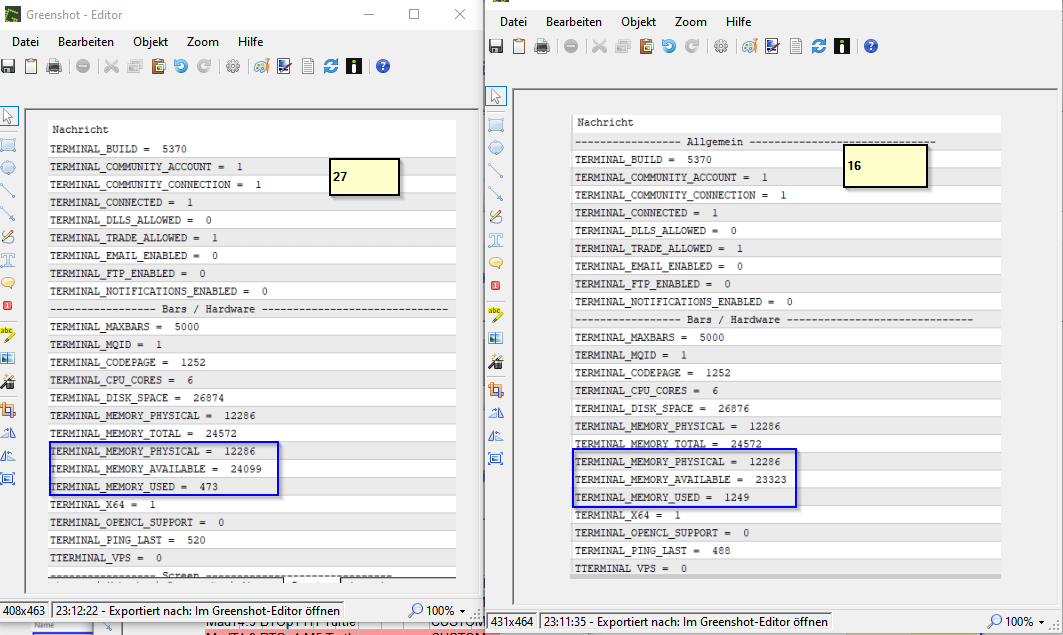
- Hier: https://www.mql5.com/de/docs/constants/environment_state/terminalstatus#enum_terminal_info_integer
(und auch die String- und Double-Werte darüber und darunter) sind Werte, die ein EA oder Indikator abfragen kann. - Ein EA oder Indikator läuft jetzt nur eingeschränkt, ein Skript aber läuft auch am Wochenende einmal durch.

- www.mql5.com
- Es ist also keine MQ-VPS, sondern eine 'eigene'?
- Sind die EA selbst programmiert oder von wo gekauft?
- Was sagt der Task-Manager?
- Auch das Terminal hat einen Task-Manager: F2 - was sagt der?
- Hier: https://www.mql5.com/de/docs/constants/environment_state/terminalstatus#enum_terminal_info_integer
(und auch die String- und Double-Werte darüber und darunter) sind Werte, die ein EA oder Indikator abfragen kann. - Ein EA oder Indikator läuft jetzt nur eingeschränkt, ein Skript aber läuft auch am Wochenende einmal durch.
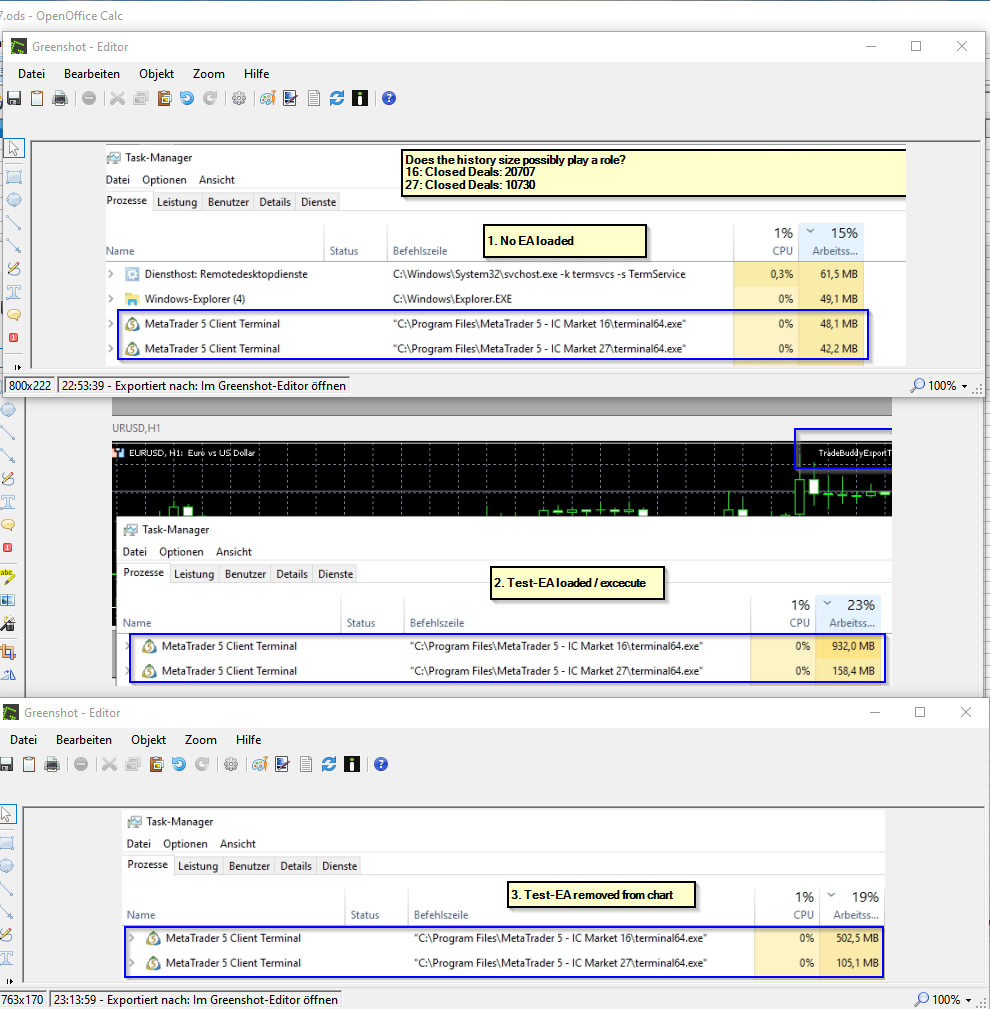
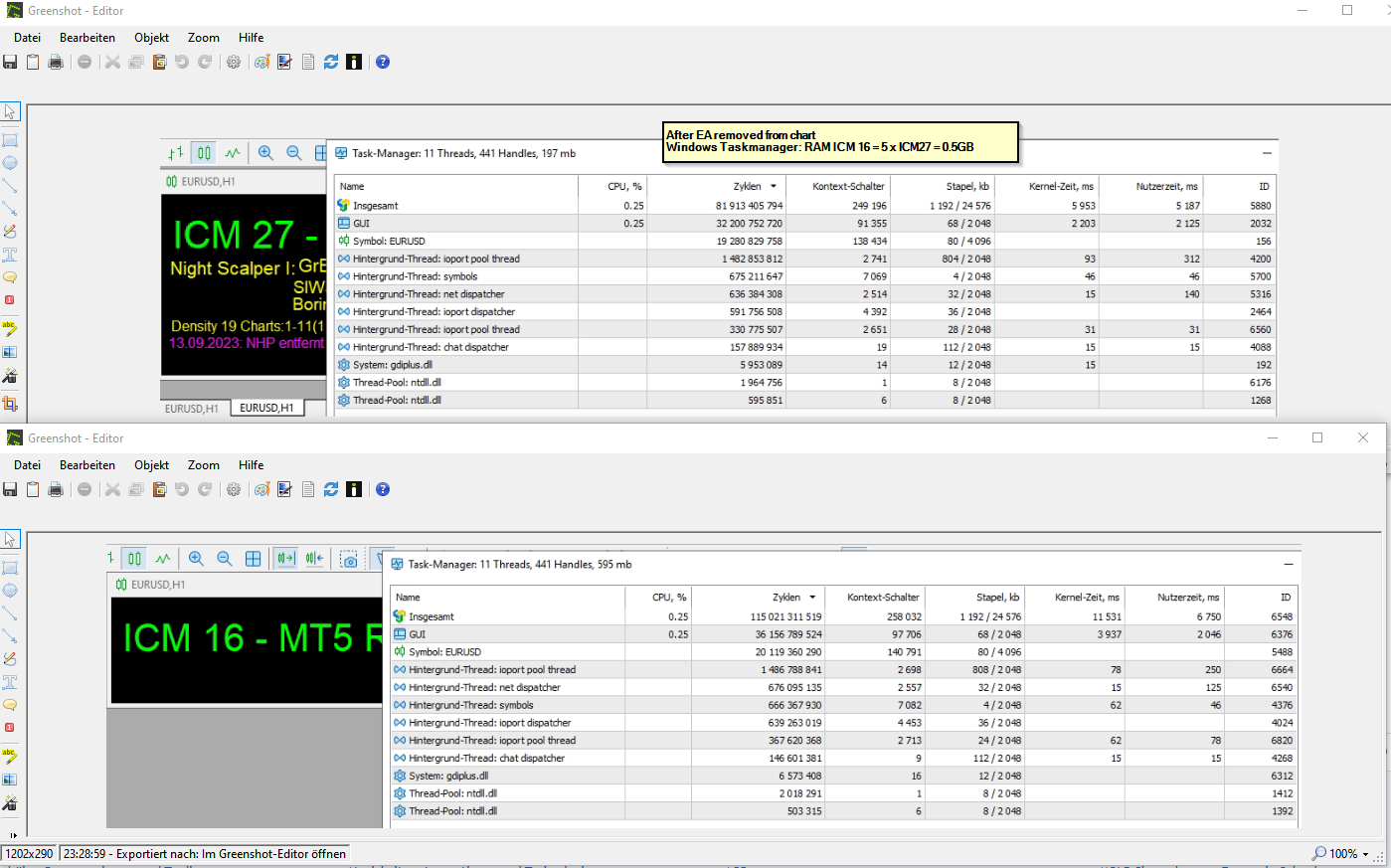
This is happening all the time, and the memory isn't being released properly on ICM 16.
ICM16 and ICM27 don't have EA, and ICM16 still pulls 0.5GB of RAM for nothing.
1. VPS not mql5
2. Test with my own Test-EA, but EAs only from mql5
-----------------------
Live trading with 6 EAs(mql5) looks like this.
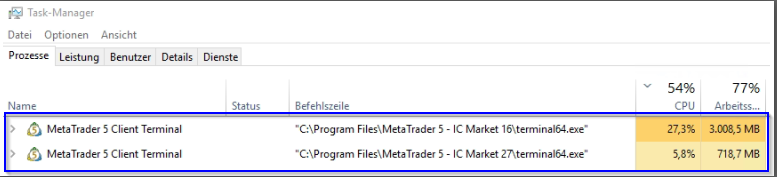
"ICM 20": Closed Deals: 19003
With Test EA: 1048.8 MB
Test EA removed: 584.1 MB
Here's another good account, like ICM27 and ICM3:
"ICM 31": Closed Deals: 10028
With Test EA: 118.1 MB
Test EA removed: 87.9 MB MB
But still, why do some accounts with such a stripped-down test configuration, as well as with comparable EA configurations in live operation, require such different amounts of RAM, regardless of the VPS or local on my Windows PC?
I can load some low-RAM-hungry accounts with EAs, and they don't reach the limits of the RAM-hungry accounts.
-> From what I've seen on my Windows PC, the RAM was freed up after a while.
Identical configuration on the VPS server, configured a few hours ago today, identical charts, 6 identical EAs with different Magic and the test EA, so 7 EAs, which means a different RAM requirement !?
What's going on!?
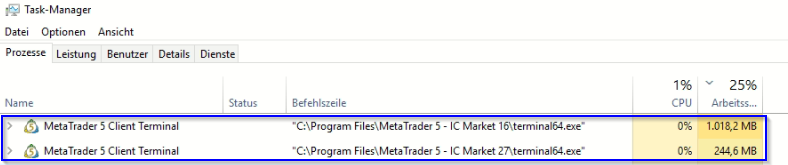
Now only test EA, I'm checking with the test EA whether the RAM on the VPS is released after a while, like on my Windows PC.
But here again, the RAM requirements of CM16 are surprisingly high compared to ICM27.
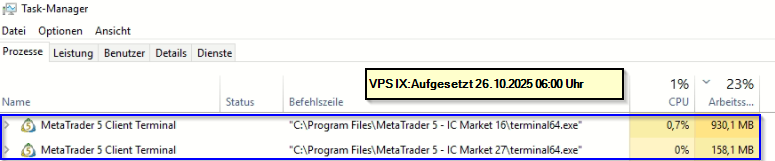
It has now cleared up the RAM: "WMO_Wise Memory Optimizer_Setup_4.2.3.129"
That alone probably won't be the solution, as I also have a CPU problem with these accounts.
Es ist ein deutsches Forum - warum schreibst Du nicht in Deutsch?
Übrigens mein Terminal belegt auch 85 MB im RAM

- www.metatrader5.com

- Freie Handelsapplikationen
- Über 8.000 Signale zum Kopieren
- Wirtschaftsnachrichten für die Lage an den Finanzmärkte
Sie stimmen der Website-Richtlinie und den Nutzungsbedingungen zu.
Auf einem VPS mit zwei identischen MT5-Konten variiert der benötigte RAM/CPU-Speicher stark. Warum ist mir das völlig unklar?
Hallo,
wie kann es sein, dass auf einem VPS mit zwei verschiedenen MT5-Konten mit identischen Konfigurationen ein Konto 5-mal mehr RAM/CPU benötigt?
An Wochenenden, an denen kein Handel stattfindet, ist die RAM/CPU-Auslastung nach dem Neustart von MT5 auf beiden Konten vergleichsweise gering. Daher wird es wahrscheinlich schwieriger sein, die Ursache am Wochenende zu erforschen.
Da jetzt keine Handelszeiten sind, verwenden alle die gleiche Menge an RAM/CPU, sodass ich dieses Wochenende nicht mit „ProcessExplorer” oder „RAMMap” überprüfen kann.
Aber ich sehe nicht wirklich, wie ich dort die Ursache finden kann, daher brauche ich vielleicht einen Tipp von Ihnen!
Ich bin völlig ratlos. Das ist nicht das erste Mal, dass mir das bei verschiedenen EAs aufgefallen ist. Wie kann ich hier die Ursache ermitteln? Speichert MQL5 vielleicht etwas pro Konto und verursacht dadurch unterschiedliche Ressourcenanforderungen?
Mir fällt das häufiger bei EAs auf, die häufig auf verschiedenen Konten installiert sind, aber das ist nur eine grobe Vermutung.
Broker ICM: [redigiert]
Chart-Konfiguration auf beiden Konten angepasst: max. 5000 Balken, um den RAM-Verbrauch zu reduzieren.
Vielen Dank im Voraus für Ihre Unterstützung!
On a VPS with two identical MT5 accounts, the amount of RAM/CPU required varies greatly. Why is it completely unclear to me?
Hello,
Now that there's no trading time, they all use the same amount of RAM/CPU, so I can't try checking with "ProcessExplorer" or "RAMMap" this weekend.
But I don't really see how I can find the cause there, so maybe I need a tip from you!
I notice this more often with EAs that are frequently installed on different accounts, but this is just a rough guess.
Broker ICM: [redacted]
Chart configuration adjusted on both accounts: max. 5000 bars to reduce RAM usage.
Thank you in advance for your support !
Automatische Übersetzung durch Moderator. Bitte schreiben Sie im deutschen Forum auf Deutsch. Verwenden Sie entweder das automatische Übersetzungstool oder posten Sie in einem der anderen Sprachforen.