在Facebook查找我们! 加入我们的粉丝群
使用MetaTrader 5新的可能性
最受欢迎的EA交易和技术指标、新闻信号、代码库中常规传入的现有的MQL5程序和热门讨论的论坛主题。
The Reverse Bar indicator paints the reversal bars according to trade strategy, described by Bill Williams in "Trading Chaos. Maximize Profits with Proven Technical Techniques" book. The bearish reversal bar has red or pink color (red-stronger signal) The bullish reversal bar has blue or light blue color(blue - stronger signal) It is recommended to use it on hourly timeframe (H1) and higher.
The Red Green Trade Signals indicator just gives you the direct signal to open and close your positions, just like traffic signals. When the signal turns to red, the market goes to short position, while the signal turns to green, the market goes to long position. This indicator also provides the precise time and price to open/close your positions with the 'buy' (green) and 'sell' (red) arrows. It's easy to use, and it's ready to go without any parameter to set. This indicator is implemented by c
This is a single currency Expert Advisor that looks for the best momentum time for DeMarker indicator when used in a particular symbol and timeframe. For this we use TRIX indicator to compare overbought and oversold lines in several times of the day. The better momentum is detected by the backtesting algorithm, where score is higher, so it's importante use Custom Max for adjustment effectiveness. About the Expert Advisor Strategy The main idea of this strategy is figure out the best momentum tim
On the MetaTrader 5 terminal, by default, the vertical scale is floating. When scrolling the chart, it is not quite intuitive to tell the price range. If use fixed scale, you are aware of the price range, but during scrolling or as new data arriving, the price will move out of the borders sooner or later. The solution is the "10 pips ruler" script! The "10 pips ruler" script always shows a red bar on the left hand side of chart. When you scroll, the price range will change and the red bar height
Championship2012 (EURUSD, 2 часа) - is a simple Expert Advisor. It uses moving average and optimized calculation of lots. Strategy Tester Report MetaQuotes-Demo (Build 705) Settings Expert: Championship2012_VIP2 Symbol: EURUSD Period: H2 (2012.01.01 - 2012.12.31) Inputs: Expert_Title=Championship2012_VIP2 Signal_ThresholdOpen=10 Signal_ThresholdClose=10 Signal_PriceLevel=0 Signal_StopLevel=71 Signal_TakeLevel=69 Signal_Expiration=4 Signal_DEMA_PeriodMA=6 Signal_DEMA_Shift=0 Signal_DE
Scalper Pad Scalper Pad panel is designed for scalping and has only the basic commands for scalping: BUY, SELL, CLOSE, REVERSE, and the choice of LOTS. Others versions: VirtualTradePad PositionsStyle VirtualTradePad Ordersstyle VirtualTradePad SignalsStyle VirtualTradePad "One Click Trading Panel" Important Features When a position is successfully opened, you will hear a sound similar to the same action in the terminal; If there is an error, you will hear the error sound; On the the BUY and SELL
MetaTrader 5 专业交易面板 —— 图表与键盘一键交易的高效控制中心 一款面向主动交易者的专业 Trading Panel,可让您比标准 MetaTrader 操作方式更快、更直观地完成开仓、平仓、修改、管理与控制。 这不是一个普通的小工具,而是一个为高频手动操作、仓位管理、挂单控制与利润管理而设计的完整交易工作台。 通过这套面板,您可以直接在图表上一键执行交易,通过键盘快速触发核心操作,并借助自动参数计算、图形提示、信息标签以及可视化管理功能,大幅减少重复性操作,让整个交易流程更加流畅、高效且专业。 使用我们的交易面板,您可以直接从图表上一键下单,执行交易操作的速度可比标准 MetaTrader 控件快约 30 倍。 全新高级版本现已推出: 使用 VirtualTradePad PRO SE 升级您的交易流程 — 适用于 MetaTrader 5 和 MetaTrader 4 的新一代专业交易面板。 MT4 版本 | 完整说明 + DEMO + PDF | 如何购买 | 如何安装 | 如何获取日志文件 | 如何测试与优化 | Expforex 的所有产品 为什么交易者会
MACCI Power is an Expert Advisor that explores the synergy power of 2 indicators: Moving Average and Commodity Channel Index . Trading Strategy: Moving Average indicator confirmed by Commodity Channel Index is used to open positions. Positions are closed by Take Profit and Stop Loss. In addition, there is the Break Even option that makes this Expert Advisor more secure. The money management is based on free margin. To lock account profit or limit account loss, you can activate Target equity and/
VirtualTradePad is a panel for managing main orders in МetaТrader 5: Buy, Sell, Buy Stop, Buy Limit, Sell Stop, Sell Limit, Close, Delete, Modify, Trailing Stop. This version is for informational purposes. Analyzing the main trade strategies using 10 indicators and 8 timeframes, the panel draws signal direction. This pane is a part of the VirtualTradePad series that took 2-nd place in the Best Graphic Panel . A free of charge demo version - VirtualTradePad Lite . Graphical Features х - no si
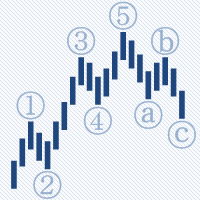
AutoElliottWaveMaker is the first tool for MetaTrader 5 , created for semi-automatic analysis of Elliott waves. It has many unique features: Automatic bar binding of waves for all timeframes; The waves can be labelled in 2 ways: drag and drop from the Labels panel and using the mouse click on the bar; Automatic arranging of the labels at all timeframes according to wave levels seniority; Automatic and manual control of the number of wave levels shown on a chart; Wave levels custom labelling sty
This indicator shows Pin Bar candlestick pattern on the chart. The bearish pin bars have red color, the bullish pin bars have blue color. The indicator shows alert when Pin Bar candlestick pattern is formed. It's recommended to use it at timeframes H1 and higher. The best moment (strong signal) is when Pin Bar is formed close to the support/resistance level.
This Expert Adviser participates in the Automated Trading Championship 2012 (ROMAN5) . This strategy is developed to trade EURUSD in both LONG and SHORT directions according to the trend. The type of trades (buy or sell) is selected on the basis of CCI and Heiken Ashi indicators. It runs on the EURUSD H1 chart. For the Championship 2012, the parameters are: CCI_Period = 100, CCI_OverBoughtLevel = 170, CCI_OverSoldLevel = -170 , volumePerTrade = 5, maxOpenTrades = 3 and gapPriceAllow = 0.0
这款剥头皮指标为您显示可以安全赚取 10 个点,且风险仅有 2 个点的那一刻。如果使用正确的资金管理,它可以极大地增加您的资产。 此指标只有一个输入参数 - 柱线数量, 用于趋势计算。 当信号出现, 在高于当前价位 2 点的上方放置挂单 (买单) 或低当前价位 2 点的下方放置卖单。 止损 - 2-3 点; 止盈 - 从 10 点起; 建议时间帧 - M1。 品种高波动且低点差 - EURUSD, AUDUSD, GBPUSD, EURJPY 等等。 如果仓位已开, 但价格未到达止盈价, 修改止损到盈亏平衡点, 并依据前一根柱线的最低价设置多单尾随停止, 或前一根柱线的最高位设置空单尾随停止。 FYI :如果您購買此指示器而不是租用它,您可以通過向我們發送您的付款證明來免費索取其源代碼。
An attempt to extend Tim's idea suggested last year. The Expert Advisor places pending orders on a breakthrough by analyzing the ZigZag, volatility and existing trend. The Expert Advisor is set up by choosing the input parameters and the trading mode (G). Working pair is EURUSD. Timeframe - M15. MetaQuotes-Demo Server. The screenshots of the modes 1 and 2 are for the last three years (01.10.2009-01.10.2012), and the modes 3 and 4 are tested for the last year (01.10.2011-01.10.2012). The mode num
The AdvancedTrend indicator automatically traces market price movement and draws a pair of resistance and support lines. It's easy to figure out market trend with resistance level and support level and when/how market breaks out key price level.
Expert Advisor Strategy The target of this strategy is to decrease Relative Drawdown of Martingale money management using multi-currency scales and stages. The idea is to apply Martingale using stages with different currencies, for example: Stage 1: EUR/USD Lot: 0.01 Stage 2: USD/JPY Lot: 0.02 Stage 3: GBP/CHF Lot: 0.04 Stage 4: .... It works with 12 pairs, and in each stage you define the number of the pair and its correlation (positive or negative). Input Parameters Stage1 Currency (-12 to 12
GoodTrade is the very first Expert Advisor purchased on the Market. On the occasion of the second anniversary of availability of the Expert Advisor on the Market, you are now looking at the second version of the Expert Advisor featuring a completely updated operating logic. GoodTrade now uses a new universal trading signal suitable for various trading instruments and working over long time periods. By default, the Expert Advisor is set to trade GBPUSD. Try it for other trading instruments. Set a
This is my Automated Trading Championship 2012 Expert Advisor. It is a multi-currency Expert Advisor that uses all symbols enabled in the event, and has several algorithms to detect trend markets and reversal moments. The final version setup is "S120.929 (H1, Custom Max, from 2012.09.01 to 2012.09.01)" (detailed configuration is provided bellow). For the Championship, the parameter maxLotTotal is set to 15 and maxLotTrade is set to 2.5 (real max is 5, this is the simulation best result), but you
The strategy is based on the Stochastic Oscillator indicator. Positions are closed by Take Profit, Stop Loss (with or without trailing stop) or according to an opposite signal. To lock account profit or limit account loss, you can activate Target equity and/or Minimum equity in percentage of deposit at the settings. This EA is optimized for EURUSD M1, but you can use it for other instruments by performing optimization first. You can adjust important parameters by performing optimization periodic
Classic Multi-currency Break-Even. It only changes order Stop Loss level when the current price reaches Break Even Level pips of profit, securing/"locking" Break Even Profit pips of profit. Allows flexible positions filtering and processing by: Pair Magic Position ID Position Type The Expert Advisor can be placed on any chart. You can use Advanced Break Even simultaneously with any other trading Expert Advisor. Also features: On Screen Display Extended logging Separate EA log file Standard Met
本指标的目的是判断点差和利率大小,以及按照存款货币每一个点的风险,设置从当前价位计算的止损距离。 本指标告知交易者有关金融工具在每个时段之间转换时可能的额外费用和利润。它还告知有关的点差和挂单的距离,从当前价位的尾随止损位。此外,指标告知交易者有关存款货币每一个点的风险。 信息被显示在图表下方的单独子窗口里。它可以避免图表被不同的信息塞满。点差和利率监控指标适合任何自定义模板。
If you want something as below: Sell FOREX trading signal. Manage multiple accounts. Follow somebody's trading. "TradeCopier_source" and "TradeCopier_follow" can help you! Features: Copying from one source (master) account to multiple follower (slave) accounts. Allow investor (read only) password for the source (master) account. There are no complicated settings and input parameters, everything is easy. Works with different Brokers. Works with different symbols (EURUSD_FX, eurusd_m, etc.). Can c
The indicator reads all deals from the history and displays them on the chart. Each deal of a position is considered separately, what allows to clearly display all actions of a trader. The application is developed on the basis of the code from the MQL4 Code Base ( https://www.mql5.com/ru/code/8804 ). Parameters: ColorBuy - buy color; ColorSell - sell color; ColorText - color of the information text; ColorProfit - profit color; ColorLoss - loss color; DaysInHistory - depth of history in days. Can
EasyPen is designed as beautiful and innovative way to create and manage all your chart analysis, scribbles, notes and more. The app takes advantage of new MQL5 technology to offer an experience unseen in the other apps or in older MQL versions. An App That Changes Everything There is no existing drawing app that allows the level of customization that EasyPen offers. Change color of your pen, choose brush size, save drawings, keep drawings attached to specific position in chart, and more. With o
Binary Band is an overlap indicator that describes price movements in two clearly distinguishable colors. It has only two statuses: up trend or down trend. Besides two filling colors, the indicator also has upper and lower borders drawn in blue color. When price goes up, the lower border inches up smoothly, but upper border shows steps effect; vice versa for a down trend. It will be easy to design an EA based on this indicator. No input parameters needed. The name of the upper and lower borders
The indicator displays the "Three white soldiers and Three black crows" candlestick model on a chart. Three white soldiers are color in blue. Three black crows are colored in red. Input parameters: Max Bars - maximum number of bars calculated on the chart. Make Signal Alert - use alert. Type of pattern rules - use a strict model of determining the pattern (short lower shadows for the three soldiers, short upper shadows for the three crows), or a simplified model. Max Shadow Ratio - coefficient o
SmartMA is a custom indicator. This script is intended to record the values of SmartMA and OHLC prices for every bar on the chart. The data is saved as a CSV file so you can conduct a quantitative analysis of trading. When the script is stopped, it tells the path where the data file is saved. Adjust the SmartMA on Realtime Deals in a way you like using the input parameters. For this script to work, the SmartMA indicator is required.
The indicator shows the timetable of the world's stock exchanges in a separate window in visual mode. Based on Time, Forex sessions and Trade Hours monitor by Vadim Baklanov (2009), converted to MQL5 by ARIES Software Corp . Input parameters: Brokers standard time zone (UTC+): - Local Time, Standard UTC + offset broker server time; Broker DST start - Date and time daylight savings time server time broker; Broker DST end - Date and time of the transition to winter time; Clock color - Clock colo
Advanced informer about all current positions and pending orders. Sends an E-Mail when Trade event occurs or/and according to the Timer, which can be configured by the user. Account info can be excluded from the messages. The best solution for those, who want to be informed about what happens in the trading terminal.
This multi-currency Expert Advisor is based on Moving Average indicator (almost the same as BetayaraFx ). It works on 4 major pairs (EURUSD, GBPUSD, USDCHF and AUDUSD). Positions are closed by Stop Loss and Take Profit. It can work either with 4 digits or 5 digits brokerage. Additional features: ECN feature allows the Expert Advisor to work on the ECN Brokerage. Hidden SLTP feature allows the Expert Advisor not send Stop Loss and Take Profit to server. Input parameters: MM - money management us
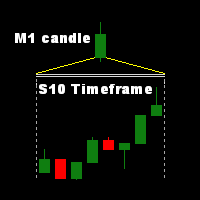
Indicator with second-timeframe in a separate window with separator line. Very useful for day traders to analyze the quick motion. Input parameters: TimeFrame - used time frame: S1 - one candle contains 1 second (max. 60 candle/sec); S2 - one candle contains 2 second (max. 30 candle/sec); S3 - one candle contains 3 second (max. 20 candle/sec); S4 - one candle contains 4 second (max. 15 candle/sec); S5 - one candle contains 5 second (max. 12 candle/sec); S6 - one candle contains
This script notifies a user about different events by playing sounds, sending emails and text messages to a mobile device. The following events are supported: New deals (in/in out/out). Expiration of Pending orders. The terminal disconnected. The terminal or the script closed. Please set a notification type for each event separately. If you need notifications via Email, please make sure that the settings on the Email tab are correct. If you need to receive notifications on a mobile device, pleas