我从小就从艰苦的课余生活开始......养猪场、拖车公园、柴火场等等,但我也很早就接触到了 Apple IIe 电脑。后来,我获得的学位比温度计还多,并于 1999 年开始交易。我所受过的最有价值的对交易有帮助的教育可能是代数、几何、高等数学 I 和 II、统计学和计算机数学。这是年轻一代的计算机科学,或者嘿......只是为下一代年轻人编程。我的盈利自动交易 EA 让我有空闲时间。我通过为其他交易者免费编写一些东西来保持空闲时间。
I've seen quite a bit of confusion about the activities of mql5.com Forum Moderators versus Administrators... versus the Service Desk, so I'll try to clear things up here. A Moderator is relegated to editing, censoring, and reorganizing the content of Forum Topics (threads) and Posts...
Here is a non-repainting ZigZag indicator that I converted from MT4 to MT5. This indicator is already posted in several Forum threads but is not easy to find. Although it works, compiles without errors, and runs fine in the Tester, the CodeBase validator will not accept it...
I've seen quite a few posts about hardware selection, so I'm sharing my experience on that subject here...
The MT4/MT5 mobile phone/tablet apps are mainly for monitoring current price and open trades, and receiving alerts--not for chart analysis nor placing trades. The mobile apps have fewer built-in indicators than the desktop platforms, and the mobile apps cannot run custom indicators. Also, mobile wireless devices inherently have slower and less reliable connections to data and trade servers. For example, my desktop's hardwired Ethernet has a 1000 Mbps connection while my 5G wireless devices have a 433 Mbps connection on the same modem-router. Keep in mind that cheaper internet service subscriptions are proportionally slower.
And if my wireless device and I go outside of my router's wireless broadcast range, wireless internet service is lost and then I'm totally reliant on my device carrier's mobile data service. My mobile data connection is never as fast as my home network connection. Therefore, I never use MT5 mobile for trading analysis nor placing trades. I only use it for receiving push notifications of disconnections between desktop MT5 and my broker-dealer's trade server, and notifications of trade executions (sent from my desktop platform).
Mac desktops are better than mobile devices but not best for running MT4/MT5. These trading platforms have been designed around the Windows pc operating system for decades. Metaquotes eventually created Mac "versions" so that more people can use the platforms without having to buy a new pc. However, Mac users generally must install and run virtual machine software and even so, the Mac functionality is never 100% on par with the pc functionality. Although Mac's are the gold standard for graphic design and desktop publishing, they are less than ideal for desktop trading.
Windows pc's have been the standard computers for both retail traders and commercial traders for decades. As retail traders, we have quite enough disadvantages to overcome. Commercial traders set up shop right next to exchange/market data centers, and they use pc's and/or field-programmable-gateway-array (FPGA) chipped computers. These folks are not using wireless devices (unless maybe, they're right on the floor of an exchange). Given the army that we're trading against, it makes no sense to disadvantage ourselves further by using workaround devices and slow/unreliable connections.
Many U.S. retail traders wonder where to turn when they discover that they have been cheated by a broker-dealer. (Information for U.K., E.U., and Canadian traders also appears below). If you have been trading for a while, this has likely happened to you at least once...
Introduction In this blog post, I will share general principles which I learned over the course of 25 years of trading stocks, futures, and forex. Learning these principles gradually enabled me to succeed in the markets...
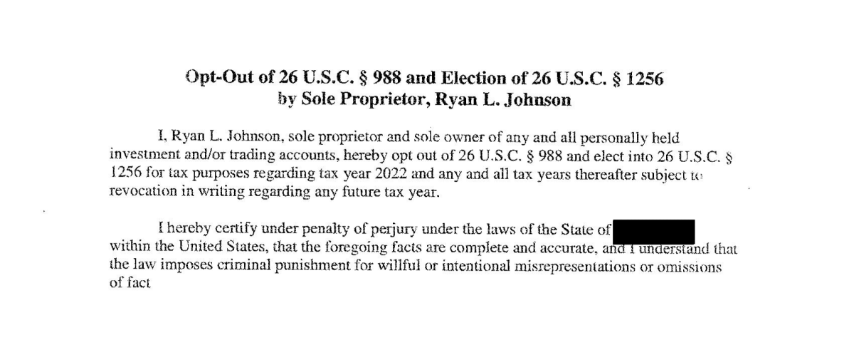
Upon becoming profitable, traders should begin to think about the most advantageous income tax strategy to use. The written and signed statement in the attached file at the bottom of this post is a redacted copy of my actual U.S. IRS Code Section 1256 Election. For income tax purposes in the U.S...