Hedging Strategy EA
- 实用工具
- 版本: 7.4
- 更新: 11 十二月 2021
- 激活: 5
Turn Your Trading Strategy Into a More Structured Trade-Management Process
Hedging Strategy EA is a powerful MetaTrader 4 trade-management utility designed for traders who already have their own entry strategy and want to automate the hedging, risk management, and pending-order management that follows.
You decide when and where to enter.
The EA helps manage what happens after the trade is opened.
Whether you trade manually or test your strategy in the Strategy Tester, Hedging Strategy EA provides an organized framework for automatically managing opposite hedge orders, risk distances, 1:1 risk/reward levels, pending orders, spread conditions, and other trade-management rules.
🚀 Why Use Hedging Strategy EA?
Manual trade management can require constant monitoring.
After opening a position, you may need to:
-
Monitor the Stop Loss
-
Calculate the appropriate hedge level
-
Calculate the hedge volume
-
Place an opposite pending order
-
Adjust Take Profit
-
Monitor spread conditions
-
Cancel outdated pending orders
-
Monitor the number of candles after entry
-
React when price moves toward the predefined risk/reward level
Hedging Strategy EA can automate many of these repetitive tasks for you.
Spend less time managing individual orders and more time focusing on your trading strategy.
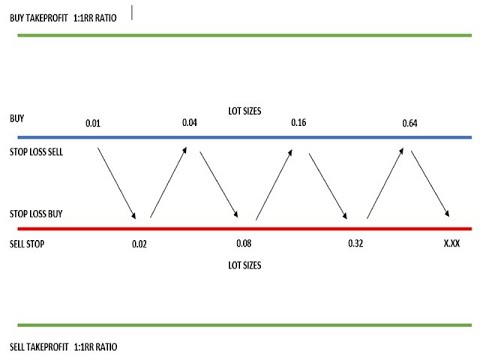
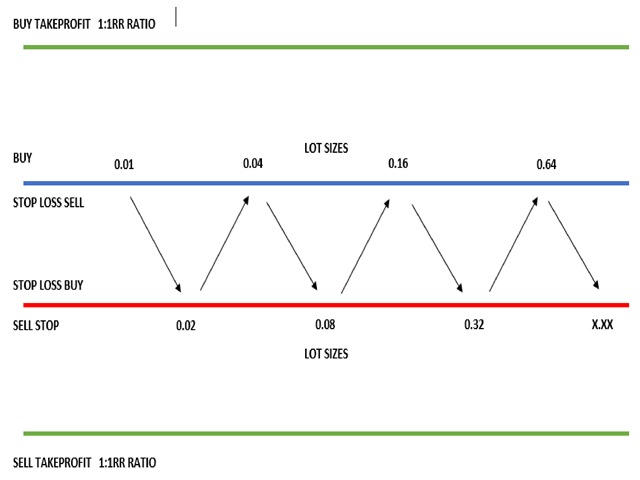
🔄 Automatic Hedge ManagementThe core function of the EA is automatic hedge-order management.
When you have a BUY position:
The EA can prepare a SELL STOP hedge order based on the original position's Stop Loss and risk distance.
When you have a SELL position:
The EA can prepare a BUY STOP hedge order based on the original position's Stop Loss and risk distance.
This allows the hedge to be positioned according to the structure of your original trade rather than requiring you to manually calculate and place the opposite pending order.
🎯 Automatic 1:1 Risk/Reward CalculationThe EA can automatically calculate a 1:1 Risk-to-Reward Take Profit using the original trade's Stop Loss distance.
For example:
BUY
Entry → Risk distance → 1:1 target
SELL
Entry → Risk distance → 1:1 target
The calculation is performed automatically according to the selected trade parameters.
No need to manually calculate the distance every time.
📊 ADR-Based Automatic Risk SettingsDon't want to manually specify the entry or risk distance?
The EA can use ADR (Average Daily Range) to automatically calculate these values.
You can configure the ADR divisor to control the relationship between the instrument's average range and the calculated trading distance.
Adjustable ADR Parameters
-
ADR-based entry distance
-
ADR-based risk/Stop Loss distance
-
Custom ADR divisors
-
Manual override available
This allows the EA to adapt its calculations to different market conditions and instruments.
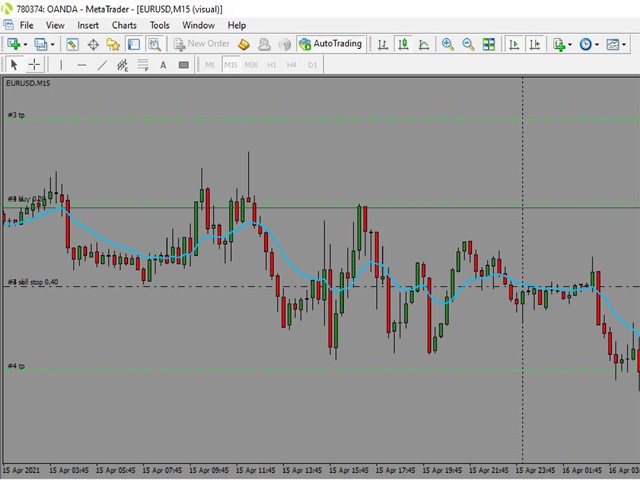
📈 Built-In Moving Average LogicFor Strategy Tester use, the EA includes optional Moving Average-based entry logic.
Configure:
-
Moving Average Period
-
Moving Average Method
-
Timeframe
-
Long or Short testing mode
Supported Moving Average methods include the standard MetaTrader Moving Average calculation methods.
This makes the EA useful not only as a live trade-management utility but also as a framework for testing the associated trading logic.
💰 Flexible Position SizingSet your preferred lot size and let the EA validate it against the symbol's trading-volume limits.
The EA automatically checks:
-
Minimum lot size
-
Maximum lot size
-
Volume normalization
-
Available margin
-
Trade eligibility
Hedge volume can also be calculated from the original position size according to the EA's hedge-management logic.
🛡️ Spread ProtectionMarket conditions can change rapidly.
During major economic events, spreads can become significantly wider.
Hedging Strategy EA includes spread-based protection designed to help prevent inappropriate hedge placement during excessive-spread conditions.
When enabled, the EA can:
✔ Avoid placing hedge orders during excessive spreads
✔ Close eligible positions when excessive spread conditions are detected
✔ Delete eligible pending hedge orders during excessive spreads
This gives you an additional layer of automated trade protection.
⏱️ Smart Pending-Order ManagementA pending order does not necessarily remain valid forever.
The EA can automatically manage pending orders according to your selected rules.
Cancel pending orders based on:
1. Risk/Reward condition
Automatically manage pending orders when the defined 1:1 condition is reached.
2. Moving Average condition
Cancel an order when price closes above or below the selected Moving Average according to the EA's logic.
3. Candle count
Automatically cancel pending orders after a specified number of new candles.
4. Spread condition
Remove eligible pending orders when excessive spread conditions are detected.
🧠 Designed for Your Own Trading StrategyHedging Strategy EA is not intended to replace your trading strategy.
Instead, it is designed to work alongside it.
Your strategy determines:
ENTRY →
Hedging Strategy EA manages:
HEDGE → RISK → PENDING ORDERS → 1:1 RR → MANAGEMENT
This separation gives you greater flexibility.
You can continue using the trading strategy you already understand while delegating repetitive trade-management tasks to the EA.
🧪 Strategy Tester SupportWant to test the concept before using it on a live account?
The EA includes an automated trading mode specifically designed for MetaTrader 4 Strategy Tester.
Available modes:
🟢 Long
Test Buy-side logic.
🔴 Short
Test Sell-side logic.
⚪ Disabled
Use the EA primarily for trade-management functionality.
This allows you to experiment with different:
-
Timeframes
-
Moving Average periods
-
ADR settings
-
Risk distances
-
Lot sizes
-
Entry parameters
You remain in control of the important parameters.
Main Settings
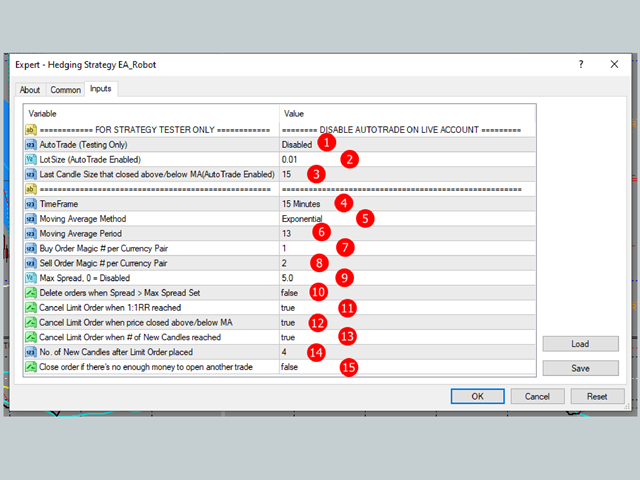
AutoTrade
Long / Short / Disabled
LotSize
Custom trading volume.
MinPipsEntry
Manual entry distance or automatic ADR-based calculation.
ADRMinCandleSizeEntryDivider
Controls automatic ADR-based entry calculation.
riskPips
Manual risk distance or automatic ADR-based calculation.
ADRRiskDivider
Controls automatic ADR-based risk calculation.
TimeFrame
Calculation and signal timeframe.
MA_Method
Moving Average method.
MA_Period
Moving Average period.
delRR
Pending-order management based on the 1:1 RR condition.
delPriceCloAboBel
Moving Average-based pending-order cancellation.
delNoCandles
Candle-count-based cancellation.
newBarCount
Number of new candles before pending-order cancellation.
delOrderifNoMoney
Optional insufficient-margin protection.
CloseAtNews
Spread-based protection.
AutoRemoveEA
Automatically remove the EA when there are no open orders.
Step 1 — Open Your Trade
Use your own trading strategy to open a BUY or SELL position.
Step 2 — Attach the EA
Place Hedging Strategy EA on the appropriate chart.
Step 3 — EA Detects the Position
The EA evaluates the eligible position and its Stop Loss/risk parameters.
Step 4 — Hedge Management
When the required conditions are satisfied, the EA can place the corresponding opposite pending hedge order.
Step 5 — Automatic Management
The EA continues monitoring:
-
Price
-
Risk distance
-
1:1 RR
-
Spread
-
Moving Average conditions
-
Candle count
-
Margin availability
-
Pending orders
Step 6 — Automatic Cleanup
Pending orders can be automatically modified or cancelled when your selected conditions are met.
⭐ Key Advantages✔ Automatic Hedging
Reduce repetitive manual hedge-order placement.
✔ ADR-Based Calculations
Use market-range-based calculations instead of relying entirely on fixed distances.
✔ Automatic 1:1 RR
Automatically calculate the 1:1 risk/reward target.
✔ Spread Protection
Monitor excessive spread conditions.
✔ Pending Order Management
Automatically manage outdated or invalid pending orders.
✔ Margin Checks
Check available funds before attempting additional trades.
✔ Flexible Parameters
Adapt the EA to your preferred strategy and instrument.
✔ Strategy Tester Support
Test the automated trading logic before deployment.
✔ Manual Strategy Compatible
Designed for traders who prefer to determine their own market entries.
⚠️ ImportantHedging Strategy EA is a trade-management utility. It does not guarantee profits and does not eliminate trading risk.
The EA does not guarantee that a hedge will improve trading results.
Trading involves substantial risk, and hedging can introduce additional:
-
Spread costs
-
Commission costs
-
Swap costs
-
Margin requirements
-
Execution risk
-
Slippage
Broker rules regarding hedging, margin, and pending orders may differ.
Always test the EA thoroughly in the Strategy Tester and on a demo account before using it with real funds.
The Strategy Tester automated-entry functionality is intended for testing purposes.
📌 Recommended ForHedging Strategy EA is suitable for traders who:
✔ Already have their own trading strategy
✔ Want to automate repetitive trade-management tasks
✔ Use manual entries but want automated hedge management
✔ Want ADR-based risk calculations
✔ Use predefined Stop Loss levels
✔ Want automatic 1:1 RR calculations
✔ Need automated pending-order management
✔ Want additional spread-based protection
✔ Want to test the associated trading logic in MetaTrader 4 Strategy Tester
Trade Your Strategy. Automate the Management.
You decide the trade.
Hedging Strategy EA helps manage the rest.
Start with the Strategy Tester, optimize your settings, and thoroughly evaluate the EA under your broker's trading conditions before moving to a live account.