Stop Survival Sizer

Stop Survival Sizer answers one practical question before you enter a trade: how wide must my stop be so that, on this symbol and timeframe, normal noise would have hit it no more often than I accept? And how many lots does that stop allow for my risk?

Instead of a fixed "2 x ATR" rule, it measures. For each of the last N bars (500 by default) it treats the bar close as a hypothetical long entry and a hypothetical short entry. It records how far price moved against each entry during the next H bars (10 by default), in units of that bar's ATR. From this distribution it picks the smallest stop multiple that would have been hit no more often than your target (20 % by default). It does this separately for longs and shorts. Rising and falling markets often have quite different adverse moves.

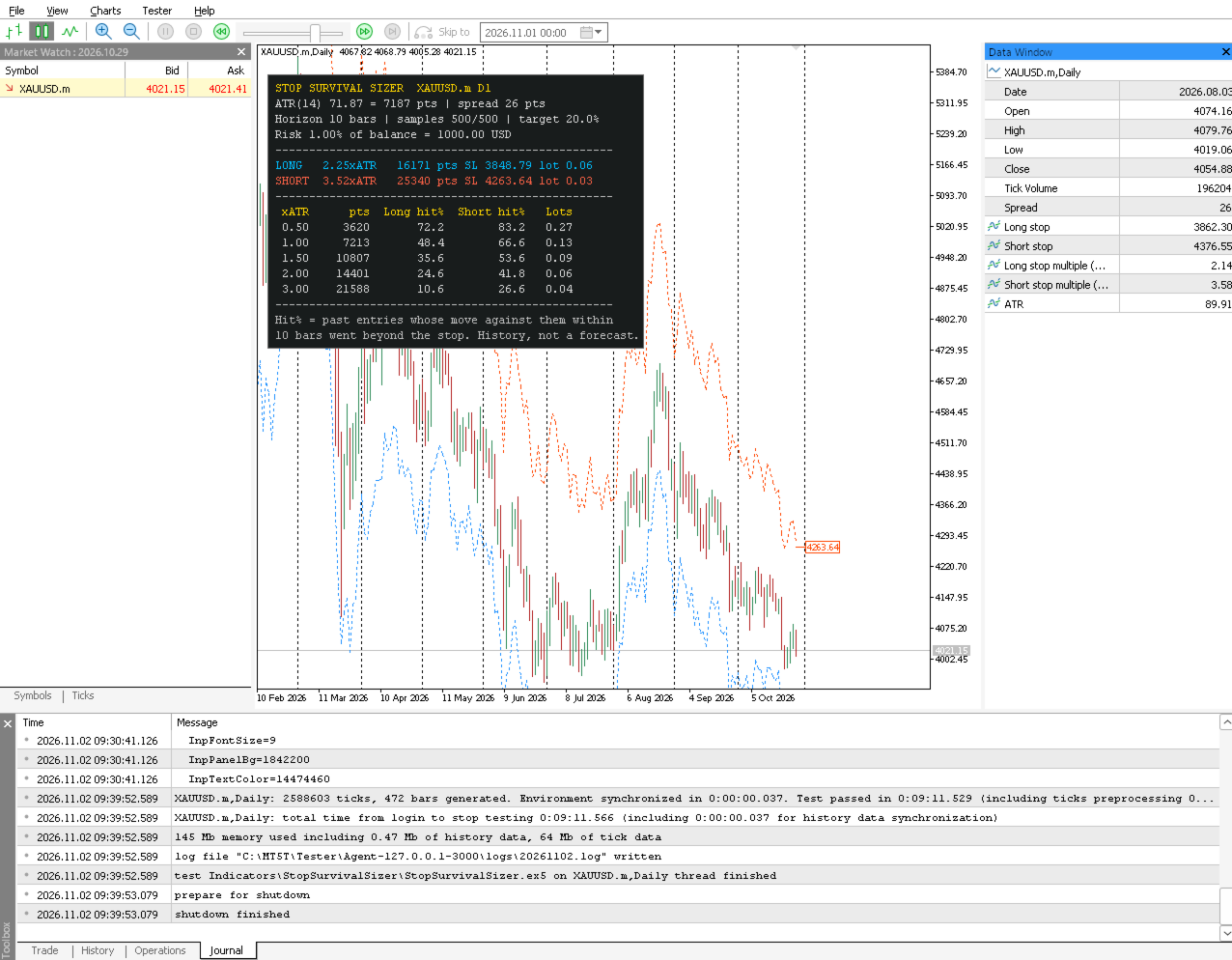
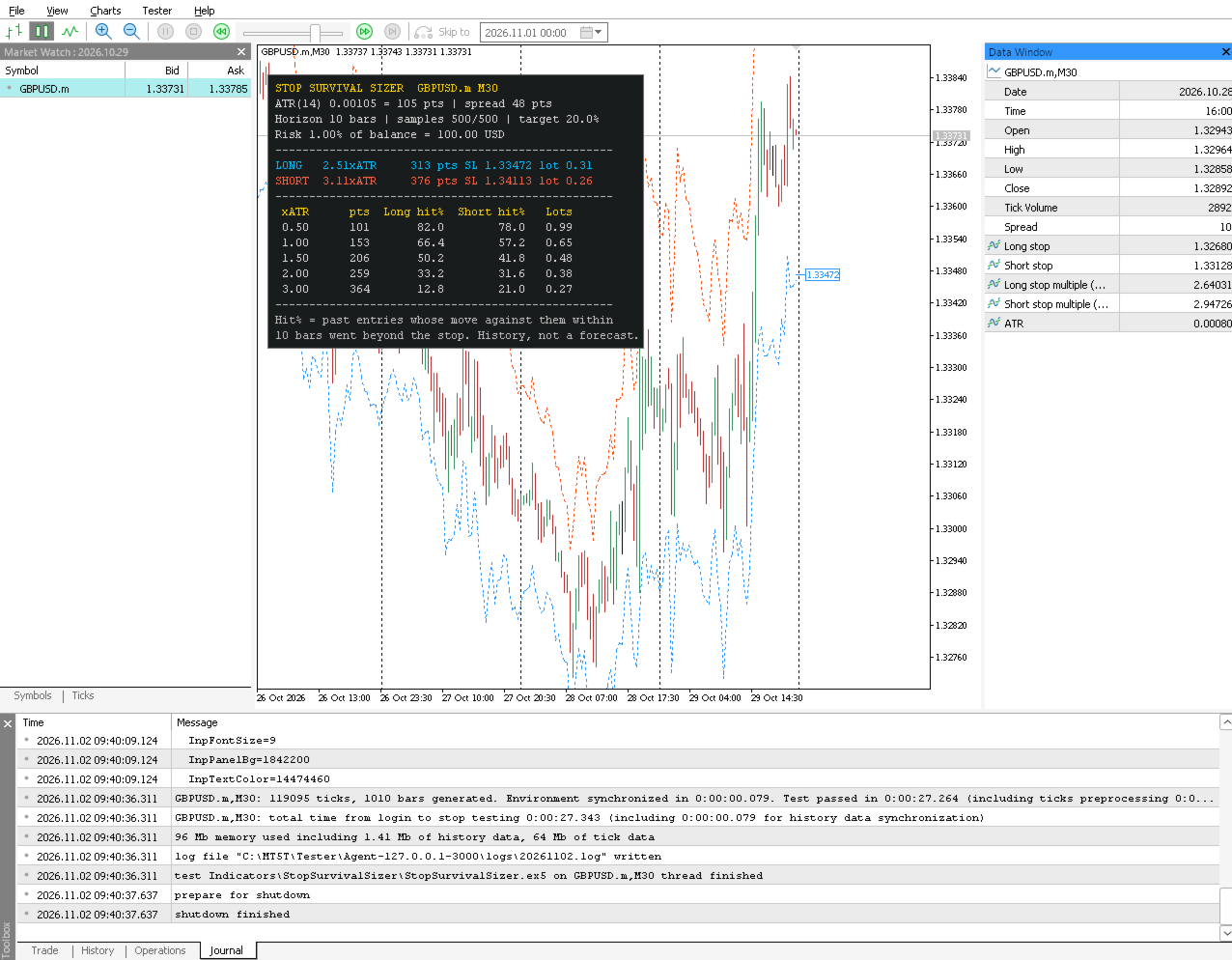
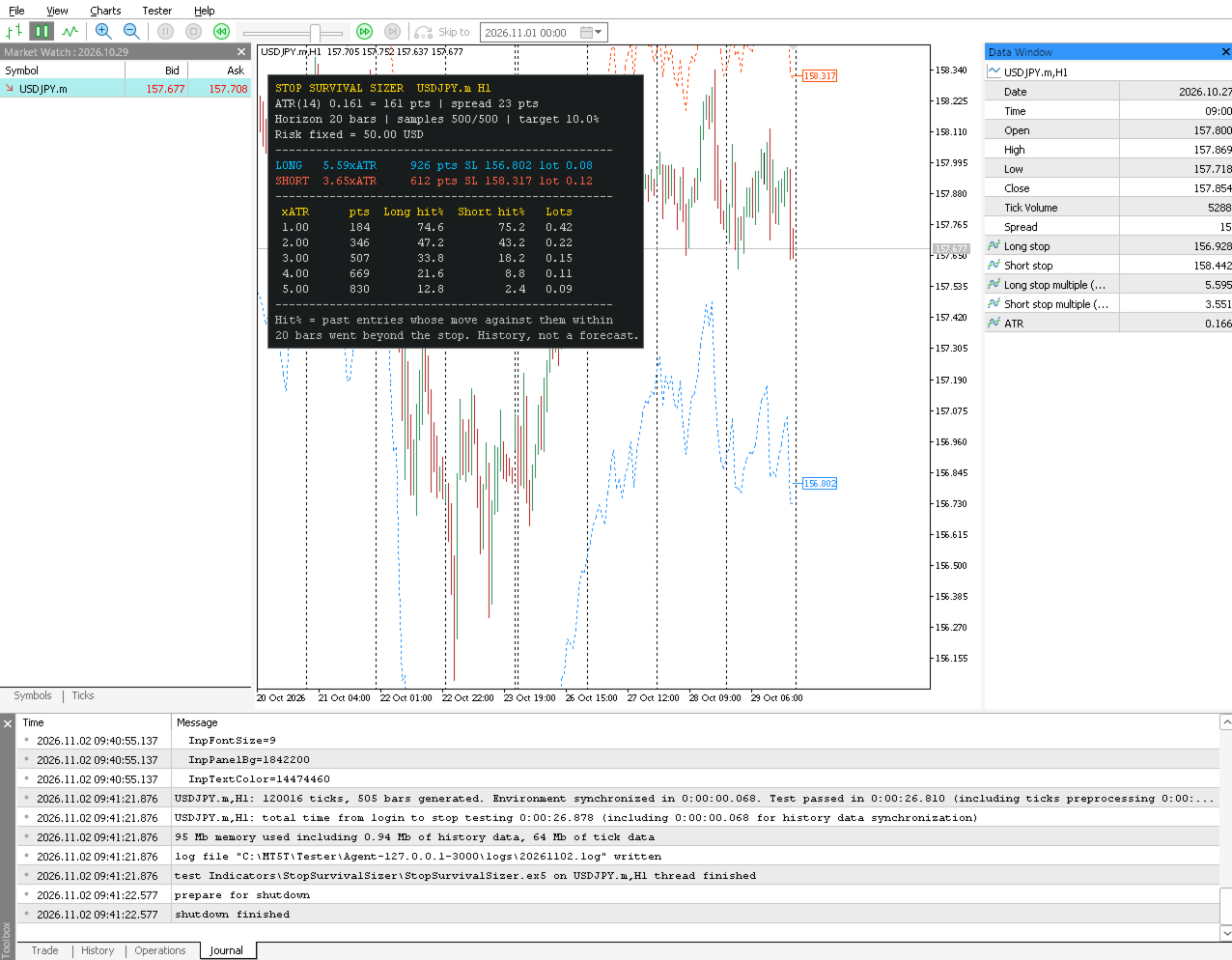
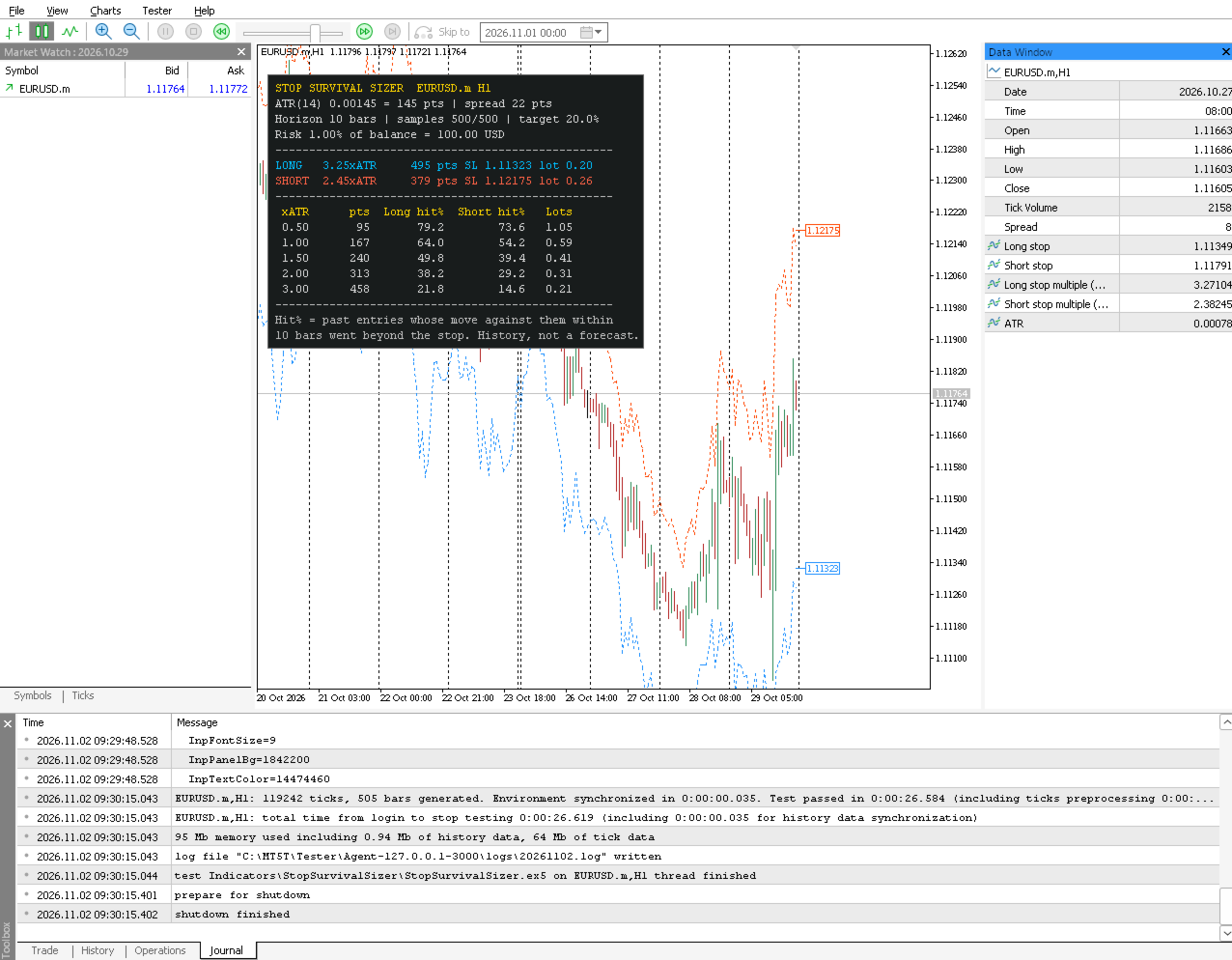
What you see on the chart

  • Long stop line (blue, dotted): bar close minus the recommended long multiple x ATR.
  • Short stop line (orange-red, dotted): bar close plus the recommended short multiple x ATR.
  • Price labels at the last bar with the current long and short stop prices.
  • Panel:
  • the recommended long and short stop in ATR multiples and in points, with stop prices from the current ask/bid and the lot size for your risk;
  • a table of 5 stop sizes you choose (0.5 / 1 / 1.5 / 2 / 3 x ATR by default) with the historical long and short hit rates, distance in points and lot size;
  • ATR, spread, horizon, number of valid samples and the risk amount.

Features

  • Empirical stop multiples for longs and shorts, recalculated once per bar.
  • Lot size from percent of balance, percent of equity or a fixed amount of money. Uses the terminal's OrderCalcProfit (tick-value fallback), so it handles forex, metals, indices and cross-currency accounts. Lots are rounded DOWN to the broker's lot step and capped at the maximum. If even the minimum lot would risk more than you allow, the panel shows "<min" instead of rounding up.
  • Optional: add the current spread to the stop distance.
  • Hit-rate table for 5 user-defined stop sizes.
  • Closed bars do not repaint. A bar's multiples use only samples whose whole holding horizon closed before that bar opened, and they are fixed when the bar opens.
  • 5 buffers for Expert Advisors (iCustom). All inputs are plain numbers, switches or colours, in a fixed order.
  • Efficient: after the first pass, only new samples and new bars are calculated. The number of bars calculated is limited (5000 by default).
  • No DLLs, no external files, no web requests. It never opens, changes or closes trades.

Inputs (in iCustom order)

1. ATR period (Wilder), default 14

2. Holding horizon, bars after entry, default 10

3. Past entries sampled (one per bar), 30..20000, default 500

4. Target stop-hit rate %, 1..99, default 20

5. Risk base: 0 = percent of balance, 1 = percent of equity, 2 = fixed money; default 0

6. Risk per trade % (balance/equity modes), default 1.0

7. Risk per trade money (fixed mode), default 100

8. Add current spread to stop distance, default true

9-13. Table rows 1-5: stop x ATR, defaults 0.5, 1.0, 1.5, 2.0, 3.0 (0.05..50)

14. Bars to calculate (most recent), 100..1000000, default 5000

15. Show panel, default true

16. Show stop price labels at the last bar, default true

17. Panel X offset (px), default 10

18. Panel Y offset (px), default 30

19. Panel font size, 6..24, default 9

20. Panel background colour

21. Panel text colour

Invalid inputs are refused at start with a clear message in the Experts log.

Buffers for iCustom (read closed bars at shift 1 or more)

0 - Long stop price (close - long multiple x ATR)

1 - Short stop price (close + short multiple x ATR)

2 - Long stop multiple (x ATR)

3 - Short stop multiple (x ATR)

4 - ATR (Wilder)

EMPTY_VALUE means "no recommendation yet" (fewer than 30 valid samples, or the bar is outside the calculated range).

Example: iCustom(_Symbol,_Period,"Market\\Stop Survival Sizer",14,10,500,20.0) - the remaining inputs keep their defaults.

How to use it

  • Choose a horizon that matches how long you usually hold a trade (in bars), and a hit-rate target you can live with.
  • Before entering, read the recommended stop and lot for your direction. Alternatively, check how often your planned stop size would have been hit, using the table.
  • A tighter stop allows more lots but is hit more often. The table shows the trade-off in numbers.

Limitations (please read)

  • Hit rates are historical frequencies, not forecasts or probabilities of your next trade. Market behaviour changes, and a stop that survived 80 % of past samples can be hit on the next trade.
  • The samples are hypothetical entries at every bar close, not your entry signals. If your entries are selective (breakouts, pullbacks), their adverse moves can differ.
  • Only the adverse move within the horizon is measured. Take-profits, trailing stops, exits before the horizon and the order of highs/lows inside a bar are not modelled.
  • Bar highs and lows are from the chart's (bid) prices. The spread is added only as the current spread (optional). Slippage, gaps over weekends/news, commission and swap are not included in the lot size.
  • The stop lines on the forming bar move with its close (the multiple itself is fixed for the bar). Closed-bar values do not change.
  • At least 30 valid samples are needed before anything is shown (about 55 bars with the default inputs); the full 500-sample window needs about 525 bars. Until then the panel says "Collecting samples".
  • Lot sizes use the current account balance/equity and the symbol's contract settings. In the Strategy Tester, they use the tester deposit.
  • This is an analysis tool. It does not trade and does not promise profit.

Testing performed (version 1.00)

  • Compiles with 0 errors and 0 warnings (MetaEditor build 6292).
  • 14 unit tests of the calculation core passed (ATR vs brute force, incremental ATR, adverse excursion vs brute force, quantile minimality on 400 random cases, lot rounding).
  • Run directly in the Strategy Tester on EURUSD (M1, H1), GBPUSD (M30), XAUUSD (D1) and USDJPY (H1), every tick and real ticks, deposits of 1, 500 and 10000 USD, all three risk modes, large sample/horizon settings: no errors in the journal. Invalid inputs were refused cleanly.
  • Repaint check over 6 runs (53,154 closed bars): bar-by-bar values were identical to those of the same instance and a fresh instance at the end of the test (0 mismatches). 503 independent recalculations from raw prices also matched (0 mismatches).
  • Screenshots are from the MetaTrader 5 visual Strategy Tester. Not yet run on a live chart over time.
作者的更多信息
UT BoT
Suresh Pargunam
The UT Bot LineRegression Program is a fully automated trading system designed to bring precision, discipline, and consistency to short-term market execution. Built around the UT Bot concept and enhanced with advanced Line Regression logic, the program analyzes price structure, volatility, and momentum to identify high-probability trade setups—especially effective on pairs like XAUUSD .
UT Bot LineReg Expert Advisor is an advanced, fully automated trading system designed for MetaTrader 5. It combines the popular UT Bot trend logic with Linear Regression–based trend confirmation to identify high-probability market entries while filtering out sideways and low-quality signals. The Expert Advisor is built with a strong focus on risk control, execution safety, and stable performance , making it suitable for both beginners and experienced traders.
The Super Trend
Suresh Pargunam
The Supertrend indicator is a popular technical analysis tool that overlays on price charts to show market trends (up/down) and signal potential buy/sell points, using price action and volatility (Average True Range - ATR) to create a visual line that changes color (green for uptrend, red for downtrend) and acts as dynamic support/resistance, helping traders identify trend direction but requiring confirmation due to its lagging nature.  
UT Master
Suresh Pargunam
UT Bot LineReg EA (M5) – Strategy Description The UT Bot LineReg EA (v9.3.4) is an advanced trend-following and reversal-protected automated trading system developed in MQL5 , optimized for M5 timeframe trading . It combines Linear Regression price tracking , Adaptive ATR volatility control , and a Safe Reverse Engine to deliver controlled, risk-managed entries with strong trend confirmation. Core Trading Logic 1. Linear Regression Price Channel The EA calculates a Linear Regression baseline ove
UtB
Suresh Pargunam
STrend EA is a fully automated trend-following Expert Advisor designed for stable and disciplined trading in netting accounts. The system is based on a Moving Average crossover strategy combined with strict position control and broker-safe execution logic. STrend EA uses: • Fast Moving Average • Slow Moving Average • Previous candle confirmation A trade is opened when a confirmed crossover signal appears. The system avoids overtrading and maintains only one position per symbol (netting-safe logi
Sanju
Suresh Pargunam
UT Bot LineReg EA PRO Adaptive AI Trend Trading Expert Advisor for MetaTrader 5 UT Bot LineReg EA PRO is a professional automated trading system developed for MetaTrader 5. It combines Linear Regression , Adaptive ATR , Trend Confirmation , and Advanced Risk Management to identify high-probability trading opportunities while protecting trading capital. Designed for both Forex and Gold (XAUUSD), the EA automatically adapts to changing market volatility and manages trades using intelligent stop-lo
Quora
Suresh Pargunam
XAUUSD Swing PRO EA v1.0 is a professional MetaTrader 5 Expert Advisor designed specifically for Gold (XAUUSD) swing trading. The EA combines EMA trend analysis, breakout confirmation, ATR-based volatility management, and advanced trade protection features to deliver stable and disciplined trading performance. This EA is optimized for traders seeking controlled drawdown, high-quality entries, and long-term consistency in both personal and funded trading accounts.
RichEMA
Suresh Pargunam
Professional EMA ATR Expert Advisor for MT5 – Description Overview The Professional EMA ATR EA is an automated trading system developed for the MetaTrader 5 (MT5) platform using MQL5 language. The strategy is designed to trade based on market trend direction using Exponential Moving Average (EMA) crossover confirmation combined with ATR-based dynamic risk management. This Expert Advisor is suitable for Forex, Gold (XAUUSD), Crypto, and Indices trading with controlled risk management and automati
Uganda
Suresh Pargunam
Three Point Gold Pro EA – Product Description Overview Three Point Gold Pro EA is an automated trading system designed primarily for XAUUSD (Gold) on the M5 timeframe . The EA uses a multi-condition three-point confirmation strategy to identify higher-quality trading opportunities while incorporating dynamic risk management and trade protection. The system is designed to avoid relying on a single indicator. A trade is considered only when multiple independent conditions confirm the same market d
Oeax
Suresh Pargunam
QuantNomad Simple EA v1.10 Version: 1.10 Platform: MetaTrader 5 (MT5) Language: MQL5 Timeframe: M5 (Recommended) Symbols: XAUUSD, EURUSD, GBPUSD, USDJPY (or any Forex/CFD symbol) Description QuantNomad Simple EA is a lightweight trend-following Expert Advisor developed for MetaTrader 5. It uses a simple Exponential Moving Average (EMA) crossover strategy to identify market trends and automatically execute buy and sell trades. The EA is designed to be easy to understand, making it suitable for be
Applies a separate R-based exit plan to each position by its magic number: break-even, two partial exits, ATR or R-step trailing, time stop and an optional protective stop. It does not open trades. Magic Profile Exit Manager manages the exits of positions that are already open on your account. You can open them by hand, through another Expert Advisor, or with a trade panel. The utility looks at each position's magic number and assigns it to one of three exit profiles. Each profile has its own pl
Trades failed breakouts of a recent range when the market is not trending. Signals come from closed bars only. Every trade has a stop-loss, and it holds one position at a time. Range Failure Reversal is an Expert Advisor that trades one idea. When price breaks out of a recent range but cannot stay outside it, and the market is not trending, it takes a position back towards the range. How a signal is formed Range: the high and low of the last N closed bars on the signal timeframe (H1 by default).
! MARTINGALE RISK WARNING – READ BEFORE USE This Expert Advisor uses a martingale / averaging strategy : when price moves against an open position it opens additional positions with larger lots in the same direction. This means: Many small winning baskets can be wiped out by one losing basket . In our default-settings real-tick backtest, the worst single basket lost -1,142.78 USD on a 10,000 USD account (about 10% of balance), while the average winning basket made only about +13 USD . With safet
Swing Structure Pullback is an Expert Advisor for MetaTrader 5 that holds trades for several days. It trades pullbacks in the direction of the higher-timeframe trend. Signals come from closed bars only, every trade has a stop-loss, and it holds one position at a time per symbol and magic number. It does not use martingale, grid, averaging or hedging. How a signal is formed - Trend filter (D1 by default): the 50 EMA must slope in the trade direction over the last 5 daily bars, and the last daily
Ratchet Flip SuperTrend is a SuperTrend-style trend indicator for MetaTrader 5, written from scratch. It draws an ATR-based trailing line that only moves in the trend direction. The line is blue while the trend is up and orange-red while it is down. Buy and sell arrows mark the bars where the trend flips. Arrows and alerts are created only after a bar has closed. They are never placed on the forming bar and do not move or disappear later. How it works - ATR (Wilder smoothing) around the median
Ratchet Flip SuperTrend EA is an Expert Advisor for MetaTrader 5 that trades flips of an ATR SuperTrend line. The line is calculated inside the EA, so you only need this one file. Signals come from closed bars only, every trade has a stop-loss, and the EA holds one position at a time per symbol and magic number. It does not use martingale, grid, averaging or hedging, and it works on netting and hedging accounts. How the trend line works - Wilder ATR (10) times a multiplier (3.0) is placed above
Bullion Session Duet is an Expert Advisor for MetaTrader 5 built for XAUUSD (gold). It runs two independent intraday strategies, a session range breakout and a trend pullback, from one chart. Every trade has a stop-loss and a take-profit from the start. There is no martingale, grid, averaging or recovery mode. It works on hedging and netting accounts. How it trades The signals use fixed M15 and H1 data, so the EA behaves the same whatever chart timeframe you attach it to. All indicators are bui
筛选:
无评论
回复评论