Pro Manager EA

Pro Manager EA

What is Pro Manager EA?

The Advanced Pro Manager EA is a professional trade management Expert Advisor for MetaTrader 4 that does not open trades but provides comprehensive management of your existing open positions.

Key Features

  1. Multi-Instrument Management

  • No need to load EA on multiple charts, works on just one
  • Manages all trades across all currency pairs from a single chart 

      2. Multiple Exit Methods:

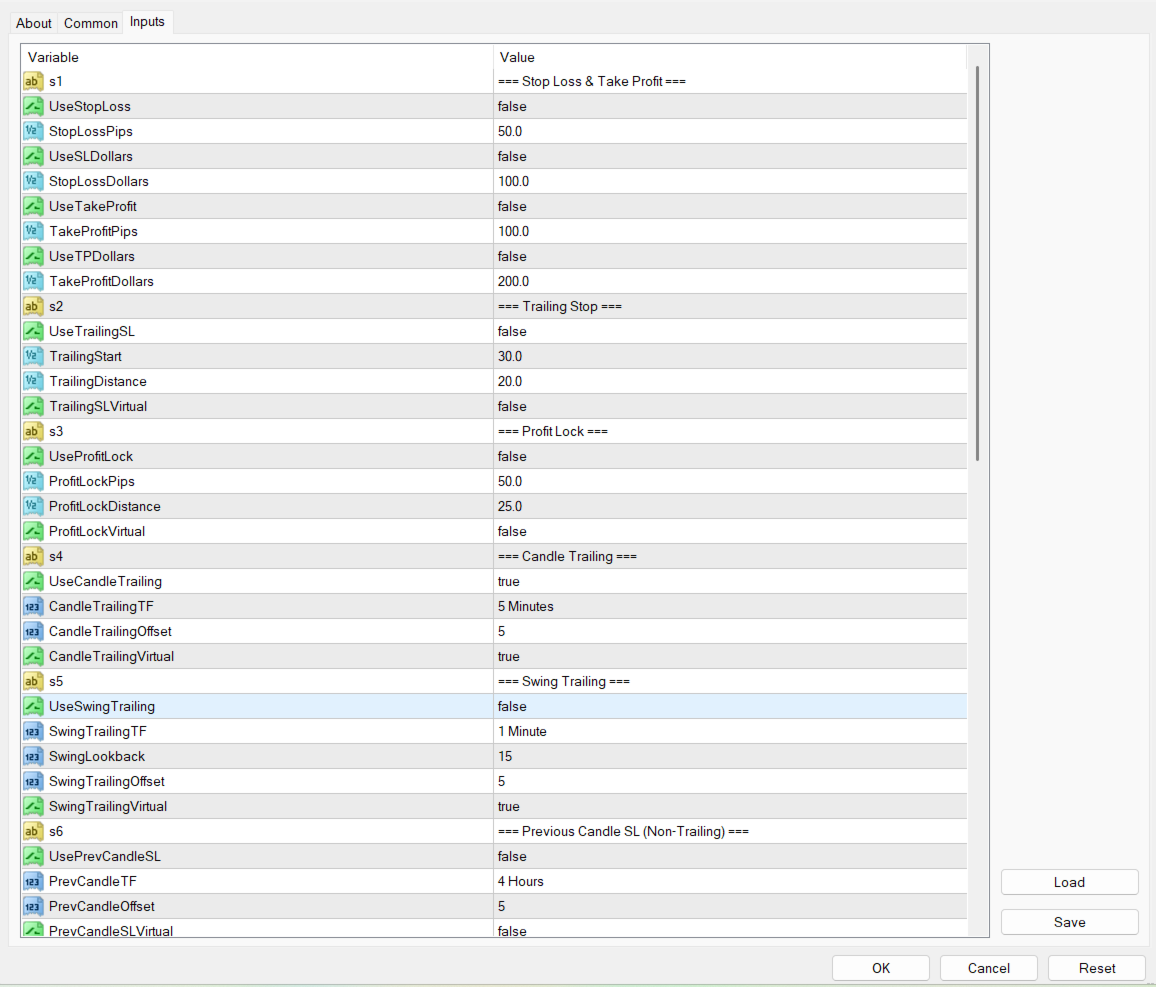
  • Trailing Stop Loss - With start trigger and following distance
  • Profit Lock - Locks in profit or breakeven at specified level
  • Candle Trailing - Constantly moves stoploss to previous candle high for sell and previous candle low for buy
  • Swing Trailing - Constantly moves stoploss to recent swing high for sell and recent swing low for buy
  • Previous Candle SL - non-trailing, set once on previous candle high for sell or previous candle low for buy
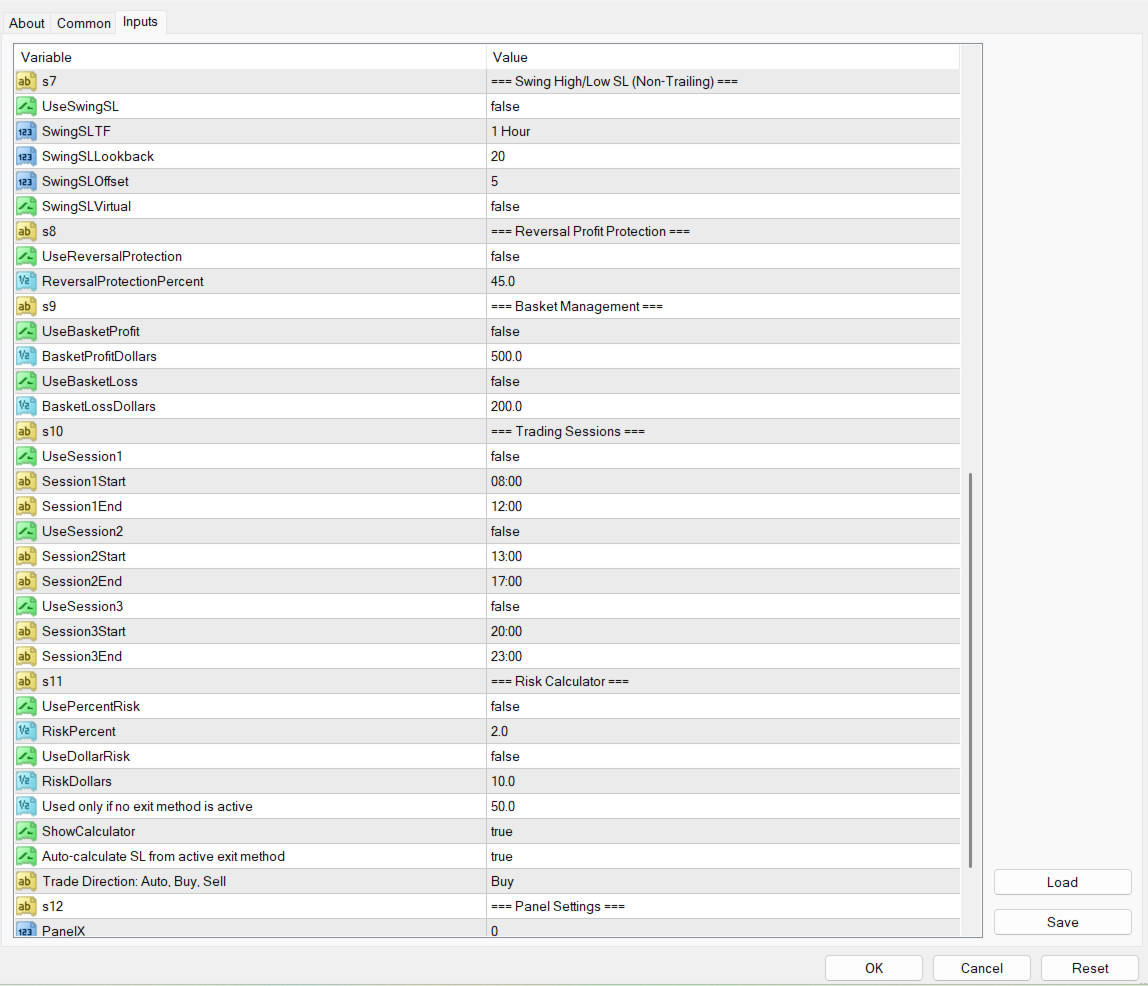
  • Swing High/Low SL - non-trailing, set once on recent swing high for sell or recent swing low for buy

      3. Stop Loss & Take Profit:

  • Traditional pip-based SL/TP
  • Dollar-based SL/TP (risk/profit in monetary value)

  1. Virtual Stop Loss:

  • Hide your stops from brokers while maintaining protection
  • All trailing methods can be set as virtual to hide from broker
  • Visual lines on chart show virtual SL levels
  • EA monitors price and closes trade when virtual level is hit

  1. Smart Risk Calculator: 

·       Calculates lot size based on dollar or percentage risk as per stop loss placement 

  1. Reversal Profit Protection:

  • Protects against giving back too much profit.
  • Closes trades when a certain percentage “%” of profit is lost during pullbacks/retracement or reversal

  1. Basket Management:

  • Manage total portfolio profit/loss targets
  • Looks for all active trades on the different instruments and collectively close, if set amount is reached in dollars.
  • Option to close on loss total or profit total
  • Works even for a single trade

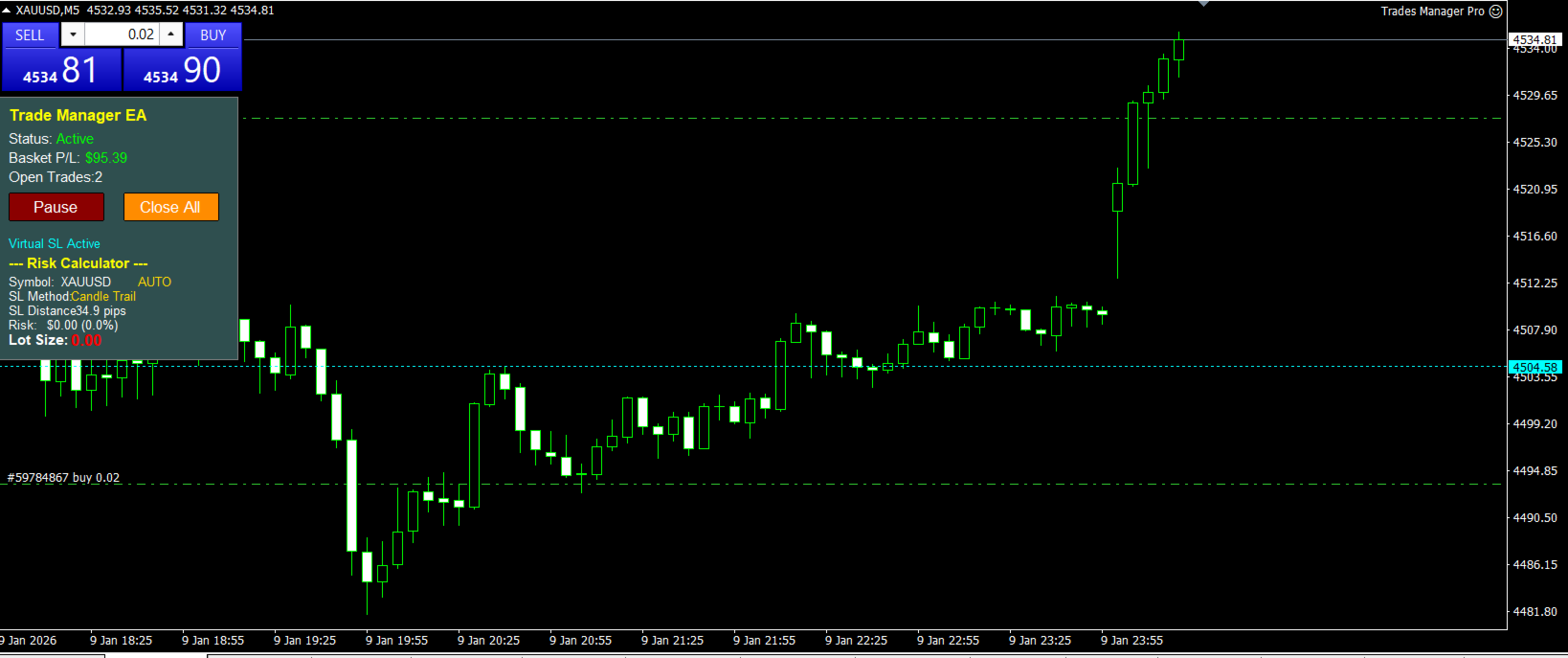
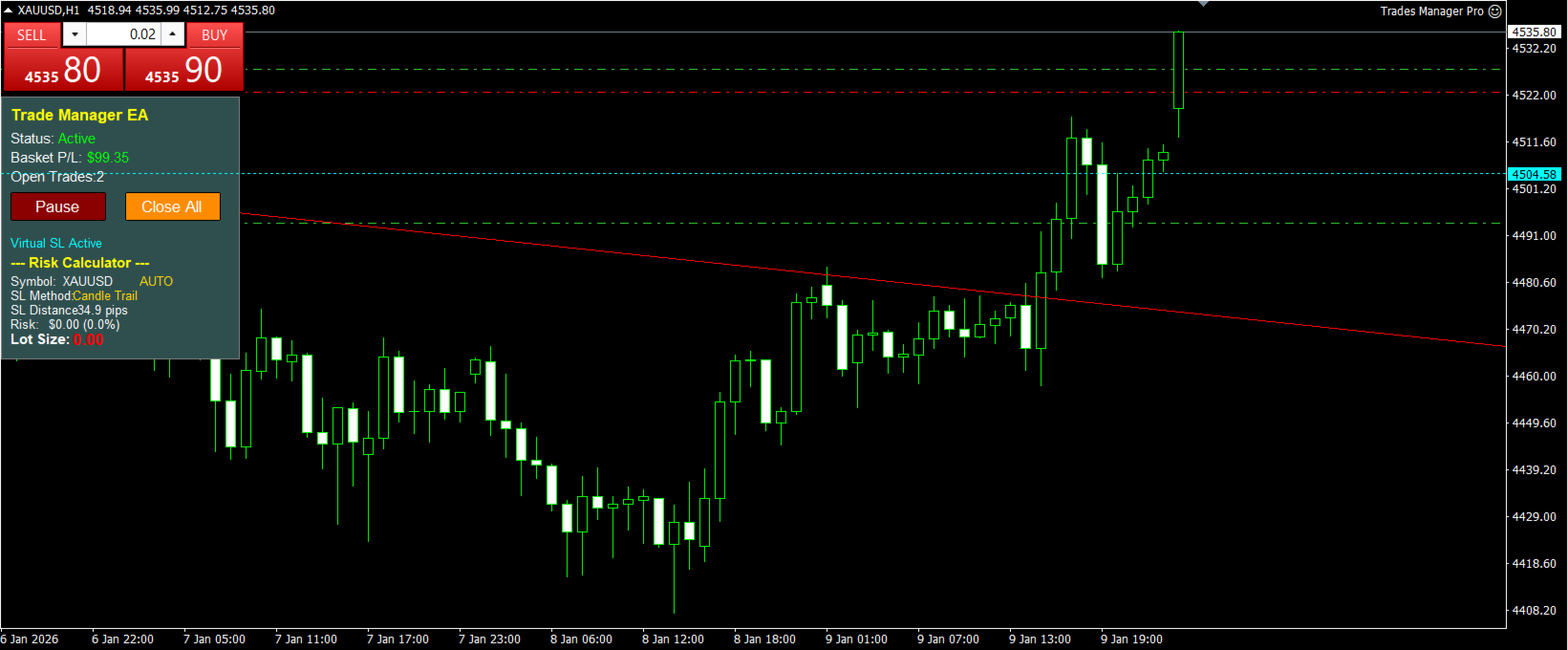
  1. Interactive Control Panel 

  • Pause/Resume button to stop management temporarily
  • One Touch Close All button to exit all positions
  • Real-time display of basket P/L
  • Shows number of open trades
  • Visual indicator when virtual SLs are active

Broker Type Recognition – automatic detection if broker is ECN or MM and information including leverage, account currency, etc…

How to Use:

  • Attach the EA to your chart
  • Configure the various stop loss methods via input parameters
  • The EA will automatically manage any active trades on the chart symbol
  • All levels will be displayed visually on the chart
Contact me for a User Manual once you have purchased.
    推荐产品
    Exp Swing
    Vladislav Andruschenko
    4.44 (64)
    它使用称为 Swinger (Pendulum, Cheburashka) 的著名策略模型 - 交替放置增加手数的挂单。 策略在于放置两个相反的挂单。当价格向某个方向移动时,触发一个挂单,同时增加另一个订单的手数。 EA 提供三种类型的挂单(TypeofTrade) 放置后自动开仓(即时开仓AutoTrade) 手动开仓后的开仓管理(Manual opening ManualTrade) 按高/低水平开盘(过去的 TFTrade 柱线的高低) OCO(一个取消另一个)订单是一种由两个订单组成的条件订单。如果第二个订单被执行,第一个订单就会自动取消。 Swing - 完整说明 MT5 version 如何购买 如何安装     如何获取日志文件     如何测试和优化     Expforex 的所有产品 这个怎么运作? 开始时,EA 发出两个订单 - 买入止损 和 卖出止损 ,距离当前价格的距离为 StopOrderDeltaifUSE。 如果 Buy Stop 触发,则 Sell Stop 将被删除,并且将放置一个交易量为 BuyStop   *   Martin 的 Sel
    FREE
    Harvest GOLD
    Sayan Vandenhout
    Harvest GOLD USES THE TREND WAVE INDICATOR AND IT CAN IDENTIFY THE BEGINNING AND THE END OF A NEW WAVE TREND MOVEMENT. AS AN OSCILLATOR, THE INDICATOR IDENTIFIES THE OVERBOUGHT AND OVERSOLD ZONES. IT WORKS GREAT TO CATCH THE SHORT TERM PRICE REVERSALS AND USES A MARTINGALE STRATEGY TO CLOSE ALL TRADES IN PROFIT. USE DEFAULT SETTINGS ON H1 OR HIGHER TIME FRAME ON ANY PAIR FOR MORE ACCURATE TRADES WHY THIS EA : Smart entries calculated by 3 great strategies The EA can be run on even a $30000
    H4 GBPUSD Trend Scalper is a trend signal scalper The EA trades according to the trend strategy using original built-in indicator for opening and closing orders. The external inputs for limiting trading on Fridays and Mondays are available. The purpose of the strategy is to use the current trend with the most benefit. According to the results of testing and working on demo and real accounts, the best results achieved by using the Н4 timeframe on the GBP/USD pair Works on MetaTrader 4 Build 971+
    这是一个常规面板,放置买卖订单网络。 这个专家顾问关闭设置中定义的利润订单。 然后,有一个名为Ladder的参数,其中包括订单之间的距离开始增加由梯形参数指示的点(这里,在主要设置中,它是10点),这意味着二阶是10点,三阶是20点,四阶 然后,你需要知道这个顾问是什么,因为这不是在设置中,但它会影响这个顾问提出的策略的逻辑。. 假设在这里的设置中,顾问将打开五个订单。.. 或购买。.. 或出售。.. 好。.. 但是,当打开订单时,它会将下一个打开订单的手数增加先前打开订单的一半。 也就是说,如果您在设置中设置了0.1手,那么根据方案将打开五个订单,第一个更接近当前价格的订单将以0.1手的价格打开。 第二,对于给定的步骤,这里50点的步骤将以0.15手的价格打开。 第三个,在另一个50点之后,将以大约0.22手的价格开盘。 第四个,以0.33手的价格通过50点的设定步骤。 第五个,以0.49手的价格设定50点。 也就是说,通过打开订单,这个顾问将增加每个后续订单的一半数量的前一个订单每次。 这种交易的逻辑是什么? (我通常使用日间交易和未平仓头寸,在上午10:00之前的某个时间。.
    Details of each condition Type 1. Set no use Hedging Martingale, to open the order by yourself only through the push button. TP and SL follow setting. Set Setting_Hedging =false;     Use_Signal =false;  Type 2. Semi Auto Recovery Zone You have to open the order by yourself only through the push button. If in the wrong direction and Set true on Hedging Martingale, EA will fix the order with the zone system by use Hedging Martingale Set Setting_Hedging =true;     Use_Signal =false;  Type 3. Use
    Angry bull Option Binary
    Fabio Oliveira Magalhaes
    1 (1)
    Angry Bull Option Binary   This is a Binary Options robot, which contains 7 strategies, you can backtest it to check what the best strategies are Settings Initial Batch Value Dynamic Investment = If activated it will use an automatic lot according to its capital Balance ($) w/ backtest = Starting balance to backtest PorcRiscoInvestment = It will be the value of % for the automatic lot if it is activated Expiration (in minutes) = It will be the expiration time of orders in Binary Options Magic
    Auto Close Manager EA – Equity & Account Protection Utility Overview Auto Close Manager EA is a risk management utility for MetaTrader 4 designed to automatically close all open positions when a predefined floating profit or floating loss level is reached. This Expert Advisor does NOT open trades. It only monitors account equity and manages existing positions. The EA works with manual trades and can optionally include trades opened by other Expert Advisors. How It Works The EA continuously moni

    | Fully-automated Smart Money Concept (ICT) inspired trading solution with multi-strategy capabilities | Built by a grid trader >> for grid traders.  This is MT4 version, click  here  for  Blue CARA MT5  (settings and logics are same in both versions)     Real monitoring signal  -->  Cara Gold Intro Blue CARA EA   ('CARA') - short for  C omprehensive  A lgorithmic R esponsive A dvisor is a next-gen  multi-currency    multi-timeframe  EA base on the widely known (and perhapse most popular) Inn
    Recovery Manager Pro MT4
    Ianina Nadirova
    5 (1)
    Recovery Manager Pro 是一个用于从其他顾问或手动开立订单中恢复回撤的系统。 RM Pro具有自动动态调整的能力。交易者需要选择风险级别,顾问将以全自动模式工作。 可以在回撤恢复模式和待机模式下工作!如果另一位顾问产生回撤,RM Pro 将禁用它,锁定头寸并开始使用部分平仓恢复存款的过程。在交易中,顾问使用智能平均、锁定和部分平仓。该顾问致力于定制趋势指标,该顾问的所有买家都将收到该指标作为礼物。 Advisor 的主要特点是能够在待机模式下工作。一旦另一位顾问产生回撤,RM Pro 将接管订单管理并打开平均订单,然后部分关闭。 设置说明:           关联 MT5版本:           关联 顾问特点: 恢复无利可图头寸的回撤 当达到指定的回撤时可以操作 使用部分闭包 开立平均订单以恢复无利可图的头寸 处理其他顾问或手动下订单的损失 根据趋势进行工作。定制移动平均线指标作为送给每位买家的礼物! 既可以处理一个订单,也可以处理一系列无利可图的订单! 适用于当前符号 根据给定的风险程度自动调整 重要的! 在启动顾问之前,我们建议在策略测试器或模拟账户中
    Spd EA
    David Binka Kumatse
    THE PRODUCT This Spd Expert is an EA to be used on multiple chosen pairs simultaneously. Every order has a TP and an SL, so there is nothing to fear. You just have to be patient as EA trades to grow your account. After purchasing the EA, you can also message me for my optimized settings.    Recommended TimeFrame is 1H TRADE PLAN Consider a recommended minimum starting capital of $100 and an initial lotsize of 0.01 yielding a minimum profit of $20 over 12 months of trading on a single pair. Then
    Exotic Adv
    Ivan Simonika
    Exotic Bot   is a multi -cream multifunctional adviser working on any time frame and in any market conditions. The robot’s work is taken as a system of averaging with the non -geometric progression of the construction of a trading grid. Built -in protection systems: special filters, spreading, internal restriction of trading time. Building a trading grid, taking into account important internal levels. The ability to configure trading aggressiveness. Work postponed orders with trailing orders. T


    По факту вы выставляете виртуальные Buy Stop и Sell Stop которые срабатывают после закрытия свечи. Данный помощник позволяет заранее выставить уровень Stop Loss и Take Profit. Так-же имеется демо режим для предварительного расчёта параметра риск/прибыль. Помощник имеет следующие настройки "Лот" по умолчанию "0.01" "Проскальзывание" по умолчанию "60"        (Значение в пунктах) "Номер Ордера" по умолчанию "0"               (Магический номер ордера) "Цвет Комментариев" по умолчанию "Black"  "Шрифт
    How the EA works (simple explanation) Trades on   M5   timeframe Uses   H1 timeframe   to analyze global market context Analyzes   2 or 3 timeframes simultaneously On each timeframe: Checks price position relative to one or two Moving Averages Evaluates MA angle and distance between price and MA Entry logic is based on   trend + volatility conditions , not on random signals The full algorithm is illustrated in the screenshots. Recommended usage Symbol:   EURUSD Timeframe:   M5 Trading
    Expert Advisor for MT4 Useful utility MUST have for all traders.  With 1 click button, you're able to close all your open positions. Its come with a warning pop up notification when you click to close all your trades, to avoid an accident press the button. Just press 'Yes' to confirm or 'No' to cancel it. The expert will close all your open positions no matter what pairs you currently open or directions. Just attach the expert on 1 of your chart, and you're good to go.
    JumpLump
    Olga Zhdanova
    對您利潤豐厚的專家顧問組合來說是一個很好的補充。該策略基於在特定時間段內突破已構建水平的算法。 EA 有一個固定的止損,允許您保持最小的回撤。 使用報價數據套件對所有報價進行測試,並使用最接近的真實交易條件,觀看視頻。 前 10 位買家的價格為 75 美元(請在評論中發布您的報告) 推薦:低點差的優秀 ECN 經紀商。 推薦貨幣對 EURUSD。可以使用其他貨幣對,例如 GBPUSD 和 USDJPY。 評論中的設置文件。 如有任何問題,請聯繫您的私信! 我很樂意為您提供幫助! 在 M1 上為上面列出的貨幣對安裝“EA 交易”,加載設置文件。 請務必通知我交易結果! 在交易中不使用危險(有毒)的交易方式導致整個存款(鞅,網格,套利等)的急劇損失; 每筆交易都有止損和止盈以保護您的存款;
    The “ SG Opposit Grid ” EA works with Virtual TakeProfit(or real) - at the trader's choice. The EA looks for signals to enter the market along the trend on D1 and H1 . If the signals coincide, the EA on the working period ( М1 - М30 depends on the trader's choice) looks for a confirming pattern and opens a position in the direction of the trend. If, after opening a position, the price moves in a profitable direction, the position is closed upon reaching the virtual TProfit with a profit. If the
    Trading panel for manual trading. Has a fairly wide functionality. Allows you to automatically calculate the order size, open both market and pending orders. It has a wide range of options for closing orders, it is possible to partially close orders, close orders after reaching a certain profit or loss, separately close profitable and unprofitable, buy and sell, as well as pending orders. The panel also contains a simple implementation of a grid of pending orders, reverse and lock functions, tr
    Close_All_Trades_with_TP_SL is a reliable and efficient MQL4 Expert Advisor designed to simplify and automate trade management for all open positions on your MT4 account. This EA is especially useful for traders who open multiple trades quickly or use high-frequency strategies where manual TP/SL placement becomes difficult and time-consuming. The primary purpose of the EA is to ensure that every open trade—whether Buy or Sell—always has a predefined Take Profit (TP) and Stop Loss (SL) applied. M
    FREE
    Set TP & SL by Price – Auto Order Modifier for MT4 自动为任意订单设置精确的止盈止损价格 ️ 兼容所有交易对和EA,可按品种或魔术编号筛选 此EA允许你使用确切价格值(例如 EURUSD 的 1.12345 )来定义并设置止盈 (TP) 和止损 (SL)。不使用点数或点差,直接精确控制所有订单的出场位置,可按图表或魔术编号过滤。 主要功能: 按精确价格即时修改TP和SL 适用于所有订单、当前品种或特定魔术编号 ️ 使用0移除TP或SL 一旦附加图表即可自动运行 兼容所有交易品种 适用于: 需要快速管理TP/SL的手动交易者 需要自定义退出逻辑的EA用户 管理多订单的交易者 有问题或建议? 欢迎留言反馈。 你的建议会推动插件的持续改进! Keywords: 精确设置止盈止损, MT4止盈止损管理, 自动设置TP SL, 修改订单MT4, EA管理工具, 设置TP SL价格, MT4订单管理EA, 智能交易管理器
    QuickBar Pro MT4
    Sergio Marquez Uroz
    单行交易工具栏:按风险计算手数、可拖动的 SL/TP 线和一键下单 — 不遮挡您的图表。 QuickBar Pro 是一款风险管理与订单执行面板,专为需要速度、精确和干净图表的交易者而设计。与占满屏幕的传统面板不同,它以紧凑的单行工具栏形式集成在图表顶部,让完整图表始终可见。没有浮动窗口。没有侵占空间的面板。只有一条简洁的工具栏,包含自信交易所需的一切 — 专为快速决策、不容分心的剥头皮和日内交易者打造。 风险管理 QuickBar Pro 根据您选择的风险百分比或固定金额自动计算手数。止损线和止盈线可直接在图表上拖动,并实时更新显示点数、金额、账户百分比和风险回报比。您的风险设置在会话之间保存,每次打开终端时,工具都会记住您的偏好。 订单执行 BUY 和 SELL 按钮始终显示在工具栏上,无需打开任何额外窗口即可一键下单 — 非常适合分秒必争的快速入场。 安全设计 发送订单前,面板会验证 SL 和 TP 是否位于价格的正确一侧。 如果订单被经纪商拒绝,您的 SL/TP 线会保留在图表上,方便您调整后重试 — 不会丢失任何设置。 清晰的屏幕提醒,而非无声失败。 可配置的最大滑点(以点
    Grid Synergy
    Mazhar Ul Hassan Noorul Hassan Noor Ul Hassan
    Overview Grid Synergy is an automated trading bot designed to implement a structured grid trading strategy while adapting to market conditions. It provides traders with a systematic approach to managing trades, focusing on strategic entries and controlled risk management. The EA is optimized for various currency pairs and gold, offering customizable settings to align with different trading styles. Key Features Multi-Currency Compatibility – Works with forex pairs such as EUR/USD, GBP/USD, USD/J
    Prof2
    Pavel Luzin
    Торговый робот PROF 2 не торгует по тренду. Всем известно, что 80% времени рынок находится в боковом движении и лишь 20% это направленные движения. Поэтому данный робот пытается поймать коррекции после сильных движений. В данной версии не используется STOPLOSS , вместо этого типа ордера стоит другая защита от потерь. Если, по мнению робота коррекции все- таки не случится, то позиции закрываются. Параметр Stop   отвечает за контроль над рисками и закрывает все сделки, в том случае если плавающий
    The Arrow Scalper
    Fawwaz Abdulmantaser Salim Albaker
    1 (2)
    Dear Friend..  I share with you this simple Expert Adviser .. it is full automatic  this Expert Adviser following the trend of the pair you install on or any stocks or indices , it is works like that: - when the trend on H4 chart show a start of up trend the expert will wait till the 15M & 1H charts show an up trend the EA will open a buy order directly , and do the same for down trend and open a sell order the buy or sell  order lot size and take profit and stop loss will measured manually  by
    FREE
    Magic EA MT4
    Kyra Nickaline Watson-gordon
    3 (1)
    Magic EA is an Expert Advisor based on Scalping, Elliot Waves and with filters such as RSI, Stochastic and 3 other strategies managed and decided with the robot smartly. Large number of inputs and settings are tested and optimized and embedded in the program thus inputs are limited and very simple. Using EA doesn't need any professional information or Forex Trading Knowledge. EA can trade on all symbols and all time frames, using special and unique strategies developed by the author. The EA wo
    Auto BE break even EA
    Calvin Andile Mahlangu
    5 (2)
    AUTO BE Utility – Breakeven Manager for MetaTrader 4 The AUTO BE Utility by KALIFX is a compact and efficient trade-management tool for MetaTrader 4. It automatically adjusts the stop-loss level to the breakeven point once the market price reaches a defined profit distance. This ensures that active trades are protected from reversals once they move into profit, without requiring manual intervention. Main Features Automatic Breakeven Control – Moves the stop-loss to breakeven when the price reac
    FREE
    Risk Commander
    Adisorn Soodkanueng
    Product Name: Risk Commander: Trade Assistant & Strategy Simulator Risk Commander is more than just a trade panel—it is a complete Manual Trading Ecosystem . It serves two powerful purposes: Live Assistant: Helps you execute trades with speed, precision, and perfect risk management in real-time markets. Training Simulator: Fully compatible with the Strategy Tester (Visual Mode) , allowing you to practice manual trading on historical data without risking a cent. NEW! Built-in Simulator Mode Stop
    Expert Grid rsi Pro
    Mykhailo Zakervashevych
    General Description Grid RSI Pro v3.1 is an advanced trading Expert Advisor for MetaTrader 4 that uses a grid strategy with RSI indicator filtering. The EA automatically opens orders at specified levels, creating a grid of orders to capture market fluctuations. Version 3.1 includes enhanced risk management features and improved signal filtering systems. Key Features 1. Trading Strategies RSI Strategy : Position opening when RSI reaches overbought (80) or oversold (20) levels Fixed Points : Posit
    Robot Dream
    Serhii Bernatskyi
    Multicurrency Expert Advisor with 100% adaptation for any currency pair and timeframe. Based on the Smart Gread indicator. Very flexible setup allows you to get maximum profit. Profit from transactions is set manually in TakeProfit (standart 200 ). Lot size is set manually by Lot (standart = 1 lot). Each subsequent lot is increased by Kolen (standart 2 ). Maximum lot size MaxLot (standart 10 ). To disable the adviser, there are special functions: StopRightNow - all orders will close rig
    EAs Holder
    Dimitri Nepomniachtchi
    EA's HOLDER - Manage multiple trading robots under full control EA's HOLDER is an advanced system for traders that helps to effectively manage multiple trading robots (EA). With the program, you can distribute your robots across separate virtual accounts and customize each one with individual risks and trading parameters. The price is temporarily reduced. This is an expensive technical assistant that has gone through many versions, ideas, time and money. In my personal use as a moderator of lim
    EasyTradePad
    Sergey Batudayev
    5 (5)
    EasyTradePad – MetaTrader 4 交易面板 EasyTradePad 是一款用于手动和半自动交易的工具。该面板可帮助您快速管理订单和持仓,并可一键计算风险管理参数。 面板功能: 按预设的风险比例(% 或账户货币)开仓和平仓 设置止损(SL)和止盈(TP):以点数、百分比或金额表示 自动计算风险回报比(Risk-to-Reward Ratio) 将止损移动至无损位置(保本) 部分平仓 移动止损(Trailing Stop):按点数或K线影线 加仓与均价操作 修改已开仓订单的参数 额外功能: 金字塔加仓 随着价格朝向预设止盈方向运行,分批加仓。每次新加仓可设置减少风险。加仓次数可灵活设置。 均价操作 在图表上手动选择加仓位置,最终按平均价格平仓。 无损转移 当价格达到设定的利润距离后,止损自动移动到开仓价。考虑点差和掉期。 移动止损 支持两种模式: 按点数(可设置启动点数、距离和步长) 按K线影线(可选时间周期) 核心设计理念: 简单易懂的下单方式 高效直观的操作界面 实盘交易中的稳定性与可靠性 您可通过产品页面提供的 演示版本 体验全部功能。 更多信息和支持
    该产品的买家也购买
    Unlimited Trade Copier Pro is a tool to copy trade remotely to multiple MT4, MT5 and cTrader accounts at different computers/locations over internet. This is an ideal solution for you if you are a signal provider and want to copy your trades to other receivers globally on your own rules. One provider can copy trades to multiple receivers and one receiver can get trade from multiple providers as well. The provider can even set the subscription expiry for each receiver, so that receiver will not b
    面板 FFx 隐藏管理 轻松帮助您在图表上直接管理您的订单。下面描述所有特征: 止盈, 止损和尾随停止均隐藏 每笔交易在图表上都有自己的指示线 可按您的需要拖拽任何线来改变止盈/止损 当止盈 #1 到达,自动将止损位移到盈亏平衡位置的选项 选择止盈/止损类型的选项 (通过点数或价格) 选择尾随停止类型的选项 (通过点数, MA, 分形, PSAR 或 ATR) 定义哪些订单您希望在当前图表上进行管理 (所有订单或特定单号) 最大化 / 最小化面板按钮 在图表上将面板拖拽到任意位置 显示交易信息的选项 如何使用它? (参看以下截图) 选择您希望管理的订单 (所有或特定的) 设置您的目标, 止损和尾随停止 … 之后点击 “放置”。它们都独立工作,这样您就只需设置一次。 如果您希望删除一个止盈, 止损或尾随停止, 选择正确的订单 … 然后点击 “删除” 当您选择设置 “所有当前符号”, 则 “当前设置”显示在面板里。这些设置将自动用于所有新开订单。若要重置/删除这些设置, 点击 “重置所有”。 如果 “显示交易信息”被选中, 一个新的小表格显示在面板之下, 包括每笔订单及其当前的目标和尾随停
    FFx Risk Calculator panel will help you to calculate very easily your trades size, SL or the risk directly on the chart. All features are described below: Option to select which parameter to calculate: Risk, Stop Loss or Lot Size The panel will show if the lot size is allowed according to the current account free margin Button to maximize/minimize the panel Drag and Drop the panel anywhere on the chart How to use it? Select the parameter you want to be calculated. It will be based on the 2 other
    News Trader Pro
    Vu Trung Kien
    4.38 (16)
    新闻操盘手专业版 是一个独特的机器人,让您使用您预先定义的策略进行消息交易。它从几个流行的外汇网站加载的每条消息的片断。您可以选择任何消息和预设的策略进行交易,之后新闻操盘手专业版根据选定的策略,在新闻来临时自动进行交易。 新闻发布给出了赚点数的机会,因为在那个时刻,价格通常有大动作。现在,利用这款工具,新闻交易变得比以往任何时候更容易,更灵活,更令人兴奋。不要等待,不要错失,不要再迷惑了。每周只需针对重要新闻设置一次,这个工具将完全按照您的计划进行精准交易。 演示版: 由于这不是一个自动交易机器人 (它是半自动), 您需要下载单独的演示版本: https://www.mql5.com/zh/market/product/5931 参考: 如果您只需要加载新闻 (无需交易), 您可以购买新闻加载机专业版: https://www.mql5.com/zh/market/product/5463 功能 包括所有 新闻加载机专业版 的功能 (查看详情)。 针对每条新闻构建您自己的策略,具有非常灵活的参数。 支持五种高级策略,带有大量控制参数 (止损, 止盈, 尾随, 网格间隔, 手数缩放,
    FFx Watcher PRO
    Eric Venturi-Bloxs
    The FFx Watcher PRO is a dashboard displaying on a single chart the current direction of up to 15 standard indicators and up to 9 timeframes. It has 2 different modes: 1. Watcher mode: Multi Indicators User is able to select up to 15 indicators to be displayed User is able to select up to 9 timeframes to be displayed 2. Watcher mode: Multi Pairs User is able to select any number of pairs/symbols User is able to select up to 9 timeframes to be displayed This mode uses one of the standard indicat
    If you wish to draw Support and Resistance lines, view: daily market opening, classical pivot levels, Fibonacci pivot levels, trend lines, Fibonacci levels, the remaining time to candle closing, and current spread. If you seek to place your orders with the exact lot that meets your desired stop loss risk. If you wish to do all this and more with just one click, then this is the perfect tool to use. This tool will allow you to feel more relaxed when deciding to open orders, as well as predicting
    Unlimited Binary Options Copier Remote is a powerful tool to copy binary options trades remotely between multiple accounts at different locations over internet. This is an ideal solution for signal provider, who want to share his binary options trades with the others globally on his own rules. One provider can copy trades to unlimited receivers and one receiver can get trade from unlimited providers as well. The provider can set the subscription expiry for each receiver, so that receiver will no
    Pairs Trade
    Oleg Pechenezhskiy
    The Pairs Trade indicator is a utility for semi-automatic pair trading. It allows combining the charts of two arbitrary instruments, even if the schedules of their trading sessions are different. It displays a spread chart in the form of a histogram with an overlaying moving average. It calculates the swap that will be charged for the synthetic position (in the deposit currency). It is possible to set a level for automatic opening of a synthetic position on the spread chart (analogous to the 'se
    Corporate Report
    Pavel Verveyko
    5 (1)
    The script displays info about the share's corporate reports and dividends. The data is downloaded from   investing.com : Report date Profit per share (EPS) Revenue Market capitalization Amount of dividends Date of payment of dividends Dividend income The product cannot be tested in the tester (since it is not possible to receive data from the Internet). Before launching:  Add 2   URL   https://ru.investing.com/earnings-calendar/Service/getCalendarFilteredData  and   https://ru.investing.com/di
    This Stacker EA will: Automatically set Stop loss on a new order Automatically set Take profit on a new order Stack (or open up to 4 additional orders at the same time) when a new order is placed, the SL/TP can be preset individually for each order. Provides a transparent replacement for the standard 1-click trading buttons in MetaTrader 4 (1 click still works and SL/TP will automatically be set as well as Stacking). Automatically calculate lot order size according to preset risk management perc
    FXFledgling Exit Tool is a complete risk management tool that analyzes both the open trades and the direction of the pair of open trades. As long as the suggested entry and lotsizing management presented here is followed strictly, you will have a high chance (but no guarantee) of surviving the trade. What It Does It is used as an exit tool. It helps the trader to manage any manual trade that he transacted. It does the following: Trail Stop Dynamic Stop Loss - a calculated stop-loss that changes
    Crypto Market Pro
    Daniil Kurmyshev
    5 (1)
    New opportunities for analyzing cryptocurrency in the usual MetaTrader 4. For example : We select the symbol of the cryptocurrency and attach any indicators, Expert Advisors or scripts. Startup Mode View cryptocurrency; Data collection. Capabilities Work as with a standard currency chart; Automatic update of open charts; Selection of individual cryptocurrency for updating; Selection of individual timeframes for updating; Work on the desired timeframes; Open charts do not affect the work of Cry
    The  Easy Strategy Builder (ESB)  is a " Do It Yourself " solution that allows you to create a wide range of the automated trading strategies without any line of codes. This is the world’s easiest method to automate your strategies that can be used in STP, ECN and FIFO brokers. No drag and drop is needed. Just by set conditions of your trading strategy and change settings on desired values and let it work in your account. ESB has hundreds of modules to define unlimited possibilities of strategi
    斐波那契折返和扩展画线工具 适用于MT4平台的斐波那契折返和扩展画线工具,非常适合于利用帝纳波利点位交易法和黄金分割交易的交易者 主要功能: 1.可以直接画线多组斐波那契折返,重要折返点之间的关系一目了然 2.可以画出斐波那契扩展 3.画线的斐波那契折返和扩展均可左右移动方便观察,有数值显示 4.图表显示非常清爽 5.可通过数字键切换周期 功能键: 1.按 [ 画折返,按需画折返,最多可画8组 2.按 ] 画扩展 3.按 \ 删除当前周期下的所有扩展和折返 4.移动、删除折返和扩展 (1)点击第一组折返的F5线条, 点击1次(变成黄色),按键盘上的Delete可删除该焦点的折返。 点击2次(恢复颜色),可以移动折返到合适的位置 (2)点击COP的线条 点击1次(变成黄色),按键盘上的Delete可该组折返 点击2次(恢复颜色),可以移动扩展到合适的位置 5.修改折返和扩展: (1)选择焦点F或反弹点数字(F或反弹点字体变大,变成黄色),移动鼠标。 (2)选择ABC三点中的某一个(字体变大,变成黄色),移动鼠标。 如何使用可以看相关视频
    Советник риск-менеджер с огромным арсеналом возможностей защиты вашего депозита. Для инвесторов, которые решили передать капитал в доверительное управление. Когда у трейдера нет доступа к настройкам - нивелирует торговые риски. А также для трейдеров, которые осознали необходимость стороннего контроля за их торговлей для улучшения торговых результатов.  Для максимальных результатов - должен стоять на отдельном VPS сервере и у трейдера не должно быть возможности менять настройки в торговый период.
    Grid Hero War Pad
    Chock Hwee Ng
    3.4 (5)
    Grid Hero War Pad is a  GRAPHICAL MANUAL TRADER version of the original Grid Hero EA, designed and created for ADVANCED TRADERS who are experienced in plotting their own market entries. It is coded using ADVANCED GRAPHICAL INTERFACE programming, that combines the power of discretionary trading with Grid Hero algorithm in the form of a graphical console with button-click easy execution. It allows you to execute trades manually using Market Orders and Pending Orders, and then automatically uses th
    The advantage of using this EA This EA directly updates takeprofit and stop losses that are still empty in a manual order Parameters Multiplier: Multiplier value of the previous transaction Distance: Distance hedging from the previous order Takeprofit: take profit taken from the last price + the value of this column We recommend that you do not add more than one manual transaction in the same pair martingale hedging | manual hedging | hedging manual | hedging lot | best robot | best ea
    MirrorEA
    Eugenio Bravetti
    The new version of  MirrorSoftware 2021  has been completely rewriten and optimized.  This version requires to be loaded only on a single chart because  it can detect all actions on every symbol and not only the actions of symbol where it is loaded. Even the  graphics and the configuration mode  have been completely redesigned. The MirrorSoftware is composed of two components (all components are required to work):  MirrorController  (free indicator): This component must be loaded into the MASTER
    Open charts
    Maksim Slovakov
    Скрипт открывает графики по всем инструментам находящимся в окне "Обзор рынка" и по желанию может задать для всех графиков один шаблон. Так-же можно удалить все графике открытые в терминале Мт4. В скрипте имеются следующие настройки: "Таймфрейм" по умолчанию M30;             (Можно поставить свой: M1, M5, M15, M30, H1, H4, D1, W1, MN.) "Задержка" по умолчанию "0";                  (Задержка перед открытием следующего графика в миллисекундах.) "Шаблон" по умолчанию "True";                (True=пр
    Quantized Trend
    Oleg Pechenezhskiy
    This utility automatically draws the trend channel on the price chart. For the time interval from the specified date to the current bar, the drawn channel is almost optimal. Placing the beginning of the channel at a more distant historical price extremum, you get a visualization of a longer-term trend. Channel slope is not a continuous value, but takes one of discrete values (in AxB format, where A is the number of price points (points), and B is the number of timeframes). This program works ONL
    欢迎使用 信号分析大师  使用教程视频 功能介绍:  本工具可以将MT4信号或者MT5信号的交易记录复盘到MT4图表上,方便直接观察信号的交易状况,从而了解信号的策略,比如可以比较容易看出是马丁策略,还是网格策略,还是早盘头皮策略,是否一次一单,或者带加仓等。 从而更好分析账号的安全性,稳定性等。 使用方法: 1.下载工具后,将它拖入MT4图表中(当成专家来使用,也就是方Experts目录里)。 2.到MQL5信号里面去下载信号 历史记录。 3.将下载好的历史记录文件粘贴到 MT4 文件->打开数据文件夹->MQL4->Files文件夹里面,并复制下文件的名字。 4.点击MT4上工具的笑脸图标,将复制文件名复制到  FIleName那一栏。 5.选择SignalType,默认MT4 信号复盘,如果是MT5信号复盘,请选择MT5_Signal. 6.点击确定,即可看到相应品种的交易记录状况。 7.如果需要切换查看品种的交易记录,可以直接将新的品种拖入已经加载了工具的图表上。
    Forex copier
    Alexandr Bryzgalov
    4.5 (2)
    We offer simple and reliable software that can  copy trades  between any MT4 accounts. Easy to use MetaTrader copier which saves valuable time Reliable, so you are protected from technical issues Powerful, with a lot of features available Who can use this MT4 copier? Forex Copier is a solution for individual traders or account managers who need to execute trade signals from external sources or who need to  manage several MetaTrader 4 accounts  at the same time. We do not offer you “yet another
    Forex Market View Dashboard and CSM
    Opengates Success International
    5 (1)
    FFXMV Dashboard + CSM is a custom indicator combined with Currency Strength Meter . It is created to give the Traders a full view of what is going on in the market. It uses a real time data to access the market and display every bit of information needed to make a successful trading. Before attaching this Indicator to your window chart, go to your MT4's Market Watch panel and HIDE all the Currency pairs you don't need or trade and leave the rest there. The reason is that FFMV Dashboard will DISP
    Trendline Scalper Robot
    Vijay Vikram Singh Kushwah
    Trading  Robot which automates your scalping and take your profitability  and forex trading experience to the next level ,Computer cannot analyse market as humans do, at same time we cannot compete with them in terms of speed of execution, hft  & emotionlessness  .  ​In this scalp-trading robot we have integrated human analysis with quick algorithmic execution  to enter and exit trades at fraction of seconds Get More details at :  https://www.noemotionfx.com/tl-scalper-ea To test , use it in dem
    NewsReady
    Joel Protusada
    NewsReady is a semi-automated Expert Advisor that uses a smart straddle methods It needs to be set in charts 2 to 10 minutes before Economic Data release with a red-flag impact on currencies related to the news. Then it run pending orders in specified number of minutes indicated in the time-period parameter. After the specified time, it will stop trading and will remove all pending orders. Important You can not backtest this tool because it is semi-automated and can only be set and run a few min
    Automatic enumeration of input parameters of the TrendImprovement Pro indicator to find the optimal combination. Description. A powerful tool for testing the input parameters for the TrendImprovement Pro indicator will allow you to quickly find the most profitable options for the input parameters. Settings DateOrBars – switch for using time or number of bars;  MaxBars - the maximum number of bars for calculation; StartHistory - indicator start time; BEGINNING - the initial historical data (In-S
    Advanced Smart Renko and Heiken Ashi Candle Trader is ONE STOP SOLUTION based semi/fully - automated multi-currency EA carefully engineered for traders to enter the trade based on their Analysis or in fully automated mode for scalping, trend trading, candle breakout trades and also automated news trading with inbuilt trade management solution.    Advantages    No grid / Martingale Works on Classic Renko, Renko Heiken Ashi charts and classic Heiken Ashi charts    Features Multi-Currency Ma
    Binary expert
    Dmitriy Konogorov
    Expert for a binary options on mt4, he have  two built-in a indicators and many different settings. The expert has one a level of martingale, but it is recommended to use it on  the instruments with a yield of 85 percent. it can be used simultaneously on a variety of currency instruments. All settings have already been made, but you can also configure them yourself . Currency for do trading is a Russian ruble. Good trading to everyone.
    This program is created by algorithm which economy based logic in the trading market. 1. The program able to work with all of currency and trading items  2. Take profit and loss are basically handled by EA program Recommendation: EUR_USD is the most preferred. Please use this program only for MT4. LOT should be managed depends on own deposit. Otherwise, high risk will be driven(e.g 0.1~0.2 lot is recommended when the deposit is 10,000 dollar)
    1.   记录每一个Tick交易的价格数据。     数据文件内容:“Tick时间”、“ASK价格”、“BID价格”、“SPREAD价差”、“Tick报价数量”。 2.   同时,生成一个1分钟周期的报价数据文件。     1min数据文件内容:“ASK时间”、“ ASK OPEN价格 ”、“ASK HIGH 价格”、“ASK LOW 价格”、“ASK CLOSE 价格”、 “ BID 时间”、“BID OPEN价格 ”、“ BID HIGH 价格”、“ BID LOW 价格”、“ BID CLOSE 价格”、 “Tick报价数量”。 3. 每天将所有报价数据保存在一个文件中,方便使用者进行数据分析和数据整理。 4.这个EA程序,任何时刻加载到MT4图标中,就可以直接开始价格数据的记录。确保记录下市场中出现的每一个报价。 5.文件存储位置:MQL4/Files/
    筛选:
    无评论
    回复评论