Not according to plan

The utility is useful for those who are looking for an opportunity not to be present in front of the monitor while a pending order is being processed and closed.

Using this utility, you can enter a pending order ticket, set a stop loss and calmly leave the terminal until its logical conclusion.

If an order is opened, it will have 2 paths to profit or loss, and if the order is not opened and the scenario does not go according to plan, then upon reaching the price level where the stop loss of the order that has not yet been opened is set, it will be deleted, about which you can be notified.
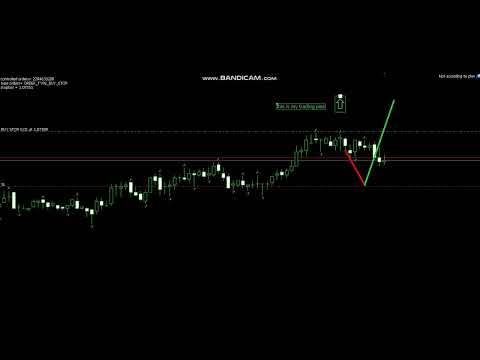




Video Not according to plan
推荐产品
Crash 5 EA
Wayne Ysel
Crash5 EA ,I s a automatic robot that has the level of professional decision when to take a trade without any emotion. The bot will help in your scalping decision making with its own TP (take profit) and SL (stop loss) with the trail stop when in profit. This is a trend based spike catching ,looking on whats happening in real time charts no repainting of any signals. The robot helps in making decisions on the candle stick pattern opened and closed lat price with the help of RSI ,MACD and the EMA
This is a standalone dashboard that let the user save their entry strategies for an unlimited number of currency pairs/indexes/commodities. Strategies remain saved after closing the meta trader or removing the EA. It saves your favourite assets to trade and places your trades in an instant.  You can save, your lot size, risk percentage, stop loss and take profit points and trailing stop points.   You can double-entry positions or reverse trades at the click of a button.  After the purchase, you
EA SB8 Panel Trade
Juan Manuel Bernal Martin
SB-8 – Manual Trading Panel with Fixed Risk & TradingView-Style Visualization for MT5 SB-8 is an advanced manual trading panel for MetaTrader 5 , designed to execute trades visually, quickly and without calculations . It is especially built for traders coming from TradingView , who often find MT5 confusing when it comes to risk management and trade visualization. With SB-8, you don’t calculate lot size, percentages or risk . You simply move the Stop Loss line , and the panel handles everything a
欢迎来到 Trade Manager EA——这是一个终极风险管理工具,旨在使交易变得更直观、精准和高效。它不仅仅是一个下单工具,而是一个用于无缝交易计划、仓位管理和风险控制的全面解决方案。不论您是新手交易员、资深交易员,还是需要快速执行的剥头皮交易员,Trade Manager EA 都可以满足您的需求,适用于外汇、指数、大宗商品、加密货币等各种市场。 借助 Trade Manager EA,复杂的计算已成过去。只需分析市场,在图表上用水平线标记入场、止损和止盈,设置您的风险水平,Trade Manager 就会立即计算出理想的头寸规模,并实时显示以点、账户货币计价的止损和止盈。每笔交易都得以轻松管理。 主要功能: 头寸规模计算器 :根据定义的风险瞬间确定交易规模。 简单的交易计划 :在图表上用可拖动的水平线直接计划交易,设置入场、止损和止盈。 实时显示 SL 和 TP :以账户货币、点或分显示止损和止盈,便于分析。 高级保护工具 盈亏平衡选项 : 基本盈亏平衡 :当您的交易达到设定水平时自动保护利润。 多级盈亏平衡 :设置多达 4 个级别以逐步保护利润。 尾随止损选项 : 基本尾随
Manually enter the price for Buy position or Sell position. This EA will automatically open 3 orders and also 3 Pending (In deposited position) = Total 6 orders per one click Please see Screenshot or Videos for more explanation. - Easy to manage your different order. - Fast in modification for SL and TP. - Can modified the SL and TP depends on individual techniques.
跟单->方便快捷的界面交互,用户上手即用       ->>>> 推荐在windows电脑,或者VPS Windows上使用 特色功能: 多样化个性跟单设置: 1.对不同的信号源可以设置不同的手数模式 2.不同的信号源分别设置正向反向跟单 3.信号分别设置注释 4.是否根据合约手数校准手数 多样化个性跟单设置2: 1.对不同的品种可以设置不同的手数模式 2.不同的品种分别设置正向反向跟单 3.信号分别设置注释 4.是否根据合约手数校准手数 注释过滤,MAGIC过滤,信号手数过滤,本地品种过滤 净持仓模式(该模式下手数计算仅支持倍率) 工作时间设置 反向同步接收端的平仓 订单绑定功能:任意订单可以绑定到设置信号源订单上( 双击表格更改) 账户风险控制 基本功能: 跟单正常交互速度0.5s以下 自动检测信号源,并显示信号源账号列表 自动匹配品种,不同平台常用交易品种(后缀不同等特殊情况)95%自动匹配,基本无需手动设置,品种映射表可随意双击更改对应品种.(映射表具有快速搜索品种功能) 4种手数计算模式(1.倍率 2.固定手数 3.自适应资金风险 4.源账户资金比例风险) 特殊手数模式:
One Click Trader  is a tool designed for MetaTrader 4 platform, which enables you to take your trading to the next level. It enables you to open, manage and close your trades in simple an efficient way by just one click of your mouse button. "-"   ,  "+"  change OCT window size  Up arrow minimizes the OCT panel Down arrow maximizes the OCT panel Right arrow displays the next panel with additional features Left arrow hides the panel with additional features Red  SELL  button enables you to open s
This   is   an   extended and modified    version   of   the   free   utility   Prop   Protector.   The   price   will   increase   as   more   users   join. Prop Protector   is a powerful trading assistant designed to solve the main problem traders face: maintaining discipline and managing risk. If you work with proprietary trading firms or simply want to adhere strictly to your trading plan, this tool will become your indispensable assistant. It takes care of routine calculations and monitor
Episode Health Monitor Episode Health Monitor is a trading utility for MetaTrader 5 designed to analyze the real-time condition of active trading positions directly on the chart. The tool evaluates the current “trading episode” - a group of open positions - and provides a structured view of risk, stability, and distance to potential failure. Instead of relying only on profit/loss or price movement, it helps identify whether the current position is stable, weakening, or approaching a critical st
Inverted_Chart_EA Utility Expert Advisor Inverted_Chart_EA creates and maintains a mirror-inverted chart of any symbol and timeframe. It automatically generates a custom instrument (e.g. US30_INV ) and keeps its price history updated in real time, with bars mirrored around a chosen pivot. This utility gives traders a new way to analyze the market from a different perspective by flipping the chart upside down. Why use an inverted chart? Highlight hidden patterns – price formations that look ordin
Smart trail sl Pro
Emerson Capiral Romero
Here is your fully updated, high-converting product description layout. It has been completely re-written to weave in all of your new pro-tier features—the on-chart control panel , the percentage-based partial take-profit matrix , the timeframe global persistence caching , and crystal-clear Buy/Sell multi-mode execution math . Short Description (Max 190 c Full Description Smart Trail SL Pro is the ultimate institutional-grade risk, capital preservation, and trade management utility engineered s
智慧遠端交易助理 MT5:基於 Telegram 的 MetaTrader 5 遠端交易面板 智慧遠端交易助理 MT5 是一款適用於 MetaTrader 5 的高級面板,專為需要透過 Telegram 快速、安全地遠端控制交易操作的交易者而設計。 取得 Windows Bridge 應用程式檔案和教學課程 Bridge 檔案用於將 Telegram 交易面板連接到 MT5 EA。相容於 Windows 10 和 Windows 11(64 位元)以及 2016 年及以後的 Windows Server 版本。目前仍處於測試階段,因此這是優惠價。每售出 10 台,價格將上漲。趕快購買吧! 與只能在交易終端內運行的傳統 MQL5 面板不同,這款助手可讓您透過手機上的交易助理介面點擊按鈕,或直接輸入命令(就像聊天一樣),即可下單、調整風險、配置入場參數、管理持倉、查看圖表快照以及控制關鍵交易功能。 (整合式文字辨識功能目前處於 Beta 測試階段,但正在持續開發和改進。) 該系統透過加密的本地橋接運行,確保連接在使用者自身環境中的安全。它並非代表您做出交易決策的交易機器人;而是一
Gold Smc Apex Scalping h1
Chaibadee Dechtanankul
Here is a breakdown of how the GOLD SMC APEX SCALPER (H1 BUY EDITION) operates specifically on the H1 (1-Hour) timeframe. This Expert Advisor (EA) uses a hybrid approach , combining Smart Money Concepts (SMC) for entry zones with a Grid & Martingale system for trade execution and recovery. 1. Execution on the H1 Timeframe (The "New Bar" Rule) Strict H1 Lock: The EA checks its environment during initialization ( OnInit ). If you attach it to any timeframe other than H1, it will trigger an alert a
BTC Terminator
Riaan Adriaan Swanepoel
# Advanced Terminator AI EA MT5 - Neural Network Powered Trading System ## Premium Features Advanced Neural Network Technology - Deep learning algorithms for market pattern recognition - Real-time adaptive strategy optimization - Smart risk management powered by AI - Multi-timeframe analysis system Dual Market Mastery - Specialized for XAUUSD (Gold) trading - Optimized for BTCUSD cryptocurrency pairs - Individual strategy optimization for each market Professional Risk Management
DAQ Capital - Visual Position Tool Stop guessing your lot sizes. Start planning trades like a professional with the visual precision of TradingView, now inside MetaTrader 5. Get this tool for FREE Unlock lifetime access to this tool (and much more) by joining the DAQ Capital community! Join here: https://daqcapital.pro/ Designed by DAQ Capital, this utility solves the biggest problem for trade
By :ForextraderEanow   Green Mower 10.0                                                                                                                                                                                                                                                                                                        This EA is Famous Grid Strategy that open grid of trades with the same size (not martingale)  and make PROFIT even when the Forex price moves in the WRONG Direction
Trading panel for manual trading. Has a fairly wide functionality. Allows you to automatically calculate the order size, open both market and pending orders. It has a wide range of options for closing orders, it is possible to partially close orders, close orders after reaching a certain profit or loss, separately close profitable and unprofitable, buy and sell, as well as pending orders. The panel also contains a simple implementation of a grid of pending orders, reverse and lock functions, tr
SkyScraperMT5
Teressa Herlene Thomson
Overview SkyScraper is a sophisticated automated trading system built exclusively for MetaTrader 5. This versatile EA adapts to your trading style on any timeframe (optimized for 3-5 minute charts) and works seamlessly across forex pairs, cryptocurrencies, and metals including gold. Why SkyScraper? Smart Automation That Protects Your Capital Intelligent trade execution with multi-layer risk controls Dynamic position sizing that automatically adjusts to your broker's requirements Adaptive stop l
AdaptiveStats  is a comprehensive and visually stunning performance analysis tool for the MetaTrader 5 (MQL5) platform, featuring a professional "Fintech Dark" (JARVIS-inspired) aesthetic. It is engineered to provide traders with real-time, actionable insights into their trading performance directly on the chart interface. Key features and capabilities include: Multi-Timeframe Performance Tracking : Automatically calculates and aggregates Net Profit, Win Rate, and Total Trades for three critical
FREE
Manual Trading Assistant Pro 【手动交易者的终极“生存工具”】 您是否曾在行情剧烈波动时,因计算手数或设置止盈止损(TP/SL)而手忙脚乱? 这款工具专为手动交易者设计,让您能100%专注于“入场(进攻)”,而将繁琐的“出场(防守)”完全交给机器处理。 【核心功能】 内置设置诊断功能 (Pips Check) 无需再为倍率设置(x1 或 x100)而困惑。 只需点击 [Pips Check] 按钮,系统就会根据您的经纪商报价格式(日元货币对、标准账户等)自动验证设置是否正确。在事故发生前杜绝人为设置错误。 自动 TP/SL 在您手动开仓的瞬间,自动设置止盈和止损线。绝不让您的仓位在无保护状态下裸奔。 篮子计算(平均盈亏平衡点) 在图表上可视化显示多个仓位的平均价格(保本线)。当总利润达到目标时,可瞬间一键全平。非常适合加仓/摊平策略。 隐形模式(虚拟订单) 如果您经纪商的止损距离(Stop Level)过大导致无法设置止损,本模式将在内部监控价格,并在达到目标时执行虚拟平仓,绕过经纪商的限制。 金额盈亏保护 (Amount Close)
Trend Edge Predator
Itumeleng Mohlouwa Kgotso Tladi
TREND EDGE PREDATOR Advanced Trend-Following Expert Advisor Trend Edge Predator   is a high-performance automated trading system designed to identify and exploit emerging market trends with surgical precision. Built for traders who value stability and logic, this EA combines advanced price action analysis with proprietary trend-filtering algorithms to stay on the right side of the market. Key Features: Smart Trend Detection:   Uses multi-timeframe analysis to confirm trend direction before en
Auto SLTP Maker MT5  is an assistant for all those who forget to set StopLoss and/or TakeProfit in deal parameters, or trade on a very fast market and fail to place them in time. This tool automatically tracks trades without StopLoss and/or TakeProfit and checks what level should be set in accordance with the settings. The tool works both with market and pending orders. The type of orders to work with can be set in the parameters. It can track either trades for the instrument it runs on, or all
达到目标利润时自动锁定利润 EquityTargetCloser   — 是一款 MetaTrader 5 实用工具型专家顾问,当   净值(Equity)超过当前余额达到指定的利润金额时 ,它会自动平掉所有市价单并删除挂单。平仓后目标自动提高:新门槛 = 新余额 + 指定利润。该 EA 不负责开仓,仅管理现有头寸,帮助可靠地锁定利润并保护积累的资金。 MT4-version:  https://www.mql5.com/en/market/product/169850 工作原理 该专家顾问持续将   净值(Equity)   与动态目标进行比较: 目标 =   当前余额(Balance) + plusMoney   (美元)。 当净值大于或等于该金额时,触发保护机制: 平掉   所有市价单   (任何品种)。 如果参数   Delete pending orders = true ,则删除   所有挂单 。 平仓后余额更新,目标重新计算:   新余额 + plusMoney 。这样,EA 在每个成功周期后逐步提高利润锁定门槛。 重要提示 :触发条件取决于   累计浮动利润 ,而不是
1. Brief Description of Gina Panel Code Functionality for End User The "Gina Panel" is a customizable trading dashboard Expert Advisor (EA) for MetaTrader 5 (MT5). It provides a graphical user interface (GUI) overlay on your chart to simplify trading and account management. Key functionalities include: Account Monitoring : Displays real-time balance, equity, profit/loss, margin levels, and net positions in a compact panel. Trade Execution : Quick buttons for buying/selling at market, setting lot
TradePad
Ruslan Khasanov
5 (1)
TradePad 是一種既可用於手動交易又可用於演算法交易的工具。我們為您提供一個簡單的解決方案,用於快速交易操作和控制多種交易工具的持股。 注意,該應用程式不適用於策略測試器! 模擬帳戶應用程式的試用版和所有工具的描述 應用程式介面適應高解析度顯示器,簡單直覺。為了方便工作,我們為交易者提供了以下工具: 熱鍵管理器,用於管理交易操作、在主圖表的週期之間切換、在 TradePad 工具之間切換; 標記交易等級的工具,用於在開倉或設定掛單時評估虧損風險並計算潛在利潤; MultiCharts 工具用於直觀地監控多個交易符號,以及接收演算法交易的交易訊號。為了方便起見,您可以組織交易對的集合,這將使您有機會在多個時間範圍內監控價格並進行多幣種交易; 用於查看任何歷史時期的交易統計資料的資訊模組,能夠產生擴展的 HTML 報告、查看交易符號的特徵和有關交易帳戶的資訊; 掛單管理器用於管理掛單 - 設定單一或一組(網路)掛單,可按訂單類型和單一符號或交易帳戶上的所有類型進行分組刪除; 設定賣出停損限價和買入停損限價掛單的工具; 頭寸管理器用於管理一個或多個頭寸(取決於帳戶類型) - 全部
Shino trade manager
Lognie Temchin Notsa
SHINO Trade Manager – Smart Risk Management EA (Auto SL, TP & Trailing Stop + Telegram Alerts) Take full control of your trades and eliminate emotional decision-making with SHINO Trade Manager , a powerful and lightweight Expert Advisor designed to automate your risk management on MetaTrader 5. Whether you are a scalper, day trader, or swing trader, this EA ensures every position is protected and managed with precision — 24/7. Protect Your Capital Automatically Never leave a trade unprotec
DDKiller Pro
Njaratahiry Michael Randrianiaina
Stop Blowing Your Account. Once and For All. DDKiller Pro is the MT5 risk guardian that runs silently on your chart and shuts down trading the moment you hit a limit — whether you're grinding a prop firm challenge or managing your own CFD account. The problem every trader knows: You set your rules. You break them anyway. One revenge trade. One overleveraged position. One session that erases a month of gains. DDKiller Pro removes that decision from your hands entirely. What it does: The second yo
| Fully-automated Smart Money Concept (ICT) inspired trading solution with multi-strategy capabilities | Built by a grid trader >> for grid traders.  This is MT5 version, click  here  for  Blue CARA MT4  (settings and logics are same in both versions)     Real monitoring signal  -->  Cara Gold Intro Blue CARA EA   ('CARA') - short for  C omprehensive  A lgorithmic   R esponsive   A dvisor is a next-gen  multi-currency    multi-timeframe  EA base on the widely known (and perhaps the most popul
该智能交易顾问(EA)会在 MetaTrader 5 中监控所有交易品种上的所有持仓。一旦在任意持仓上 手动设置或调整 了止损(SL)或止盈(TP),EA 会将该值 自动应用于其他所有未平仓头寸 ,无论是买单还是卖单、哪个交易品种。这确保整个账户的 SL 和 TP 水平始终保持同步。 非常适合通过平板或智能手机进行移动交易!    ......................................................................................................................................................
Tradegram Pro MT5
Florian Pierre Bonnet
TradeGram Pro MT5 – Trading Monitoring & Telegram Assistant Launch Price: 49 USD (Limited to the first 30 buyers) Regular Price: 149 USD Your 24/7 Trading Control Center TradeGram Pro connects your MetaTrader 5 to Telegram for  real‑time monitoring  and  automatic alerts when the drawdown reaches thresholds you have defined . Ideal for algorithmic trading on a VPS and for manual traders who need instant alerts on mobile. Conceived to  facilitate the monitoring of your challenge‑style account
该产品的买家也购买
Farmed Hedge Yield Farming | All Markets (Manual - Hybrid - Semi/Automated EA) MULTI-ASSET SUPPORT Trade any asset available on your broker - Forex: Major, Minor, Exotic pairs - Crypto: BTC, ETH, XRP, SOL, BNB - Stocks: Apple, Tesla, Amazon, Google, etc. - Commodities: Gold, Silver, Oil, Gas - Indices: US30, NAS100, SPX500, DAX40 - Any CFD your broker offers VERIFIED TRADING RESULTS - Farmed Hedge Yield Axi Copy:  https://www.mql5.com/en/signals/2356376 - Farmed Hedge Yield Exn Copy:   https:/
YuClusters
Yury Kulikov
4.93 (43)
Attention: You can view the program operation in the free version  YuClusters DEMO .  YuClusters is a professional market analysis system. The trader has unique opportunities to analyze the flow of orders, trade volumes, price movements using various charts, profiles, indicators, and graphical objects. YuClusters operates on data based on Time&Sales or ticks information, depending on what is available in the quotes of a financial instrument. YuClusters allows you to build graphs by combining da
MT5 Trading Deck
Manuel Michiels
5 (2)
One button. One trade. MT5 Trading Deck is a hotkey trading panel for MetaTrader 5 that turns the platform into a keyboard-driven execution cockpit. Stop loss, take profit and lot size are pre-calculated for every key; the moment you press, a market order is live on the broker. A complete technical user manual is attached in the product Comments section. It documents every input parameter, the full hotkey map, the recommended Stream Deck XL layout, and the advanced workflows for Pre-Limit orders
HINN Lazy Trader
ALGOFLOW OÜ
5 (2)
The core idea: using the user interface, you configure the parameters the chart must meet before entering a position (or positions), choose which entry models to use, and set the rules for when trading and planning should end. Lazy Trader  handles the rest: it  takes over all the routine chart watching and execution! full description  :: 3 key videos [1] ->  [2]   ->  [3] What can it do? - Understands Larry Williams market structure - Understands swing market structure by Michael Huddleston
EA Performance Logger Telegram
Abdulqudus Tomiwa Akande-owoo
The Performance Logger is a utility for MetaTrader 5 designed to track and report account metrics. It identifies trades based on specific criteria and provides summaries of account activity. Main Functions Automated Reporting : Generates summaries of account performance and sends them to specified communication channels (Telegram or Discord) on a weekly, monthly, or yearly basis. Strategy Analysis : Organizes performance data based on the specific Expert Advisor or strategy used for each trade.
Mt5 To InterativeBrokers Copier allows you to copy deals from MT5 account to Interactive Brokers. With this, you can run your EA strategy on a MT5 Demo/Real Account, then copy all the deals to Interactive Brokers account real time. Features: 1. Copy or Invert-Copy deals Realtime from MT5 to IB Account. 2. Synchronizing positions of both accounts periodicaly, in case any missing copying. 3. You can choose only Buy position or Sell position. Symbols Setup: General Format:  {MT Symbol} -> {IB S
Gamma Edge Pro MT5 — GexBot Classic API Integration Gamma Edge Pro   brings institutional-grade   Gamma Exposure (GEX) data   directly onto your MetaTrader 5 chart — the same data used by professional options traders to anticipate price magnets, hedging flows, and dealer positioning. Powered by the   GexBot Classic API , this indicator automatically maps options market data from US-listed instruments onto any   MT5 CFD instrument   — Forex pairs, Gold, indices, and more — with intelligent price
Unlimited Trade Copier Pro MT5 is a tool to copy trade remotely to multiple MT4, MT5 and cTrader accounts at different computers/locations over internet. This is an ideal solution for you if you are a signal provider and want to copy your trades to other receivers globally on your own rules. One provider can copy trades to multiple receivers and one receiver can get trade from multiple providers as well. The provider can even set the subscription expiry for each receiver, so that receiver will n
GRat Crypto
Ivan Titov
4.5 (2)
Trade on crypto exchanges in MT5! GRat_Crypto is a tool for manual and automated trading , including ANY available EA, ANY  cryptocurrency  on most popular crypto exchanges in the familiar MT5 environment 24/7. Features 1. ALL instruments of the 9 most popular crypto exchanges are available: Binance, BingX, Bybit, Coinbase, CoinEx, Kraken,   KuCoin, MEXC and OKX . 2. The ability to place ANY type of order available in MT5, both market and pending, to modify orders and positions, to delete order
Crystal Trade Manager – Advanced MT5 Risk and Trade Control Utility Overview Crystal Trade Manager (CTM) is a professional MetaTrader 5 utility designed for risk management, trade automation, and instant execution control. It provides traders with an integrated system for protecting equity, managing daily drawdowns, controlling lot sizes, and applying automation features such as automatic SL/TP, break-even, and trailing stop. The tool is suitable for manual traders, prop-firm challenge particip
EA price is reduced to 50% discount for limited time period. Spot vs Future Arbitrage EA for MT5 Spot vs Future Arbitrage EA is an automated Expert Advisor designed for MetaTrader 5 that operates using price differences between Gold spot and Gold futures instruments. The strategy opens positions on both instruments simultaneously to take advantage of temporary differences between spot and futures prices. Requirements The trading account must provide both Gold spot and Gold futures instruments
ENGLISH VERSION TICK CHART SERVICE - Professional Tick Chart Service
******************************* ***************** ********************** ***************** ********************** ************************* GoldMine Train 是一款针对黄金的趋势交易策略 EA。 操作员确定主要趋势方向并指示Train前进。 Train 将在该方向连续买入/卖出, 手数取决于账户余额和预设的杠杆比率。 当操作员改变趋势方向时,Train将停止并锁定利润。 用户可以使用图表上的按钮轻松选择趋势方向。 ******************************* ***************** ********************** ***************** ********************** *************************
Mentfx Mmanage mt5
Anton Jere Calmes
4.25 (8)
The added video will showcase all functionality, effectiveness, and uses of the trade manager. Drag and Drop Trade Manager. Draw your entry and have the tool calculate the rest. Advanced targeting and close portions of a trade directly available in tool (manage trades while you sleep). Market order or limit order on either side with factored spread. Just draw the entry, the tool does the rest. Hotkey setup to make it simple. Draw where you want to enter, and the stop loss, the tool calculates al
Introduction Our system is more than just a tool—it’s your personal guide in the dynamic trading landscape. Expertly developed and optimized using advanced strategies, this groundbreaking predictor gives traders a powerful edge. It’s not just about the features; it’s about a trading journey that stands out from the crowd. Get ready for an enhanced trading experience like never before! What It Does Next Candle Prediction: Imagine gaining insights into the market’s next move before it happens. Our
Here is the corrected, MQL5-compliant version of your second product description. I have removed the custom bullet point symbols, cleaned up the list formatting to use standard markdown, and organized the setup guide into clean, numbered steps. PropFolio Command Manager Pro is an advanced, multi-symbol execution terminal designed to automate your custom arrow indicators. Simply enter the name of your arrow indicator into the settings, and the Command Manager will monitor up to 30 currency pairs
Reward Multiplier is a semi-automatic trade manager based on pyramid trading that opens additional orders with the running profit of your trades to maximize return exponentially without increasing the risk. Unlike other similar EAs, this tool shows potential profit/loss and reward to risk ratio before even entering the first trade! Download Demo here  (starting lot is fixed at 0.01) Guide + tips here MT4 version   here You only open the first order. When your trade goes into profit RM opens a ne
Trading Chaos Expert
Gennadiy Stanilevych
5 (11)
世界上没有本软件的同等产品,它代表一个覆盖交易信号的通用交易 "控制台",自动入场,设置止损和止盈,还有在单一窗口里同时进行多交易尾随终止。EA 的 "三次点击" 直观控制,确保在不同计算机上全方位使用所有功能,包括平板电脑。 与附加的信号指标交互来标记图标,给出实际市场的全貌,EA 令您做出正确的选择,以及在大多数情况下成为胜者一方。内置资金管理算法, 还有自动计算手数, 虚拟订单交易, 以及一些其它从崩溃账户里挽救交易者的 "诀窍"。它不是一个 "黑盒子"。而是一个深思熟虑的交易员的不可或缺的助理, 至少要尝试一次它的动作。 注,在面板上形成的 EA 不能在策略测试员中测试。可以在您的模拟账户里以实时模式检查它, 您可以下载本 EA 的免费版 - 混沌交易 EA 演示 。 EA 表现为一个面板,带有内置功能的交易机器人的,自动基于交易者可直观检查的交易信号入场,完全按照比尔·威廉姆斯的策略“混沌交易:第二版”和“新贸易维度”。在单独的窗口里,EA 识别价格走势的导向,用于指定品种和时间帧的全自动交易模式,也可以多品种并发。 它同时分析 MetaTrader 5“市场观察”窗口中显示
Features   With MT5 to Interactive Brokers(IB) Trader, you can: 1. Load chart data from IB to MT5, and Analyze with all standard or customer Indicators. 2. Place Orders to IB Account Directly in MT5. 3. Make your Own EAs upon IB Securities by only making minus changes of the trading function. Usage 1) Installation Copy the "Mt5ToIBTraderEn.ex4" and sample files to [MT5 Data Folder]->MQL5->Experts.  2)  MT5 Settings Add the IP Address to the MT5 Allowed URLs in 'Tools->Options->Expert Adviso
一款专业的订单与风险管理工具,专为希望精确控制风险、仓位大小以及交易管理的交易者而设计。 该智能交易系统旨在帮助交易者实现系统化、纪律化的交易方式,提供全面的订单管理、风险计算和持仓管理功能。 EA 功能 自动手数计算 根据设定的风险百分比,基于 账户余额(Balance)或净值(Equity) 自动计算下单手数。 风险回报管理系统(Risk–Reward) 支持基于 风险回报比(R:R) 的交易管理方式, 帮助交易者在风险与收益之间保持一致和可控的比例关系。 市价单与挂单支持 全面支持: 市价订单 挂单类型(Buy Limit、Buy Stop、Sell Limit、Sell Stop) 手动部分平仓(3 个级别) 提供 3 个可自定义的手动部分平仓级别 ,灵活管理持仓规模。 自动保本系统(Breakeven) 自动将止损移动至保本位置。 适用于 所有已开仓位 。 自动部分平仓系统 自动管理持仓的部分平仓操作。 适用于 所有已开仓位 。 快捷键支持 通过 可自定义的快捷键 快速执行关键交易管理功能。 为系统化风险管理而设计 专为注重 一致性、纪律性以及基于规则的风险管理 的交易
News Trader Pro is a unique robot that allows you to trade the news by your predefined strategy. It loads every piece of news from several popular Forex websites. You can choose any news and preset the strategy to trade it, and then News Trader Pro will trade that news by selected strategy automatically when the news comes. News release gives opportunity to have pips since the price usually has big move at that time. Now, with this tool, trading news becomes easier, more flexible and more exciti
Elliott Wave Counter 是一个面板,用于快速和用户友好地手动标记 Elliott 波浪。可以选择一种颜色和一个级别的标记。还有用于删除最后一个标记和工具制作的整个标记的功能。一键制作标记。点击五次 - 有五波!艾略特波浪计数器对于艾略特波浪的初学者和专业分析师来说都是一个很好的工具。 艾略特波浪计数器安装和输入指南 如果你想得到   关于 EA 添加 URL (   http://autofxhub.com   ) MT5 终端的 通知 (见截图)。 MT4版本 https://www.mql5.com/en/market/product/14016 MT5版本 https://www.mql5.com/en/market/product/15081 一般输入: 波形类型按钮: 此按钮允许用户选择他们想要在图表上突出显示的波形类型。可用的选项包括推动波、调整波和其他自定义波模式。 波级按钮: 这个按钮   允许用户选择他们想要在图表上突出显示的波形级别。可用的选项包括初级、中级和次级波级别。 波浪颜色: 这个   按钮   允许用户选择他们想要在图表上突出显示的波浪图
If you wish to draw Support and Resistance lines, view: daily market opening, classical pivot levels, Fibonacci pivot levels, trend lines, Fibonacci levels, the remaining time to candle closing, and current spread. If you seek to place your orders with the exact lot that meets your desired stop loss risk. If you wish to do all this and more with just one click, then this is the perfect tool to use. This tool will allow you to feel more relaxed when deciding to open orders, as well as predicting
如果产品有任何问题或者您需要在此产品上添加功能,请联系我 Contact/message me if you encounter any issue using the product or need extra feature to add on the base version. There is Demo version of this panel Dashboard Babon Scalping System MT5 Demo in my product list, please try it out to get familiar with all functionalities for free. Free version: LINK MT4 version: LINK This system basically utilizes TDI, Heiken Ashi Trend, Price Trend on H1 time-frame and TMA on H1&H4 time-frame to generate the trend (big picture). Then
The new version of  MirrorSoftware 2021  has been completely rewriten and optimized.  This version requires to be loaded only on a single chart because  it can detect all actions on every symbol and not only the actions of symbol where it is loaded. Even the  graphics and the configuration mode  have been completely redesigned. The MirrorSoftware is composed of two components (all components are required to work):  MirrorController  (free indicator): This component must be loaded into the MASTER
ClusterSecond
Rafil Nurmukhametov
4.78 (32)
该工具允许绘制不同类型的图表。 秒图从1秒到86400秒 从1滴答开始的滴答图 成交量图 三角洲图 仁科图 范围图 用于体积分析的内置指标。 该工具的演示版 https://www.mql5.com/ru/channels/clustersecond 每日市场概况和所选时间框架的市场概况。 集群搜索。 不平衡。 VWAP。 动态POC、VAH、VAL 价格窗口简介 具有不同表现形式的垂直体积。 δ,有不同的可视化选项。 当前的和高的时间框架极 地下室指标烛台显示 也可以从图表中进行交易。 注意:该工具是为具有真实(交换)量的市场设计的。 它不适合外汇市场。它在VPS上不起作用。它在策略测试器中不起作用。 为了控制该图表,我们使用了 鼠标左键 - 移动图表,在设置中选择不同的模式,调用位于屏幕左下角带螺丝刀的钥匙图标下的主设置窗口。 鼠标右键 - 用于输入位于屏幕左上角图标下的图形结构的设置,以及绘制垂直、水平、趋势线和矩形的单独设置。 在图表区域旋转鼠标滚轮--左右移动图表,按住Ctrl键--上下移动图表,在价格比例区域--按价格比例,在时间轴区域--按时间比例。 H键--在
The script displays info about the share's corporate reports and dividends. The data is downloaded from   investing.com : Report date Profit per share (EPS) Revenue Market capitalization Amount of dividends Date of payment of dividends Dividend income The product cannot be tested in the tester (since it is not possible to receive data from the Internet). Before launching:  Add 2   URL   https://ru.investing.com/earnings-calendar/Service/getCalendarFilteredData  and   https://ru.investing.com/di
Telegram Publisher Agent 是一个附加组件,允许交易者实时向他们的 Telegram 频道和群组发送信号。通过可定制的消息、图表截图和其他功能,该工具可以帮助交易者与他们的追随者分享他们的交易见解和策略。该工具还具有亮暗主题切换的精美设计,为用户提供美观和功能性的交易体验。 Telegram Publisher Agent 旨在将您的所有交易作为信号发布在您的频道和群组中。您所要做的就是提供交易,然后 Telegram 发布商代理将为您完成所有繁重的工作,只需单击一个按钮即可将交易信号发送到您的交易渠道或群组。 电报发布代理   安装和输入指南 如果您想获得有关 EA 添加 URL (   http://autofxhub.com   ) MT4/MT5 终端的通知(见屏幕截图)。 MT4版本 https://www.mql5.com/en/market/product/18985 MT5版本 https://www.mql5.com/en/market/product/23946 主要特点: 信号发送 - 将信号发送到用户的 Telegram 频道和组,带有可
Telegram Notify MT5 Telegram Notify MT5 is an utility tool to bridge your MetaTrader 5 activities to your Telegram chat/channel. It is useful for monitoring your MetaTrader 5 account by sending a notification to your particular Telegram chat/channel when someone/EA is placing trades, modifying order's TP/SL, closing trades and etc. This EA does not place any trade for your account. This EA also could be a convenient tool for monitoring other's EA trading activities or a tool for publishing your
Telegram ChartSnap MT5 is an utility tool to bridge your MetaTrader 5 activities to your Telegram chat/group/channel. It will screen shot your MetaTrader 5 chart and send it to your dedicated Telegram chat/group/channel through a Telegram bot. The whole process will keep repeating based on a time cycle that predetermined by the user. It is a convenient tool for those who like to get access to their favorite system/dashboard that only available at MetaTrader Desktop. Beside that, trader can easi
作者的更多信息
This utility records the swap, which allows you to monitor and analyze the changes in the swap. The program writes a file with the swap data for every pair selected in the Market Watch. The data are recorded to a csv file at the specified time, the file is located in <terminal root directory>/MQL4/Files. File format: Date Day Time Currency pair Long-swap Short-swap 16.01.2018 Mon 23:30 EURNOK -34.81 27.14 16.01.2018 Mon 23:30 EURDKK -0.022 -0.032 16.01.2018 Mon 23:30 EURGBP -2.38 0.15 To start r
筛选:
无评论
回复评论