全部订单
全部订单
 规则
规则
工作已完成

指定
PLEASE SEE ATTACHMENT FOR GENERAL SPECIFICATIONS NEEDED .
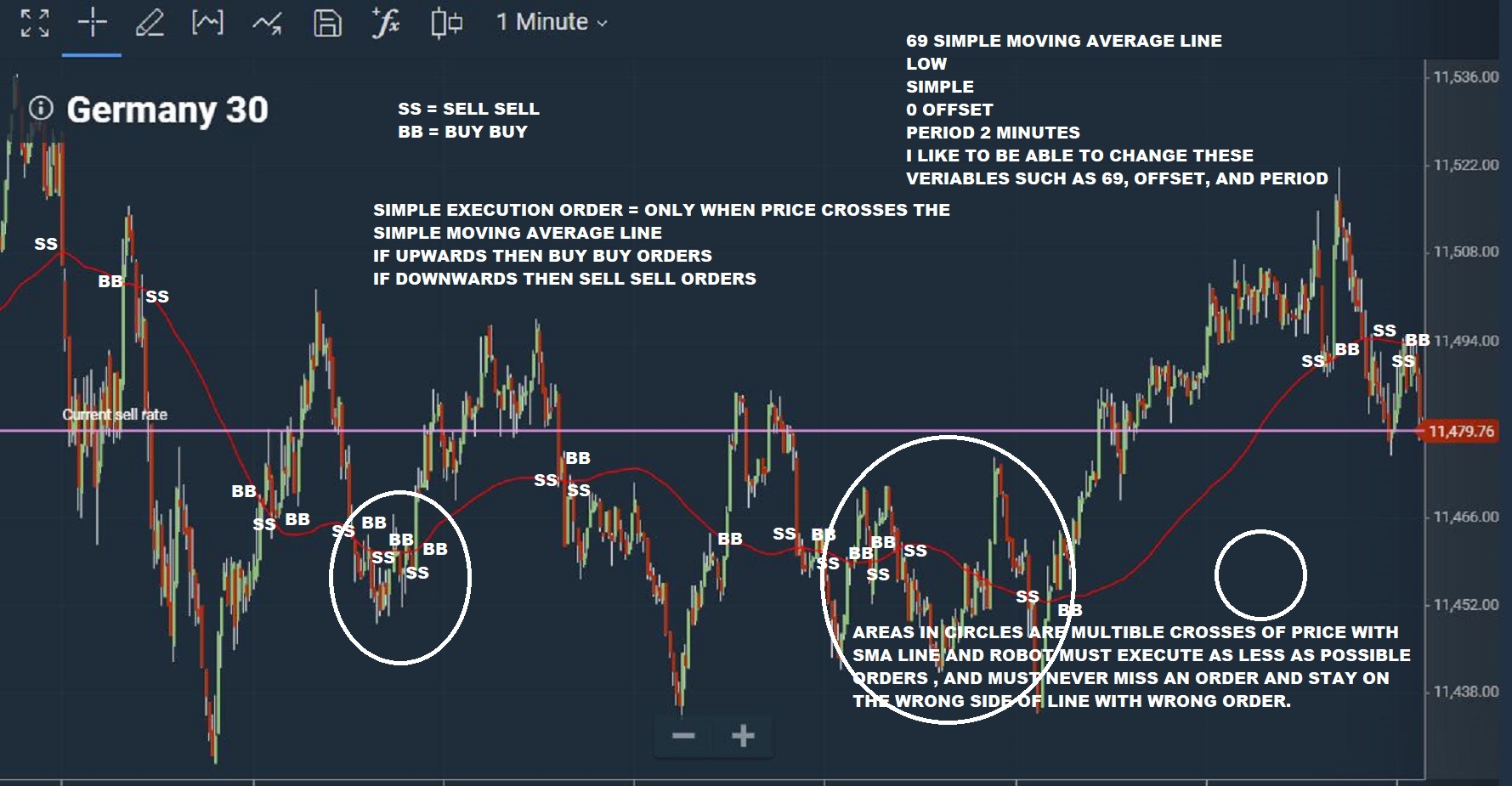
SIMPLE RULE OF TRADING. TRADE WHEN CROSS MA.
SELL SELL ORDERS WHEN CROSS MA DOWNWARDS
BUY BUY ORDERS WHEN CROSS MA UPWARDS
ADVICE IF CAN CREATE ONE FOR ME AND FURTHER DETAILS
1. The idea of the trading system is as follows: double market entries are performed, BUY BUY or SELL SELL when price of commodity intersects/crosses the Moving Average line. <:p><:p>
2. Trend is determined based on direction of crossing the MOVING AVERAGE line. If price of commodity crosses the MA line downward then a SELL SELL order is executed. If its upward a BUY BUY order is executed. See photo <:p><:p>
3. Trading Signals: <:p><:p>
- Buy signal: the price line crosses the MA line upwards. 2 times BUY signal is executed (one to close the sell position we had from previous order, and one to start a new positioning) <:p><:p>
- Sell signal: the price line crosses the MA line downwards The below figure shows Buy BUY and Sell SELL cases.
If no prior position is open (for example the position was closed by me prior to reaching the MA line, then a single BUY or SELL will be executed only. <:p><:p>
4. Positions are closed at opposite signals: Buy positions are closed at Sell signals, and Sell positions are closed at Buy signals. <:p><:p>
5. Positions are opened at the market price, when the price crosses the MA line. The Expert Advisor is to be tested using Open prices, so there is no need to add functions for disabling operations inside the bar. <:p><:p>
6. Close by me — I can close any position at any time. Then the next time the price line crosses the MA line a new single BUY or SELL order is executed to start the next serious of trades. <:p><:p>
<:p><:p>
<:p><:p>
<:p><:p>
Signal description <:p><:p>
A buy or sell signal emerges when a certain condition as described above. Buy signal appears when the price crosses the Moving Average upwards and vice versa. Use the following parameters in this signal description: <:p><:p>
- Moving Average type – Simple Moving Average <:p><:p>
- Moving Average period – I want to be able to change it if possible? Otherwise use 2 minute MA period. <:p><:p>
Also, the phrase "the price crosses the Moving Average" should be very clear!!!!. <:p><:p>
I want to avoid the robot to be confused and when the PRICE crosses SMA line to execute many orders because its on the line and doesn’t pass over completely for a few seconds. Is the best method to achieve that to wait for the candlestick to break the MA and close above it. This affects your Expert Advisor code, as well as the TICK GENERATION be used during testing? Also for the same reason, to have as less possible trades when price crosses the SMA line like the trades in the circles in my graph above, which is the best to use: candlestick, line, or bar or which? <:p><:p>
Therefore, we recommend following some EA developing and debugging rules. <:p><:p>
- To enable signal visual testing and debugging, the EA should display emerging signals as labels/objects on the chart. In addition to debugging on history data, you will be able to view the formation of signals on the chart. Sometimes, it can be hard to understand complex algorithms. The visual display of Signals provides a convenient way to monitor opening of trades. <:p><:p>
- Another convenient solution is to start with the creation of an indicator which displays Buy/Sell signals as arrows on the chart. This is a more convenient solution, which allows you to debug the two applications separately. Let the robot trade and the indicator plot. In this case, the Expert Advisor code will contain only the required functionality. In addition, there can be more Signals than the executed deals. For example, the EA receives a buy signal and enters the market. According to the algorithm, other buy signals are no longer checked. If you are using a separate indicator, it will show all buy signals regardless of the presence of an open position. <:p><:p>
- In addition to providing separate descriptions for Buy and Sell signals in the Requirements Specification, it is recommended to debug them separately. Buy and sell signals are often interrelated, i.e. when there is a Buy position, all Sell signals are ignored (unless Sell signals are used for closing Buy positions). Separate testing of Buy and Sell signals allows you to check the correctness of the underlying logic in its pure form. <:p><:p>
Also, you can optimize the parameters of the strategy separately for buying and selling, and then combine the algorithms in a single trading robot. This way, search for optimal parameters will be performed faster with fewer errors. However, in this case you will need to pay additionally for the creation of indicators and intermediate Expert Advisors. <:p><:p>
Signal lifetime <:p><:p>
In some trading systems, a position is not opened immediately after the emergence of a signal. Such system may require confirmation by additional signals. For example, after the breakout of the resistance level, you may want to wait till the price returns to the broken level, in order to enter the market under better conditions. You should define the time parameter here: how long the Level Breakout signal will be valid. Systems may wait for 5 bars or until the trading session end, after which the signal is canceled. <:p><:p>
Add the Lifetime parameter to use additional filters, which may improve trading system quality. <:p><:p>
Placing of orders and opening of positions <:p><:p>
<:p><:p>
A trading order is not always executed successfully. It is necessary to provide for situations when the position cannot be opened/closed during the first attempt. How should the EA handle such a situation: should it make a pause or wait for a new tick? How many attempts are allowed? What information should be written to logs? In what format should information be written? Should a notification be sent to a trader? How often should messages be sent to avoid DDoS attack situations? <:p><:p>
Use comments to trading orders for quick analysis of trading history. Sometimes, trade servers write specific comments to this field. Therefore, your robot may additionally write its own daily log of trading operations. <:p><:p>
<:p><:p>
Cancellation of orders and closing of positions <:p><:p>
- I need to be able to close any position at any time. If I do that, then the next time the price crosses the SMA line a single BUY or SELL order is executed depending on the direction of the crossing. After that it should be double orders BUY BUY or SELL SELL since there is already an open position so the first BUY for example is to close the previous opened SELL position and the second BUY is to position my self as the new trade. <:p><:p>
Order lot calculation <:p><:p>
- I need to be able to change the variables of the order: <:p><:p>
a) Which commodity to trade <:p><:p>
b) How much to trade <:p><:p>
c) Change the SMA line variables as I said above also <:p><:p>
<:p> <:p>
Processing trading errors and environment state <:p><:p>
A trading robot is an autonomous program, which operates 24 hours a day. Therefore, provide mechanism to control its operation. Your Expert Advisor actions can be written to the Experts journal using the Print() function. In general, it is recommended to record the emergence of signals, patterns and setups, the current market price and trade request parameters before sending an order for execution. <:p><:p>
If trade request execution fails, its results should also be written to the log. Analyze trade server return codes to understand the reason for the failure and to fix it. Describe the following in the Requirements Specification: <:p><:p>
- the situations, in which the EA should write messages to the journal; <:p><:p>
- what parameters should be included in the message; <:p><:p>
- required entry format, such as specification of time, numbers, separators, etc. <:p><:p>
Detailed logs of trade orders and execution results will allow you to quickly identify trade errors and save your money. <:p><:p>
An important point often forgotten by beginning algo traders is the restart of the terminal and loss of Internet or server connection. In such cases you may request the possibility of notification via messaging functions or e-mail. <:p><:p>
Difference between bar-opening and in-bar trading <:p><:p>
With each price change, the robot starts processing the NewTick event by the OnTick() function. A lot of ticks can be received during a bar lifetime, so the EA will execute its logic at each incoming bar. If your strategy produces signals only at the opening of the bar, then you need to decide the following: <:p><:p>
- how to calculate trading signals, get indicator values and the trading environment state only at the first tick, skipping the next ones; <:p><:p>
- what to do if the necessary actions could not be performed at the first tick. <:p><:p>
Let's analyze a simple example: a signal at the intersection of moving averages. If your EA checks a signal at each tick, then there may be a situation where the signal appears and then disappears. As a result, the EA will open and close the position several times during one bar. This may cause problems during online trading. This is what you must avoid!!!! HOW CAN WE DO THAT???? <:p><:p>
To avoid such problems, test the Expert Advisor in the "Every Tick" or "Every Tick Based on Real Ticks" mode. If you see a lot of similar operations within one bar, then revise your robot's code. Make sure to perform the visual testing of the Expert Advisor and used indicators, to check their operation on different history intervals directly on the chart. <:p><:p>
Tick/scalping strategies <:p><:p>
If you are a beginner, choose systems operating at new bar opening. Such strategies are easier to develop and debug, while you will only need to provide a proper handling of the New Bar event. You can check the correctness of the Expert Advisor trading at bar opening: testing results in the "Open Price Only" must match results in the "Every Tick"/"Every Tick Based on Real Ticks" mode. <:p><:p>
Trading systems operating inside a bar are more difficult. We recommend reading the article How to quickly develop and debug a trading strategy in MetaTrader 5, which contains the description of all steps required to create, debug and optimize the code of a strategy based on the analysis of the continuous tick flow. <:p><:p>
When developing a scalping robot, note that such strategies are extremely sensitive to spread, commission, network delays, history quality and performance speed. Any worsening in trading conditions can "kill" such a strategy. <:p><:p>
<:p><:p>
please advice which country u live in. thanks