Fleetdeck Multi Account Monitor

Fleetdeck shows the state of every MetaTrader 5 account that runs on your computer in one panel on one chart. You see total equity, profit of the day and week, open risk and the health of each account at a glance, and you get an alert when something is wrong. Fleetdeck only reads. It never opens, closes or changes a trade.

Problems it solves

  • You run several terminals (own accounts, funded accounts, demo) and have to switch windows to see how they are doing.
  • An account goes offline, or Algo Trading is switched off after a restart, and you notice hours later.
  • A position without stop loss, or a growing daily loss on one account, goes unseen while you look at another one.

How it works

Fleetdeck uses two roles of the same Expert Advisor. In every terminal you attach Fleetdeck with the role Reporter to one chart. It writes a small status file about once per second into the shared common folder of MetaTrader, in its own sub folder "Fleetdeck". On one chart you attach Fleetdeck with the role Dashboard. It reads all files and draws the panel. The dashboard can also report its own account, so a setup with three terminals needs two reporters and one dashboard. No DLL, no WebRequest, no internet access is needed. Incomplete or damaged files are ignored, and files are written in a way that avoids locks.

Functions

  • Summary line: total equity, profit today, profit this week, open profit, number of accounts online.
  • Table or card view, sortable by name, equity, today, week, open profit or status.
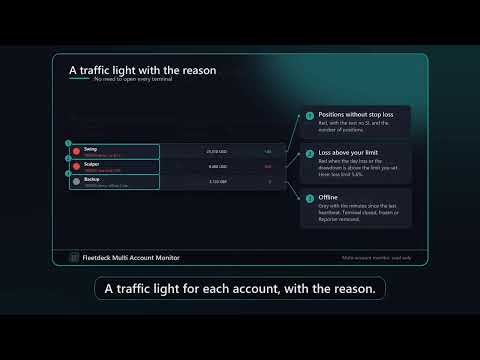
  • Traffic light per account: green = fine, yellow = Algo Trading off, no connection or low margin level, red = positions without stop loss or loss above your limit, grey = offline (no heartbeat).
  • Mini equity curve of the day per account.
  • Per account: login, server, company, name or your own alias, balance, equity, margin, free margin, margin level, open profit, profit today (including commission and swap of all deals), week and month, largest drawdown of the day, number of positions and orders, open risk to stop loss, positions without stop loss, Algo Trading on or off, connection.
  • Aliases by input, for example 12345=Prop A;67890=Real.
  • Sum in one currency with rates you enter. Accounts in a currency without a rate are not summed and the panel says so.
  • Alerts (alert window and push): account offline, Algo Trading off, day loss above X percent, margin level below Y percent, positions without stop loss. Each alert has a repeat interval.
  • Daily report by push at a time you choose.
  • CSV history of all accounts to a file in the common folder.
  • Collapsible panel, scale setting, English and German. Works with 20 or more accounts, with paging.

Quick start

1. Copy Fleetdeck to the Experts folder of every terminal (or install it from the Market in each terminal) and restart or refresh.

2. In each terminal attach Fleetdeck to one chart, role Reporter. Algo Trading does not have to be on for reporting: the Reporter also reports when it is off.

3. In one terminal attach Fleetdeck to one chart, role Dashboard.

4. Optionally enter account names, the sum currency and the rates, and the alert limits.

FAQ

Does it work across two computers or a VPS and my home PC? No. The terminals must run on the same computer and the same Windows user, because the data is exchanged through the local common folder.

Does it place trades? No.

Why does a Reporter need a chart? An Expert Advisor runs on a chart. Use any symbol and timeframe. Only one Reporter per terminal.

Why is an account shown as offline? No new status file arrived for the offline time you set (default 15 seconds). The terminal may be closed, frozen, or the Reporter was removed.

What is "today"? Profit of deals closed since the daily reset hour of the broker server (input), including commission, swap and fees, plus the current open profit.

Does it work on the Strategy Tester? In the tester it shows a demo panel with simulated accounts and opens a tiny demo trade for the Market check. Real data exchange is not possible in the tester.

Input parameters

Role, Language, Account names, Write interval, Day reset hour, Own name, Dashboard also reports, Offline after seconds, Currency for the sum line, Rates, Red when day loss above percent, Red when no stop loss, Yellow when margin level below, Rows per page, Panel scale, X and Y distance, Start collapsed, Start in card view, alert switches and limits, repeat minutes, daily report on and time, CSV history on and interval.

Honest limits

  • Only terminals on the same computer and the same Windows user are shown.
  • A Reporter must be attached to a chart in every terminal and must keep running. If the terminal is closed, the account is shown as offline.
  • Push notifications need your MetaQuotes ID entered in the terminal where the Dashboard runs.
  • The day value uses the broker server reset hour you set. Brokers with unusual rules may differ from their own statements.
  • The open risk counts positions with a stop loss. A position without stop loss is counted separately because its risk cannot be calculated.
  • Fleetdeck is an information tool. It gives no trading advice and no guarantee about results.
Yazarın diğer ürünleri
Lotwise Risk Console works out the lot size from the risk you choose and the stop loss line you drag on the chart. You click Buy or Sell, and the manager can then look after the open position: break-even, partial closes, trailing, time exit. It never opens a trade by itself. It takes the lot calculation off your hands for every order. Example on a 10,000 USD account: 1 % risk and a stop of 191 points give 0.51 lot on EURUSD. The panel shows the money at risk (97.41 USD) and the possible gain at
Limitline Prop Monitor shows the limits of a funded or challenge account in one foldable panel on the chart and warns you before a limit is reached. If you enable the trade brake or the emergency stop, it can also close trades and delete orders that would break a limit. It does not open trades by itself. The reason I built it: the daily loss limit usually resets at the firm's own time, not at broker midnight, and open stops and pending orders count too. The panel does that arithmetic for you. In
Event Window Manager reads the economic calendar that is already built into your terminal and opens a protection window around important events. Inside the window it can warn you, block new trades, delete and later restore pending orders, and close positions or move them to break-even. Your other EAs can ask for its state through global variables. It needs no DLL, no WebRequest and no website. The calendar comes through your broker connection. One instance on one chart covers the whole account,
Magic Atlas Journal reads the closed positions of your account and sorts them by magic number, symbol, calendar day, weekday and entry hour. You see profit factor, win rate, drawdown and expectancy for each EA without a spreadsheet. It only reads history and places no orders on a live account. I use it when several EAs run on one account and the broker statement only gives one total. A profitable account can hide one EA that has been losing for weeks, and a flat account can hide one that works.
Magic Atlas Snapshot reads the closed positions of your account and shows net profit, win rate, profit factor, maximum drawdown and expectancy for each EA. It covers the three magic numbers with the most closed positions. It only reads history and places no orders on a live account. Magic Atlas Snapshot is the reduced version of Magic Atlas Journal. Same source, with the extra views and reports removed. Three problems it solves 1. Several EAs on one account and no idea which one earns. 2. Broker
FREE
Twinlane Copier copies positions and pending orders from one MetaTrader 5 terminal to one or more other terminals that run on the same PC or VPS. The same EA works as Master or as Slave, and the terminals exchange a small snapshot file in the shared common folder. No DLL, no web request, no account passwords. It is built so that a copied trade is never opened twice: every copy carries the master ticket in its comment, the slave checks open positions and orders before it sends anything, and a sta
Magic Brake watches every EA on your account, one row per magic number. It scores each EA from 0 to 100, tells you why, and, if you want it to, brakes only the EA that misbehaves: it closes its new trades, closes all of its trades, or sets the stop loss it forgot. Default mode is warn only. Problems it solves 1. You run five or ten EAs on one account. One of them starts doubling its lot after every loss or piles up a grid, and you only see it when the account equity has already dropped. 2. Some
Twinlane Copier One copies positions from one MetaTrader 5 terminal to one other terminal on the same PC or VPS. The same EA works as Master or as Slave. The terminals exchange a small snapshot file in the shared common folder. No DLL, no web request, no passwords. Twinlane Copier One is the reduced version of Twinlane Copier. It has no time limit. It is limited in these points: One slave account (the master binds itself to the first slave that answers). Lot mode: master lot multiplied by a fact
FREE
Fleetdeck Account Overview is the reduced version of Fleetdeck Multi Account Monitor. It shows up to three MetaTrader 5 accounts that run on your computer in one panel on one chart: total equity, profit of the day and week, open profit and a traffic light for each account. It only reads and never opens, closes or changes a trade. Problems it solves You run several terminals and have to switch windows to see how they are doing. An account goes offline or Algo Trading is off after a restart, and y
FREE
Daymark Chart Companion puts the timing of your trading day on the chart: a candle countdown on five timeframes, the four trading sessions with their average range, the levels of the previous day, week and month, today's range against the daily ATR and your own event times. Everything sits in one calm panel and every part can be switched off. The indicator never trades. It is built for traders who plan entries around session opens, candle closes and key levels. Example from the screenshots: GBPU
Daymark Session Timer combines three small tools in one light indicator: a countdown to the candle close, the Sydney, Tokyo, London and New York sessions as soft boxes on the chart, and the previous day high and low. A small panel shows the countdown, which session is open, the spread and the server time. The indicator never trades. Two problems it solves 1. Session boxes in the wrong place. Brokers use different GMT offsets and change them with daylight saving, and the cities change on other da
FREE
Filtrele:
Değerlendirme yok
Değerlendirmeye yanıt