Fleetdeck Multi Account Monitor
- 유틸리티
- 버전: 1.0
- 활성화: 10

Fleetdeck shows the state of every MetaTrader 5 account that runs on your computer in one panel on one chart. You see total equity, profit of the day and week, open risk and the health of each account at a glance, and you get an alert when something is wrong. Fleetdeck only reads. It never opens, closes or changes a trade.
Problems it solves
- You run several terminals (own accounts, funded accounts, demo) and have to switch windows to see how they are doing.
- An account goes offline, or Algo Trading is switched off after a restart, and you notice hours later.
- A position without stop loss, or a growing daily loss on one account, goes unseen while you look at another one.
How it works
Fleetdeck uses two roles of the same Expert Advisor. In every terminal you attach Fleetdeck with the role Reporter to one chart. It writes a small status file about once per second into the shared common folder of MetaTrader, in its own sub folder "Fleetdeck". On one chart you attach Fleetdeck with the role Dashboard. It reads all files and draws the panel. The dashboard can also report its own account, so a setup with three terminals needs two reporters and one dashboard. No DLL, no WebRequest, no internet access is needed. Incomplete or damaged files are ignored, and files are written in a way that avoids locks.
Functions
- Summary line: total equity, profit today, profit this week, open profit, number of accounts online.
- Table or card view, sortable by name, equity, today, week, open profit or status.
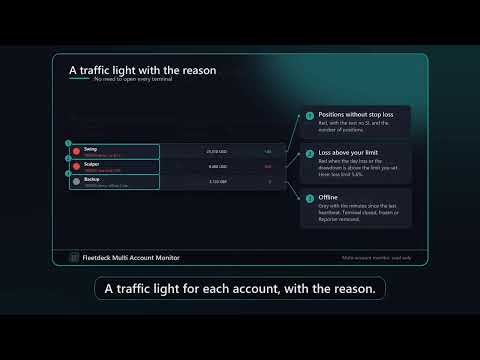
- Traffic light per account: green = fine, yellow = Algo Trading off, no connection or low margin level, red = positions without stop loss or loss above your limit, grey = offline (no heartbeat).
- Mini equity curve of the day per account.
- Per account: login, server, company, name or your own alias, balance, equity, margin, free margin, margin level, open profit, profit today (including commission and swap of all deals), week and month, largest drawdown of the day, number of positions and orders, open risk to stop loss, positions without stop loss, Algo Trading on or off, connection.
- Aliases by input, for example 12345=Prop A;67890=Real.
- Sum in one currency with rates you enter. Accounts in a currency without a rate are not summed and the panel says so.
- Alerts (alert window and push): account offline, Algo Trading off, day loss above X percent, margin level below Y percent, positions without stop loss. Each alert has a repeat interval.
- Daily report by push at a time you choose.
- CSV history of all accounts to a file in the common folder.
- Collapsible panel, scale setting, English and German. Works with 20 or more accounts, with paging.
Quick start
1. Copy Fleetdeck to the Experts folder of every terminal (or install it from the Market in each terminal) and restart or refresh.
2. In each terminal attach Fleetdeck to one chart, role Reporter. Algo Trading does not have to be on for reporting: the Reporter also reports when it is off.
3. In one terminal attach Fleetdeck to one chart, role Dashboard.
4. Optionally enter account names, the sum currency and the rates, and the alert limits.
FAQ
Does it work across two computers or a VPS and my home PC? No. The terminals must run on the same computer and the same Windows user, because the data is exchanged through the local common folder.
Does it place trades? No.
Why does a Reporter need a chart? An Expert Advisor runs on a chart. Use any symbol and timeframe. Only one Reporter per terminal.
Why is an account shown as offline? No new status file arrived for the offline time you set (default 15 seconds). The terminal may be closed, frozen, or the Reporter was removed.
What is "today"? Profit of deals closed since the daily reset hour of the broker server (input), including commission, swap and fees, plus the current open profit.
Does it work on the Strategy Tester? In the tester it shows a demo panel with simulated accounts and opens a tiny demo trade for the Market check. Real data exchange is not possible in the tester.
Input parameters
Role, Language, Account names, Write interval, Day reset hour, Own name, Dashboard also reports, Offline after seconds, Currency for the sum line, Rates, Red when day loss above percent, Red when no stop loss, Yellow when margin level below, Rows per page, Panel scale, X and Y distance, Start collapsed, Start in card view, alert switches and limits, repeat minutes, daily report on and time, CSV history on and interval.
Honest limits
- Only terminals on the same computer and the same Windows user are shown.
- A Reporter must be attached to a chart in every terminal and must keep running. If the terminal is closed, the account is shown as offline.
- Push notifications need your MetaQuotes ID entered in the terminal where the Dashboard runs.
- The day value uses the broker server reset hour you set. Brokers with unusual rules may differ from their own statements.
- The open risk counts positions with a stop loss. A position without stop loss is counted separately because its risk cannot be calculated.
- Fleetdeck is an information tool. It gives no trading advice and no guarantee about results.