Twinlane Copier One
- Yardımcı programlar
- Sürüm: 2.0
- Güncellendi: 14 Kasım 2026

Twinlane Copier One copies positions from one MetaTrader 5 terminal to one other terminal on the same PC or VPS. The same EA works as Master or as Slave. The terminals exchange a small snapshot file in the shared common folder. No DLL, no web request, no passwords.
Twinlane Copier One is the reduced version of Twinlane Copier. It has no time limit. It is limited in these points:
- One slave account (the master binds itself to the first slave that answers).
- Lot mode: master lot multiplied by a factor. No fixed lot, balance, equity or risk mode.
- Symbol names: identical names, plus one manual pair (for example EURUSD=EURUSD.pro).
- No pending orders, no reverse copy, no filters, no daily loss protection, no automatic prefix/suffix matching.
Three problems it is built to avoid
1. Duplicate positions. Each copy carries the master ticket in its comment. The slave checks open positions before it sends an order, and a state file survives restarts. A restart or lost connection does not create a second copy.
2. Wrong lot after a partial close. When the master closes part of a position, the slave closes the same share of its own position, rounded to the volume step.
3. Difficult setup. Four steps and one channel name.
What it does
- Master writes the snapshot to a temporary file and renames it, so the slave never reads half a file. Sequence number and heartbeat are included.
- Slave opens, changes and closes trades to match the snapshot. A trade is closed only after it is missing in two snapshots.
- Stop loss and take profit are copied and follow later changes (distance from the own entry price).
- No action when the master heartbeat is older than 10 seconds.
- Trades older than 30 seconds at the time the slave sees them are skipped. Trades that were open before the slave started are not copied.
- Margin check, stop and freeze level check, filling mode selection, retries with pause.
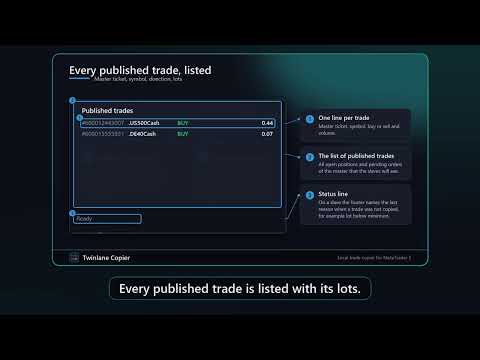
- Panel on the chart: connection, heartbeat age, delay in ms, counters, list of copied trades with master and slave ticket, on and off switch, collapse button, English or German.
- Strategy Tester: copying between terminals is not possible in the tester. The EA runs a built-in self-test with a simulated master snapshot and small test trades (open, partial close, SL/TP change, close).
Quick start
1. Install the EA on both terminals and allow algorithmic trading. Both terminals must run on the same Windows PC or VPS under the same Windows user.
2. Master terminal: attach with Role = Master and a channel name, for example Main.
3. Slave terminal: attach with Role = Slave, the same channel name and a factor. The slave must be a hedging account.
4. Check the panel: green dot and a heartbeat age below one second. Test with small lots first.
FAQ
Different PCs? No, same PC, VPS or Windows user only. Not on the built-in MQL5 VPS.
Netting slave? No, the slave must be hedging.
More slaves? Use the full version Twinlane Copier.
Why is a trade not copied? The footer of the panel shows the last reason.
Input parameters
General: Role of this terminal, Channel name, Panel language, Show status panel, Panel scale, Timer interval in ms.
Slave sizing: Lot factor (slave lot = master lot x factor).
Symbol mapping: One pair, for example EURUSD=EURUSD.pro (empty = same names).
Honest limits
Same PC, VPS or Windows user only. MT5 to MT5 only, hedging slave. Copies are not identical to the master trades because of delay, spread and slippage. No guarantee of results. Test with small lots first.