Guardrail Grid
- Uzmanlar
- Sürüm: 1.2
- Etkinleştirmeler: 5

Guardrail Grid — built around risk control
A grid strategy needs a plan for when the market keeps moving against it. Guardrail Grid puts that plan at the centre of its design.
Guardrail Grid is an automated Expert Advisor for MetaTrader 5, focused on AUDCAD on the five-minute chart. It combines price-rejection entries with staged recovery, selective position reductions and several protective exit rules. It is designed for traders who want to understand how their grid enters, how its exposure develops and what makes it stop.
The approach is systematic: wait for a qualifying setup, manage each basket through a defined sequence and accept a loss when an exit rule is reached.
How the strategy works
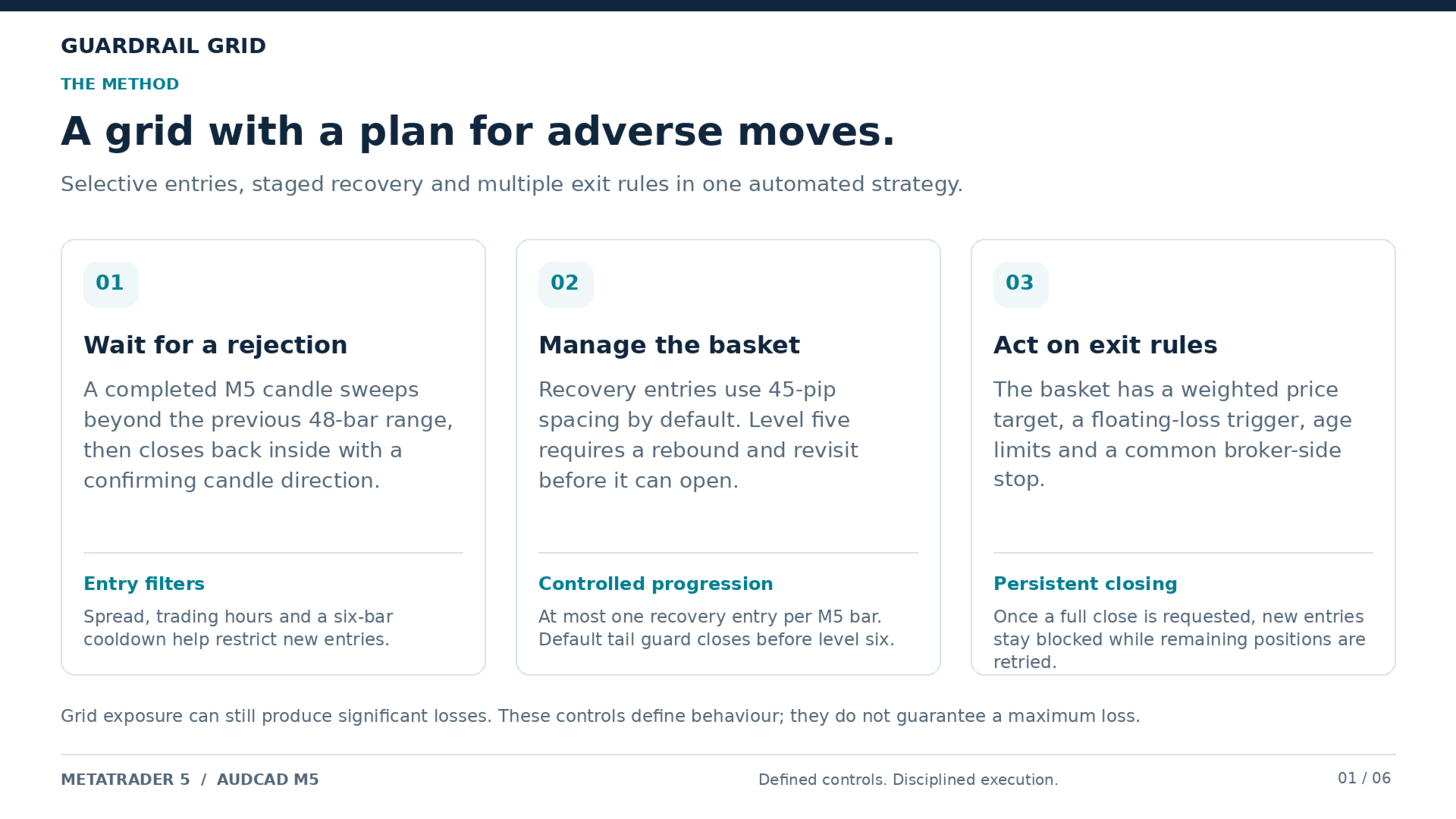
- Wait for a rejected price move. The strategy checks whether a completed five-minute candle moves beyond a recent high or low, then closes back inside the range with a reversal candle body. Spread, timing and cooldown checks must also pass before a new basket opens.
- Manage a structured basket. If price moves against the entry, additional positions can be opened at defined intervals. The default sizing stages are 1x, 1x, 2x, 2x and 3x the balance-scaled base size. New recovery entries are limited to one per five-minute bar.
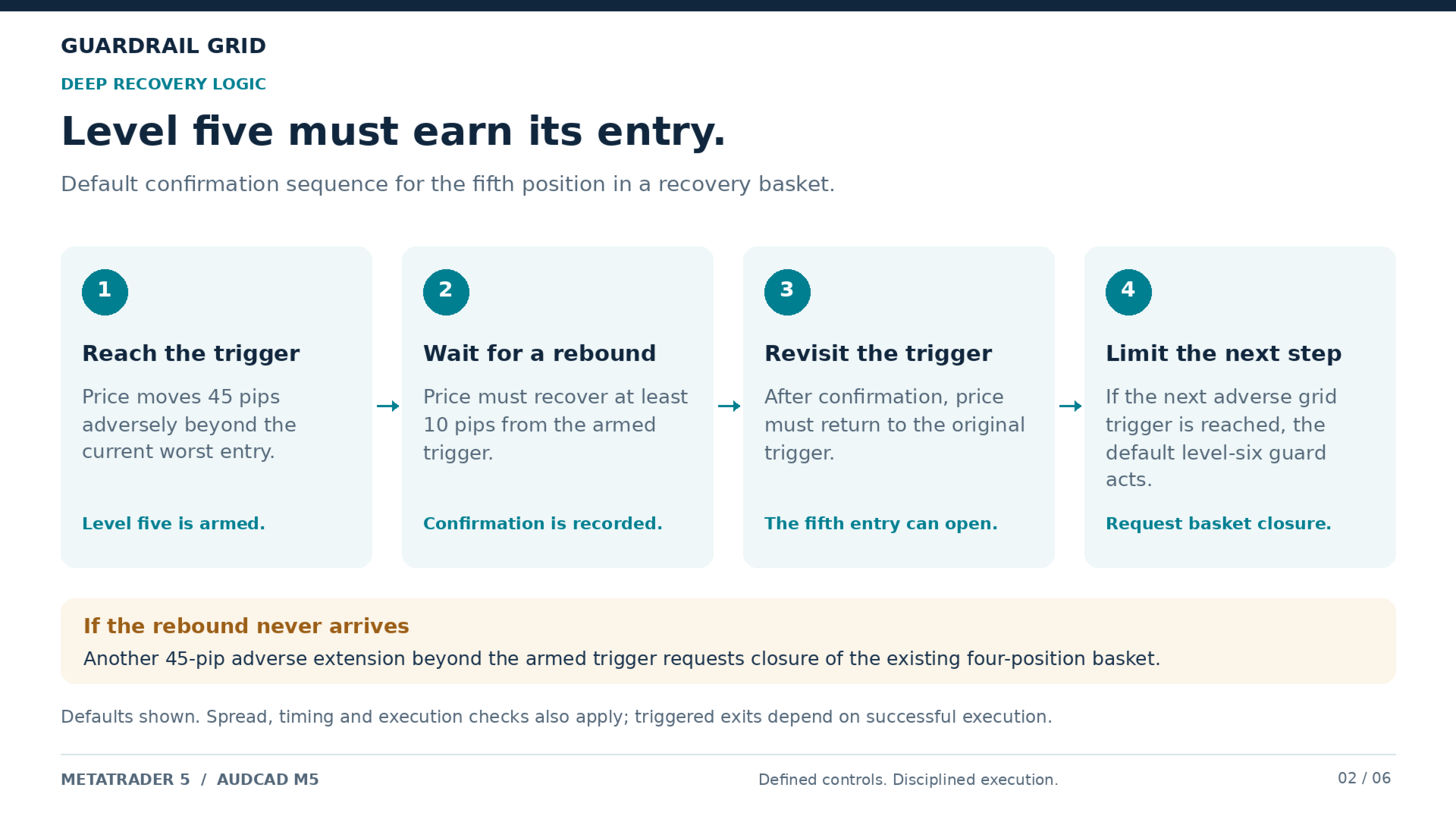
- Require more evidence before deeper recovery. Before level five can open, price must rebound by the configured distance and then revisit the original trigger. If it continues another grid interval against the basket without that rebound, the strategy initiates a basket close.
- Reduce exposure or close the basket. The strategy manages a volume-weighted basket target, can partially close qualifying profitable recovery positions, and monitors its loss and time-based exit rules.
The guardrails
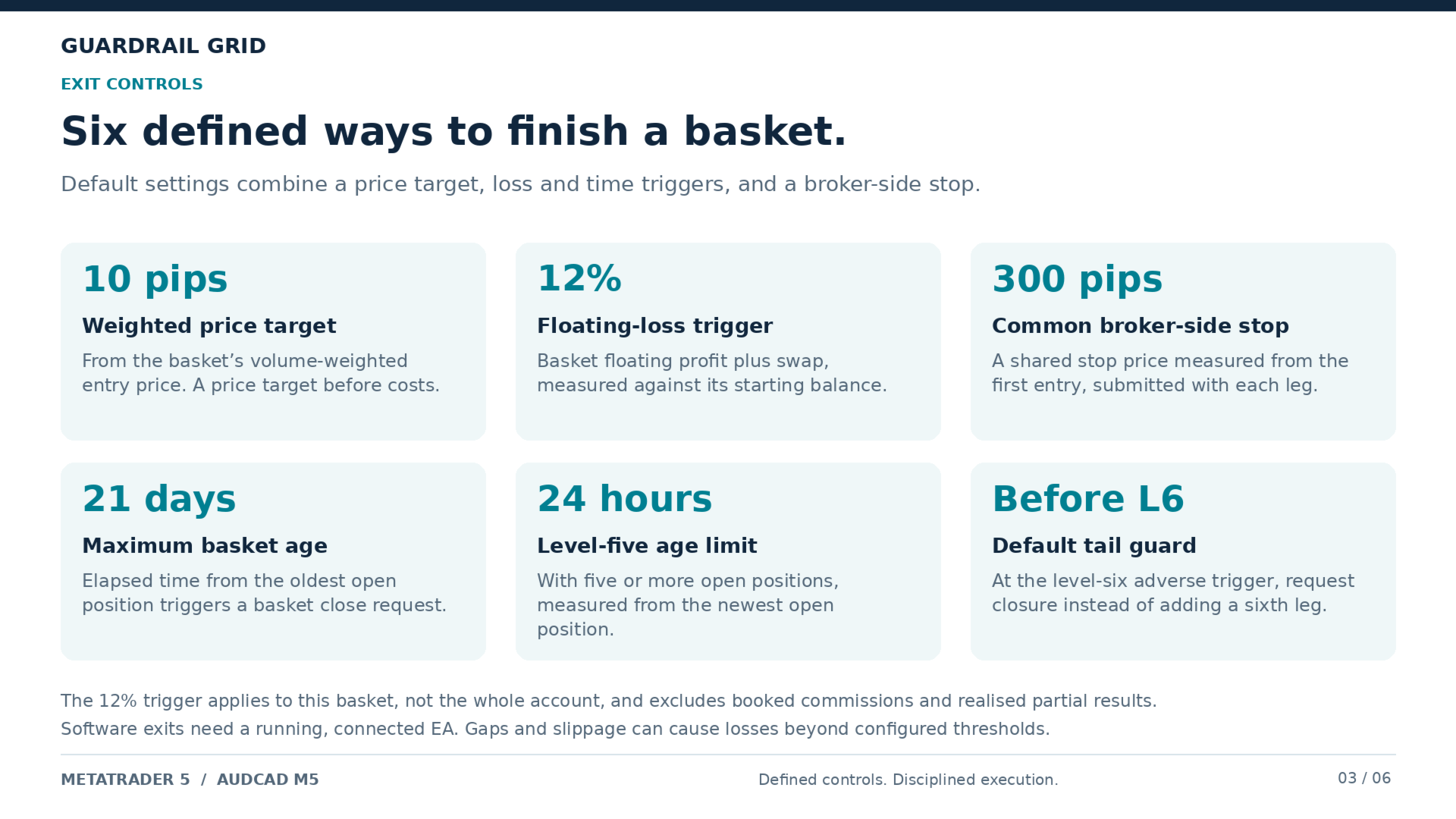
- A defined end to the recovery sequence. With the default tail-guard setting, the strategy initiates a close when a sixth level would otherwise be added. The normal default sequence therefore opens up to five positions.
- A basket loss trigger. Open basket profit and loss, including swap, is checked against a percentage of the balance recorded when the basket began. Reaching the threshold initiates a basket close.
- A common protective stop. Each new position is submitted with a broker-side stop at the basket's common stop price, calculated from the first entry.
- Time limits on unresolved recovery. A maximum basket age and a separate deep-recovery timeout provide additional reasons to close.
- Selective reductions at levels four and five. When the latest qualifying recovery position has moved favourably by the target distance, the strategy can close its excess size while retaining a position equal to the original entry size.
- Closure takes priority. Once a full basket close starts, new entries are blocked. The strategy retains its closing state and retries remaining positions on subsequent ticks until the basket is flat.
Entry and execution discipline
Guardrail Grid checks the spread before opening a new basket or adding a recovery position. It also checks quote freshness, available margin, the broker's minimum stop distance and permitted order-filling mode before submitting an entry.
New baskets are restricted after the configured Friday cutoff, and new short baskets have a separate excluded time window. A cooldown follows a completed basket. The Friday cutoff applies to new baskets; it does not automatically close existing positions or stop their recovery management.
Setup
- Platform: MetaTrader 5.
- Instrument and timeframe: AUDCAD, M5.
- Account mode: hedging. Separate positions are required; netting accounts are not supported.
- Reference account currency: USD. The lot-size formula uses the account's balance units and does not convert other currencies into USD.
- Operation: keep the trading terminal or VPS running, connected and permitted to trade for the software-managed exits and recovery rules to operate.
- Configuration: check broker server time, minimum lot size and volume step before use. Keep the magic number and basket settings unchanged while positions are open.
Position management applies to the chart symbol and the configured magic number. The basket loss trigger is not a shared account-wide risk limit for other robots, manual trades or additional instances.
Input parameters: entries and timing
The following values are the current defaults. All session hours use broker server time.
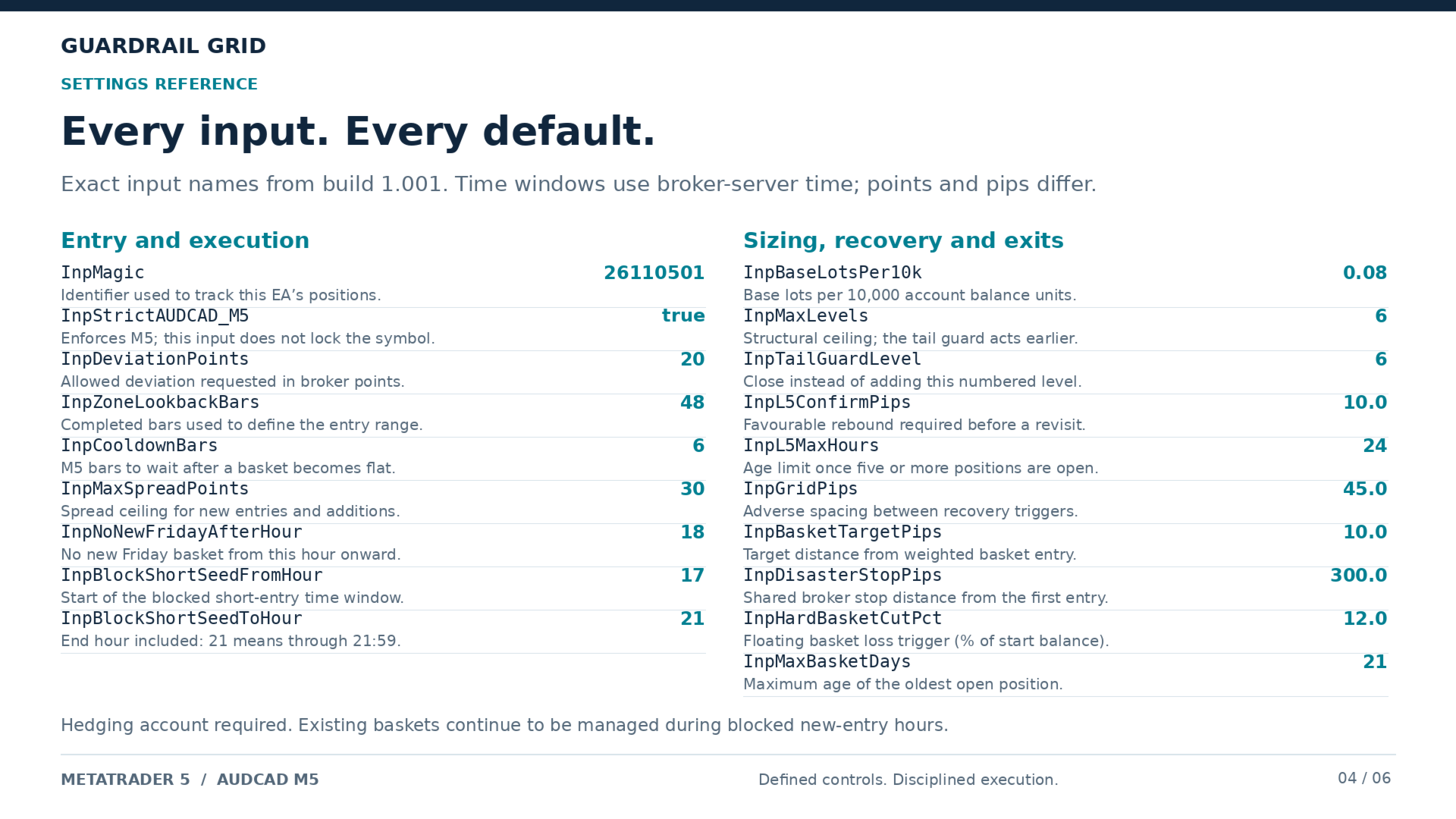
- InpZoneLookbackBars — 48: number of earlier M5 bars used to define the range for a price-rejection entry.
- InpCooldownBars — 6: waiting period after a basket is confirmed flat. Six M5 bars correspond to 30 minutes.
- InpMaxSpreadPoints — 30: maximum spread allowed for a new basket or recovery entry, measured in broker points.
- InpNoNewFridayAfterHour — 18: blocks new baskets from 18:00 on Friday. Existing baskets continue to be managed.
- InpBlockShortSeedFromHour — 17: first hour of the excluded window for new short baskets.
- InpBlockShortSeedToHour — 21: final hour of that window, inclusive. The default window runs from 17:00 through 21:59.
Input parameters: position sizing and recovery
- InpBaseLotsPer10k — 0.08: base position size per 10,000 units of account balance, before the recovery-stage multiplier and broker volume rounding. For example, a USD 10,000 balance gives a base size of 0.08 lots. This is a sizing example, not a minimum-balance recommendation.
- InpGridPips — 45.0: adverse price interval used to trigger the next recovery stage, measured from the furthest adverse entry in the basket.
- InpMaxLevels — 6: configured ceiling on the number of open basket positions. The tail guard can close the basket before this ceiling is reached.
- InpTailGuardLevel — 6: the next recovery level at which the strategy closes the basket instead of adding that position. The default closes before level six.
- InpL5ConfirmPips — 10.0: favourable rebound required after level five is armed. Price must subsequently revisit the trigger before level five can open.
- InpL5MaxHours — 24: deep-recovery timeout. When five or more positions are open, reaching this age from the newest position initiates a basket close.
Input parameters: targets and protective exits
- InpBasketTargetPips — 10.0: favourable distance from the basket's volume-weighted average entry used for its price target. The same distance is used to qualify partial reductions on eligible deep-recovery positions.
- InpDisasterStopPips — 300.0: distance from the first entry used to establish the common broker-side stop price for the basket's positions.
- InpHardBasketCutPct — 12.0: basket floating-loss percentage that initiates a close, measured against the balance saved at basket start. The calculation includes open-position profit and swap; it does not include commissions or realised partial-close results.
- InpMaxBasketDays — 21: maximum age of the oldest open position before the strategy initiates a basket close.
Input parameters: identification and execution
- InpMagic — 26110501: identifier used to select this strategy's positions on the chart symbol.
- InpStrictAUDCAD_M5 — true: requires the attached chart or test to use M5. Despite its historical input name, this switch checks the timeframe, not the symbol; select AUDCAD yourself.
- InpDeviationPoints — 20: requested permitted price deviation for trade operations, in broker points. Its effect depends on the broker's execution mode.
On a five-digit AUDCAD quote, 10 points equal one pip. Price-distance inputs labelled in pips and execution inputs labelled in points use different units.
Understanding the exposure
Guardrail Grid uses averaging and larger recovery positions at later stages. Increasing the base lot size increases the exposure of the whole sequence. Its basket loss setting is an exit trigger, not a guaranteed maximum account loss: gaps, slippage, connectivity and execution conditions can result in losses beyond the configured threshold. Price-based basket targets also differ from net monetary results after trading costs.
Test the method before buying
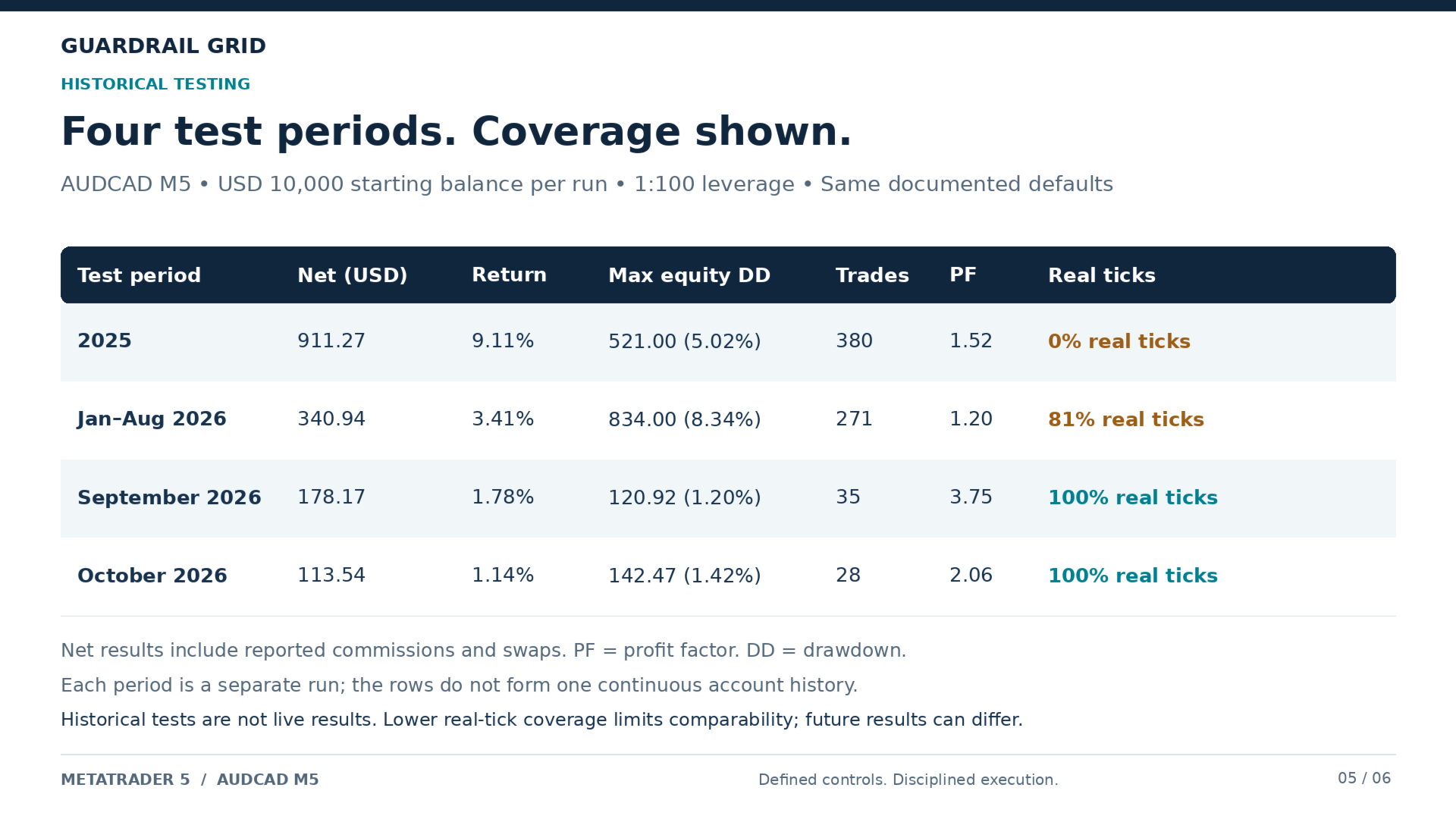
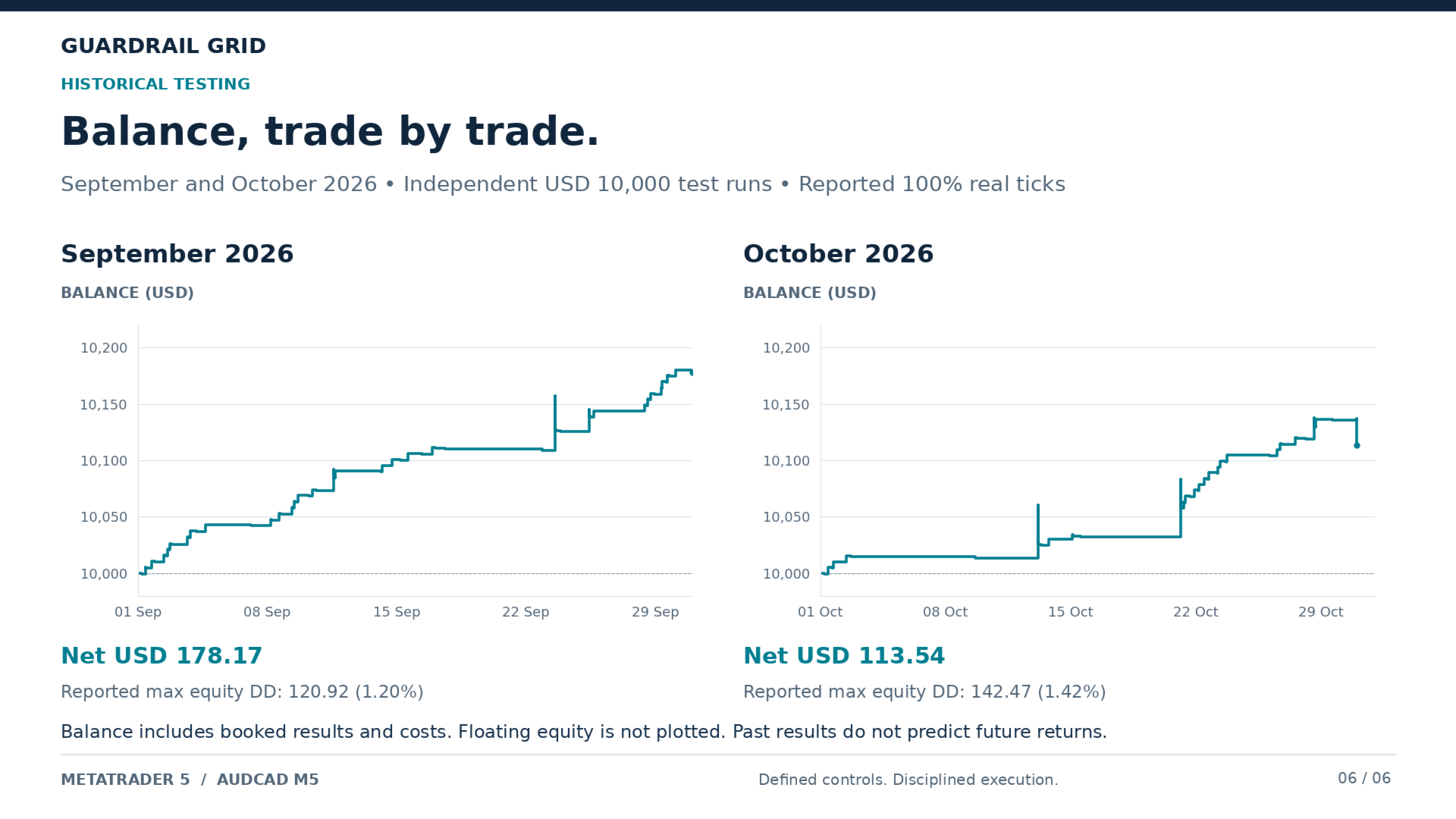
Use the free Market demo in MetaTrader 5's Strategy Tester to examine entries, recovery stages, partial reductions and exits on your broker's AUDCAD history. Select M5 and real-tick testing where adequate history is available, and check the report's actual tick-data coverage.
Review floating drawdown, basket duration, position sizes and losing periods alongside the final result. Match the intended account balance, leverage and trading costs. The Market demo runs in the Strategy Tester; forward testing on a chart requires the full purchased or rented version.
For setup questions, use the product's Comments section or contact the seller through MQL5 messages.