Nightfall Scalper EA
- Uzmanlar
- Sürüm: 2.13
- Güncellendi: 6 Kasım 2026

🚀 Nightfall Scalper EA While the market sleeps, quiet ranges can become opportunity.
When London and New York close, the market does not stop — it slows. Prices drift inside tidy boxes, volatility fades and the chaos of news and big players is gone. Nightfall Scalper was designed for exactly this calm environment.
Instead of fighting violent moves, it hunts short, controlled trades at the edges of an automatically detected range, with strict spread, time and breakout protection. If volatility wakes up, the EA steps aside. It is a scalper with manners.
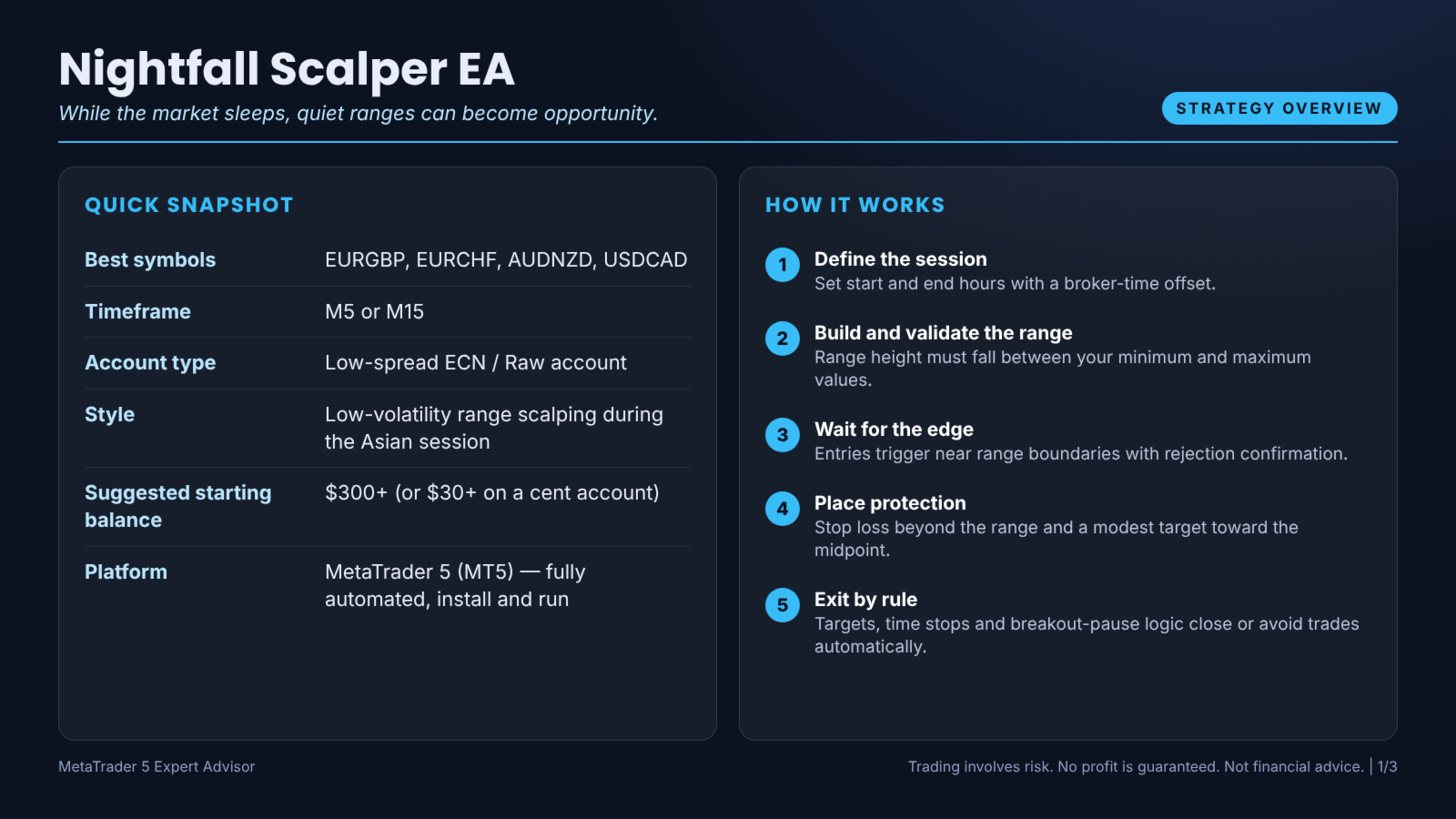
📌 QUICK SNAPSHOT
Most scalpers get hurt when volatility explodes. Nightfall trades only when the market is quiet and structured.
❌ Spreads eating your edge
Tight targets are meaningless when spreads are wide. A strict spread filter protects every entry.
❌ Holding trades that never resolve
Stale trades tie up margin. A time-based exit closes positions that overstay.
Nightfall Scalper EA was built to answer exactly these frustrations — with clear rules, defined risk and no emotional decision-making.
Trade the edges. When price reaches the outer part of the range and shows rejection, the EA opens a short-duration mean-reverting trade back toward the middle, with a hard stop beyond the range.
Respect the breakout. If price closes decisively outside the range or volatility spikes, Nightfall pauses for the session. Staying out of bad conditions is as important as trading good ones.
Set start and end hours with a broker-time offset.
2. Build and validate the range
Range height must fall between your minimum and maximum values.
3. Wait for the edge
Entries trigger near range boundaries with rejection confirmation.
4. Place protection
Stop loss beyond the range and a modest target toward the midpoint.
5. Exit by rule
Targets, time stops and breakout-pause logic close or avoid trades automatically.
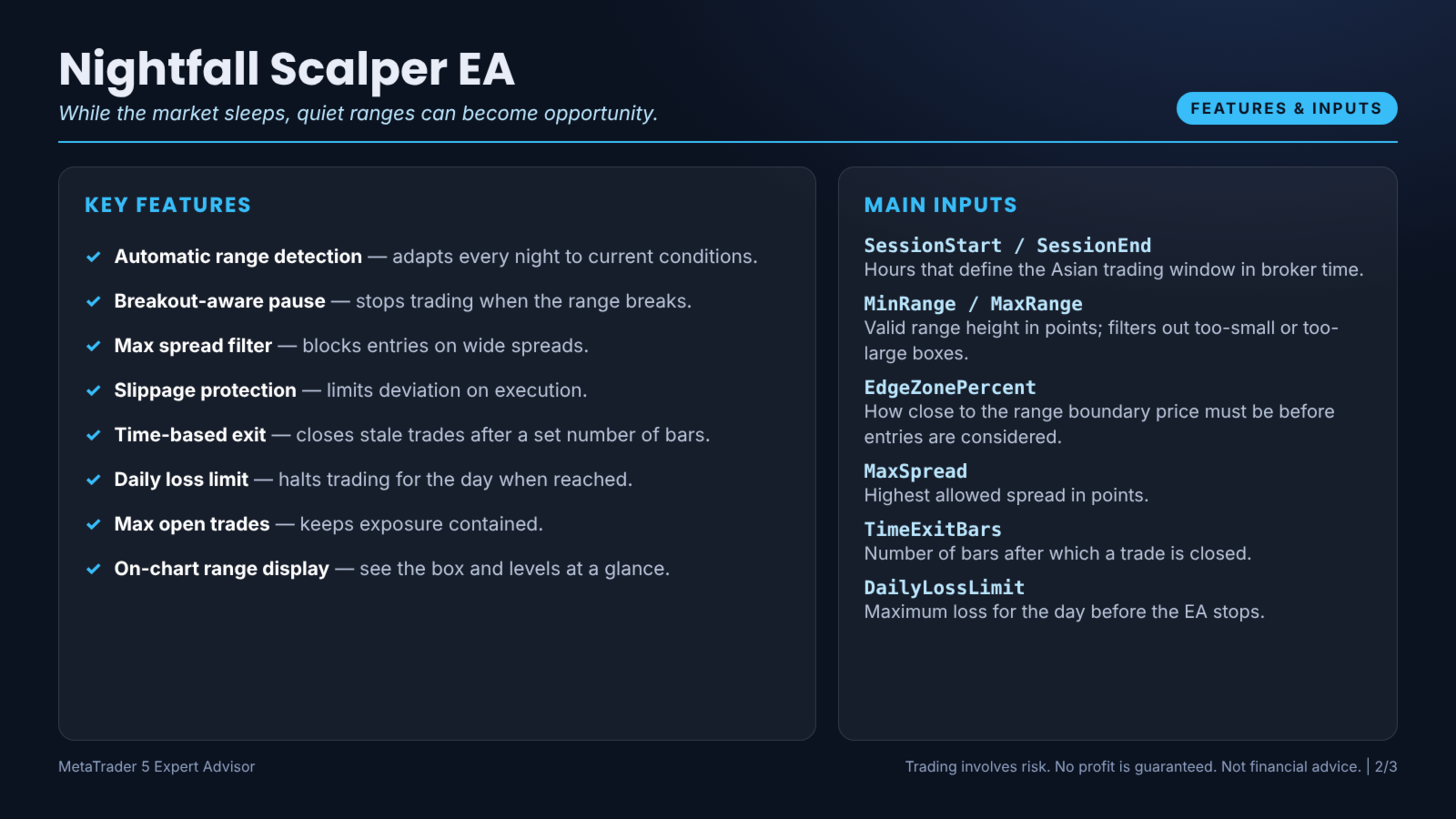
✅ Breakout-aware pause — stops trading when the range breaks.
✅ Max spread filter — blocks entries on wide spreads.
✅ Slippage protection — limits deviation on execution.
✅ Time-based exit — closes stale trades after a set number of bars.
✅ Daily loss limit — halts trading for the day when reached.
✅ Max open trades — keeps exposure contained.
✅ On-chart range display — see the box and levels at a glance.
🔹 SessionStart / SessionEnd — Hours that define the Asian trading window in broker time.
🔹 MinRange / MaxRange — Valid range height in points; filters out too-small or too-large boxes.
🔹 EdgeZonePercent — How close to the range boundary price must be before entries are considered.
🔹 MaxSpread — Highest allowed spread in points.
🔹 TimeExitBars — Number of bars after which a trade is closed.
🔹 DailyLossLimit — Maximum loss for the day before the EA stops.
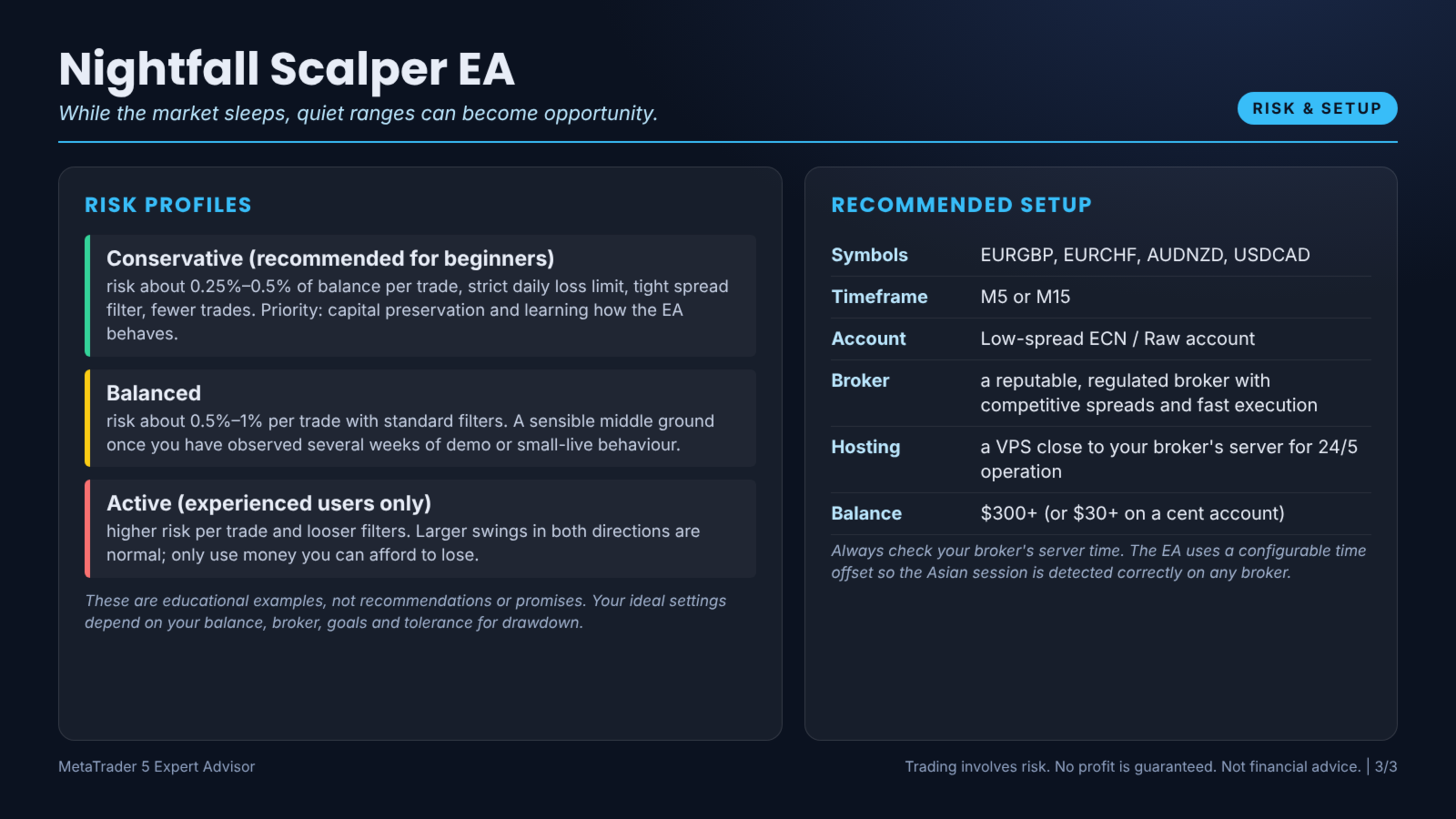
🟢 Conservative (recommended for beginners): risk about 0.25%–0.5% of balance per trade, strict daily loss limit, tight spread filter, fewer trades. Priority: capital preservation and learning how the EA behaves.
🟡 Balanced: risk about 0.5%–1% per trade with standard filters. A sensible middle ground once you have observed several weeks of demo or small-live behaviour.
🔴 Active (experienced users only): higher risk per trade and looser filters. Larger swings in both directions are normal; only use money you can afford to lose.
These are educational examples, not recommendations or promises. Your ideal settings depend on your balance, broker, goals and tolerance for drawdown.
✖️ Probably not for you if you:
Always check your broker's server time. The EA uses a configurable time offset so the Asian session is detected correctly on any broker.
Step 2. Open a chart of EURGBP and set the timeframe to M5 or M15.
Step 3. Make sure algorithmic trading is allowed: Tools → Options → Expert Advisors → Allow algorithmic trading, and that the Algo Trading button in the toolbar is green.
Step 4. Drag Nightfall Scalper EA from the Navigator onto the chart. In the Common tab tick Allow Algo Trading.
Step 5. In the Inputs tab choose your risk settings (start conservative), press OK, and confirm the smiling face in the top-right corner of the chart.
That is it. Add more symbols by repeating the steps on additional charts, using a unique Magic Number for each so the EA can manage its own trades cleanly.
1. Use the free demo. The MQL5 Market lets you run the demo version in the Strategy Tester so you can see the behaviour on your own terms.
2. Set up the tester realistically. Open View → Strategy Tester (Ctrl+R), choose Nightfall Scalper EA, your symbol, timeframe M5 or M15, and the model Every tick based on real ticks where available. Use a realistic deposit, leverage and spread that match your real account.
3. Test a long period. Cover at least two to three years and include different market conditions: trends, ranges, high-volatility events and quiet periods.
4. Beware of over-optimisation. Perfect-looking curves usually come from fitting the past too tightly. Prefer robust, round-number settings that work across a range of values.
5. Forward-test on demo for 2–4 weeks. Observe how the EA reacts to live spreads and news, then move to a small live account before scaling.
6. Keep a journal. Note settings, dates and what you observe. Data beats guesswork.
Remember: no tool removes risk. A drawdown is a normal part of trading, and every strategy goes through losing streaks. Size your trades so that a bad week is an inconvenience, not a disaster.
Choosing a broker: look for tight spreads, fast execution, transparent commissions, reliable regulation and a platform that supports your chosen symbols. Execution quality directly affects any automated system, so test on demo with the same broker before going live.
Account type: Spread is critical for scalping: choose a broker with tight spreads during Asian hours and avoid accounts with wide overnight rollover spreads. Check whether your account is hedging or netting, and confirm the symbol names in your Market Watch (some brokers add suffixes such as .m or .pro).
A: No. Position size does not increase after a loss and every trade has a hard stop.
Q: Does it trade during news?
A: The session is designed for quiet hours and a breakout pause helps avoid volatile bursts, but you should also avoid running it during unexpected events.
Q: Which broker time zone should I use?
A: Any. Set the offset input so the session matches the actual Asian hours on your server.
Q: Can it work on exotic pairs?
A: It is intended for liquid, range-prone cross pairs. Exotics often have wide spreads that harm scalping.
Q: Does it need a VPS?
A: It is strongly recommended. The EA only works while MetaTrader is online, so a VPS gives you consistent, uninterrupted operation.
Q: Can I run it on several symbols at once?
A: Yes. Attach it to separate charts and assign a different Magic Number to each so trades are tracked independently. Remember that total risk adds up across charts.
Q: Can I try it before buying?
A: Yes. A demo version is available on the MQL5 Market for the Strategy Tester. We also recommend forward-testing on a demo account.
Q: Can I use it on a prop firm or funded account?
A: You may, but you must check your firm's rules (news, drawdown, EA usage, holding times) and choose conservative settings. Compliance with those rules is your responsibility.
Q: Which settings should I start with?
A: Begin with the defaults and the conservative risk profile above. Change one setting at a time and observe the results.
Q: What happens if my connection drops?
A: Open positions remain protected by their stops on the broker's server. After reconnection the EA resumes and re-evaluates conditions. A VPS minimises this risk.
Q: How do I get help?
A: Send a private message through the MQL5 website or leave a comment on the product page. Please include your broker, symbol, timeframe and a screenshot of your inputs.
Q: Is any profit guaranteed?
A: No. No honest vendor can guarantee profit. Trading involves risk and results vary. Please read the disclaimer below.
📅 Week 1 — Learn and observe. Install the EA on a demo account with the same broker you plan to use live. Keep the default settings, watch how and when it opens trades, and read the log in the Experts tab. Take screenshots and notes. Your goal this week is understanding, not profit.
📅 Week 2 — Validate against your tester results. Run the Strategy Tester on EURGBP, timeframe M5 or M15, using real ticks. Compare the type of trades, the time of day and the approximate frequency with what you saw on demo. Large differences usually point to broker data, spread or server-time issues that are worth fixing before going live.
📅 Week 3 — Fine-tune carefully. Change only one setting at a time, such as the risk percentage, spread limit or trading hours. Record each change. Resist the urge to chase last week's result.
📅 Week 4 — Go live small. If you are satisfied, move to a small live account using the conservative risk profile. Use a VPS. Review weekly and keep your risk limits exactly where you set them.
This roadmap is educational. There is no obligation to go live; many traders happily stay on demo for longer.
• Account balance: $1,000
• Risk per trade: 1% = $10
• Stop-loss distance: 20 pips
If one pip on one micro lot (0.01) is worth roughly $0.10 on a USD-quoted pair, a 20-pip stop costs about $2 per 0.01 lot. To risk $10, you would trade around 0.05 lots. When the account grows or shrinks, or when the stop distance changes, the lot size changes with it. That is exactly what automatic risk-based sizing does for you in Nightfall Scalper EA.
Why it matters: if you risk 1% per trade, ten losses in a row cost roughly 10% of your account, uncomfortable but survivable. If you risk 10% per trade, the same sequence is catastrophic. Smaller risk gives your strategy the time it needs to work.
This is a simplified, hypothetical illustration, not a recommendation. Pip values vary by symbol, broker and account currency.
✅ Good candidates to adjust:
2. Judging too early. Any system can have a bad week. Judge by a meaningful sample of trades, not by two or three outcomes.
3. Changing settings every day. Constant tweaking makes it impossible to learn whether the strategy works.
4. Running without a VPS. Disconnections create missed exits and missed entries.
5. Ignoring broker conditions. Wide spreads, high commissions and slow execution change the picture dramatically.
6. Stacking correlated EAs. Running many systems on similar symbols can multiply your exposure without you noticing.
7. Trading money you need. Emotional pressure leads to bad decisions. Only use risk capital.
8. Expecting perfection. Every system loses sometimes. What matters is how you manage those losses.
During the session: The EA evaluates conditions on every new bar. When the filters agree it opens a trade with the defined protection; when they do not, it simply waits. Quiet periods are normal and intentional.
After trades: Stops, targets and management rules operate automatically. You can glance at the on-chart information or your mobile terminal to see what is happening.
End of day: Optional daily limits keep your exposure within the boundaries you chose. At the weekend the EA stays calm and you can review the results with a clear head.
The idea is simple: remove emotion from execution, so you can focus on risk, review and the rest of your life.
A modest portfolio of two to four well-chosen symbols is usually plenty for most traders.
Nightfall Scalper EA removes those weak points:
Automation does not make trading risk-free, but it helps you execute a plan the way it was designed.
What you can do:
Professional traders think in terms of long series of trades. A single loss is not important; the process is.
Screen time: manual trading can demand hours of focus; the EA runs on a VPS while you live your life.
Reaction speed: humans take seconds to click; the EA reacts instantly when conditions are met.
Emotional pressure: manual decisions are influenced by fear and greed; the EA has neither.
Flexibility: a discretionary trader can interpret unusual events; the EA does not understand surprises, which is why risk limits and supervision still matter.
The best results often come from combining both: automated execution plus human oversight of risk.
Slippage — the difference between the expected and actual execution price.
Stop Loss (SL) — an order that closes a trade at a predefined loss level to limit risk.
Take Profit (TP) — an order that closes a trade when a predefined profit level is reached.
Drawdown — the decline from a peak in account equity to a subsequent low; a normal part of every strategy.
Magic Number — a unique ID that lets an EA recognise its own trades.
ATR — Average True Range, a measure of recent volatility used to scale stops and targets.
Risk-to-Reward (R:R) — the ratio between potential loss and potential gain on a trade.
Backtest — a simulation on historical data; useful, but never a guarantee of future results.
Forward test — running the EA on a demo or small live account in real time to confirm behaviour.
I see an error in the Experts tab. Make sure the symbol name matches your broker and the lot size is within the broker's minimum and maximum.
Backtest looks different from live. Use real ticks and realistic spreads; also compare broker data quality and server time offset.
The EA is running on a second chart but ignoring it. Confirm each chart uses a unique Magic Number.
Still stuck? Message us with your broker, symbol, timeframe and a screenshot of the Experts log. We will gladly help.
👉 Download the demo, test it on your own terms, and add Nightfall Scalper EA to your toolkit today.
If you enjoy the product, a review helps other traders and supports further development. Thank you for your trust!
Trading foreign exchange, CFDs, precious metals, stock indices and cryptocurrencies on margin carries a high level of risk and may not be suitable for all investors. You can lose some or all of your invested capital, and in some cases more than your deposit depending on your broker's terms. Never trade with money you cannot afford to lose.
This Expert Advisor is an automated software tool. It is not financial advice, an investment recommendation, a signal service or a managed account. No profit, return, win rate or drawdown level is promised, guaranteed or implied. Past performance, backtests, optimisations and demo results are not indicative of future results and may differ significantly from live trading because of spreads, commissions, swaps, slippage, execution speed, requotes, liquidity, broker policy and changing market conditions.
You are solely responsible for your trading decisions, your risk settings and for complying with the rules of your broker, your prop firm (if any) and the laws of your country. Always test on a demo account first, start with conservative risk, and make sure you understand every setting before going live. The author and publisher accept no liability for any direct or indirect loss, damage or missed profit arising from the use of, or inability to use, this product.
By purchasing, downloading or using this product you confirm that you have read, understood and accepted this disclaimer.
When London and New York close, the market does not stop — it slows. Prices drift inside tidy boxes, volatility fades and the chaos of news and big players is gone. Nightfall Scalper was designed for exactly this calm environment.
Instead of fighting violent moves, it hunts short, controlled trades at the edges of an automatically detected range, with strict spread, time and breakout protection. If volatility wakes up, the EA steps aside. It is a scalper with manners.
📌 QUICK SNAPSHOT
- Best symbols: EURGBP, EURCHF, AUDNZD, USDCAD
- Timeframe: M5 or M15
- Account type: Low-spread ECN / Raw account
- Style: Low-volatility range scalping during the Asian session
- Suggested starting balance: $300+ (or $30+ on a cent account)
- Platform: MetaTrader 5 (MT5) — fully automated, install and run
😩 Does This Sound Familiar?
❌ Scalping in the wrong conditionsMost scalpers get hurt when volatility explodes. Nightfall trades only when the market is quiet and structured.
❌ Spreads eating your edge
Tight targets are meaningless when spreads are wide. A strict spread filter protects every entry.
❌ Holding trades that never resolve
Stale trades tie up margin. A time-based exit closes positions that overstay.
Nightfall Scalper EA was built to answer exactly these frustrations — with clear rules, defined risk and no emotional decision-making.
💡 Meet Nightfall Scalper EA: The Idea Behind the Engine
Detect the box. During your chosen Asian-session window Nightfall measures the high and low and validates that the range is neither too tight nor too wide. Only well-formed ranges qualify.Trade the edges. When price reaches the outer part of the range and shows rejection, the EA opens a short-duration mean-reverting trade back toward the middle, with a hard stop beyond the range.
Respect the breakout. If price closes decisively outside the range or volatility spikes, Nightfall pauses for the session. Staying out of bad conditions is as important as trading good ones.
⚙️ How It Works — Step by Step
1. Define the sessionSet start and end hours with a broker-time offset.
2. Build and validate the range
Range height must fall between your minimum and maximum values.
3. Wait for the edge
Entries trigger near range boundaries with rejection confirmation.
4. Place protection
Stop loss beyond the range and a modest target toward the midpoint.
5. Exit by rule
Targets, time stops and breakout-pause logic close or avoid trades automatically.
🏆 Key Features
✅ Automatic range detection — adapts every night to current conditions.✅ Breakout-aware pause — stops trading when the range breaks.
✅ Max spread filter — blocks entries on wide spreads.
✅ Slippage protection — limits deviation on execution.
✅ Time-based exit — closes stale trades after a set number of bars.
✅ Daily loss limit — halts trading for the day when reached.
✅ Max open trades — keeps exposure contained.
✅ On-chart range display — see the box and levels at a glance.
🎛️ Settings Explained in Plain English
Every input is documented and grouped logically. Defaults are intentionally conservative so you can start safely, then adjust as you gain confidence.🔹 SessionStart / SessionEnd — Hours that define the Asian trading window in broker time.
🔹 MinRange / MaxRange — Valid range height in points; filters out too-small or too-large boxes.
🔹 EdgeZonePercent — How close to the range boundary price must be before entries are considered.
🔹 MaxSpread — Highest allowed spread in points.
🔹 TimeExitBars — Number of bars after which a trade is closed.
🔹 DailyLossLimit — Maximum loss for the day before the EA stops.
🧭 Three Ready-Made Risk Profiles
Not sure where to start? Use these as a guide and always confirm on a demo account first.🟢 Conservative (recommended for beginners): risk about 0.25%–0.5% of balance per trade, strict daily loss limit, tight spread filter, fewer trades. Priority: capital preservation and learning how the EA behaves.
🟡 Balanced: risk about 0.5%–1% per trade with standard filters. A sensible middle ground once you have observed several weeks of demo or small-live behaviour.
🔴 Active (experienced users only): higher risk per trade and looser filters. Larger swings in both directions are normal; only use money you can afford to lose.
These are educational examples, not recommendations or promises. Your ideal settings depend on your balance, broker, goals and tolerance for drawdown.
🎯 Is Nightfall Scalper EA Right for You?
✔️ A great fit if you:- Like short-term, rule-based trading
- Prefer quieter market hours
- Have access to a low-spread broker
- Use a VPS for 24/5 operation
✖️ Probably not for you if you:
- Trade with high-spread retail accounts
- Want long-term swing trades
- Plan to leave the EA unmonitored on a weak connection
🛠️ Recommended Setup
- Symbols: EURGBP, EURCHF, AUDNZD, USDCAD
- Timeframe: M5 or M15
- Account: Low-spread ECN / Raw account
- Broker: a reputable, regulated broker with competitive spreads and fast execution
- Hosting: a VPS close to your broker's server for 24/5 operation
- Balance: $300+ (or $30+ on a cent account)
Always check your broker's server time. The EA uses a configurable time offset so the Asian session is detected correctly on any broker.
📥 Installation in 5 Minutes
Step 1. Purchase or download Nightfall Scalper EA from the MQL5 Market. It will appear in your MT5 Navigator → Expert Advisors → Market folder.Step 2. Open a chart of EURGBP and set the timeframe to M5 or M15.
Step 3. Make sure algorithmic trading is allowed: Tools → Options → Expert Advisors → Allow algorithmic trading, and that the Algo Trading button in the toolbar is green.
Step 4. Drag Nightfall Scalper EA from the Navigator onto the chart. In the Common tab tick Allow Algo Trading.
Step 5. In the Inputs tab choose your risk settings (start conservative), press OK, and confirm the smiling face in the top-right corner of the chart.
That is it. Add more symbols by repeating the steps on additional charts, using a unique Magic Number for each so the EA can manage its own trades cleanly.
🔬 Test It Like a Professional
We encourage you to verify everything yourself before risking a single dollar. A responsible process looks like this:1. Use the free demo. The MQL5 Market lets you run the demo version in the Strategy Tester so you can see the behaviour on your own terms.
2. Set up the tester realistically. Open View → Strategy Tester (Ctrl+R), choose Nightfall Scalper EA, your symbol, timeframe M5 or M15, and the model Every tick based on real ticks where available. Use a realistic deposit, leverage and spread that match your real account.
3. Test a long period. Cover at least two to three years and include different market conditions: trends, ranges, high-volatility events and quiet periods.
4. Beware of over-optimisation. Perfect-looking curves usually come from fitting the past too tightly. Prefer robust, round-number settings that work across a range of values.
5. Forward-test on demo for 2–4 weeks. Observe how the EA reacts to live spreads and news, then move to a small live account before scaling.
6. Keep a journal. Note settings, dates and what you observe. Data beats guesswork.
🛡️ Risk Management Comes First
Successful long-term traders obsess over risk before reward. Nightfall Scalper EA follows the same principle:- Defined protection on every position — protective stops, basket limits or equity-based safeguards, never an open-ended gamble.
- Position sizing by percentage — lot size can be calculated from your balance and stop distance so each trade risks a controlled amount.
- Spread and slippage filters — the EA avoids abnormal market conditions where costs explode.
- Daily and overall loss controls — set the maximum pain you accept and let the software enforce it without emotion.
- Time and session controls — trade only during the hours that suit the logic and your broker's liquidity.
- Transparent behaviour — no hidden tricks and no promises of impossible results.
Remember: no tool removes risk. A drawdown is a normal part of trading, and every strategy goes through losing streaks. Size your trades so that a bad week is an inconvenience, not a disaster.
🌐 VPS and Broker Guide
Why a VPS? An EA can only act while MetaTrader is running and connected. A VPS keeps your terminal online 24 hours a day, five days a week, with low latency and no interruptions from power cuts, Wi-Fi drops or system updates. The MQL5 Virtual Hosting service is the simplest option because it migrates your terminal with a few clicks; any reliable third-party VPS near your broker's data centre also works.Choosing a broker: look for tight spreads, fast execution, transparent commissions, reliable regulation and a platform that supports your chosen symbols. Execution quality directly affects any automated system, so test on demo with the same broker before going live.
Account type: Spread is critical for scalping: choose a broker with tight spreads during Asian hours and avoid accounts with wide overnight rollover spreads. Check whether your account is hedging or netting, and confirm the symbol names in your Market Watch (some brokers add suffixes such as .m or .pro).
🔍 What Makes Nightfall Scalper EA Different
Most EAs on the market share the same weaknesses: vague logic, no risk controls, and sales pages full of promises. Here is how we approach it differently:- Clear, explainable logic — you know what the EA is doing and why.
- Risk is defined — every approach has built-in protection and adjustable limits.
- Honest communication — we describe what the product does and what it does not do.
- Built for real conditions — spread, slippage, session and news controls are part of the design, not an afterthought.
- Easy to start — sensible defaults mean you can be running on demo in minutes.
- Professionally supported — questions answered via the MQL5 messaging system, with updates delivered through the Market.
❓ Frequently Asked Questions
Q: Is Nightfall a martingale scalper?A: No. Position size does not increase after a loss and every trade has a hard stop.
Q: Does it trade during news?
A: The session is designed for quiet hours and a breakout pause helps avoid volatile bursts, but you should also avoid running it during unexpected events.
Q: Which broker time zone should I use?
A: Any. Set the offset input so the session matches the actual Asian hours on your server.
Q: Can it work on exotic pairs?
A: It is intended for liquid, range-prone cross pairs. Exotics often have wide spreads that harm scalping.
Q: Does it need a VPS?
A: It is strongly recommended. The EA only works while MetaTrader is online, so a VPS gives you consistent, uninterrupted operation.
Q: Can I run it on several symbols at once?
A: Yes. Attach it to separate charts and assign a different Magic Number to each so trades are tracked independently. Remember that total risk adds up across charts.
Q: Can I try it before buying?
A: Yes. A demo version is available on the MQL5 Market for the Strategy Tester. We also recommend forward-testing on a demo account.
Q: Can I use it on a prop firm or funded account?
A: You may, but you must check your firm's rules (news, drawdown, EA usage, holding times) and choose conservative settings. Compliance with those rules is your responsibility.
Q: Which settings should I start with?
A: Begin with the defaults and the conservative risk profile above. Change one setting at a time and observe the results.
Q: What happens if my connection drops?
A: Open positions remain protected by their stops on the broker's server. After reconnection the EA resumes and re-evaluates conditions. A VPS minimises this risk.
Q: How do I get help?
A: Send a private message through the MQL5 website or leave a comment on the product page. Please include your broker, symbol, timeframe and a screenshot of your inputs.
Q: Is any profit guaranteed?
A: No. No honest vendor can guarantee profit. Trading involves risk and results vary. Please read the disclaimer below.
🎁 What You Get
- The full Nightfall Scalper EA Expert Advisor for MetaTrader 5
- Clear input descriptions and sensible default settings
- Free updates delivered automatically through the MQL5 Market
- Private-message support for setup and usage questions
- On-chart information so you always know what the EA is doing
- Compatibility with VPS and Virtual Hosting
🗓️ Your First 30 Days with Nightfall Scalper EA
A smart start matters more than a fast start. Follow this simple roadmap to build confidence and protect your capital.📅 Week 1 — Learn and observe. Install the EA on a demo account with the same broker you plan to use live. Keep the default settings, watch how and when it opens trades, and read the log in the Experts tab. Take screenshots and notes. Your goal this week is understanding, not profit.
📅 Week 2 — Validate against your tester results. Run the Strategy Tester on EURGBP, timeframe M5 or M15, using real ticks. Compare the type of trades, the time of day and the approximate frequency with what you saw on demo. Large differences usually point to broker data, spread or server-time issues that are worth fixing before going live.
📅 Week 3 — Fine-tune carefully. Change only one setting at a time, such as the risk percentage, spread limit or trading hours. Record each change. Resist the urge to chase last week's result.
📅 Week 4 — Go live small. If you are satisfied, move to a small live account using the conservative risk profile. Use a VPS. Review weekly and keep your risk limits exactly where you set them.
This roadmap is educational. There is no obligation to go live; many traders happily stay on demo for longer.
🧮 Position Sizing Explained with a Simple Example
Position size is the single most important lever you control. Here is how percentage-based risk works, using a purely hypothetical example:• Account balance: $1,000
• Risk per trade: 1% = $10
• Stop-loss distance: 20 pips
If one pip on one micro lot (0.01) is worth roughly $0.10 on a USD-quoted pair, a 20-pip stop costs about $2 per 0.01 lot. To risk $10, you would trade around 0.05 lots. When the account grows or shrinks, or when the stop distance changes, the lot size changes with it. That is exactly what automatic risk-based sizing does for you in Nightfall Scalper EA.
Why it matters: if you risk 1% per trade, ten losses in a row cost roughly 10% of your account, uncomfortable but survivable. If you risk 10% per trade, the same sequence is catastrophic. Smaller risk gives your strategy the time it needs to work.
This is a simplified, hypothetical illustration, not a recommendation. Pip values vary by symbol, broker and account currency.
🧪 Optimisation: What to Adjust and What to Leave Alone
The Strategy Tester's optimiser is powerful and dangerous. Used well, it reveals the settings neighbourhood where a strategy is robust. Used badly, it produces beautiful curves that fall apart in live trading.✅ Good candidates to adjust:
- Risk percentage and daily loss limits, based on your personal tolerance
- Trading hours and session filters to match your broker's liquidity
- Spread limits, matched to your broker's typical conditions
- Symbol selection and timeframe, within the recommended range
- Narrowly tuned indicator periods that win only in one specific year
- Very high risk values that hide a weak edge behind a lucky streak
- Disabling safety filters just to increase the number of trades
🚫 Common Mistakes to Avoid
1. Over-leveraging. Using the maximum lot size because 'the backtest looks great'. Risk is what ends accounts, not strategy quality.2. Judging too early. Any system can have a bad week. Judge by a meaningful sample of trades, not by two or three outcomes.
3. Changing settings every day. Constant tweaking makes it impossible to learn whether the strategy works.
4. Running without a VPS. Disconnections create missed exits and missed entries.
5. Ignoring broker conditions. Wide spreads, high commissions and slow execution change the picture dramatically.
6. Stacking correlated EAs. Running many systems on similar symbols can multiply your exposure without you noticing.
7. Trading money you need. Emotional pressure leads to bad decisions. Only use risk capital.
8. Expecting perfection. Every system loses sometimes. What matters is how you manage those losses.
🌅 A Typical Day with Nightfall Scalper EA
Before the market: Your VPS is online, MetaTrader is connected and the EA is running on its EURGBP chart (M5 or M15). You do not need to be at the screen.During the session: The EA evaluates conditions on every new bar. When the filters agree it opens a trade with the defined protection; when they do not, it simply waits. Quiet periods are normal and intentional.
After trades: Stops, targets and management rules operate automatically. You can glance at the on-chart information or your mobile terminal to see what is happening.
End of day: Optional daily limits keep your exposure within the boundaries you chose. At the weekend the EA stays calm and you can review the results with a clear head.
The idea is simple: remove emotion from execution, so you can focus on risk, review and the rest of your life.
🧱 Building a Sensible Multi-Symbol Portfolio
Diversification is one of the few 'free lunches' in trading, but only when done thoughtfully.- Start with one symbol. Understand how Nightfall Scalper EA behaves before adding more.
- Check correlations. EURUSD and GBPUSD often move together; running both at full risk can double your exposure.
- Cap total risk. Decide your maximum combined risk across all charts and divide it between them.
- Use unique Magic Numbers. This keeps trade management clean and your statistics clear.
- Mind rollover and news. Several positions open on Wednesday rollover or high-impact days can amplify costs and volatility.
A modest portfolio of two to four well-chosen symbols is usually plenty for most traders.
⚙️ Technical Notes
- Platform: MetaTrader 5, any recent build.
- Execution: The EA uses standard market and pending orders and handles broker stop-level and freeze-level restrictions.
- Symbols: Works with broker suffixes or prefixes; attach it to the chart you want to trade.
- Resources: Lightweight and designed for VPS use. No DLLs or external dependencies required.
- Updates: New versions are delivered through the MQL5 Market; you will be notified in your terminal.
- Language and support: English documentation; support through MQL5 messages.
🧠 Why Automate? The Psychology Edge
Ask experienced traders what hurts results most and many will not say 'strategy'. They will say emotion: fear after a loss, greed after a win, hesitation on valid setups, revenge trades after a bad day.Nightfall Scalper EA removes those weak points:
- Consistency — the same rules are applied to every setup, every day.
- Speed — orders are placed and managed in milliseconds, not minutes.
- Patience — it never gets bored and never forces a trade out of impatience.
- Discipline — stops, limits and filters are always respected.
- Time freedom — you are no longer glued to the screen all day.
Automation does not make trading risk-free, but it helps you execute a plan the way it was designed.
📉 Understanding Drawdown (and Why It Is Normal)
Every strategy, without exception, goes through drawdowns. A drawdown is simply the distance between a recent equity peak and a later low. Seeing one does not automatically mean something is broken.What you can do:
- Choose a risk level where a normal losing streak will not make you panic.
- Use the daily loss limit and equity safeguards to define your worst acceptable day.
- Compare live behaviour with your tester results over a sufficient number of trades before concluding anything.
- Avoid increasing risk after losses to 'win it back'. That is the fastest way to turn a drawdown into a disaster.
- Take a break if you feel emotional. The EA will still be there tomorrow.
Professional traders think in terms of long series of trades. A single loss is not important; the process is.
⚖️ Manual Trading vs. Nightfall Scalper EA
Consistency: manual traders drift from their rules when tired or stressed; the EA follows the same logic every time.Screen time: manual trading can demand hours of focus; the EA runs on a VPS while you live your life.
Reaction speed: humans take seconds to click; the EA reacts instantly when conditions are met.
Emotional pressure: manual decisions are influenced by fear and greed; the EA has neither.
Flexibility: a discretionary trader can interpret unusual events; the EA does not understand surprises, which is why risk limits and supervision still matter.
The best results often come from combining both: automated execution plus human oversight of risk.
🔧 Broker and Terminal Checklist
Before you start, take two minutes to verify the following:- Algo Trading is enabled in the terminal and allowed on the chart.
- The symbol is visible in Market Watch and matches the chart you attached the EA to.
- Your account type (hedging or netting) is understood and suitable.
- The minimum lot, lot step and stop level of the symbol are known.
- Your server time zone and daylight-saving changes are accounted for in time inputs.
- Your VPS has a stable connection and the terminal restarts automatically after updates.
- Push notifications are configured if you want mobile alerts.
🔄 Continuous Improvement
Nightfall Scalper EA is not a one-off release. Markets change, platforms evolve and traders send brilliant ideas. We review feedback, monitor behaviour under new conditions and publish improvements through the MQL5 Market. If you have a suggestion, a question or an observation, tell us; many of the best features in any product come from users who care enough to ask.📚 Mini Glossary for New Traders
Spread — the difference between buy and sell price; a real cost on every trade.Slippage — the difference between the expected and actual execution price.
Stop Loss (SL) — an order that closes a trade at a predefined loss level to limit risk.
Take Profit (TP) — an order that closes a trade when a predefined profit level is reached.
Drawdown — the decline from a peak in account equity to a subsequent low; a normal part of every strategy.
Magic Number — a unique ID that lets an EA recognise its own trades.
ATR — Average True Range, a measure of recent volatility used to scale stops and targets.
Risk-to-Reward (R:R) — the ratio between potential loss and potential gain on a trade.
Backtest — a simulation on historical data; useful, but never a guarantee of future results.
Forward test — running the EA on a demo or small live account in real time to confirm behaviour.
📈 Habits That Help Automated Traders Last
- Start small. Prove the process before you scale the size.
- Change one thing at a time. Otherwise you will never know what made the difference.
- Respect your daily loss limit. It exists to protect you on bad days.
- Review weekly, not hourly. Strategies need a meaningful sample of trades before you judge them.
- Avoid overlapping risk. Running several EAs on correlated symbols multiplies exposure.
- Keep your terminal updated and check your VPS regularly.
- Stay realistic. Aim for consistency and capital protection rather than overnight riches.
🧩 Troubleshooting Quick Guide
The EA is not opening trades. Check that Algo Trading is enabled, the smiley face is visible on the chart, the market is open, the spread is within your limit and the time filters allow trading.I see an error in the Experts tab. Make sure the symbol name matches your broker and the lot size is within the broker's minimum and maximum.
Backtest looks different from live. Use real ticks and realistic spreads; also compare broker data quality and server time offset.
The EA is running on a second chart but ignoring it. Confirm each chart uses a unique Magic Number.
Still stuck? Message us with your broker, symbol, timeframe and a screenshot of the Experts log. We will gladly help.
🤝 Our Commitment to You
We build tools we would be comfortable using ourselves: transparent, risk-aware and practical. We read every message, we listen to feedback and we improve the product through regular updates. Your success as a trader comes from process, patience and discipline, and our goal is to give you a well-built tool that supports all three.🔥 Ready to Put Nightfall Scalper EA to Work?
Stop second-guessing every entry and let a rules-based system handle execution while you keep full control of risk.👉 Download the demo, test it on your own terms, and add Nightfall Scalper EA to your toolkit today.
If you enjoy the product, a review helps other traders and supports further development. Thank you for your trust!
⚠️ RISK DISCLAIMER
Please read carefully before purchasing or using this product.Trading foreign exchange, CFDs, precious metals, stock indices and cryptocurrencies on margin carries a high level of risk and may not be suitable for all investors. You can lose some or all of your invested capital, and in some cases more than your deposit depending on your broker's terms. Never trade with money you cannot afford to lose.
This Expert Advisor is an automated software tool. It is not financial advice, an investment recommendation, a signal service or a managed account. No profit, return, win rate or drawdown level is promised, guaranteed or implied. Past performance, backtests, optimisations and demo results are not indicative of future results and may differ significantly from live trading because of spreads, commissions, swaps, slippage, execution speed, requotes, liquidity, broker policy and changing market conditions.
You are solely responsible for your trading decisions, your risk settings and for complying with the rules of your broker, your prop firm (if any) and the laws of your country. Always test on a demo account first, start with conservative risk, and make sure you understand every setting before going live. The author and publisher accept no liability for any direct or indirect loss, damage or missed profit arising from the use of, or inability to use, this product.
By purchasing, downloading or using this product you confirm that you have read, understood and accepted this disclaimer.