Voltra
- Uzmanlar
- Sürüm: 3.12

IMPORTANT! After purchase, please send me a private message on MQL5 — I will provide the installation guide, recommended settings, and help you with the initial setup of the Expert Advisor.
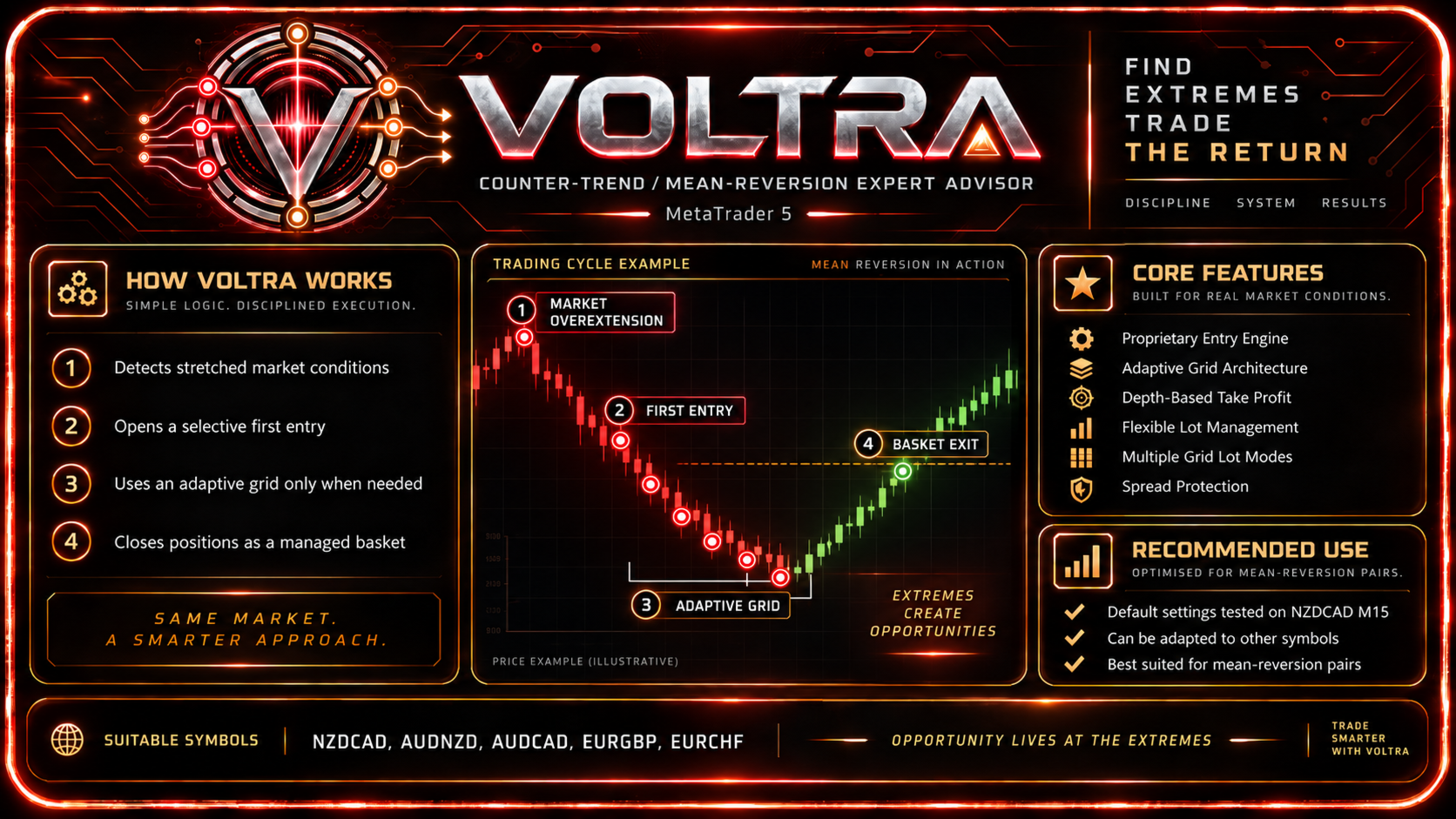
Voltra is a trading Expert Advisor for MetaTrader 5 based on a counter-trend price mean-reversion approach.
The system is built around a proprietary quantitative first-entry model, an adaptive grid architecture, and integrated multi-level risk control.
Voltra’s primary trading style is Counter-Trend / Mean Reversion.
The Expert Advisor looks for situations where, after a directional price move, the probability of a correction or price reversion increases. After the first entry, Voltra manages the entire trading cycle automatically: it calculates the distance between positions, the volume of subsequent trades, and the common basket exit level.
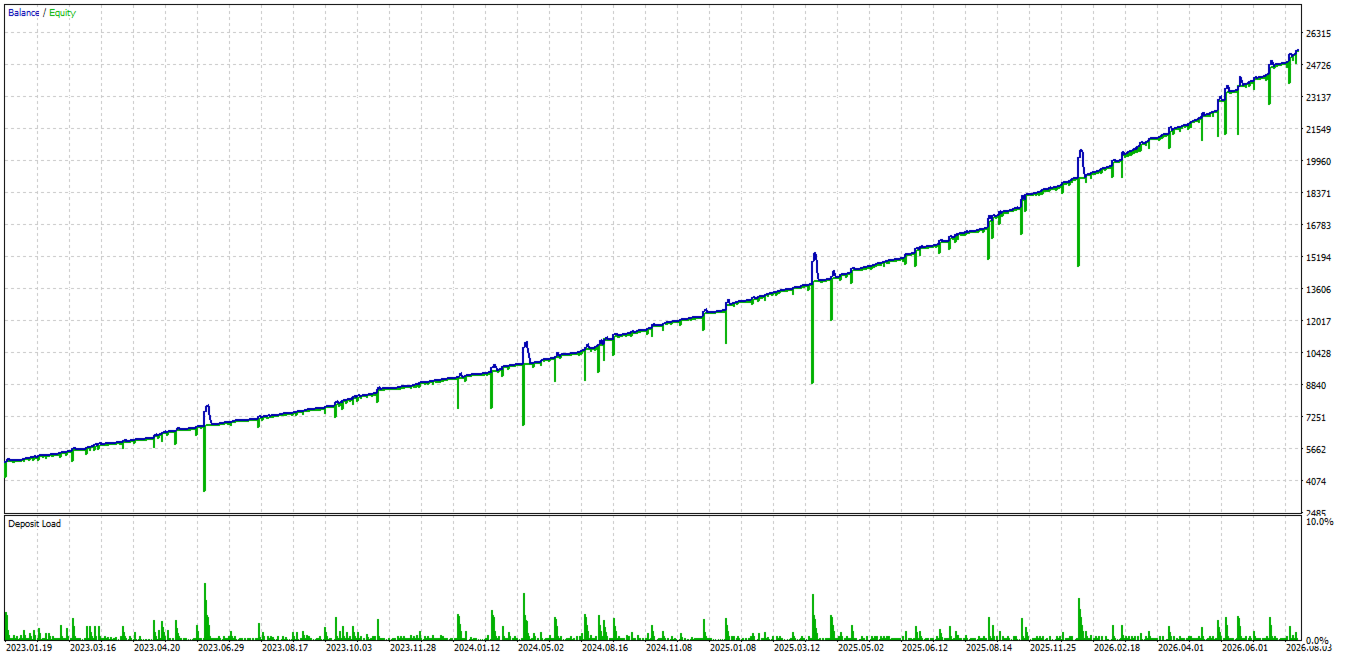
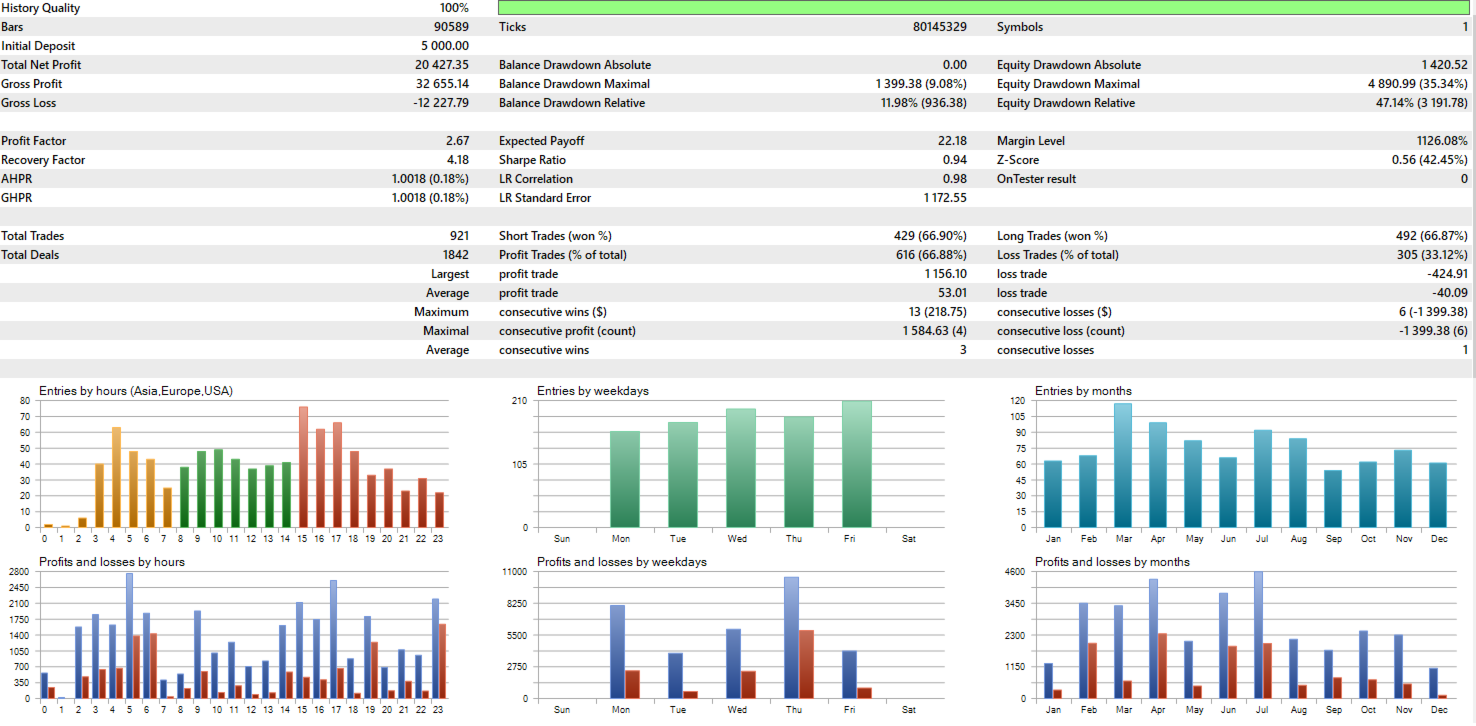
The main development and historical testing were performed on NZDCAD M15. The default settings are also configured for NZDCAD, but Voltra can be adapted to other currency pairs.
Proprietary Entry Engine
The first entry is generated by Voltra’s proprietary internal quantitative model.
Before opening a position, the signal passes an additional multi-stage verification process. The built-in safety layer evaluates the current price movement, market momentum, and the broader market structure.
When increased risk is detected, Voltra may skip a potentially dangerous counter-trend entry and wait for a more suitable market condition.
The first-entry algorithm and internal protection model are part of Voltra’s proprietary logic and do not require user configuration.
All analysis is performed directly inside Voltra — no external indicators, DLLs, additional libraries, or third-party services are required.
Adaptive Grid Architecture
If price continues to move against the initial position, Voltra uses an adaptive grid system.
The distance between trades does not have to remain constant throughout the entire cycle.
The user can configure the base and maximum grid distance, individual distance multipliers, and the adaptive strength for different grid levels.
As the grid becomes deeper, the distance between positions can expand, helping reduce the concentration of large trading volume within a narrow price range.
Dynamic Basket Exit
All positions within one trading cycle are managed as a single basket.
The exit level is calculated relative to the volume-weighted average price of all open positions.
Shallow grids use the main profit target, while the Take Profit can gradually decrease as the grid becomes deeper. This allows normal trading cycles to target higher profits while deeper baskets require a smaller price retracement to exit.
Take Profit targets for different grid depths can be adjusted in the settings.
Flexible Lot Management
Voltra supports several methods for calculating the initial lot size:
- Fixed Lot
- Account Balance
- Account Equity
- Free Margin
- Minimum of Balance and Equity
When a dynamic mode is used, the initial trading volume automatically adjusts with the size of the trading account.
Several algorithms are also available for subsequent grid positions:
- Fixed
- Lot Sum
- All Lot Sums
- Martingale
- Custom Multipliers
- Fibonacci
- Geometric Progression
In Custom mode, the user can define an individual multiplier for every grid position.
All available modes are fully functional and directly affect trading volume calculations.
Trading Controls
Voltra allows the user to configure:
- BUY and SELL trading;
- initial lot size and calculation method;
- maximum grid depth;
- subsequent lot calculation method;
- individual volume multipliers;
- base and maximum grid distance;
- distance settings for individual levels;
- adaptive grid strength;
- Take Profit for different grid depths;
- spread limits;
- trading days and trading hours;
- restriction of new entries on the same bar.
All visible user parameters are connected to the trading logic and genuinely affect the behavior of the Expert Advisor.
Main Features
- Counter-Trend / Mean-Reversion Strategy — counter-trend trading approach.
- Proprietary Entry Engine — proprietary quantitative first-entry system.
- Internal Safety Layer — additional protection against potentially dangerous entries.
- Adaptive Grid — dynamic management of the distance between positions.
- Depth-Based Grid Expansion — increasing grid distance as the basket becomes deeper.
- Dynamic Basket Take Profit — different exit targets depending on grid depth.
- Weighted Average Basket Exit — basket exit calculated from the volume-weighted average price.
- Flexible Initial Lot Management — Fixed, Balance, Equity, and Free Margin.
- Multiple Grid Lot Modes — Fixed, Lot Sum, All Lot Sums, Martingale, Custom, Fibonacci, and Geometric.
- Custom Lot Multipliers — individual multipliers for subsequent positions.
- Custom Distance Multipliers — individual grid distance configuration.
- Spread Protection — trading-cost control.
- Trading Schedule — configurable trading days and hours.
- Persistent Trading State — internal trading state is preserved across terminal restarts.
- No DLL Required — no external libraries or third-party services are required.
Suitable Symbols
Voltra is a counter-trend system, so instruments with regular corrective movements and a relatively strong tendency toward mean reversion are generally preferable.
Possible instruments for further configuration include:
- NZDCAD
- AUDNZD
- AUDCAD
- EURGBP
- EURCHF
NZDCAD is the primary instrument used during Voltra’s development.
Other currency pairs require individual optimization of grid distance, position sizing, and exit parameters.
Recommended Conditions
Platform: MetaTrader 5
Trading style: Counter-Trend / Mean Reversion
Timeframe: M15
Symbol: testing and default settings were developed for NZDCAD; the EA can be configured for other currency pairs
Suitable symbols: NZDCAD, AUDNZD, AUDCAD, EURGBP, EURCHF
Account type: Hedging
Execution: ECN / RAW Spread with low trading costs
Leverage: 1:500 recommended
VPS: recommended for continuous operation
Voltra’s main development and historical testing were performed on NZDCAD M15, so the default settings are the recommended configuration for this instrument.
When using another currency pair, it is recommended to separately optimize the initial lot, grid distance, subsequent lot multipliers, and Take Profit, and then test the configuration in the MetaTrader 5 Strategy Tester.
Important
Voltra uses Grid mechanics with the possibility of increasing the volume of subsequent positions.
Because the strategy is counter-trend, the most difficult market conditions are prolonged one-directional movements without sufficient corrections.
Under such conditions, the number of open positions, total exposure, used margin, and floating drawdown may increase significantly, while individual baskets may remain open for an extended period.
The built-in entry filters, adaptive grid, and protection mechanisms are designed to reduce the risk of difficult market situations, but they cannot eliminate market risk completely.
Particular attention should be paid when changing the initial lot size, Martingale/Custom multipliers, grid distance, and maximum number of positions.
Before using Voltra on a real account, it is recommended to test the Expert Advisor in the Strategy Tester and on a demo account, and to select an initial lot size appropriate for the account balance and acceptable risk level.
Historical results and backtesting results do not guarantee similar performance in the future.