Grid Advance EA
- Uzmanlar
- Sürüm: 1.11
- Etkinleştirmeler: 7

90 % off only for the first 10 buyers, after the promo period will go back to original price
Grid Advance EA — Features & Advantages
Key Features
1. Dual-Direction Grid
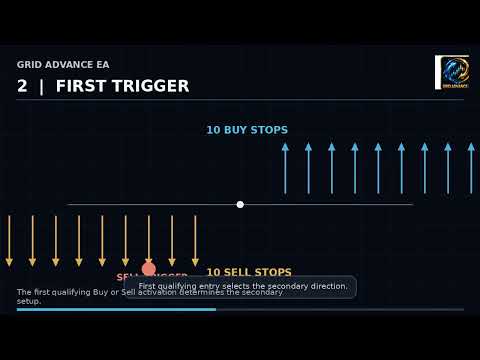
- Places Buy Stop and Sell Stop orders around the current market.
- Designed to participate when price moves in either direction.
- Default setup uses 5 Buy Stops and 5 Sell Stops.
2. Secondary Once Technology
- Uses a special secondary-entry mechanism after the first qualifying trade.
- The secondary setup is activated only once per trading cycle.
- Helps prevent repeated secondary-order placement.
3. Automatic Basket Profit Management
- Monitors the combined profit of the EA's positions.
- When the configured basket-profit target is reached, the EA begins closing the trading cycle.
4. Automatic Pending-Order Management
- The EA manages its own pending orders.
- When the basket closes, remaining pending orders are removed before starting a new cycle.
5. Automatic Restart
- After all positions and pending orders are cleared, the EA automatically resets.
- A new grid can then be established without requiring the trader to manually restart the EA.
6. Magic Number Protection
- Uses a dedicated Magic Number to identify its own trades.
- Helps prevent the EA from managing trades belonging to other EAs or manual trading.
7. Spread Protection
- Includes an optional spread guard.
- The trader can specify a maximum acceptable spread before the EA continues normal grid placement.
8. Equity Drawdown Protection
- Includes an equity drawdown protection mechanism.
- If the configured maximum drawdown is reached, the EA can initiate its protection/cleanup process.
9. Broker Compatibility Features
- Checks broker trading conditions before placing pending orders.
- Handles different order-filling modes.
- Checks minimum stop-distance requirements.
- Normalizes trading volume according to the symbol's trading specifications.
10. Error Handling
- Checks trade-operation results.
- Reports failed operations in the MT5 Experts/Journal log.
- Includes retry/cleanup behavior for certain trade-management operations.
Fully Automated
Once configured and attached to MT5, the EA manages the grid, secondary setup, basket monitoring, closing process, and restart automatically.
Designed for Two-Way Market Movement
Instead of relying on only Buy or only Sell entries, the base grid uses both Buy Stop and Sell Stop orders.
One-Time Secondary Entry
The Secondary Once mechanism is designed to prevent continuous recreation of secondary entries during the same trading cycle.
Automatic Cycle Cleanup
When the basket target is reached, the EA handles the closing and pending-order cleanup automatically.
Continuous Trading Cycle
After the EA becomes flat and the restart conditions are satisfied, it can establish a fresh grid automatically.
Built-In Risk Controls
The EA includes configurable spread and equity-drawdown protection features.
Designed for MT5
The EA is built specifically for Meta Trader 5 and includes handling for broker-specific trading requirements.
For Better Performance Best pair XAUUSD, the Default Parameters is Low Risk in a $1000 Standard Account,
if the Capital is below $500, use Cent Account only.
Low Risk Parameters - Default Settings.
Medium Risk Parameters - Lot size for every base order & Lot size for secondary order is 0.02, and Basket profit target in account currency is 0.2 in a $1000 Standard Account, and Cent Account.
High Risk Parameters - Lot size for every base order & Lot size for secondary order is 0.05, and Basket profit target in account currency is 1.0 in a $1000.
Standard Account, and Cent Account.
If the EA is trap in a loop of the market, "this is the only weakness of the EA", there are 2 option to get out from the loop.
Option 1 - close everything & allow the EA to restart.
Option 2 - is called "+1 formula". the formula is when the actual market is sitting on a strongest support & resistance & reject you will add an entry, if the price is in the Support add one Buy entry, if the price is in the Resistance add one Sell entry, the lot size to be use is the exact amount of the active entry, once the floating turn into positive close everything and allow the EA to restart.
Caution: this step will only be applied when the EA is trap in a loop. a Market Loop is when all the entry is triggered, or the other side of the Grid are all triggered. that is the only time you need to choose on the 2 Options.