ClarityAlgoLabs Strategy Builder MT5
- Uzmanlar
- Sürüm: 1.0
- Etkinleştirmeler: 5

ClarityAlgoLabs Strategy Builder MT5
Build and test rule-based trading configurations directly in MetaTrader 5.
ClarityAlgoLabs Strategy Builder MT5 is a configurable Expert Advisor that evaluates selected indicator conditions after a chart bar has closed. Optional higher-timeframe confirmation and candle-pattern filtering can be added to the entry decision. The EA supports long, short and both-direction operation.
KEY FEATURES
- Closed-bar, edge-triggered entry evaluation
- Optional higher-timeframe confirmation
- Long, short or both-direction trading
- EMA trend and price/EMA conditions
- RSI, MACD and MACD histogram conditions
- ADX with DI, Stochastic, CCI and ROC conditions
- Session VWAP/VWMA condition
- Optional engulfing, hammer/shooting-star, inside-bar, outside-bar, morning/evening-star and doji filter
- ATR or fixed-percent stop calculation
- Optional risk/reward take profit
- ATR trailing stop
- Optional close on opposite signal
- Cooldown, maximum-position and maximum-daily-entry gates
- Spread filter and configurable UTC session window
- Realized daily-loss entry gate
- Broker-aware volume, tick-size and margin checks
- Netting and hedging account handling
- Strategy Tester and parameter optimization support
HOW SIGNALS WORK
The EA evaluates the selected Start Signal conditions on the last closed chart bar. Every enabled condition must agree with the proposed direction. If Higher TF Enabled is active, every enabled condition in the Higher TF group must also agree. When Candle Patterns Enabled is active, at least one selected candle pattern must match.
A signal is edge-triggered: a continuously true condition does not repeatedly create entries on every bar. Entry can also be blocked by the selected direction, position limit, cooldown, spread, trading hours, maximum trades per day, daily realized-loss gate, insufficient data, broker stop rules, volume constraints, margin requirements or an order rejection.
AVAILABLE CONDITIONS
Start Signal and Higher TF groups can use:
- EMA Trend
- Price relative to EMA
- RSI relative to a configurable threshold
- MACD line versus signal line
- MACD histogram direction
- ADX strength with DI direction
- Stochastic direction
- CCI direction
- ROC direction
- Session VWAP/VWMA relation
POSITION SIZING AND BROKER HANDLING
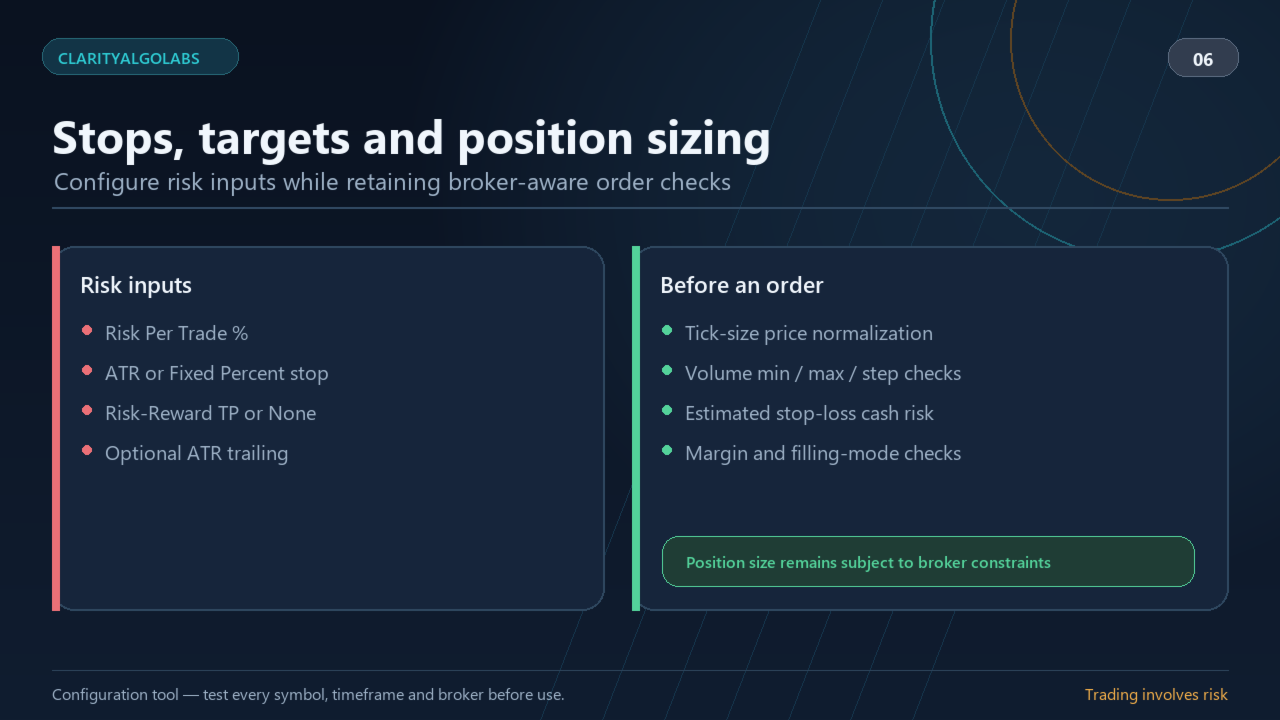
Risk Per Trade requests a position size from current account equity and the estimated loss at the initial stop. The EA uses the symbol contract specification, normalizes volume down to the broker lot step, checks minimum and maximum volume and estimates margin before sending an order.
The EA does not force the broker minimum lot when that minimum would exceed the requested cash risk. A trade can therefore be blocked. The sizing calculation allows a maximum 0.1% relative estimation tolerance for platform calculation precision. Gaps, slippage, spread, commission, swap and execution changes can still make the realized result different from the estimate.
Stops, take profit and trailing levels are normalized to the symbol tick size. Broker stop level, freeze level, filling mode and trading-session constraints are checked where applicable. Rejected or incomplete trade operations are reported in the Journal.
RISK AND TRADE MANAGEMENT
Stop Mode:
- ATR: stop distance from ATR and ATR Stop Multiplier
- Fixed Percent: stop distance as a percentage of the closed signal-bar price
Take Profit:
- Risk-Reward: target distance from the initial stop and Risk / Reward
- None: no fixed take-profit target
Additional management options include ATR trailing, Close On Opposite, Max Open Positions, Cooldown Bars, spread control, UTC trading hours, Max Trades / Day and Max Daily Realized Loss %.
The daily-loss setting is an entry gate calculated from realized balance changes. It is not an equity drawdown stop and does not close an open position.
NETTING, HEDGING AND RESTARTS
On hedging accounts, the EA manages only positions carrying its magic number on the current chart symbol. On netting accounts, it avoids modifying a position that cannot be proven to belong exclusively to this EA.
In live/demo operation, the EA reconstructs the current UTC day's realized balance changes, its own entry count and its most recent exit from account history after restart. It also primes its signal latch without immediately trading on terminal startup.
INSTALLATION
1. Install the product from MQL5 Market in MetaTrader 5.
2. Attach ClarityAlgoLabs Strategy Builder MT5 to the chart you want to test.
3. Review every value in Inputs.
4. Run the EA in Strategy Tester using the intended broker, symbol and timeframe.
5. Review the tester Journal, trades, spreads, commissions, swaps and broker contract settings.
6. Enable algorithmic trading only after you accept the tested configuration and its risks.
No external licence key, DLL, external account registration or separate restricted demo is required. MQL5 Market manages licensing and activations.
STARTING CONFIGURATION
The defaults are a functional starting profile, not a performance recommendation:
- Direction: Short
- Higher TF Enabled: true
- Higher Timeframe: H6
- Candle Patterns Enabled: false
- Risk Per Trade: 1.0%
- Stop Mode: Fixed Percent
- Fixed Stop: 0.61%
- Take Profit: Risk-Reward
- Risk / Reward: 0.1
- ATR Trailing Enabled: true
- Close On Opposite: true
- Max Open Positions: 1
- Cooldown Bars: 3
- Trading Hours: 03:00 to 00:00 UTC
- Max Trades / Day: 7
- Max Daily Realized Loss: 2.0%
- Tester Server UTC Offset Hours: 0.0
- Pip Size Override: 0.0 (automatic)
Before testing, verify the symbol's tick size, point, digits, contract specification, minimum and maximum volume, volume step, stop and freeze levels, trading sessions, spread, commission, swap, leverage and filling mode.
IMPORTANT INPUT NOTES
- Higher TF Enabled: requires agreement from the selected higher-timeframe conditions.
- Higher Timeframe: timeframe used only for optional confirmation.
- Candle Patterns Enabled: when false, individual pattern switches have no effect.
- Risk Per Trade %: requested risk before broker normalization and execution effects.
- Tester Server UTC Offset Hours: converts historical tester server time for UTC session, day boundary and intraday VWAP grouping. It is ignored for live/demo offset inference.
- Pip Size Override: affects the spread filter and pip diagnostics only. Leave at zero unless the broker uses a different CFD pip convention.
- Max Daily Realized Loss %: blocks new entries after the realized balance-loss gate is reached; it is not an equity stop.
WHY DID THE EA NOT OPEN A TRADE?
Check the Journal. Typical reasons include:
- no new closed-bar signal
- selected direction does not permit the signal
- higher-timeframe or candle filter did not agree
- position limit or cooldown
- spread or UTC session gate
- maximum daily entries or realized daily-loss gate
- insufficient chart or higher-timeframe history
- invalid broker stop distance
- minimum volume would exceed requested risk
- insufficient margin
- broker or market rejection
REQUIREMENTS AND LIMITATIONS
MetaTrader 5 and a broker account that permits algorithmic trading for the selected symbol are required. The EA needs sufficient chart and higher-timeframe history.
Symbols, data feeds, tick volume, bars, contract settings, spread, commission, swap, execution and session boundaries differ between brokers. Results can differ even with the same visible parameters. Test every symbol, timeframe, broker and account configuration separately.
The tester UTC offset is fixed for one historical test. A single value cannot automatically reproduce a daylight-saving-time change inside that test.
RISK DISCLAIMER
This product is software for MetaTrader 5. It does not provide investment advice, a recommendation to trade or a promise of any result. Historical testing is a simulation and does not predict future performance. Market conditions, gaps, spread, commission, swap, slippage, latency, leverage and broker rules can materially affect outcomes. You are responsible for testing, configuration and risk decisions. Trading can result in losses, including loss of the entire account balance.
SUPPORT
Use the Questions/Comments area on the product page or MQL5 private messages. Include the MT5 build, broker, symbol, timeframe, account mode, Inputs, tester settings, relevant Journal lines and steps to reproduce the issue. Never share credentials or account passwords.