 MetaTrader 5
 Uzmanlar
 Göstergeler
 Komut dosyaları
 Kütüphaneler
 Depo
Depo
Fan sayfamıza katılın

Nikkei 225 Gap Continuation EA - MetaTrader 5 için uzman

- Görüntülemeler:
- 41
- Derecelendirme:
- Yayınlandı:
- Güncellendi:
-
 Alım-satım fırsatlarını kaçırıyorsunuz:
- Ücretsiz alım-satım uygulamaları
- İşlem kopyalama için 8.000'den fazla sinyal
- Finansal piyasaları keşfetmek için ekonomik haberler
Kayıt Giriş yapWeb sitesi politikasını ve kullanım şartlarını kabul edersiniz
Hesabınız yoksa, lütfen kaydolun -
 Bu koda dayalı bir robota veya göstergeye mi ihtiyacınız var? Freelance üzerinden sipariş edin
Freelance'e git
Bu koda dayalı bir robota veya göstergeye mi ihtiyacınız var? Freelance üzerinden sipariş edin
Freelance'e git
Nikkei 225 Açık Fiyat Farkı Devamlılığı Uzman Danışmanı
Nikkei 225 Gap Devamlılığı EA, MetaTrader 5 için geliştirilmiş eğitici bir Uzman Danışmandır. Nikkei 225 nakit seansının açılış boşluğunu inceler ve ilk fiyat aralığı oluştuktan sonra devam eden işlem fırsatlarını arar. Strateji, hem yükseliş hem de düşüş boşluklarını işleyebilir ve ek bir onay filtresi olarak seans VWAP'sini kullanır.
Program, otomatik pozisyon büyüklüğü belirleme, spread koruması, kısmi kar alma, başabaş noktası yönetimi ve zamana dayalı emniyetli çıkış özelliklerini içerir. Hem netleştirme hem de riskten korunma hesaplarını destekler. Tüm önemli kararlar grafikte görüntülenebilir ve analiz için Uzman Danışman günlüğüne kaydedilebilir.
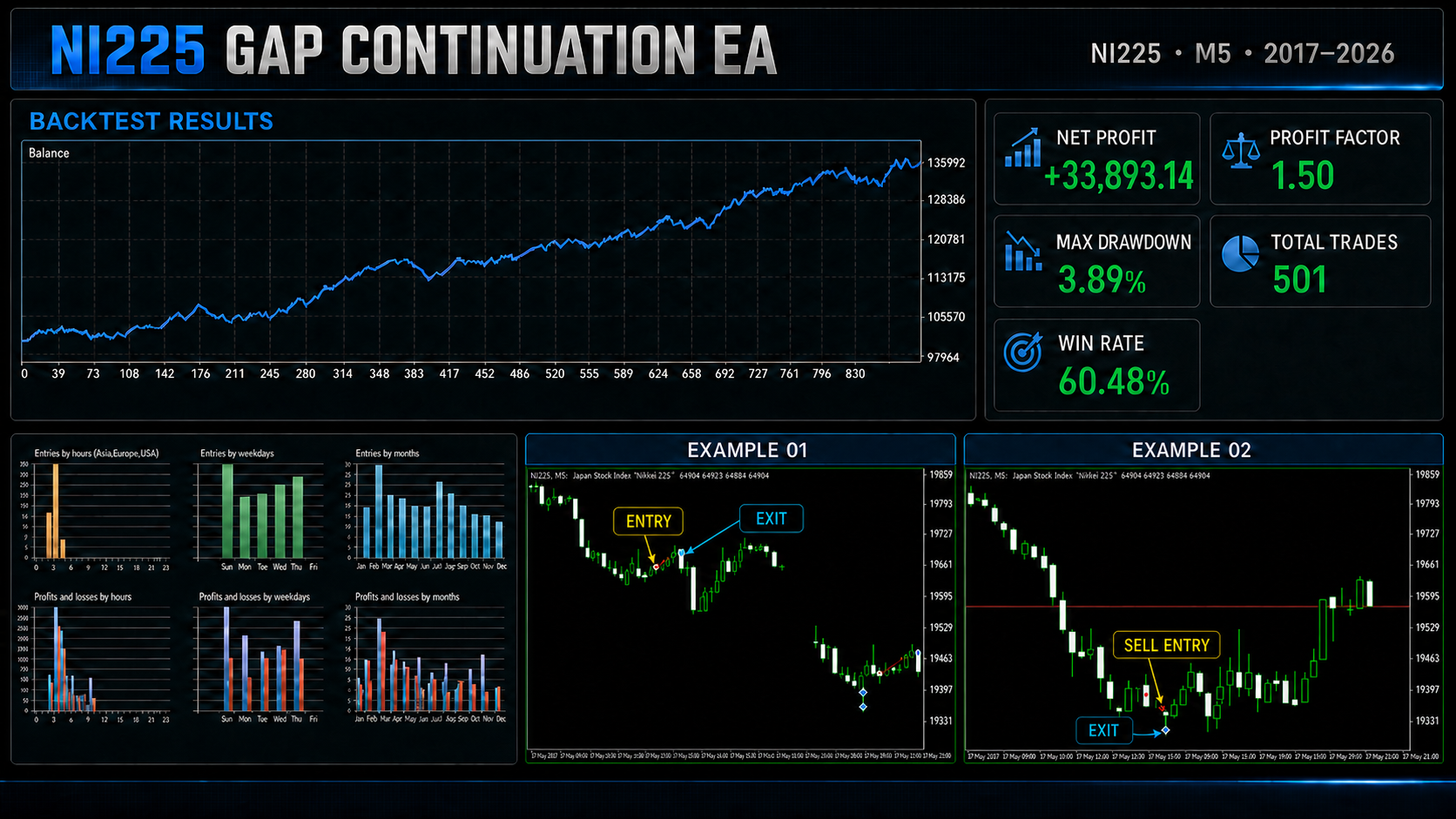
Stratejiye genel bakış
Her işlem gününün başında, EA etkin nakit seans takvimini hesaplar. Otomatik modda, Japonya Standart Saati, sunucunun yaz saati ayarlaması da dahil olmak üzere Darwinex sunucu saatine dönüştürülür. Diğer brokerlar için manuel sunucu saati modu da mevcuttur.
EA, önceki nakit seans kapanışını alır ve bunu mevcut seans açılışıyla karşılaştırır. Mutlak açılış boşluğu, yapılandırılan eşik değerinden küçükse, herhangi bir kurulum oluşturulmaz. Yükseliş boşluğu bir AL kurulumunu etkinleştirebilirken, düşüş boşluğu bir SAT kurulumunu etkinleştirebilir.
Seans açıldıktan sonra, EA bir dakikalık çubuklardan bir açılış aralığı oluşturur. Ayrıca, mevcut olduğunda gerçek hacmi, yoksa yedek olarak tik hacmini kullanarak seans VWAP’sini hesaplar. Giriş yapılmadan önce orijinal açılış boşluğunun yarısından fazlası doldurulursa, kurulum iptal edilir.
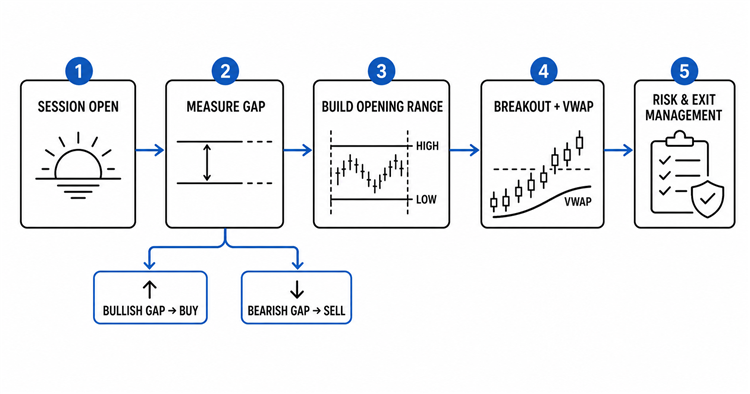
Şekil 1. Uzman Danışman tarafından kullanılan karar süreci.
Giriş koşulları
Bir AL işlemi için, seans uygun bir yükseliş boşluğuyla açılmalıdır. Ardından fiyat, açılış aralığının en yüksek seviyesini kırmalı ve mevcut seansın VWAP'sinin üzerinde kalmalıdır. Stop-loss, isteğe bağlı stop tamponu ve brokerın minimum stop mesafesi dahil olmak üzere açılış aralığının en düşük seviyesinin altına yerleştirilir.
SATiş işlemi için, seans uygun bir düşüş boşluğu ile açılmalıdır. Fiyat, açılış aralığının en düşük seviyesinin altına düşmeli ve VWAP'nin altında kalmalıdır. Stop-loss, açılış aralığının en yüksek seviyesinin üzerine yerleştirilir. Her işlem günü için yalnızca bir stratejiye giriş yapılmasına izin verilir.
- Yükseliş boşluğu: Açılış aralığı ve VWAP’ın üzerinde AL kırılması.
- Aşağı yönlü boşluk: Açılış aralığının ve VWAP'nin altına kırılma durumunda SAT.
- Girişten önce boşluğun %50'den azı doldurulmuş olmalıdır.
- Spread, yapılandırılmış her iki spread filtresinden de geçmelidir.
- Kırılma, giriş son tarihinden önce gerçekleşmelidir.
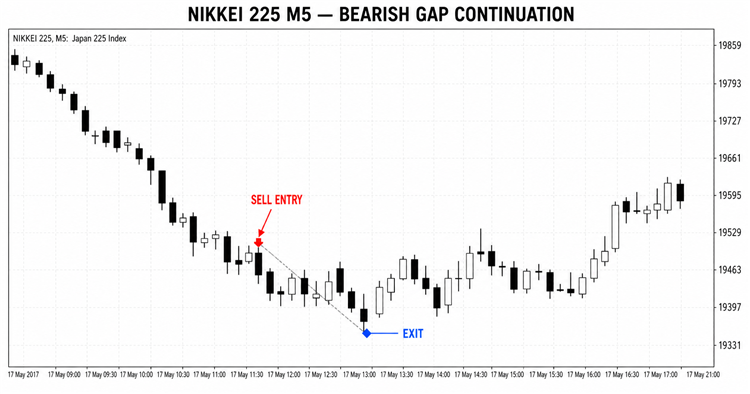
Şekil 2. SATIŞ girişi ve çıkışı içeren bir düşüş boşluğu devam formasyonu örneği.
Risk ve pozisyon yönetimi
Varsayılan olarak, pozisyon büyüklüğü hesap özkaynakları, seçilen risk yüzdesi ve giriş ile stop-loss arasındaki fiyat farkı temel alınarak hesaplanır. EA, lot başına tahmini zararın hesap para biriminde ifade edilmesi için OrderCalcProfit işlevini çağırır. Bu, tick değeri ve kotasyon para birimi brokerlar arasında farklılık gösterebilen endeks CFD'leri için kullanışlıdır.
Risk temelli boyutlandırma yerine sabit bir lot büyüklüğü seçilebilir. Hesaplanan hacim her zaman broker hacim adımına yuvarlanır ve minimum ile maksimum hacim sınırları ile karşılaştırılır. Brokerın minimum lot büyüklüğü izin verilen riski aşarsa, günlük kurulum iptal edilir.
Fiyat kısmi hedefe ulaştığında, EA pozisyonun yapılandırılan yüzdesini kapatır. Ardından stop-loss'u giriş fiyatına taşıyabilir. Kalan pozisyon, nihai R-katı hedefine doğru yönetilir veya nakit seansı sona ermeden kapatılır.
Ana girdi grupları
| Giriş grubu | Amaç |
|---|---|
| Nakit seansı | Seans süresi modu, nakit seans saatleri, açılış aralığı süresi, giriş son tarihi ve zorunlu çıkış. |
| AL - yükseliş boşlukları | AL kurulumlarını etkinleştirir ve minimum yükseliş açılış boşluğunu tanımlar. |
| SAT - düşüş boşlukları | SAT kurulumlarını etkinleştirir ve minimum düşüş eğilimli açılış boşluğunu tanımlar. |
| Genel sinyal filtreleri | Hacim kaynağı, maksimum spread, dinamik spread-to-stop filtresi ve stop tamponu. |
| AL riski / SAT riski | Ayrı sermaye-risk ayarları ve daha küçük aşağı yönlü boşluklar için isteğe bağlı azaltılmış risk. |
| Hacim ve çıkışlar | Sabit lotlar, maksimum lotlar, kısmi kapatma, R-katlı hedefler ve başabaş yönetimi. |
| Yürütme | Sihirli sayı, kayma, grafik durumu ve tanılama günlüğü seçenekleri. |
Kod örneği: açılış boşluğu hesaplaması
Açılış boşluğu, önceki nakit seans kapanışının yüzdesi olarak ölçülür. Sonucun işareti, EA'nın AL veya SAT dalını değerlendirip değerlendirmeyeceğini belirler.
g_gap_percent=(g_session_open_px/g_previous_close-1.0)*100.0; double minimum_gap=(g_gap_percent>0.0 ? InpMinimumBuyGapPercent : InpMinimumSellGapPercent); if(MathAbs(g_gap_percent)<minimum_gap) { g_cancelled=true; return(false); }
Kod örneği: kırılma ve VWAP onayı
Yön spesifik giriş filtresi, fiyatın VWAP'ın doğru tarafında kalırken açılış aralığının uygun tarafını kırmasını gerektirir.
// BUY confirmation if(!(tick.bid>g_range_high && tick.bid>g_vwap)) return; // SELL confirmation if(!(tick.ask<g_range_low && tick.ask<g_vwap)) return;
Kod örneği: riske dayalı hacim
İstenen parasal risk, lot başına tahmini zarara bölünür. Sonuç daha sonra sembol hacim adımına göre normalleştirilir ve isteğe bağlı maksimum lot ayarı ile sınırlandırılır.
double risk_money=AccountInfoDouble(ACCOUNT_EQUITY)*risk_percent/100.0; if(OrderCalcProfit(order_type,_Symbol,1.0,entry,stop,calculated_profit)) loss_per_lot=MathAbs(calculated_profit); g_last_raw_volume=risk_money/loss_per_lot; if(InpMaxLots>0.0) g_last_raw_volume=MathMin(g_last_raw_volume,InpMaxLots); return(NormalizeVolumeDown(g_last_raw_volume));
Kurulum ve kullanım
- MQ5 dosyasını MQL5\Experts dizinine kopyalayın.
- Dosyayı MetaEditor'da açın, Styler'ı çalıştırın ve derleyin.
- EA'yı Nikkei 225 endeksini temsil eden broker sembolüne ekleyin.
- Sağlanan varsayılan kurulum için M5 zaman dilimini kullanın.
- Sembol sözleşme özelliklerini ve nakit işlem saatlerini onaylayın.
- Otomatik JST dönüştürmesini seçin veya sunucu saatlerini manuel olarak yapılandırın.
- Risk, hacim, spread ve çıkış parametrelerini gözden geçirin.
- Algoritmik ticareti etkinleştirin ve ayarları Strateji Test Aracı'nda test edin.
Broker ve testle ilgili hususlar
Nikkei 225 sembol adları, fiyat hassasiyeti, tik değerleri, minimum hacim ve işlem seansları brokerlar arasında farklılık gösterir. Varsayılan otomatik seans dönüştürme, Darwinex sunucu programı için tasarlanmıştır. Diğer brokerların kullanıcıları, testi çalıştırmadan önce manuel seans ayarlarını doğrulamalıdır.
EA, aynı sembolde halihazırda başka bir pozisyon varken yeni bir giriş yapılmasını engeller. Kısmi kapatma ve başabaş noktası yönetiminin yeniden bağlanma veya terminalin yeniden başlatılmasından sonra geri yüklenebilmesi için temel pozisyon yönetimi verilerini terminal genel değişkenlerinde saklar.
Geçmişe dönük testler, veri kalitesine, spread varsayımlarına, sözleşme özelliklerine ve seans tanımlarına duyarlıdır. Geriye dönük test sonuçları gelecekteki performansı garanti etmez. Bu kaynak kodu eğitim ve araştırma amaçlı sağlanmıştır; her kullanıcı, kendi işlem koşulları altında bu kodu doğrulamaktan sorumludur.
Yazar
Francesc Jordi Mallol Nolden tarafından geliştirilmiştir. Kaynak kodu, MetaTrader 5 için seans tabanlı açılış boşluğu stratejisinin eksiksiz bir eğitim örneği olarak yayınlanmıştır.
MetaQuotes Ltd tarafından İngilizceden çevrilmiştir.
Orijinal kod: https://www.mql5.com/en/code/75301
 Draw On Liquidity + Kill Zone
Draw On Liquidity (DOL) göstergesi, bu temel seviyeleri grafiğinize otomatik olarak işler ve seansın “kill zone”ları aracılığıyla yüksek olasılıklı işlem fırsatlarını vurgular. Tam özelleştirme seçenekleriyle, işlem kararlarınızı güçlendirmek için net, profesyonel ve son derece bilgilendirici bir görünüm sunar.
BlueMoon
BlueMoon EA, EMA Envelope girişlerini uyarlanabilir portföy yönetimi, kademeli pozisyon belirleme, spread filtreleme, değer kaybı koruması ve riskten korunma hesapları için otomatik işlem kurtarma özellikleriyle birleştiren bir MT5 Uzman Danışmanıdır.
Asian Session Breakout / BhanuCodeLab
Asian Session Breakout, Asya işlem seansı sırasında oluşan fiyat aralığını belirler ve bu seansın sona ermesinden sonra fiyatın nasıl davrandığını izler. Asya En Yüksek ve Asya En Düşük seviyeleri, brokerın işlem gününün sonuna kadar geçerliliğini korur. Bu durum, söz konusu aralığın Avrupa ve ABD seansları sırasında gün içi destek ve direnç bölgesi olarak kullanılmasını sağlar. Kompakt bir gösterge paneli, mevcut aralık değerlerini, yapılandırılmış seans süresini, kırılma durumunu, kırılma onay yöntemini ve onay zaman aralığını gösterir. Gösterge, işlem açmaz veya yönetmez. İsteğe bağlı işlemler veya EA geliştirme için piyasa yapısı ve kırılma bilgileri sağlar.
Timer Candle
simple coundown timer